

Import an OpenSCAD design — including third-party libraries like BOSL2 and MCAD — as real, solid geometry in build123d, Python's native CAD kernel. Keep your existing OpenSCAD models and libraries; get fillets, exact STEP export, and everything else that comes from working in a solid-modeling kernel instead of a mesh renderer.
scad123d converts OpenSCAD models to STEP. solid123d is the geometry engine underneath it — OpenSCAD's semantics on build123d — usable on its own if you're writing SolidPython rather than converting
.scadfiles. Both ship in this one package:pip install scad123dgives youimport scad123dandimport solid123d.
import scad123d
from build123d import export_step, export_stl

# Call one module from a library directly, like a Python function --
# usually what you actually want:
gear = scad123d.import_module("MCAD/involute_gears.scad", "gear")
part = gear(number_of_teeth=12, circular_pitch=8, gear_thickness=6, bore_diameter=5)

# Or import a whole library file's modules at once, as a namespace:
gears = scad123d.import_module("MCAD/involute_gears.scad")
part = gears.gear(
    number_of_teeth=12, circular_pitch=8, gear_thickness=6, bore_diameter=5
)

# Or bring in a whole file's geometry at once:
part = scad123d.import_scad("bracket.scad")

# Export to STEP or STL:
export_step(part, "part.step")
export_stl(part, "part.stl")
Calling an OpenSCAD module returns a normal build123d object, so from there you're just doing build123d.
scad123d requires Python 3.10 or later and the OpenSCAD program. It's tested on macOS, Windows, and Linux.
pip install scad123dor
uv add scad123dYou also need the OpenSCAD program
itself installed — scad123d asks the real OpenSCAD to evaluate your file
(so every language feature and every library works), then converts the
result. It looks for OpenSCAD on your $PATH and in the usual install
locations automatically. If your OpenSCAD executable lives somewhere else,
set $SCAD123D_OPENSCAD to point at it directly.
OpenSCAD is a great way to describe parts in code, and there's a huge amount of OpenSCAD out there — your own old projects, and libraries like BOSL2 and MCAD that save you from redrawing gears, bearings, and hardware from scratch. But OpenSCAD's own geometry engine works by turning everything into a mesh of flat triangles — even a sphere is secretly hundreds of tiny polygons. That's fine for previewing a design, but it means every curve is an approximation, filleting a rounded corner just rounds a pile of facets instead of the actual surface, and the only thing you can export is that same triangle mesh (as an STL).
build123d is built on OpenCASCADE, the same kind of solid-modeling kernel used by mainstream CAD software (Fusion 360, SolidWorks, FreeCAD). Circles stay circles. A cylinder is a cylinder, not 64 flat rectangles pretending to be one — right up until you actually need a mesh, e.g. for 3D printing.
scad123d bridges the two: it hands your .scad file to the real OpenSCAD
program (so every language feature, every library, works exactly as it
always has), and rebuilds the result as native build123d geometry instead of
a mesh. You get a better kernel underneath code you already have.
Real STEP export. OpenSCAD can only export a mesh (STL). scad123d lets you export STEP directly from an OpenSCAD design — the standard interchange format nearly every CAD program reads as an actual solid body, with exact curves, not a pile of triangles pretending to be one.
import scad123d
from build123d import export_step, export_stl

# cube_cyl.scad:
# union() {
#   cube([10, 10, 5]);
#   cylinder(h=10, r=3, center=true);
# }
part = scad123d.import_scad("cube_cyl.scad")
export_step(part, "cube_cyl.step")
export_stl(part, "cube_cyl.stl")
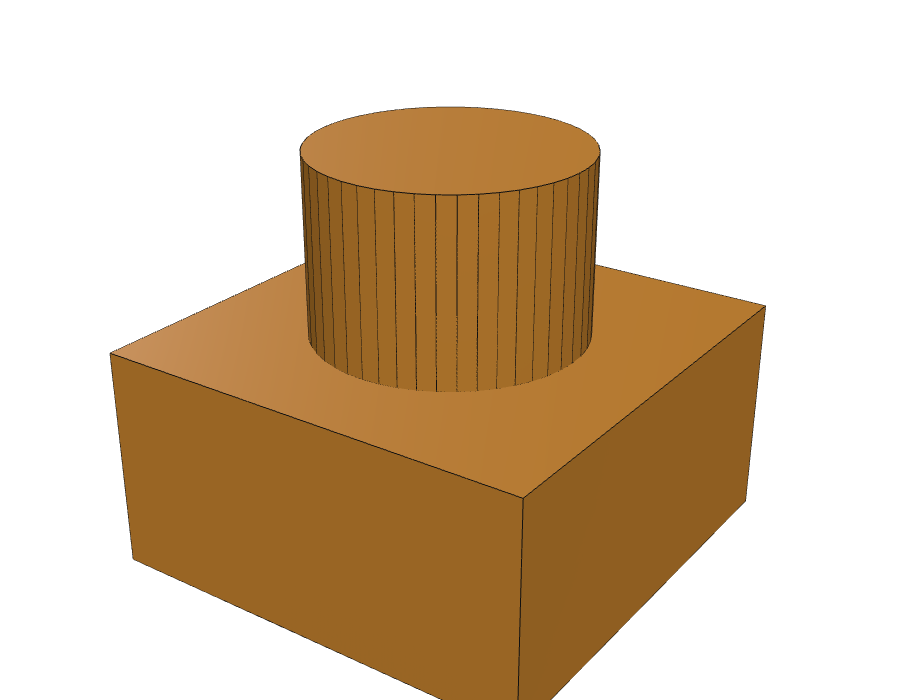
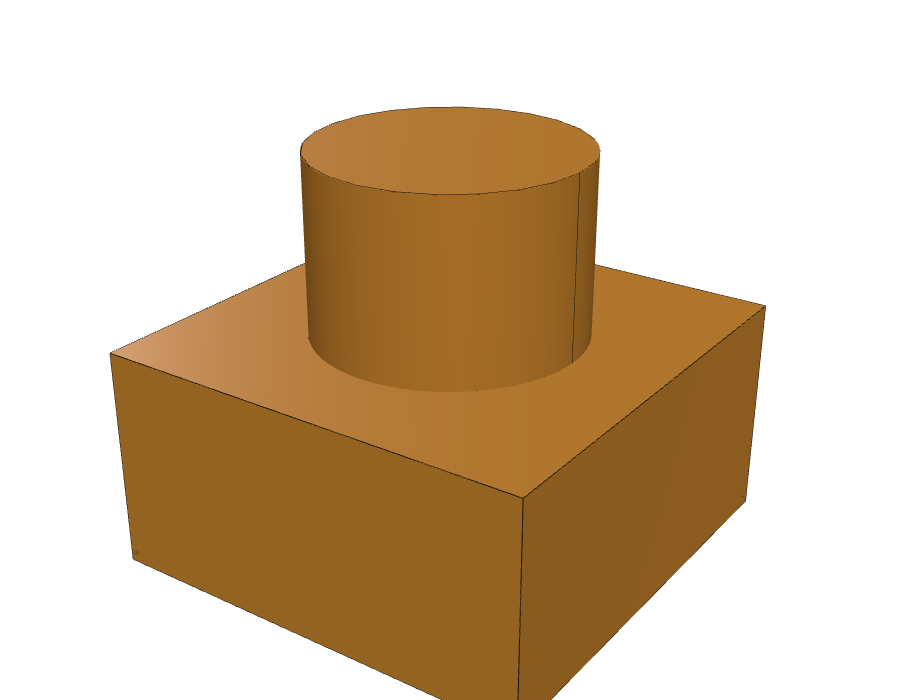
Here's one model — a cylinder rising out of a cube — each way, with edges highlighted. OpenSCAD's STL approximates the cylinder as 48 flat panels, and each panel boundary is an edge in the mesh. The scad123d version maintains the true edges of the shape and has just one face for the cylinder.
Fillets that behave. Round a corner on a mesh and you round the facets, instead of the surface. Because scad123d keeps the real geometry, you can fillet and chamfer edges normally after importing:
from build123d import fillet, Axis, export_step

part = scad123d.import_scad("bracket.scad")
part = fillet(part.edges().group_by(Axis.Z)[-1], radius=2)
export_step(part, "bracket_fillet.step")
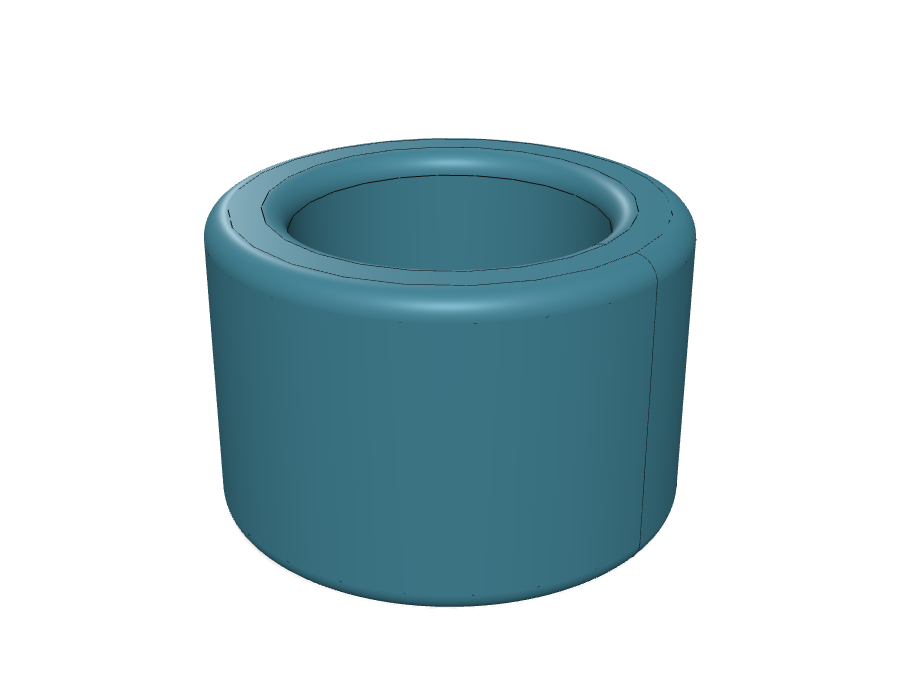
Here's a BOSL2 tube() imported and
then filleted — a smooth, continuous rounded rim, instead of a faceted
approximation of one.
color() survives into STEP. STL has no notion of color, so OpenSCAD
exports throw it away. STEP files support colored, named bodies, and
scad123d keeps them: colors live on bodies, never on groups, and every
operation preserves one invariant — the result is a set of
non-overlapping bodies, each with at most one resolved color. Contested
material goes to the assigned color over uncolored material, and between
two assigned colors to the later one — so a red part stays whole under a
later uncolored one, while a later blue part would take the overlap. A
union() of overlapping colored parts is partitioned on that rule; a
difference() cuts each colored body on its own
and keeps its color, ignoring the cutter's; an intersection() gives the
shared material the later operand's color when it has one; an enclosing
color() fills whatever is still uncolored without repainting explicit
inner colors. hull() and minkowski() create new material, so they
drop their children's colors with a warning. Each body is labeled with the
color name you wrote and becomes its own STEP product, under the model's
own grouping by default; scad2step --group-by-color puts the bodies
under one group per color (plus uncolored) instead, which is what
slicers read, at the cost of the author's structure. scad123d-batch
records each model's volume per color in the ledger (--show prints it).
# two_tone.scad:
# color("SteelBlue") cube([20, 20, 3]);
# color("Orange") translate([5, 5, 3]) cylinder(h=8, r=4);
part = scad123d.import_scad("two_tone.scad")
export_step(part, "two_tone.step")  # two bodies: "steelblue" and "orange"
No lost precision. Nothing gets tessellated until you ask for a mesh (e.g. exporting an STL for printing). Curves stay curves through as many operations as you throw at them.
It mixes freely with regular build123d code. The imported part is a plain
Shape — select faces on it, boolean it against something you built natively
in build123d, sweep along one of its edges.
Because scad123d hands your file to the real OpenSCAD, include/use
statements work exactly as they do when you run OpenSCAD directly — install a
library the normal OpenSCAD way (in your
OpenSCAD library folder,
or alongside your project) and reference it like always.
Most of the time you want one specific, parameterized module from a
library — a particular gear, a particular bracket — not a whole file.
import_module(path, module_name) calls it directly.
An MCAD gear:
gear = scad123d.import_module("MCAD/involute_gears.scad", "gear")
part = gear(number_of_teeth=12, circular_pitch=8, gear_thickness=6, bore_diameter=5)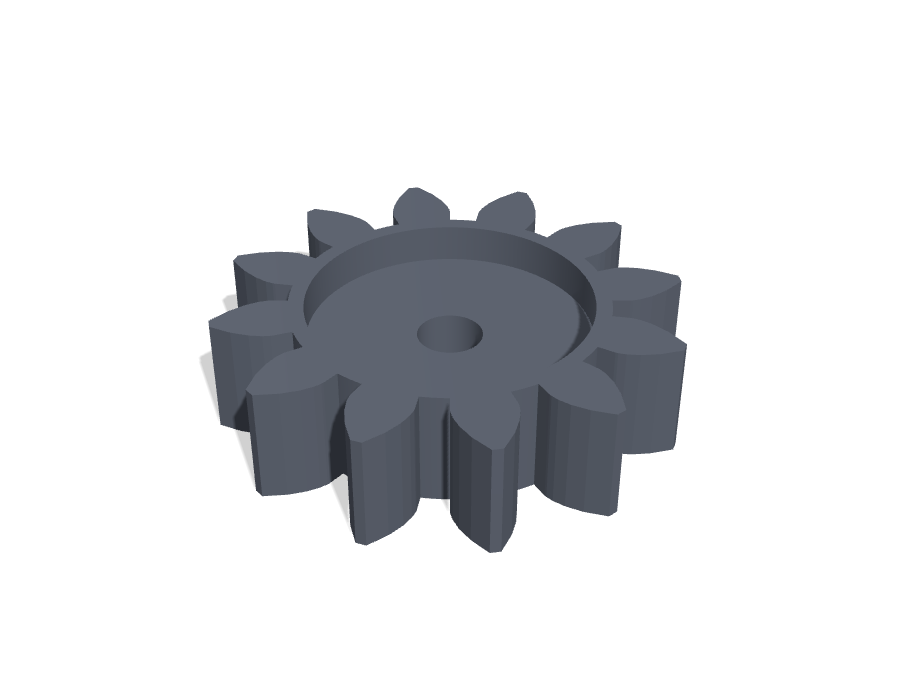
Sometimes an OpenSCAD library contains a number of modules you want to use. Importing the file without specifying a module name returns every module in the file as a namespace instead.
gears = scad123d.import_module("MCAD/involute_gears.scad")
part = gears.gear(
    number_of_teeth=12, circular_pitch=8, gear_thickness=6, bore_diameter=5
)If you already have a complete .scad file that just creates geometry,
import_scad() brings in the whole file's top-level result as a build123d
Shape object:
part = scad123d.import_scad("bracket.scad")You can also pass values into top-level variables in the file, the same way
OpenSCAD's -D flag does:
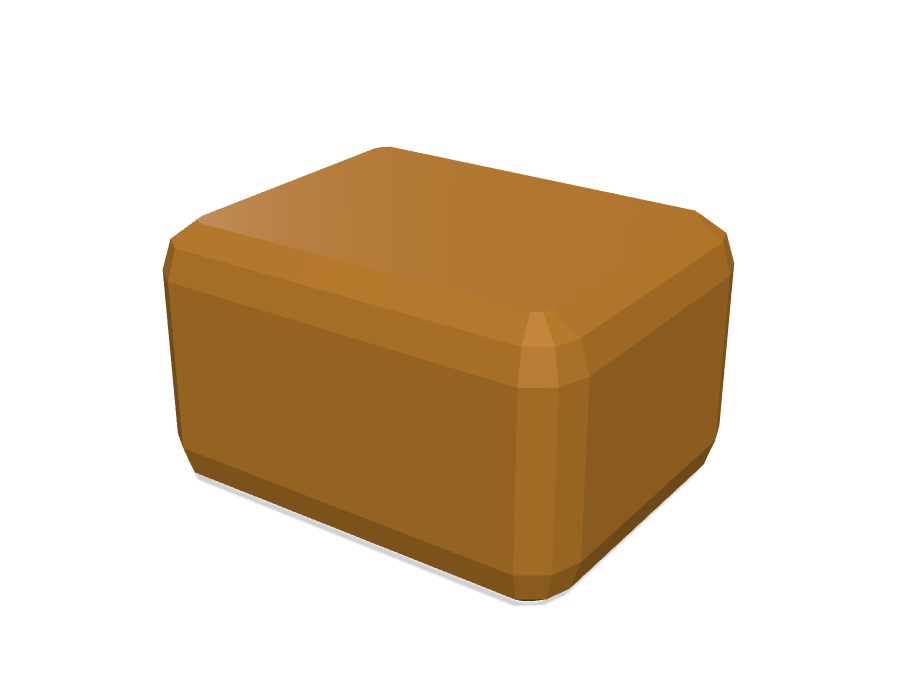
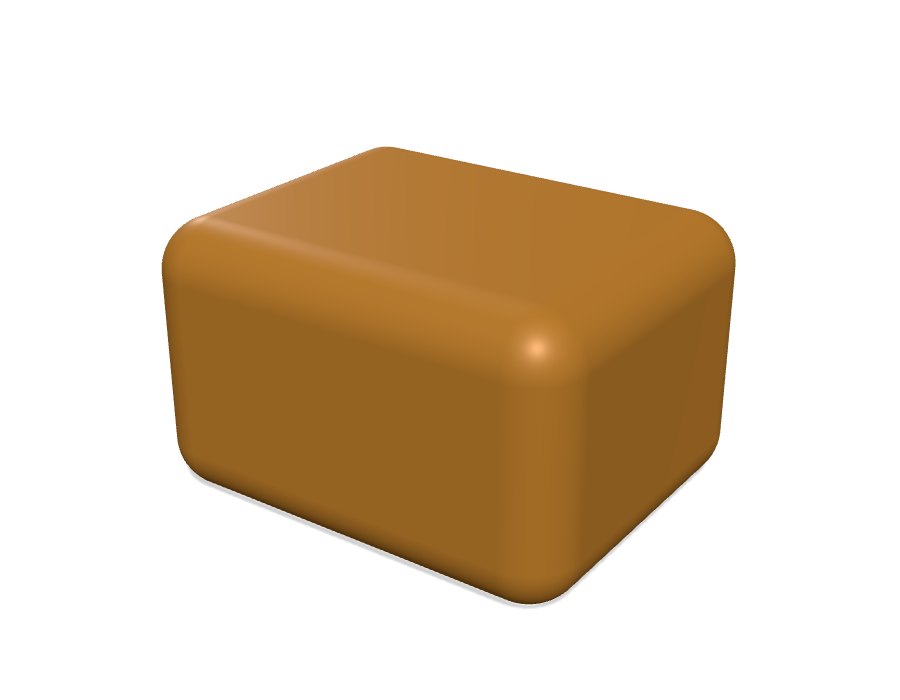
part = scad123d.import_scad("bracket.scad", width=40, holes=6)Rounding a shape with minkowski() (summing it with a small sphere) is
one of the most common things people do in OpenSCAD. OpenSCAD computes it by
meshing everything and finding the sum numerically — the rounded corners come
out as a cluster of small flat facets, not a true curve.
scad123d recognizes this specific, very common pattern and computes it directly as an exact geometric offset instead. The result isn't just cleaner — it's more accurate than OpenSCAD's own answer, and it stays a real curved surface you can select and fillet further, rather than an approximation that's baked in for good. It's often several times faster, too.
Same minkowski() call, OpenSCAD's own result on the left, scad123d's on the
right:
This covers the overwhelming majority of real-world minkowski() calls,
since rounding a shape is what most people use it for.
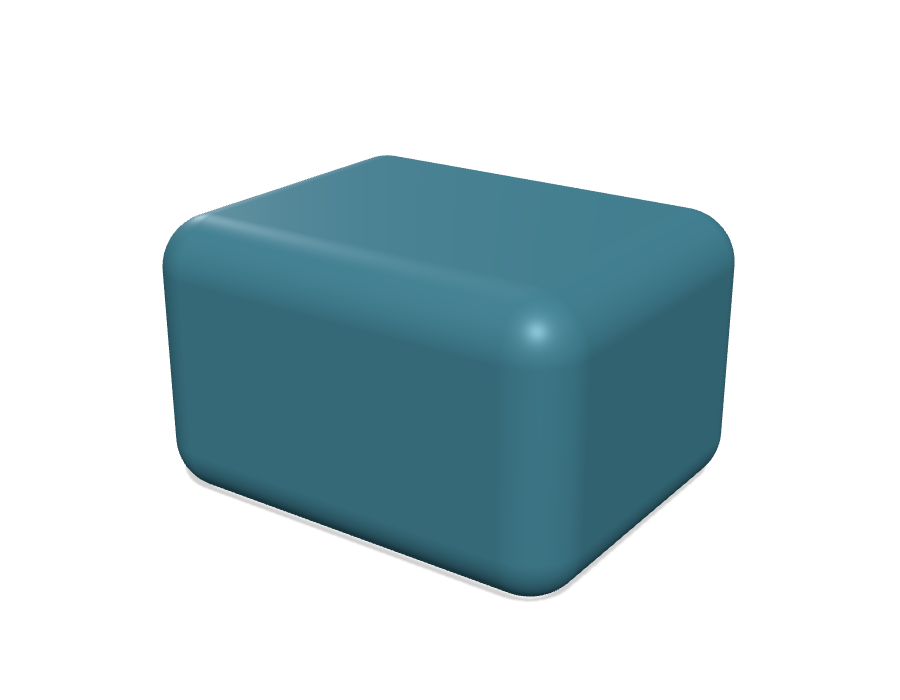
hull() doesn't have as clean an answer, but most real uses are computed
exactly. Any hull of polyhedral children — cubes, polyhedron()s,
extruded polygons, anything flat-faced, in any orientation — is exactly the
convex hull of their vertices, built as real solid geometry. And the
classic curved idioms are recognized specifically — most usefully the
"rounded box built from spheres at each corner":
hull() {
    translate([-10,-7.5,-5]) sphere(r=3);
    translate([ 10,-7.5,-5]) sphere(r=3);
    // ...6 more corners
}
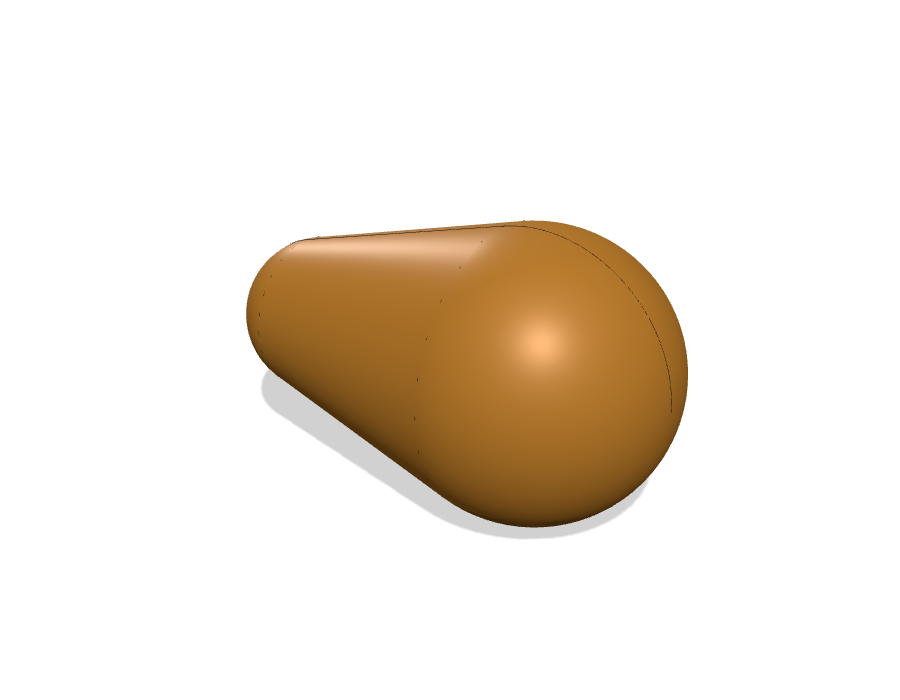
We can hull 2 spheres, but not 3+. A hull of exactly two spheres — any two radii — is computed exactly. But the hull of 3 or more spheres is computed as a mesh.
hull() {                                   // exact: smooth caps + tangent cone
    translate([-8, 0, 0]) sphere(r = 5);
    translate([ 8, 0, 0]) sphere(r = 9);
}hull() { // no closed form: mesh fallback
translate([-8, 0, 0]) sphere(r = 5);
translate([ 8, 0, 0]) sphere(r = 9);
translate([ 0, 16, 0]) sphere(r = 7);
}
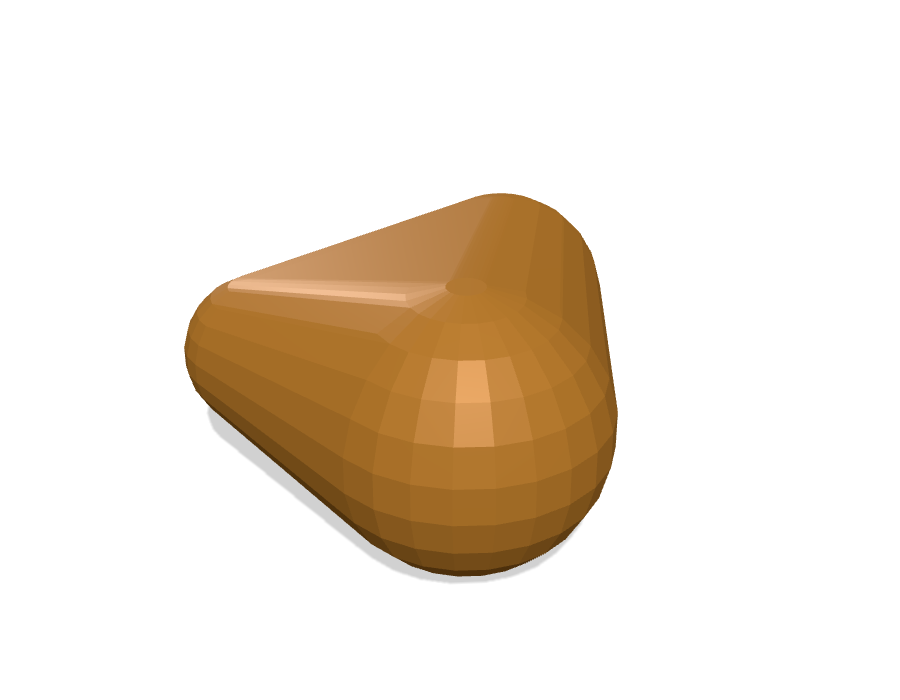
scad123d never refuses to import something — it just tells you, with a warning naming the exact operation, whenever a piece of your model had to fall back to a mesh instead of staying exact. See docs/REFERENCE.md for the full, precise list of what's covered and what isn't, if you want to know exactly where a particular model will land.
For more than a handful of files, don't loop over scad2step — importing
build123d costs about two seconds per process, and a typical model converts
in a fraction of that. scad123d-batch keeps a pool of long-lived worker
processes busy instead, and looks after everything a big run needs:
pip install 'scad123d[batch]'          # adds rich (dashboard) and psutil

scad123d-batch ~/models -o ~/models-step -j 12 --timeout 120- Resumable. A SQLite ledger in the output directory records every file's result. Ctrl-C, then re-run the same command, and it carries on where it stopped; files added to the tree since (say, a download still in progress) are picked up on each scan, edited files are redone.
- Failures are classified, not fatal. Each file ends up
ok,empty(a library file with no top-level geometry),openscad-error,unsupported,occt-error,mesh-error,timeout, orcrash. A worker that hangs is killed and replaced; one that crashes takes only its current file with it.scad123d-batch --report OUT_DIRsummarizes by class with the most common messages, and--retry timeout,crash --timeout 900re-queues just those for a second, more patient pass. - Memory is enforced, not just watched. A file whose worker (with its
OpenSCAD render) grows past
--max-rss-gbis killed and recorded asmemory; if all workers together exceed--memory-budget-gb, or the machine drops under--min-free-gb, the largest worker is killed. The defaults come from RAM and-j(60% of RAM shared across workers), so twelve workers cannot push a 48 GB machine into swap.--retry memory -j 4redoes the big ones with room. - Duplicates are converted once. Byte-identical inputs (common in a scraped corpus) share one conversion; the others get a hard link to it.
- Replayable. Each STEP gets the OpenSCAD
.csgexport it was built from beside it (--no-csgto skip), so a wrong result can be bisected withscad123d-diffwithout running OpenSCAD again. - A live dashboard shows each worker's current file, elapsed time, and
memory, plus throughput and an ETA for this run; when the run doesn't
cover the whole tree (
--limit, or a partial re-run) it adds, labeled separately, how long the rest would take at the run's average rate — so a--limit 500trial tells you both when it finishes and whether the full corpus is feasible (--no-dashboardfor plain log lines, the default when stderr isn't a terminal). - Built for finding scad123d's own bugs. Every failure keeps its Python
traceback and OpenSCAD's warnings in the ledger;
--reportgroups failures by the scad123d source line they died on,--list OUT_DIR CLASSprints the inputs in a class, and--show OUT_DIR PATHprints one file's full trace. Workers run withfaulthandler, so a segfault inside OCCT — or a hang, which the harness asks the worker to dump before killing it — leaves the Python stack inlogs/worker-N.logunder aconverting <file>marker.--verifygoes further and catches silently wrong output: each built part's volume is checked against OpenSCAD's own render of the same CSG, tessellated finely so the comparison is sharp (fast with the Manifold backend); a disagreement over 1% is classedmismatch, with the magnitude bucketed in the message so--reportgroups them. One deliberate divergence lands in the 1–2% bucket: aminkowski()whose ball is a faceted polyhedron (what BOSL2'scuboid(rounding=)emits) is built as an exact sphere, slightly larger than OpenSCAD's inscribed facets. Anything beyond that is worthscad123d-diffon the saved.csg.
Two things to arrange before a large run: install the libraries your corpus
includes (BOSL2, MCAD, ...) where OpenSCAD finds them (OPENSCADPATH), or
those files will all fail as openscad-error; and write the output outside
any cloud-synced folder — STEP files are large, and a sync client indexing
tens of thousands of them will compete for the CPU.
Missing includes. A scraped corpus loses the files its models include
— a configuration.scad, a helpers.scad, the library they were written
against — and OpenSCAD renders what survives with only a warning, so those
models come out silently wrong. scad123d-includes scan DIR reads every
model's includes and says what doesn't resolve and why: a known library
(with where to get it), a sibling (the same thing's file, elsewhere in the
corpus), or absent. resolve copies siblings into an overlay tree that
mirrors the corpus; fetch fills absent ones from the Thingiverse API (an
app token, $THINGIVERSE_TOKEN); and scad123d-batch --include-overlay DIR
puts each model's overlay folder on OPENSCADPATH for that model. Nothing
touches the corpus itself.
The worker half is exposed too: scad2step --batch reads JSON tasks
({"input": ..., "output": ...}) one per line on stdin and writes one JSON
result per line, if you'd rather drive it from your own tooling.
-
2D shapes never leave the XY plane, however you transform them. This is OpenSCAD's rule, not ours, and it surprises people: a 2D shape there is a polygon with no z coordinate at all, so the z part of any transform acts on a coordinate that does not exist. You might reasonably expect this to make two circles at different heights:
union() {
    circle(10);
    translate([0, 0, 5]) circle(20);   // looks like it lifts the circle
}
It does not. Both circles stay at z = 0 and merge into one region of the area of the larger alone. The same goes for
scale([1, 1, 1.5]), which changes nothing, and for tipping a shape out of plane withrotate([90, 0, 0]), which OpenSCAD refuses outright: it warns "Scaling a 2D object with 0 - removing object" and the shape disappears.The sharp edge is what this does to a boolean. A subtrahend written as
translate([0, 0, 0.1]) text(...)is still in the same plane as its minuend, so it cuts — and a cookie cutter built that way gets its letter outlines. Read it the other way and the two operands are in different planes, the subtraction quietly removes nothing, and every letter comes out a solid block.scad123d matches OpenSCAD here, because being OpenSCAD is the point.
solid123ddeliberately does not: it is a bridge to build123d rather than an OpenSCAD reimplementation, and there a 2D shape is a face in 3-space that moves and tilts like any other object. If you want a circle at z = 5, that is where to get one. -
Cylinders and circles you deliberately made low-poly (a hexagon nut, a 6-sided bolt head) are preserved as the actual polygon you asked for — not smoothed out into a circle. This is a heuristic based on how many sides you asked for, and it's configurable if it ever guesses wrong.
-
A few less-common OpenSCAD features —
projection(),surface(), importing a mesh file withimport(),linear_extrude(twist=...)— always take the mesh-fallback path for now. Everything else works normally. -
import_module()guesses whether to bring a file in viaincludeoruse, based on its content, and gets it right for real libraries like BOSL2 and MCAD — you shouldn't need to think about it. If a call fails complaining about a missing variable, or comes back with extra geometry you didn't ask for, passimport_style="include"/"use"explicitly; see docs/REFERENCE.md for how the guess works and when to override it. -
Only import files you trust. scad123d runs the real OpenSCAD interpreter on your file, and OpenSCAD can
includeother files or read arbitrary paths from disk — the same way running any script you didn't write is a risk. Don't point this at a.scadfile from someone you don't trust. -
Just want a STEP file, no Python?
uvx scad2step yourfile.scad -o out.stepdoes exactly that from the command line — see scad2step. It also accepts a.csgfile that OpenSCAD has already exported (openscad -o model.csg model.scad), which is how OpenSCAD's own Export as STEP menu item calls it. -
Customizer parameter sets apply automatically. If a saved OpenSCAD customizer file sits next to your input (
model.scad+model.json),scad2step model.scadapplies it —-P namepicks a set,-D name=valueoverrides single variables,--no-customizerignores the file. Same selection rules as OpenSCAD's own-p/-Pflags.
just test      # everything
just test-ci   # only tiers that need no OpenSCAD binary
just fixtures  # regenerate committed .csg fixtures + reference metrics
See docs/REFERENCE.md for exactly how the import works and the precise behavior of every option, ROADMAP.md for what's planned next, and CHANGELOG.md for what changed in each release, breaking changes first.
MIT