
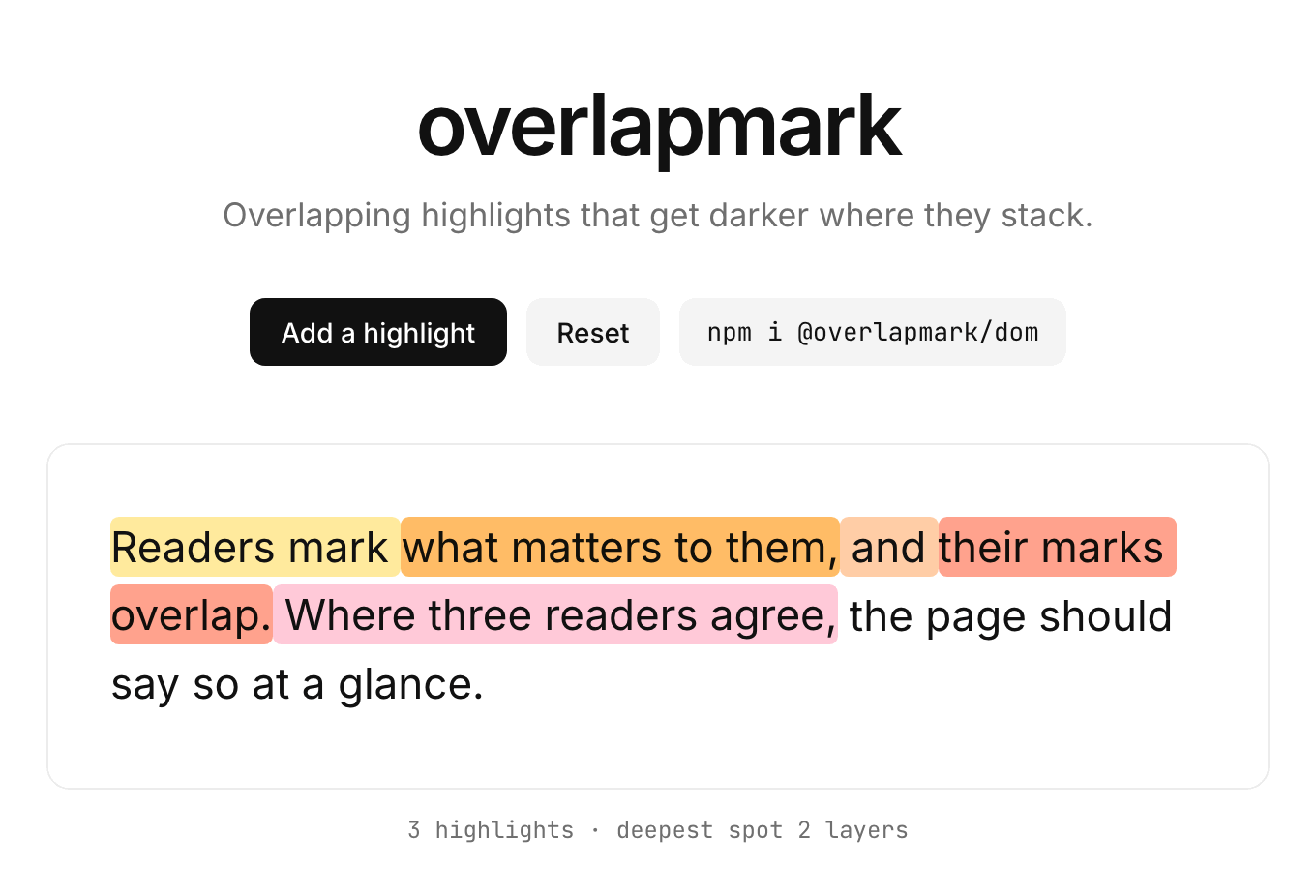


Overlapping text highlights for Vue, React, Svelte and plain JS. The more highlights cover a spot, the darker it gets, even when every highlight has its own color, and a click tells you exactly which highlights cover that spot.
npm install @overlapmark/vue @overlapmark/core # or @overlapmark/react, @overlapmark/svelte, @overlapmark/dom- Overlaps get darker. Nested highlights darken the spot they share (Overlap modes).
- Click tells you which highlights. A click, tap or Enter reports every highlight covering that point; a selection reports its range, so you can add a highlight from it.
- Same DOM and events everywhere. Vue, React, Svelte and vanilla JS render the same markup, report the same detail objects and render on the server.
- Style it your way. CSS variables, per-highlight colors and classes, decorations of your own, or no shipped CSS at all.
The text is rendered once and cut into segments: runs of text covered by the same set of highlights. They stay aligned with the text however the layout wraps. Positions are plain JS string indices (UTF-16 code units, end exclusive), so text.slice(start, end) is the highlighted text. No third-party runtime dependencies.
- Packages
- Quick start: vanilla JS, Vue, React, Svelte
- Highlights and options
- Overlap modes
- Styling
- Events
- Accessibility
- Browser support
- Server rendering and React Server Components
- Shadow DOM and iframes
- Dev warnings
- Migrating from
vue-easy-highlight - Known limitations
- Versioning
- Contributing
| Package | Description |
|---|---|
@overlapmark/core |
Segment computation, findMatches, types, DOM helpers, styles.css; the DOM contract |
@overlapmark/dom |
Vanilla JS adapter: createHighlighter |
@overlapmark/vue |
Vue 3 component: Highlighter |
@overlapmark/react |
React component: Highlighter |
@overlapmark/svelte |
Svelte 5 component: Highlighter |
Every adapter renders the same DOM from @overlapmark/core and reports the same events with the same detail objects. None of them injects CSS: import @overlapmark/core/styles.css yourself (or skip it and style the DOM contract).
Install @overlapmark/core next to the adapter even though the adapter depends on it: your own code imports @overlapmark/core/styles.css and the types, and strict package managers (pnpm, Yarn PnP) only resolve what you depend on directly.
npm install @overlapmark/dom @overlapmark/core<p id="text"></p>import '@overlapmark/core/styles.css';
import { createHighlighter } from '@overlapmark/dom';
const text = 'Overlapping highlights get darker where they overlap.';
let highlights = [{ id: 'a', start: 0, end: 20 }];
const hl = createHighlighter(document.getElementById('text')!, {
text,
highlights,
});
hl.on('select', ({ start, end }) => {
highlights = [...highlights, { id: crypto.randomUUID(), start, end }];
hl.update({ highlights });
});
hl.on('click', ({ highlights: covering }) =>
console.log(
'covered by',
covering.map((h) => h.id),
),
);Select text with the mouse or a finger, or extend a selection with Shift+Arrow keys, and a new highlight is added. Overlapping parts get darker. Clicking (or pressing Enter/Space on a focused highlight) reports every highlight covering that point.
The quick starts use crypto.randomUUID() for ids. Browsers only offer it in secure contexts (HTTPS or localhost), so a dev server opened over a LAN IP on plain HTTP needs another id source, such as a counter.
To add highlights from a search instead of a selection:
import { findMatches } from '@overlapmark/core';

highlights = findMatches(text, 'highlights').map((m, i) => ({
    id: `m${i}`,
    ...m,
}));
hl.update({ highlights });
The live demo and docs live in site: pnpm --filter overlapmark-site dev.
npm install @overlapmark/vue @overlapmark/core<script setup lang="ts">
import '@overlapmark/core/styles.css';
import { ref } from 'vue';
import type { Highlight, SelectDetail } from '@overlapmark/core';
import { Highlighter } from '@overlapmark/vue';
const text = 'Overlapping highlights get darker where they overlap.';
const highlights = ref<Highlight[]>([{ id: 'a', start: 0, end: 20 }]);
const add = ({ start, end }: SelectDetail) =>
highlights.value.push({ id: crypto.randomUUID(), start, end });
</script>
<template>
<Highlighter :text="text" :highlights="highlights" @select="add" />
</template>Events are @select, @click, @dblclick and @hover, with the same detail objects as in vanilla JS; decorations go in the decoration scoped slot. See @overlapmark/vue.
npm install @overlapmark/react @overlapmark/coreimport '@overlapmark/core/styles.css';
import { useState } from 'react';
import type { Highlight, SelectDetail } from '@overlapmark/core';
import { Highlighter } from '@overlapmark/react';
export function Article({ text }: { text: string }) {
const [highlights, setHighlights] = useState<Highlight[]>([]);
const add = ({ start, end }: SelectDetail) =>
setHighlights((list) => [
...list,
{ id: crypto.randomUUID(), start, end },
]);
return <Highlighter text={text} highlights={highlights} onSelect={add} />;
}Handlers are onSelect, onClick, onDblClick and onHover; they receive core's detail objects, not React events. Decorations come from the renderDecoration prop. See @overlapmark/react.
npm install @overlapmark/svelte @overlapmark/core<script lang="ts">
import '@overlapmark/core/styles.css';
import type { Highlight, SelectDetail } from '@overlapmark/core';
import { Highlighter } from '@overlapmark/svelte';
const text = 'Overlapping highlights get darker where they overlap.';
let highlights = $state<Highlight[]>([{ id: 'a', start: 0, end: 20 }]);
const add = ({ start, end }: SelectDetail) =>
highlights.push({ id: crypto.randomUUID(), start, end });
</script>
<Highlighter {text} {highlights} onselect={add} />Callback props are onselect, onclick, ondblclick and onhover; they receive core's detail objects, not DOM events. Decorations come from the decoration snippet. See @overlapmark/svelte.
In the three components, classes and other attributes you give the component land on its root div, after the om-root class; om-root, data-om-strategy (from strategy) and data-om-overlap (from overlap) always stay the component's own. @overlapmark/dom renders into the element you pass instead: it adds om-root to that element's classes and sets the two attributes, and destroy() takes them off again.
A highlight is a plain object (Highlight<T> from @overlapmark/core):
| Field | Type | Description |
|---|---|---|
id |
string |
Unique among the highlights you pass, and without whitespace (see Dev warnings) |
start |
number |
Integer UTF-16 index of the first character |
end |
number |
Integer UTF-16 index after the last character (exclusive) |
color |
string |
Optional CSS color, set as --om-color on the highlight's element |
className |
string |
Optional class for the highlight's element, such as a preset |
data |
T |
Optional payload of your own; events hand your highlight objects back, so you read it from there |
Ranges are normalised before rendering: a non-integer range is dropped, a range outside the text is clamped to it, and an empty or reversed range is dropped, each with a dev warning; a range that splits a surrogate pair is widened to the whole character, silently. Ids are compared everywhere (data-om-ids, hover, keys), so duplicate ids get a warning too. The ids of the highlights covering a segment are written space-separated in its data-om-ids attribute, which is why an id must not contain whitespace.
findMatches(text, query, options?) finds literal occurrences of a string or an array of strings and returns { start, end }[]. Options: caseSensitive (default false), overlapping (default true) and wholeWord (default false).
Every adapter takes the same options, as options of createHighlighter or as component props:
| Option | Type | Default | Description |
|---|---|---|---|
text |
string |
required | The source text |
highlights |
Highlight<T>[] |
[] |
See Highlights |
strategy |
'layers' | 'depth' |
'layers' |
layers: one nested element per highlight. depth: one element per segment, darkened by its overlap count |
overlap |
'multiply' | 'darken' | 'none' |
'multiply' |
How nested layers combine with the layers strategy; the depth strategy ignores it. See Overlap modes |
focusable |
boolean |
true |
Make highlighted segments Tab stops (tabindex="0", role="button"); Enter/Space reports click. See Accessibility |
describe |
(highlights: readonly Highlight<T>[]) => string |
count | The accessible description of a focusable segment, from the highlights covering it: '1 highlight' / `${n} highlights` by default; return '' for none |
defaultColor |
string |
#ddd6ff |
Color of highlights without color: baked into their --om-brush, and, when given, set as --om-default-color on the root |
brush |
(color: string) => string |
built-in | Returns a CSS image value for --om-brush (used by om-style-marker) |
minSelectionLength |
number |
1 |
Shorter selections do not report select |
touchSelectionDelay |
number |
500 |
Milliseconds without a selection change before a touch selection reports select |
Decorations are adapter-specific: decorate in @overlapmark/dom, the decoration slot in Vue, renderDecoration in React and the decoration snippet in Svelte (see Styling, tier 3).
With the default layers strategy, each highlight covering a segment is its own nested <mark>. The overlap option decides how those layers combine. It only sets data-om-overlap on the root; the stylesheet does the rest, so every adapter and the server-rendered markup look the same. The depth strategy paints one color per segment, already darkened by its overlap count, and ignores overlap.

Each nested layer multiplies with the layers under it (mix-blend-mode: multiply), like a highlighter pen drawn over itself, so every highlight covering a spot darkens it, for any color except pure white (a white layer multiplies to no change). The root is an isolated group (isolation: isolate), so the layers never blend with the page behind the root.
When to use: text on a light background, with any palette. Caveats: a nested layer, its own text included, multiplies with everything painted under it inside the root, so a decoration such as a badge's background inside a nested mark is tinted too. On a dark background, pastel layers fade into the background, and the light text of a nested highlight is tinted by the layers below it and loses contrast. For dark themes, keep a light reading surface behind the highlighted text, or switch to darken with deeper colors (see the snippet below).

Each nested layer takes its own color mixed toward --om-depth-ink (default black) by --om-depth-step (default 12%) per nesting level, up to --om-max-depth, and is painted at --om-alpha. It uses no blend mode: the layers are translucent over the page, and the text is not tinted.
When to use: dark themes, or wherever blending is unwanted. Caveats: it darkens reliably only when the overlapping colors have similar lightness. A pale color nested inside a saturated one still comes out lighter than the color around it, so pick a palette of similar lightness.

Plain translucent layers, each at --om-alpha, with no depth effect. Overlaps of light colors may look the same as, or lighter than, a single highlight.
When to use: when the overlap itself should not stand out, or when you draw depth yourself with [data-om-depth] or --om-level.
/* Option 1: keep the default multiply mode on a light reading surface. */
.article {
    background: #fbf8f1;
    color: #1d1d1f;
}

/* Option 2: overlap: 'darken' with deeper colors on the dark page. */
@media (prefers-color-scheme: dark) {
    .article {
        --om-default-color: #6d5bd0;
        --om-alpha: 70%;
        --om-depth-ink: black;
    }
}
Give per-highlight colors the same treatment: deeper colors of similar lightness in the dark theme.
Three levels, from least to most control:
-
Theme with CSS variables. Set them on
.om-rootor any ancestor, such as:root(values shown are the defaults; the stylesheet only uses them asvar()fallbacks, so an ancestor value is never overridden).:root { --om-default-color: #ddd6ff; /* color of highlights that have no `color` */ --om-alpha: 55%; /* opacity of each layer (layers strategy) */ --om-depth-step: 12%; /* how much darker per level (darken mode, depth strategy) */ --om-depth-ink: black; /* what darken mode mixes toward */ --om-max-depth: 6; /* depth at which darkening stops */ }
--om-coloris set per highlight fromhighlight.colorand is reset on every.om-hl, so setting it on the root has no effect. Use--om-default-coloror thedefaultColoroption instead; when given,defaultColorsets--om-default-coloron the root, which wins over a value inherited from an ancestor. -
Per highlight. Give a highlight a
colorand/or aclassName. Built-in presets:om-style-marker(a marker stroke from--om-brush),om-style-underlineandom-style-box.{ id: 'note', start: 0, end: 12, color: '#ffd6d6', className: 'om-style-underline' }
The presets are made for the
layersstrategy, where nesting shows: nested underlines stack 4px below each other and nested boxes reach 3px further above and below the text per level. The box is drawn around the highlight's padding, so even a single box reaches 0.12em above and below the text. Under thedepthstrategy a preset replaces the darkened fill and has no levels, so all depths look alike there; a depth segment also takes the color of the first covering highlight that has one, and the classes of all of them.You can also write your own CSS against the DOM contract (
.om-hl,[data-om-depth],[data-om-ids~="id"],--om-level). Every library selector is wrapped in:where()(zero specificity), so a plain class rule such as.memo { background-color: pink }or.memo { --om-color: pink }wins regardless of stylesheet order. -
Decorations. Add your own presentational markup after the text of each highlighted segment, such as an overlap count or an icon:
@overlapmark/dom: thedecorate: (segment) => Node | string | nulloption- Vue: the
decorationscoped slot ({ segment }) - React: the
renderDecoration: (segment) => ReactNodeprop - Svelte: the
decorationsnippet (segment)
createHighlighter(el, {
    text,
    highlights,
    decorate: (segment) => (segment.depth > 1 ? `×${segment.depth}` : null),
});
A decoration goes in
<span data-om-skip aria-hidden="true">, the last child of the segment's innermost element. It is presentational: it never shifts the offsetsselectandclickreport, the shipped stylesheet gives ituser-select: noneso it stays out of selections and copies, andaria-hiddenhides it from assistive technology, so it must not contain buttons, links or other focusable content. Plain (unhighlighted) segments are not decorated, and a segment whose decoration renders nothing gets no container:decoratereturningnullor'', a Vue slot rendering only comments (such asv-if), empty text or an empty array, orrenderDecorationreturningnull,undefined, a boolean,''or an empty array. Svelte is the exception: every highlighted segment gets a container (see Known limitations).
Unstyled usage. Independently of the tiers above, you can skip @overlapmark/core/styles.css entirely and style the DOM contract yourself. The library never injects CSS. Keep a visible focus style if you do: the shipped one is the :focus-visible outline.
| Event | When | Detail |
|---|---|---|
select |
A selection inside the root is finished | { start, end, text, rect, highlights } |
click / dblclick |
Click or tap with no active selection; Enter/Space on a focused highlight (click) |
{ offset, segment, highlights, event } |
hover |
A mouse pointer enters or leaves a highlighted segment | { type: 'enter' | 'leave', segment, highlights, event } |
The names follow each framework: on('select', fn) in @overlapmark/dom, @select in Vue, onSelect in React (onDblClick for dblclick), onselect in Svelte. The detail types (SelectDetail, PointDetail, HoverDetail) come from @overlapmark/core. highlights in every event follow the library order: start ascending, then longer first, then input order.
select:highlightsare those overlapping the selection, andrectis the bounding rect of the selected text inside the root (clipped to the root), in the viewport coordinates of the root's own window: an iframe's, for a root inside one. The same range is not reported twice in a row: it is reported again only after the selection was cleared or changed.clickalso fires on unhighlighted text, withhighlights: [].offsetis the index of the character clicked.hovercomes from mouse pointers only, whatever the device: a tablet with a mouse gets it, touch and pen do not.
select fires on the next task after the mouse button or key is released (on touch, after touchSelectionDelay ms, default 500, without a selection change). On the keyboard, keyup confirms only once no modifier (Shift/Ctrl/Alt/Meta) is held, so a Shift+Arrow run emits a single select when Shift is released. Shift+Arrow extends a selection the user already has; in Chrome and Safari, Shift+Arrow from a caret in static text selects nothing.
Touch is verified in the acceptance tests on emulated mobile profiles (Pixel 7 in Chromium, iPhone 15 in WebKit): a tap reports click with the covering highlights and no hover, in both. A long press that selects text, and the select that follows once the selection settles, is verified in Chromium on macOS only, with a real press-and-hold that the browser turns into a selection; Playwright's Chromium on Linux CI runners does not turn an emulated long press into a selection. Automation cannot hold a touch in WebKit, so there that gesture is not tested; nor are the selection handles you drag after a long press.
A left mouse press on a focusable highlight focuses it when the button is released, if the press made no selection (a click), not when it goes down: Chrome would otherwise not start a drag selection on a highlight's first character. A press with Ctrl held is left alone (on macOS, Ctrl+click opens the context menu), so see Known limitations for Ctrl+drag.
Every hover enter is followed by one leave for the same segment object. Besides the mouse moving away, a leave is also emitted when the adapter is destroyed (or the component unmounted) and when an update removes the hovered highlight from under the mouse. Such a programmatic leave has no pointer event behind it, so its event is null. An update that re-renders the hovered segment unchanged (same start and highlight ids) emits nothing.
- Keyboard. With
focusable: true(the default), every highlighted segment is a Tab stop: Tab moves between them, and Enter or Space reportsclickwith the highlights covering it. The Tab stops are per segment, not per highlight: a highlight that overlaps two others can be split into five segments. For densely annotated text, setfocusable: falseand offer another way to reach the highlights, such as a list next to the text. Withfocusable: false, segments get notabindex, role or description. - Screen readers. A focusable segment is
role="button"with anaria-descriptionofdescribe(highlights): screen readers announce its text, "button", and the description, "2 highlights" by default. Passdescribeto word it yourself, for example with the names of the highlights ((hs) => hs.map((h) => h.id).join(', ')); return''for none. The description is an attribute, rendered on the server too, so it never enters the text, a selection, a copy or the offsets.aria-descriptionis from the ARIA 1.3 draft; the oldest browsers in Browser support, older Safari with VoiceOver above all, may not announce it. - Decorations are
aria-hidden: a count you show in one is not announced, so put what matters indescribe. - Focus ring. The shipped stylesheet draws a
:focus-visibleoutline. Keep one if you style highlights yourself. - Forced colors (such as Windows High Contrast). The shipped stylesheet paints every highlight in the system
Markcolors with an outline, so highlights stay visible in the user's palette. All presets and colors flatten into that one system fill there, and depth shows only through the outlines of nested highlights.
styles.css needs color-mix(), which sets the floor: Chrome and Edge 111, Firefox 113, Safari 16.2 (iOS 16.2). Without it the background declarations are dropped and highlights show no fill; for older browsers, set .om-hl { background-color: … } yourself. Every other feature the library uses shipped earlier, or is only needed in a narrower case:
| Feature | Used for | Chrome / Edge | Firefox | Safari | Without it |
|---|---|---|---|---|---|
color-mix() |
Every highlight fill | 111 | 113 | 16.2 | No fill |
mix-blend-mode, isolation |
multiply mode |
41 / 79 | 32 / 36 | 8 | Plain translucent layers, as in none |
:where() |
Zero-specificity rules | 88 | 78 | 14 | The rules are dropped |
aria-description |
The description of a focusable segment | 83 | 119 | 17.4 | The segment is announced without its description |
Selection.getComposedRanges() |
Selections in a shadow root | 137 | 142 | 17 | The window selection's ranges: Chromium reports them inside the shadow root; other engines are not tested without it |
forced-colors, Mark |
Forced-colors style | 102 | 109 | n/a | The browser's own forced colors |
Minimum versions are those in MDN's browser compatibility data (@mdn/browser-compat-data 8.1.6, October 2026); the color-mix() row matches caniuse. For aria-description the versions are those of the ariaDescription property, which reflects the attribute. They are where each feature shipped, not tested versions: the tests run in Playwright's current Chromium, Firefox and WebKit (see Known limitations).
The main entry of @overlapmark/core reads no window or document, so it runs on the server; @overlapmark/core/dom is browser-only. The Vue, React and Svelte components render the same markup on the server as on the client, including data-om-overlap, --om-default-color and the accessible descriptions, and hydrate on it. Import @overlapmark/core/styles.css yourself on both sides.
@overlapmark/react's entry starts with 'use client'. In the Next.js App Router (or any React Server Components setup), a Server Component can render Highlighter with plain props, but functions cannot cross from the server to the client: when you pass handlers (onSelect, onClick, …), describe, brush or renderDecoration, render Highlighter from a Client Component of your own (a file starting with 'use client').
The root may sit inside an open shadow root or in an iframe's document: selection, focus, offsets and the document listeners are read from the root's own tree and window. The acceptance tests cover clicks, drags, and keeping the selection and focus across an update, in both. Limits:
- Closed shadow roots, in Chromium: a drag that starts on a focusable highlight's first character selects nothing (the press is seen at the shadow host, so the workaround in Events does not apply). Clicks, selection and focus are expected to work there, but closed shadow roots are not tested.
- Safari 17 takes
getComposedRangesin an older form, which is handled but not tested. - Slotted content in the root is not supported.
In development, core logs each of these once, as console.warn('[overlapmark] …'):
- Duplicate ids. Ids must be unique among the highlights you pass.
- Whitespace in ids.
data-om-idsis space-separated, so an id with a space would read as two ids in[data-om-ids~="…"]. - Unsafe colors. A
colorordefaultColorthat contains;,{,},<,>,\,url(orexpression(, or is longer than 64 characters, is ignored, and the default color applies. Colors go into style attributes, also as server-rendered strings, so such a value could inject CSS. - Ranges that are dropped or clamped (see Highlights).
Warnings are on unless process.env.NODE_ENV is 'production', which bundlers replace in production builds. Where there is neither the replacement nor a process global, as in a plain <script type="module"> without a bundler, core stays silent.
overlapmark replaces vue-easy-highlight (last release 0.1.14). In Vue, render Highlighter from @overlapmark/vue: you compute the ranges yourself and pass them as highlights with ids.
vue-easy-highlight 0.1.14 |
overlapmark |
|---|---|
import VueEasyHighlighter from 'vue-easy-highlight' |
import { Highlighter } from '@overlapmark/vue', and import '@overlapmark/core/styles.css' |
text |
text |
textsToHighlight (a Set of strings) |
highlights: findMatches(text, [...set], { overlapping: false }).map((m, i) => ({ id: `m${i}`, ...m })) |
baseColor |
defaultColor (or --om-default-color in CSS) |
textsBaseColorMap ({ [text]: color }) |
color on each highlight: findMatches(text, key, { overlapping: false }).map((m) => ({ ...m, id: …, color })) for each entry |
selectedTextColor, selectedTextBackgroundColor |
Your own CSS: .om-root ::selection { color: …; background-color: … } |
@text:selected="(text, rect) => …" |
@select="({ text, rect, start, end }) => …" |
@text:clicked="({ event, targetIndex, targetCharacter }) => …" |
@click="({ event, offset, segment, highlights }) => …": offset is the character index, text[offset] the character |
Behavior differences:
- Search. The old search was case-insensitive and found non-overlapping matches per string, which
findMatches(text, strings, { overlapping: false })reproduces (caseSensitiveisfalseby default).findMatchestakes a string or an array, not aSet. - Darkening. The old component painted each character one color, darkened by how many matches covered it.
strategy="depth"is the closest to that; the defaultlayersstrategy keeps each highlight's own color and darkens overlaps with themultiplymode. - Selections. The old
text:selectedskipped selections shorter than 2 characters: use:min-selection-length="2". It also reported the text with spaces and line breaks removed;detail.textis the selected source text as is, with itsstartandend. - Double-click. The old component selected the clicked word and re-emitted
text:selected.@dblclickreports the point, like@click, and leaves the browser's own word selection in place. - Clicks report the highlights covering the point, which the old component did not.
vue-easy-highlight will be deprecated on npm with a pointer to @overlapmark/vue once overlapmark is published.
- Peer lower bounds get a reduced test.
@overlapmark/reactdeclares React 18 or later,@overlapmark/vueVue 3.3 or later and@overlapmark/svelteSvelte 5 or later. The full suites run on React 19, Vue 3.5 and Svelte 5.57. On React 18.3, Vue 3.3 and Svelte 5.0 an app type-checks against the published types and runs the core scenarios (select, click, keyboard activation, update) in Chromium. The Vue type declarations are also checked against Vue 3.4, 3.5.0 and the latest 3.5. Other releases in between are not tested. - Svelte 5.0 needs an older esrap.
Highlighter.svelteships as TypeScript source. Svelte 5.0.5 accepts any esrap 1.x, and esrap 1.4 or later (as of October 2026) fails to compile TypeScript in any component (Not implemented type annotation EmptyStatement). The tests pin esrap to 1.2.3 for Svelte 5.0.5 (npmoverrides, pnpmpnpm.overrides) and need no pin on Svelte 5.57; releases between them are not tested, so pin esrap if you see that error. - Ctrl+drag from a highlight's first character, in Chromium. A press with Ctrl held is left alone (see Events), so in Chromium a Ctrl+drag that starts on a focusable highlight's first character selects nothing, on every platform. Start the drag elsewhere, or set
focusable: false. - Verified browsers and devices. Each app (vanilla, Vue, React and Svelte), installed from the packed tarballs, runs the full acceptance suite in Playwright's desktop Chromium, Firefox and WebKit and in its emulated Pixel 7 (Chromium) and iPhone 15 (WebKit) profiles, on Linux in CI. These are Playwright's engine builds and device emulation, not branded Chrome, Edge or Safari, and no real phone or tablet is tested. The packages' own browser tests run in Chromium only. A long press that selects text is verified only in Chromium's mobile emulation on macOS (see Events).
- Server rendering is verified on development builds. The Vue, React and Svelte apps render on the server and hydrate in desktop Chromium, Firefox and WebKit with the frameworks' development builds, which report hydration mismatches. What their production builds do on a mismatch is not tested.
- ESM only for the framework adapters.
@overlapmark/vue,@overlapmark/reactand@overlapmark/svelteship ES modules only;@overlapmark/coreand@overlapmark/domship both ES modules and CommonJS. - Programmatic hover
leave. Aleavecaused by unmounting, destroying or an update, not by the mouse, carriesevent: null. Hiding the component also emits one for a hovered segment: React's<Activity mode="hidden">and Vue's<KeepAlive>deactivating it. - Vue decorations. A
decorationslot whosev-forrenders an empty list leaves an empty container (no text, takes no space): it renders an empty fragment, not one of the empty results listed in Styling. - Svelte differences.
- When the component is removed while a segment is hovered, the
leavestill reachesonhover, but Svelte has already taken the rootdivout of the document by then. - Every highlighted segment gets a decoration container when a
decorationsnippet is given: what a snippet renders is only known once it rendered, so a segment it renders nothing for keeps an empty container (no text, takes no space). The other adapters render no container for a decoration that renders nothing (see Styling, tier 3). - Highlights held in deep
$statearrive in events as Svelte's state proxies (the same valueshighlights[i]gives you), not your original objects. Use$state.rawwhen you need=== myHighlight. - Svelte's hydration does not check the server markup against the client render, so a mismatch is neither reported nor repaired. Pass the same props on the server and the client.
- When the component is removed while a segment is hovered, the
overlapmark follows semantic versioning; while it is 0.x, a minor release may contain breaking changes. Each package has its own CHANGELOG.md. @overlapmark/core/adapter, the helpers the adapters are built on, is unstable and may change in any minor release.
Setup, the test layers, the acceptance suite, changesets and releasing are described in CONTRIBUTING.md.
MIT