
Render DGMO diagrams from ```dgmo fenced code blocks in your Docusaurus site at build time. Powered by @diagrammo/dgmo and the framework-agnostic remark-dgmo core. Zero client JavaScript by default.
📖 Setup guide: diagrammo.app/embed#docusaurus · 🔭 Live showcase: every chart type rendered through docusaurus-plugin-dgmo — every block is in showcase mode, so hovering a diagram reveals its copy / open-in-editor footer.
Every diagram is rendered twice at build time (light + dark palettes) and follows the Docusaurus color-mode toggle via shipped CSS.
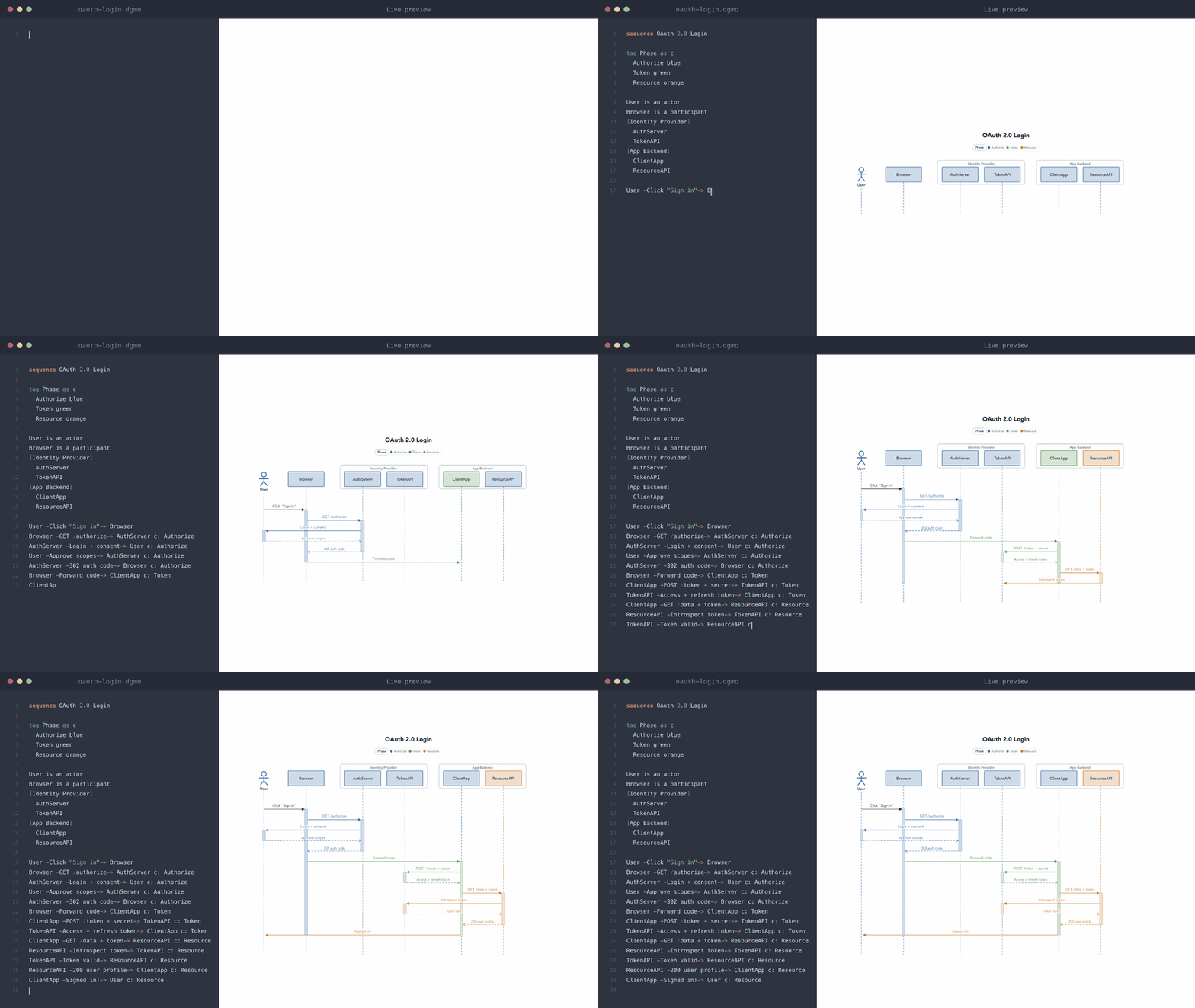
Write a fenced dgmo block — it renders to SVG at build time.
One small plain-text language, 50+ chart types — flowcharts, sequence, state, class, ER, C4, org charts, gantt, maps, mind maps, and the full bar/line/pie/area/sankey family. Browse every type with live examples in the language reference.
Prefer to author visually? Draft diagrams in the Diagrammo desktop app or the online editor — live preview, autocomplete, optional vim keybindings, 7 themeable palettes, and one-click PNG/SVG export — then paste the dgmo block into your docs. More at diagrammo.app.
pnpm add docusaurus-plugin-dgmo @diagrammo/dgmo@diagrammo/dgmo is a peer dependency. Node 20.6+. ESM only. Your docusaurus.config.js must be .mjs/.ts/.mts, or your package.json must have "type": "module".
Wrap your docusaurus.config.ts with defineConfig. The helper injects the remark plugin into your classic preset's docs/blog/pages slots, sets markdown.format = 'md' (raw-HTML output is incompatible with MDX), and registers docusaurus-plugin-dgmo. Nothing else to wire.
// docusaurus.config.ts
import { defineConfig } from 'docusaurus-plugin-dgmo/config';

export default defineConfig({
  title: 'My Docs',
  url: 'https://example.com',
  baseUrl: '/',
  presets: [
    [
      'classic',
      {
        docs: { sidebarPath: './sidebars.ts' },
        blog: { showReadingTime: true },
      },
    ],
  ],
});
That's the whole integration. defineConfig returns Promise<Config>; Docusaurus accepts a promise as the default config export.
Pass remark-dgmo options as a second argument:
export default defineConfig(
  {
    /* …config… */
  },
  { dgmo: { palette: 'catppuccin', colorMode: 'auto' } }
);By default defineConfig sets markdown.format = 'md' because the rendered diagrams are emitted as raw HTML nodes that MDX rejects. If you want JSX (component imports, frontmatter expressions, etc.) in the same files as your dgmo blocks, opt in:
export default defineConfig(
  {
    /* …config… */
  },
  { mdx: true }
);
This forwards mdx: true to remark-dgmo so it emits an mdxJsxFlowElement (<div dangerouslySetInnerHTML={…} />) which MDX accepts. markdown.format is left alone, so Docusaurus's default 'mdx' parser runs and your files get full MDX features.
If defineConfig doesn't fit (custom preset, deeply dynamic config, you need to inspect the wiring), do it by hand:
// docusaurus.config.ts
import type { Config } from '@docusaurus/types';

export default async function createConfig(): Promise<Config> {
  const remarkDgmo = (await import('docusaurus-plugin-dgmo/remark')).default;
  return {
    // …
    markdown: { format: 'md' },
    plugins: ['docusaurus-plugin-dgmo'],
    presets: [
      [
        'classic',
        {
          docs: { remarkPlugins: [remarkDgmo] },
          blog: { remarkPlugins: [remarkDgmo] },
          pages: { remarkPlugins: [remarkDgmo] },
        },
      ],
    ],
  };
}
The async-function default export is required because remark-dgmo is ESM-only and the jiti loader Docusaurus uses to read the config rejects top-level await in a sync default export.
Drop a fenced block with the language dgmo into any .md (or .mdx with mdx: true) file in your docs/, blog/, or pages/ directory.
```dgmo
sequence
Client -POST /login-> API
API -validate-> Auth
Auth -JWT-> API
API -200 OK-> Client
```Append options to the fence info string. Tokens are space-separated; values may be quoted.
```dgmo showcase title="Login flow" palette=catppuccin colorMode=light
sequence
A -> B
```
See the remark-dgmo README for the full option matrix.
A live link is a diagram somebody shows on the web from the Diagrammo app. The app marks it with an amber globe 
Get the link in the app (see where in the app) — either route copies it to your clipboard:
- Open the diagram and press Share on the left rail (or ⌘E / Ctrl+E), then Show on the web → Show.
- Or right-click the diagram in the file list and choose Show and copy link.
To copy it again later, open the diagram and press the lit amber globe on the left rail.
Paste it into a dgmo fence, on a line of its own:
```dgmo
https://online.diagrammo.app/d/dgm_01M3PG3DQ6S89W7ZFM5Z06J1CD
```
Once you know the id, live-link dgm_01M3PG3DQ6S89W7ZFM5Z06J1CD inside the fence does the same job.
The build fetches it, renders it like any other block, and writes what it fetched to .dgmo/references/<id>.json — commit that directory. It is what keeps your build reproducible and independent of our uptime.
If the diagram changes after your last build, the page notices by default: readers get a small link to the live version. Re-drawing it in the browser instead means shipping the renderer, so it is opt-in:
export default defineConfig(
  { title: 'My Docs' /* … */ },
  { dgmo: { liveLink: { refresh: 'render' } } }
);
defineConfig passes that through to the plugin, which registers the extra client module for you — no second step. Wiring the plugin by hand instead? Give it the same options, or the setting has nothing to act on:
plugins: [['docusaurus-plugin-dgmo', { liveLink: { refresh: 'render' } }]];Webpack emits the renderer as its own lazy chunk, so readers download it only when a diagram has actually changed. connect-src https://api.diagrammo.app, or the baked diagram renders and simply never updates.
tests/fixture/ is a complete minimal Docusaurus 3 site running this plugin. Copy tests/fixture/docusaurus.config.ts as a template for your own site.
git clone https://github.com/diagrammo/docusaurus-plugin-dgmo
cd docusaurus-plugin-dgmo
pnpm install && pnpm build
cd tests/fixture && pnpm install --no-frozen-lockfile && pnpm exec docusaurus start
Opens at http://localhost:3000 with four example diagrams (plain auto, colored tag sequence, showcase mode, per-block override). See tests/fixture/README.md for details.
The plugin's getClientModules() registers two assets:
remark-dgmo/client.css— three rules that hide the wrong-mode SVG based on[data-theme="dark"](Docusaurus's color-mode signal on<html>). Docusaurus emits it as a<link rel="stylesheet">in<head>.- A small client script (~1.5 KB) that tightens each diagram's
viewBoxto its content bounds and binds showcase-mode copy buttons. The script is registered asonRouteDidUpdateso it fires on every SPA route change.
The shipped remark-dgmo/client.css keys on [data-theme="dark"] — the convention Docusaurus uses. For sites with a custom toggle that signals dark mode via .dark or some other selector, see the "Custom color-mode selector" section in the remark-dgmo README.
defineConfigis an async helper that dynamically imports the ESM-onlyremark-dgmoplugin, then injects it into everydocs/blog/pagesslot in your classic preset (or any standalone@docusaurus/plugin-content-*entry), setsmarkdown.format = 'md', and adds'docusaurus-plugin-dgmo'toplugins[].- The plugin itself registers
remark-dgmo's CSS and a Docusaurus-shaped client wrapper viagetClientModules(). - At build time, the remark plugin walks the mdast, finds
```dgmoblocks, callsrender()from@diagrammo/dgmoonce per theme under defaultcolorMode: 'auto', and replaces the block with anhtmlnode carrying the rendered wrappers. - The client script tightens each SVG's
viewBoxafter every route change.
All rendering happens at build time. The browser ships only the inline SVG + the small CSS rules.
MIT