Repository navigation
Conversation


|
@Somnius thank you for marking this one as a draft and for pointing me at the parts that matter; a page that handles the PIN deserves that. I read it end to end and tried it against a stand-in on my side, and the core of it is right:
Three things before it leaves draft:
Smaller things: your description names the PINs you tested with and the one the phone is on now; it's a public thread, so please change that PIN and edit it out (there's also a stray "true" on the first line). The runner could accept stdin input for the I'll try it on my Pixel 7 Pro with a root SSH login open as the way back before Settings ships with this page, and report here. |
bf1fa15 to
1622ba8
Compare
Somnius
changed the title

|
@derekross, thank you, and for catching the PINs in the description. They are out of it now (and the stray "true" on the first line). I'm changing the phone's PIN as you asked, and that isn't done yet; this PR stays a draft until it is. The branch is restacked directly on #628 with your command and is 0.1.4.
Smaller things: What ran: the backend tests ( |
|
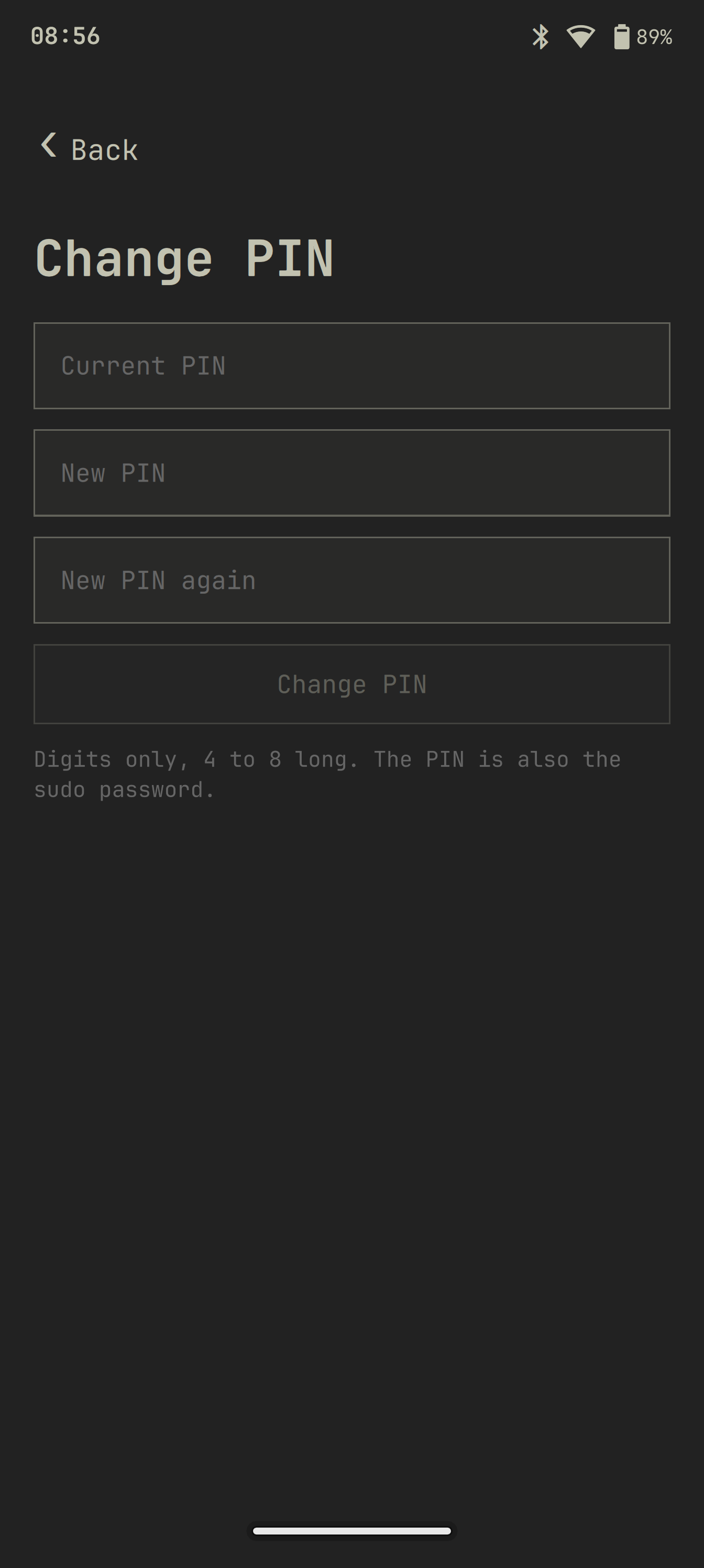
Here's the page on my Pixel 8 Pro, empty fields, nothing typed. It stays a draft until I've changed the phone's PIN, as I said above. @marselnenaj, same as on #629: this page builds on your Settings app from #526, so any feedback from you is welcome.
|
…77759-charger

The page runs backends/charge.sh like the Display page does. Setting a value
runs systemctl start --no-ask-password omamobile-charge-limit@N.service (a
polkit rule allows those five instances for the active local user), which runs
libexec/charge-limit as root: start threshold 0 (resume 5 below), then the end
threshold, and only then /etc/omamobile/charge-limit is saved. No writable end
threshold or a failed write: exit 1, nothing saved.

At boot a udev rule on the charger's add pulls in
omamobile-charge-limit-apply.service, which applies the saved value on husky
only (device tree google,zuma-husky). Units have StartLimitIntervalSec=0.

Note: the page is inert on husky today. omamobile-device-husky blacklists
max77759_charger, so there is no max77759-charger power supply and the page
says the limit is not available until that blacklist is lifted.

Version 0.1.3 (to be renumbered at merge; derekross#629 and derekross#630 hold 0.1.3/0.1.4).
Tests: test/charge-backend.sh against a scratch root (backend, helper, a
stand-in systemctl, polkit/unit/udev contents, staged paths and modes), core
tests open BatteryPage and check the runner's charge entry.
|
Thanks, Lef. I read this head end to end for where the PIN goes, and it is still clean: fields, the runner's stdin (for the pin tool only, at most 256 characters), Before it leaves draft:
I still owe you my own run on the Pixel 7 Pro with a root SSH login open, and I'll do it once this is out of draft. I did not run the tests this round; CI is green on this head. |
…77759-charger

The page runs backends/charge.sh like the Display page does. Setting a value
runs systemctl start --no-ask-password omamobile-charge-limit@N.service (a
polkit rule allows those five instances for the active local user), which runs
libexec/charge-limit as root: start threshold 0 (resume 5 below), then the end
threshold, and only then /etc/omamobile/charge-limit is saved. No writable end
threshold or a failed write: exit 1, nothing saved.

At boot a udev rule on the charger's add pulls in
omamobile-charge-limit-apply.service, which applies the saved value on husky
only (device tree google,zuma-husky). Units have StartLimitIntervalSec=0.

Note: the page is inert on husky today. omamobile-device-husky blacklists
max77759_charger, so there is no max77759-charger power supply and the page
says the limit is not available until that blacklist is lifted.

Version 0.1.3 (to be renumbered at merge; derekross#629 and derekross#630 hold 0.1.3/0.1.4).
Tests: test/charge-backend.sh against a scratch root (backend, helper, a
stand-in systemctl, polkit/unit/udev contents, staged paths and modes), core
tests open BatteryPage and check the runner's charge entry.
… keyboard

The Display page gets 30 s, 1, 2, 3, 5 min and Never, plus an on/off for
staying unlocked while a keyboard is connected. The text says that lock and
screen off are the same timer and that Never also keeps the phone awake.
0.1.3 clashes with open derekross#629, derekross#630 and derekross#860; renumber at merge.

The lock screen PIN is the account password (the lock checks it with
pam_unix), so the page runs the system's own /usr/bin/passwd in a
pseudo-terminal and lets it do the checking: three entries on stdin, never
an argument or in the environment, never logged or printed. The new PIN is
digits only, 4 to 8 long, different from the current one and typed twice;
passwd checks the current PIN and anything else. passwd runs with LC_ALL=C
and a minimal environment so its prompts are the English ones the script
matches. A refusal that asks again is reported at once, and a passwd that is
still running after 12 seconds is killed: before the retype was sent nothing
has changed, after it the result says the PIN may or may not have changed.
The fields are cleared when the call returns.

The ActionRunner gets back a stdin input (at most 256 characters) for this
page. Stacked on the Keyboard haptics and Display pages. The backend test
runs the script against a stand-in for passwd, with the path and the
deadline replaced in a copy of the script: a wrong current PIN, a refusal
that asks again, a hang after the retype, Greek prompts, and a check that
the script's own environment holds no PIN.

Signed-off-by: Lef <me@lefteros.com>
…N-less phones, pin.py

The runner keeps a tool that is still running and the last result nobody took,
so a page left while passwd runs finds the outcome when it is opened again
(test: a hanging stand-in backend, no listener, the result is taken once). The
backend directory is a constructor argument for the test, not an environment
switch. Input goes to the pin tool only. pin.sh gets a status verb: the page
reads what omamobile-set-pin records (pin or password) and whether the account
has a password, and offers the form only on a phone that unlocks with a PIN
and has one; a password phone and a PIN-less phone get a plain line. The
script moves from a python -c string to pin.py. The page says the PIN is also
the sudo password. Back test for the page.
… trusts no environment, status fails closed

A request is now named by tool and first argument (change, status) and the
finished signal carries it, so a status started by a page that was left is not
taken for the change by the next one, a running change survives a status, and
the form is enabled only by a status that says a PIN is set. bash runs with -p
and the runner drops exported functions, SHELLOPTS and the like and sets PATH
to the system's; pin.sh finds nothing by name. status answers with an error
instead of guessing when omamobile-set-pin or passwd -S gives no answer, and
omamobile-shell is an optional dependency for that. Tests: a status beside a
running change, the signal's verb, a missing backend, BASH_ENV and PATH; the
backend test uses PINs that do not occur in an ordinary environment.
… it knows about the phone

The status line is now the phone's state, the outcome of a change that finished
while the page was gone, or only the running change, so a late status can no
longer replace a result and a failed status can't wipe it. The runner's PATH
includes Omarchy's own bin directory, for omarchy-hw-display. The environment
test restores what it changes and the status/change ordering test sleeps
longer.
1622ba8 to
9a995b0
Compare


@derekross, @marselnenaj, this is stacked on the Keyboard haptics and Display pages (#628 and the haptics PR): the first two commits are those, only the last one is new.
The lock screen PIN is the account password (the lock checks it with pam_unix), so the page runs the system's own /usr/bin/passwd in a pseudo-terminal and lets it do the checking. The three entries go to the script on stdin, never as an argument or in the environment, and are never logged or printed. The new PIN must be 4 to 8 digits, different from the current one and typed twice; passwd checks the current PIN and anything else. passwd runs with LC_ALL=C and a minimal environment, so its prompts are the English ones the script matches. After 12 seconds passwd is killed: before the retype was sent nothing has changed, after it the message says the PIN may or may not have changed. The page opens with
org.omamobile.Settings.Open("pin").Things you should look at, because this one can lock someone out: the entries sit as text in the page until the call returns and are cleared then, but the session's memory isn't wiped. The 4 to 8 digit rule is mine, not PAM's: on my phone the stack is plain pam_unix with no minimum length, and a 4 digit PIN worked as the user, but another setup could refuse short ones, which the page reports as "the system refused the new PIN".
Tested: test/all passes on the phone with a new backend test that runs the script against a stand-in passwd (a wrong current PIN, a refusal that asks again, a hang after the retype, Greek prompts, a check that the script's environment holds no PIN, nothing printed). The page renders. I also ran the final script against the real passwd on my phone: the PIN changed to another one and the lock screen unlocked with it, then I changed it back and it unlocked with the old one again. Not tested on any other phone.