A LinkedIn-inspired community platform to share achievements, resources, and opinions — built for teams staying connected in distributed work environments.

Networking is one of the key elements in staying connected with people and their work lives. As remote work became the norm, communication channels broke down across teams and communities.
Community Connect bridges that gap — a platform where you can announce achievements, share resources, and voice opinions. Posts gain community support, and the most popular ones surface in the feeds of community members.
- Authentication — Sign in with Firebase Auth (Google OAuth)
- Create Posts — Share text, photos, videos, events, and articles
- Live Feed — Real-time post updates ordered by timestamp using Firestore
- Animated Feed — Smooth post transitions powered by
react-flip-move - User Profiles — Display name, avatar, and email pulled from auth state
- Sidebar — Community navigation and profile snapshot
- Widgets — Trending topics and community highlights
- Redux State Management — Global auth state via Redux Toolkit
src/
├── App.js                  # Root component — auth listener + layout
├── Header.js               # Top navigation bar
├── Feed.js                 # Live post feed + post creation
├── Post.js                 # Individual post card
├── Sidebar.js              # Left sidebar with profile info
├── Widgets.js              # Right sidebar widgets
├── Login.js                # Auth screen
├── InputOption.js          # Reusable post input action button
├── firebase.js             # Firebase config — Firestore, Auth
├── app/
│   └── store.js            # Redux store
└── features/
    └── userSlice.js        # Auth state slice (login/logout)
| Layer | Technology |
|---|---|
| Frontend | React.js 17, Redux Toolkit, React-Redux |
| UI Components | Material UI (MUI v5), Emotion |
| Animations | react-flip-move |
| Backend / Database | Firebase Firestore |
| Authentication | Firebase Auth |
| Hosting | Firebase Hosting |
git clone https://github.com/deepti-96/Community-Connect.git
cd Community-Connectnpm installCreate a Firebase project at console.firebase.google.com and update src/firebase.js with your config:
const firebaseConfig = {
  apiKey: "YOUR_API_KEY",
  authDomain: "YOUR_AUTH_DOMAIN",
  projectId: "YOUR_PROJECT_ID",
  storageBucket: "YOUR_STORAGE_BUCKET",
  messagingSenderId: "YOUR_MESSAGING_SENDER_ID",
  appId: "YOUR_APP_ID"
};npm startOpen http://localhost:3000 in your browser.
npm run buildfirebase deploy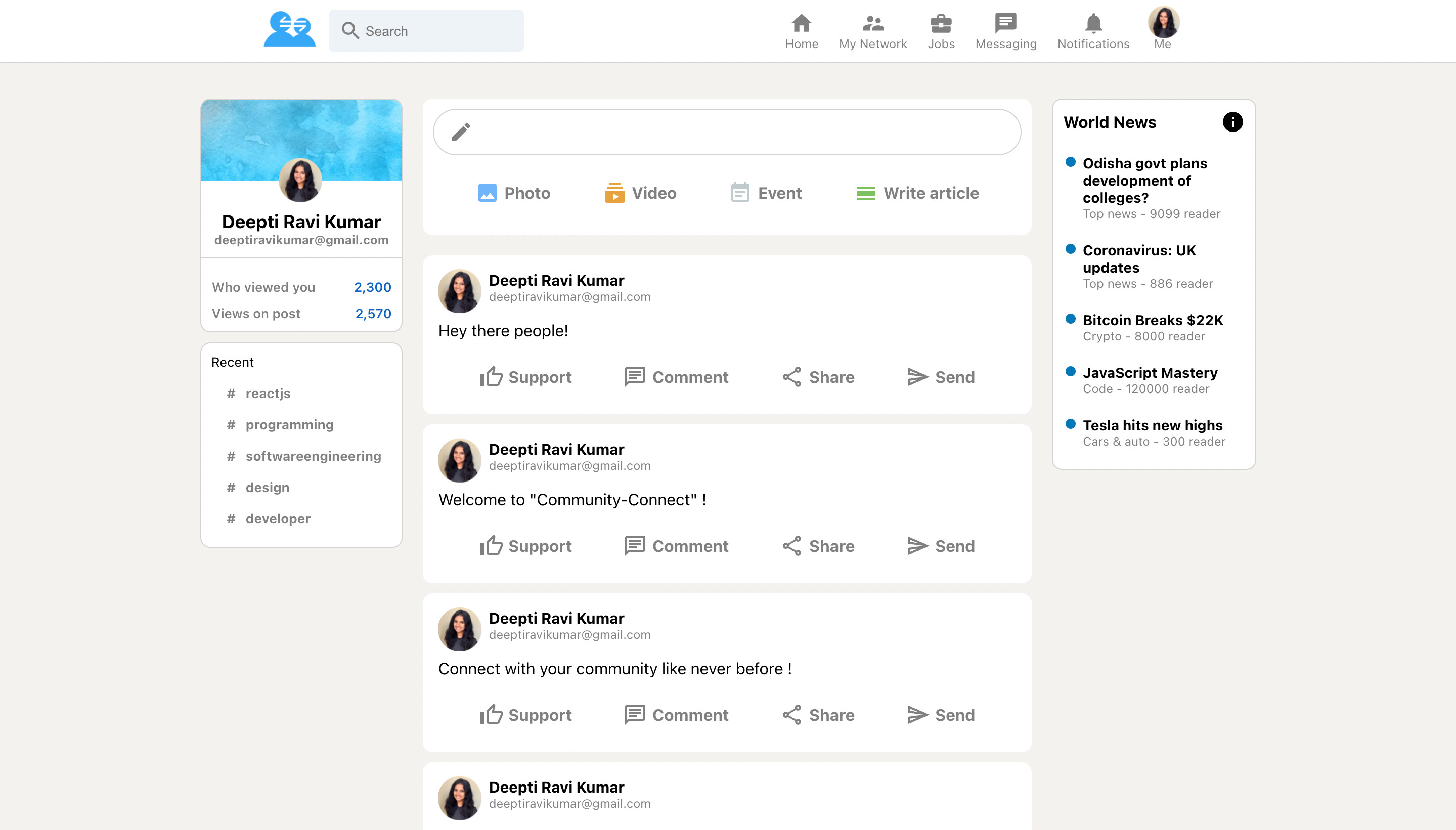
- Like and comment on posts
- Follow/unfollow community members
- Notification system
- Direct messaging
- Rich text post editor