
The MSX (MicroSoft eXtended) was a standardized home computer architecture announced by Microsoft and ASCII Corporation in 1983. It was created to unify the fragmented home computer market in the early 1980s, offering a consistent hardware and software platform. The MSX standard was widely adopted in Japan, parts of Europe, South America, and the Middle East.
- Sony: Produced some of the most iconic MSX machines, including the HitBit series.
- Panasonic: Known for its high-quality MSX2 and MSX2+ computers.
- Philips: Prominent in Europe, offering MSX systems like the VG-8020.
- Toshiba, Yamaha, Canon, Mitsubishi: These brands also contributed hardware to the MSX ecosystem.
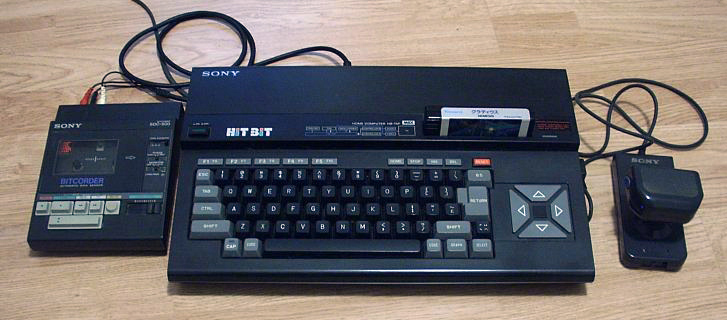
The MSX was a powerhouse for early gaming, hosting classics like Metal Gear by Konami, which debuted on MSX. Multiple Generations: MSX evolved through several iterations: MSX, MSX2, MSX2+, and MSX Turbo R, each adding advanced capabilities.
While it struggled in the U.S., the MSX was highly successful in Japan, the Netherlands, and Brazil, becoming a cultural icon in those regions. Music and Creativity: Yamaha's MSX machines included features for music composition, aligning with the company's expertise in musical instruments. The MSX remains a beloved platform among retro computing enthusiasts, celebrated for its versatility, gaming legacy, and role in standardizing home computers.
- Online emulator: Try it online at FileHunter/MSXdev.
- Software Emulators: Popular options are openMSX and blueMSX. These reproduce MSX hardware on modern systems and let you mount disk images or cartridges.
- Real MSX Computer: If you own an actual MSX, you’ll need compatible storage media (floppy disks, cassette tapes) or a flash cartridge (e.g., MegaFlashROM) to load programs.
- MSX BASIC: The built-in interpreter is ideal for learning and quick experimentation.
- Cross-Development Tools: For advanced projects, use tools like SDCC or MSX-DOS toolchains to build binaries that run on MSX hardware/emulators.
- Text Editor: Write .BAS files in any plain text editor (Notepad++, VS Code, vim).
- To save a program from BASIC: SAVE "A:PROGRAM.BAS" (writes to device A: if a disk is attached).
- To load a program: LOAD "A:PROGRAM.BAS" then RUN to execute.
- Emulators: mount a disk image or use the emulator's file-transfer features to move .BAS files between the host and the virtual MSX.
For testing or running programs, blank disk images and software archives are useful.
- Resources: [RetroROM] MSX2 Collection
- Online MSX BASIC documentation and retro programming books such as the "MSX BASIC Handbook".
- Online Book: Working with MSX Basic by Ian Sinclair.
- Book: Modern MSX BASIC Game Development by Raul Portales.
- Community: MSX Resource Center.
- Flash Carts: Devices like the MegaFlashROM let you load software from an SD card.
- External devices: adapters exist to use modern USB keyboards or SD card readers with MSX hardware.
With these basics you can start typing programs, saving them, and running them in an emulator or on real hardware. See the full tutorial: Getting Started with MSX BASIC Programming