- Updating a datastore | The CQRS Pattern
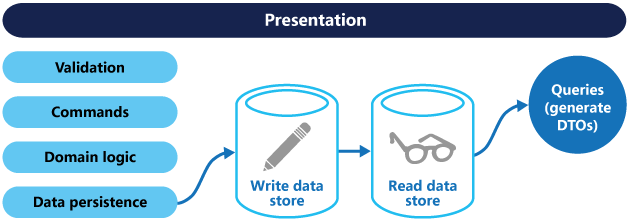
- CQRS example (from https://docs.microsoft.com/en-us/azure/architecture/patterns) :
- Creating an audit log (Who, What, When)
- In views
    # https://docs.djangoproject.com/en/3.0/ref/class-based-views/generic-editing/#formview
    def form_valid(self, form):
        # This method is called when valid form data has been POSTed.
        # It should return an HttpResponse.
        instance = form.save(commit=True)
        do_smth_with(instance)
return super().form_valid(form)- In forms (changed_data/cleaned_data)
    # Override ModelForm.save
    def save(self, commit=True):
        instance = super().save(commit)
        do_smth_with(instance)
        do_smth_with(self.changed_data)
        # you can check if target_field in self.changed_data
return instance- DRF - In the serializer
    # Override ModelForm.save
    def save(self, **kwargs):
        instance = super().save(**kwargs)  # for create
        # for update self.instance is available
        do_smth_with(instance)
        do_smth(self.validated_data)
# you can check if target_field in self.validated_data- Overriding model save / or using custom manager method
    from django.db import models
    class BookManager(models.Manager):
        def create_book(self, title):
            book = self.model(title=title)
            book.save()
            do_smth_with(book)
return book- Signals (2scoops note)
    from django.db.models.signals import post_save
    from django.dispatch import receiver

    @receiver(post_save, sender=models.Book)
    def asset_post_save(sender, instance, **kwargs):
do_smth_with(instance)- Time Tracking models - The Model
    from django.db import models
    class TimeStampedModel(models.Model):
        created = models.DateTimeField(auto_now_add=True)
        modified = models.DateTimeField(auto_now=True)
        class Meta:
            abstract = True

    class Book(TimeStampedModel):
title = models.CharField(max_length=200)- Time Tracking models - Script
    from datetime import datetime, timedelta
    my_interval = datetime.now() - timedelta(seconds=120)
queryset = Book.objects.filter(modified__gte=my_interval) CREATE OR REPLACE FUNCTION my_handler() RETURNS TRIGGER AS
$$
BEGIN
-- OLD - the old record
-- NEW - the new record
-- TG_OP - DELETE or INSERT or UPDATE
-- do stuff with them
END;
$$ LANGUAGE plpgsql;
CREATE TRIGGER my_trigger
AFTER INSERT OR UPDATE OR DELETE
ON my_table
FOR EACH ROW
EXECUTE PROCEDURE my_handler();
Pros and cons for db triggers:
- diff paradigm - python directed vs db directed - fights with django
- repetitive (harder code reuse)
- harder to unittest
- django models will need to refresh_from_db() if triggers change data from underneath them
- difficult migrations
- Usually needs another service for reading the chatty DB logs
- Increased complexity - how to interpret and make sense / associate with django models / entities
- Everything is logged
- serialize, do computations, etc.
- process it on the spot sync
- use an async worker, Celery, SRQ...
- django-simple-history
- django-revision
- they usually rely on signals and are sync