


A tiny, dependency-free syslog / log receiver for your terminal. It listens on UDP and/or TCP, understands
RFC 5424, RFC 3164 and plain lines (plus Laravel/Monolog-style channel.LEVEL: messages), and prints them as
colorful, aligned lines. Every color is a hex code you can change in a config file, and changes are applied
live while it is running.
- Single static binary, zero third-party dependencies (standard library only)
- UDP and TCP listeners, run either or both
- RFC 5424, RFC 3164, bare
<PRI>and plain-text lines, Laravel/Monolog prefixes, JSON/dict payload highlighting - Full hex color theming (
#RRGGBB/#RGB), foreground and background, per level, per field - Hot reload: edit the config while
logrecvruns and colors change within ~0.5 s; a broken edit is ignored - Truecolor with automatic fallback to 256 colors, respects
NO_COLORand disables colors when piped - Safe output: control characters in incoming logs can't inject terminal escape sequences
- Level filter, text filter, and raw-line file tee
- Ready-made logging setups for Laravel (Monolog), Python, Go and Rust, see Integrations
- Prebuilt binaries for Linux, Windows, macOS, the BSDs, Solaris/illumos, AIX and Plan 9
- How it works
- Install
- Quick start
- Usage
- Sending logs to it
- Integrations: Laravel, Python, Go, Rust
- Supported message formats
- Colors and configuration
- Hot reload
- Color modes
- Build from source
- CI and releases
- Supported platforms
- Troubleshooting
- License
- Author
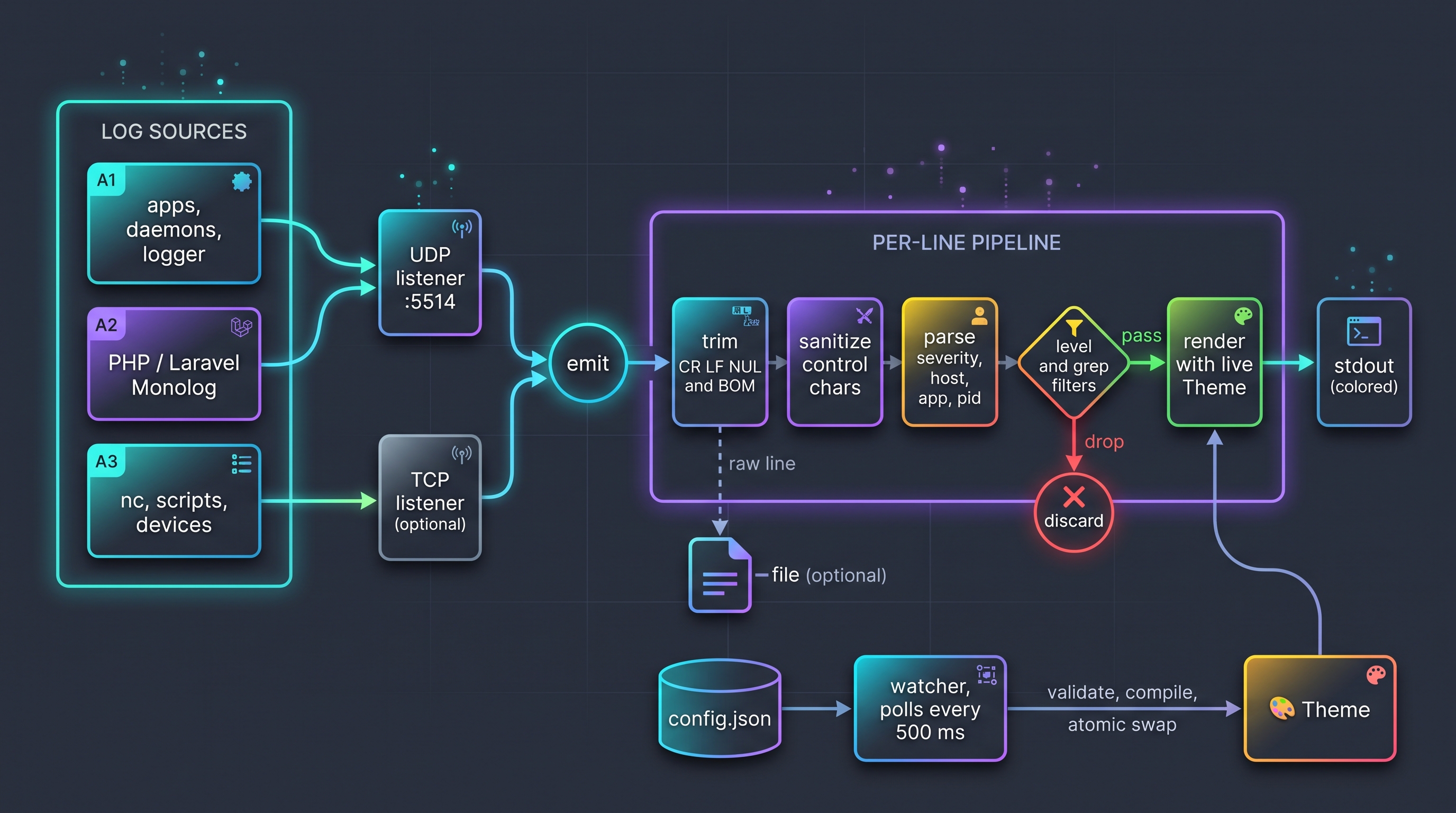
flowchart LR
    subgraph Sources["Log sources"]
        A1["apps, daemons, logger"]
        A2["PHP / Laravel Monolog"]
        A3["nc, scripts, devices"]
    end

    A1 --> UDP["UDP listener :5514"]
    A2 --> UDP
    A3 --> TCP["TCP listener (optional)"]

    UDP --> EMIT["emit"]
    TCP --> EMIT

    subgraph Pipeline["Per-line pipeline"]
        EMIT --> TRIM["trim CR LF NUL and BOM"]
        TRIM --> SAN["sanitize control chars"]
        SAN --> PARSE["parse severity, host, app, pid"]
        PARSE --> FLT{"level and grep filters"}
        FLT -->|pass| REND["render with live Theme"]
    end

    FLT -->|drop| X(("discard"))
    REND --> OUT["stdout (colored)"]
    TRIM -.->|raw line| FILE["-file (optional)"]

    CFG[("config.json")] --> WATCH["watcher, polls every 500 ms"]
    WATCH -->|"validate, compile, atomic swap"| THEME["Theme"]
    THEME --> REND
Download the archive for your platform from the Releases
page, verify it against SHA256SUMS, and put the logrecv binary somewhere on your PATH.
# Linux amd64 example
VERSION=v1.0.1
curl -LO https://github.com/cumulus13/logrecv-go/releases/download/$VERSION/logrecv_${VERSION}_linux_amd64.tar.gz
curl -LO https://github.com/cumulus13/logrecv-go/releases/download/$VERSION/SHA256SUMS
sha256sum --check --ignore-missing SHA256SUMS
tar xzf logrecv_${VERSION}_linux_amd64.tar.gz
sudo install logrecv_${VERSION}_linux_amd64/logrecv /usr/local/bin/
On Windows download the .zip, extract it, and run logrecv.exe.
macOS: binaries are not notarized. If Gatekeeper blocks the download, run
xattr -d com.apple.quarantine ./logrecvonce.
go install github.com/cumulus13/logrecv-go@latestThis installs a binary named logrecv-go (Go names it after the module). Rename or alias it to logrecv if you like.
logrecv init      # write the default config file (optional, defaults work without it)
logrecv show      # print effective config + a colored preview of every level
logrecv           # listen on UDP :5514 and print incoming logs
In another terminal:
logger -n 127.0.0.1 -P 5514 -d -p user.err -t myapp "something went wrong"logrecv [run] [flags] start the receiver (default command)
logrecv init [-f] write the default config file (-f overwrites)
logrecv show [-json] show effective config and a color preview
logrecv path print the config file path
logrecv version print the version
logrecv help
| Flag | Default | Description |
|---|---|---|
-udp ADDR |
:5514 |
UDP listen address. Empty string disables UDP. |
-tcp ADDR |
(off) | TCP listen address, e.g. :5514. Lines are newline-delimited (max 1 MiB per line). |
-level LEVEL |
debug |
Minimum level to show: emerg, alert, crit, error (err), warn (warning), notice, info, debug. |
-grep TEXT |
(none) | Only show lines containing TEXT (case-insensitive). |
-file PATH |
(none) | Also append the raw (uncolored) lines to PATH. |
-timefmt FMT |
15:04:05.000 |
Go time layout for the timestamp. |
-config PATH |
per-OS default | Config file to use. Also settable via LOGRECV_CONFIG. |
-color MODE |
auto |
auto, always, never or 256. See Color modes. |
Informational messages (listening addresses, config reloads, warnings) go to stderr, so stdout contains only log lines and is safe to pipe.
logrecv -udp :514 -tcp :514                 # both transports on the standard syslog port (needs privileges)
logrecv -level warn                         # warnings and above only
logrecv -grep "payment" -file payments.log  # filter and keep a raw copy
logrecv -tcp :5514 -udp ""                  # TCP only
logrecv -color always | less -R # keep colors when pagingAnything that speaks syslog (RFC 5424 or RFC 3164) works. Quick tests from a shell:
# util-linux logger over UDP
logger -n 127.0.0.1 -P 5514 -d -p user.warning -t myapp "disk almost full"

# raw datagram with netcat (RFC 5424: <PRI>VERSION TIMESTAMP HOST APP PID MSGID SD MSG)
echo '<11>1 2026-10-28T10:00:00Z web01 nginx 4242 - - upstream failed {"code":502}' | nc -u -w1 127.0.0.1 5514

# TCP: one message per line
printf '<14>Oct 28 10:00:00 db01 postgres[7]: ready\n' | nc -w1 127.0.0.1 5514   # needs: logrecv -tcp :5514
# PowerShell
$u = New-Object System.Net.Sockets.UdpClient
$b = [Text.Encoding]::UTF8.GetBytes('<11>1 2026-10-28T10:00:00Z win01 app 1 - - test message')
$u.Send($b, $b.Length, '127.0.0.1', 5514) | Out-NullFor application code, see Integrations below. rsyslog can forward everything with
*.* @127.0.0.1:5514 (UDP) or *.* @@127.0.0.1:5514 (TCP).
Every example below sends to 127.0.0.1:5514 over UDP (the default). For TCP start the receiver with
logrecv -tcp :5514 (UDP and TCP can use the same port number). Runnable copies of all the code live in
examples/. Replace 127.0.0.1 with the machine running logrecv when your app runs elsewhere.
What you get on screen, whatever the language:
10:15:02.114  DEBUG  web01 my-app[240] cache miss {"key":"user:42"}
10:15:02.115  INFO   web01 my-app[240] user logged in {"name":"hadi"}
10:15:02.116  ERROR  web01 my-app[240] payment failed {"order":1234}
The colored parts are the timestamp, the level badge, the host, the app name, the pid and the trailing JSON.
Needs Laravel 10 or newer (Monolog 3). Laravel talks to logrecv through Monolog's SyslogUdpHandler, no package required.
1. Add a channel to config/logging.php
(examples/laravel/logging-channel.php):
<?php
// config/logging.php  (Laravel 10+ / Monolog 3)

use Monolog\Formatter\LineFormatter;
use Monolog\Handler\SyslogUdpHandler;
use Monolog\Processor\PsrLogMessageProcessor;

return [
    // ...
    'channels' => [
        // ...
        'logrecv' => [
            'driver'  => 'monolog',
            'level'   => env('LOG_LEVEL', 'debug'),
            'handler' => SyslogUdpHandler::class,
            'handler_with' => [
                'host'  => env('LOGRECV_HOST', '127.0.0.1'),
                'port'  => (int) env('LOGRECV_PORT', 5514),
                'ident' => env('LOGRECV_IDENT', 'laravel'), // shown as the app name (no spaces)
            ],
            // Laravel's default formatter adds a "[date]" prefix; logrecv already shows the time.
            'formatter' => LineFormatter::class,
            'formatter_with' => [
                'format' => '%channel%.%level_name%: %message% %context% %extra%',
                'allowInlineLineBreaks' => true,
                'ignoreEmptyContextAndExtra' => true,
                'includeStacktraces' => true,
            ],
            'processors' => [PsrLogMessageProcessor::class],
        ],
    ],
];
2. Turn it on in .env, either on its own:
LOG_CHANNEL=logrecvor next to your normal log file (Laravel 11+; on older versions add 'logrecv' to the channels array of the stack channel):
LOG_CHANNEL=stack
LOG_STACK=single,logrecv
Optional settings:
LOGRECV_HOST=127.0.0.1
LOGRECV_PORT=5514
LOGRECV_IDENT=my-laravel-app
3. Log as usual:
use Illuminate\Support\Facades\Log;

Log::debug('query', ['sql' => 'select 1', 'ms' => 0.4]);
Log::info('user {name} logged in', ['name' => 'hadi']);
Log::warning('disk almost full', ['free_gb' => 1.2]);
Log::error('payment failed', ['order' => 1234]);

Log::channel('logrecv')->info('only sent to logrecv');   // when you use the stack

try {
    throw new RuntimeException('boom');
} catch (Throwable $e) {
    report($e);                                          // stack trace lines get the error colors
}
Notes:
- The
%channel%part is yourAPP_ENV(for examplelocal), shown as[local]in its own color. formatteris set on purpose: Laravel's default formatter prefixes every line with[2026-10-28 10:15:02], which would repeat the timelogrecvalready shows. With the default formatter things still work, just noisier.identbecomes the app name column. Keep it free of spaces.- Running in Docker or Sail? Point
LOGRECV_HOSTat the host:host.docker.internal(on Linux Docker add--add-host=host.docker.internal:host-gatewayor use theextra_hostsentry in Compose). - Each log line is its own UDP datagram, so a large stack trace can't blow past the datagram limit.
Without Laravel, the same thing with plain Monolog (composer require monolog/monolog):
<?php
require __DIR__ . '/vendor/autoload.php';

use Monolog\Formatter\LineFormatter;
use Monolog\Handler\SyslogUdpHandler;
use Monolog\Logger;

$handler = new SyslogUdpHandler(host: '127.0.0.1', port: 5514, ident: 'my-php-app');
$handler->setFormatter(new LineFormatter(
    format: '%channel%.%level_name%: %message% %context% %extra%',
    allowInlineLineBreaks: true,
    ignoreEmptyContextAndExtra: true,
    includeStacktraces: true,
));

$log = new Logger('app', [$handler]);
$log->error('payment failed', ['order' => 1234]);Standard library only. The three-line version
(examples/python/simple.py):
import logging
from logging.handlers import SysLogHandler

log = logging.getLogger("myapp")
log.setLevel(logging.DEBUG)
log.addHandler(SysLogHandler(address=("127.0.0.1", 5514)))

log.debug("cache miss")
log.info("user logged in")
log.warning("disk almost full")
log.error("payment failed")
log.critical("queue stalled")
That shows the level and message, with the sender's IP as the host. To also get host, app name and pid in their own
colors, give the handler a syslog-style format
(examples/python/formatted.py):
import logging
import socket
from logging.handlers import SysLogHandler

HOST = socket.gethostname()

handler = SysLogHandler(address=("127.0.0.1", 5514), facility=SysLogHandler.LOG_USER)
# RFC 3164 style header so logrecv can show host, app name and pid in their own colors
handler.setFormatter(logging.Formatter(
    f"%(asctime)s {HOST} %(name)s[%(process)d]: %(message)s",
    datefmt="%b %d %H:%M:%S",
))

log = logging.getLogger("myapp")
log.setLevel(logging.DEBUG)
log.addHandler(handler)

log.info("user logged in")
log.error("payment failed")
try:
    1 / 0
except ZeroDivisionError:
    log.exception("boom")  # the traceback is shown with the same level/host/app
Multi-line messages such as tracebacks arrive as one datagram; every continuation line is shown with the same level, host,
app and pid as the first line, so a log.exception(...) stays red from top to bottom.
logging.config.dictConfig and Django. Use the same handler and formatter in your config
(examples/python/dictconfig.py). In Django, put the dict in settings.py as LOGGING:
# Works the same in Django: put this dict in settings.py as LOGGING
# (and add "disable_existing_loggers": False).
import logging
import logging.config
import socket

LOGGING = {
    "version": 1,
    "disable_existing_loggers": False,
    "formatters": {
        "syslog": {
            "format": "%(asctime)s " + socket.gethostname() + " %(name)s[%(process)d]: %(message)s",
            "datefmt": "%b %d %H:%M:%S",
        },
    },
    "handlers": {
        "logrecv": {
            "class": "logging.handlers.SysLogHandler",
            "address": ("127.0.0.1", 5514),  # UDP
            "formatter": "syslog",
        },
    },
    "loggers": {
        "myapp": {"handlers": ["logrecv"], "level": "DEBUG"},
    },
}

logging.config.dictConfig(LOGGING)
logging.getLogger("myapp").warning("configured with dictConfig")
TCP instead of UDP, if you want delivery guarantees
(examples/python/tcp.py, start logrecv -tcp :5514):
import logging
import socket
from logging.handlers import SysLogHandler

# TCP instead of UDP: reliable delivery, same message format
handler = SysLogHandler(address=("127.0.0.1", 5514), socktype=socket.SOCK_STREAM)

log = logging.getLogger("myapp")
log.setLevel(logging.DEBUG)
log.addHandler(handler)

log.info("one")
log.error("two")Two options.
A) A log/slog handler (recommended). Portable (it also works on Windows), standard library only, and structured
attributes are sent as the trailing JSON that logrecv highlights. Copy the handler from
examples/go/slog/main.go (it is below) and use it like this:
h, err := NewSyslogHandler("udp", "127.0.0.1:5514", "my-go-app", slog.LevelDebug)
if err != nil {
	panic(err)
}
defer h.Close()
log := slog.New(h)

log.Debug("cache miss", "key", "user:42")
log.Info("user logged in", "name", "hadi", slog.Group("req", "ip", "10.0.0.5", "ms", 12))
log.Warn("disk almost full", "free_gb", 1.2)
log.With("order", 1234).Error("payment failed", "err", errors.New("card declined"))
Use "tcp" as the first argument to send over TCP. slog levels map to syslog severities: Error is ERROR, Warn is
WARN, Info is INFO, Debug is DEBUG.
Full handler code (examples/go/slog/main.go)
package main

import (
	"context"
	"encoding/json"
	"errors"
	"fmt"
	"log/slog"
	"net"
	"os"
	"sync"
	"time"
)

// SyslogHandler is a slog.Handler that ships RFC 5424 messages to logrecv.
// Standard library only, works on every OS (including Windows).
type SyslogHandler struct {
	mu     *sync.Mutex
	conn   net.Conn
	nl     string // "\n" for TCP framing, "" for UDP
	host   string
	app    string
	level  slog.Leveler
	attrs  []slog.Attr
	prefix string // dotted group path
}

// NewSyslogHandler dials network ("udp" or "tcp") and address, e.g. "127.0.0.1:5514".
func NewSyslogHandler(network, addr, app string, level slog.Leveler) (*SyslogHandler, error) {
	conn, err := net.Dial(network, addr)
	if err != nil {
		return nil, err
	}
	host, _ := os.Hostname()
	if host == "" {
		host = "-"
	}
	nl := ""
	if network == "tcp" {
		nl = "\n"
	}
	return &SyslogHandler{mu: &sync.Mutex{}, conn: conn, nl: nl, host: host, app: app, level: level}, nil
}

func (h *SyslogHandler) Close() error { return h.conn.Close() }

func (h *SyslogHandler) Enabled(_ context.Context, l slog.Level) bool {
	return l >= h.level.Level()
}

func severity(l slog.Level) int {
	switch {
	case l >= slog.LevelError:
		return 3 // error
	case l >= slog.LevelWarn:
		return 4 // warning
	case l >= slog.LevelInfo:
		return 6 // info
	default:
		return 7 // debug
	}
}

func flatten(dst map[string]any, prefix string, a slog.Attr) {
	v := a.Value.Resolve()
	if v.Kind() == slog.KindGroup {
		p := prefix
		if a.Key != "" {
			p += a.Key + "."
		}
		for _, ga := range v.Group() {
			flatten(dst, p, ga)
		}
		return
	}
	if a.Key == "" {
		return
	}
	switch x := v.Any().(type) {
	case error:
		dst[prefix+a.Key] = x.Error()
	default:
		dst[prefix+a.Key] = x
	}
}

func (h *SyslogHandler) Handle(_ context.Context, r slog.Record) error {
	fields := map[string]any{}
	for _, a := range h.attrs {
		flatten(fields, "", a)
	}
	r.Attrs(func(a slog.Attr) bool {
		flatten(fields, h.prefix, a)
		return true
	})
	msg := r.Message
	if len(fields) > 0 {
		if b, err := json.Marshal(fields); err == nil {
			msg += " " + string(b)
		}
	}
	const facilityUser = 1
	line := fmt.Sprintf("<%d>1 %s %s %s %d - - %s%s",
		facilityUser*8+severity(r.Level), r.Time.Format(time.RFC3339Nano), h.host, h.app, os.Getpid(), msg, h.nl)
	h.mu.Lock()
	defer h.mu.Unlock()
	_, err := h.conn.Write([]byte(line))
	return err
}

func (h *SyslogHandler) WithAttrs(attrs []slog.Attr) slog.Handler {
	c := *h
	for _, a := range attrs {
		if h.prefix != "" {
			a = slog.Group(h.prefix[:len(h.prefix)-1], a)
		}
		c.attrs = append(append([]slog.Attr(nil), c.attrs...), a)
	}
	return &c
}

func (h *SyslogHandler) WithGroup(name string) slog.Handler {
	if name == "" {
		return h
	}
	c := *h
	c.prefix += name + "."
	return &c
}

func main() {
	h, err := NewSyslogHandler("udp", "127.0.0.1:5514", "my-go-app", slog.LevelDebug)
	if err != nil {
		panic(err)
	}
	defer h.Close()
	log := slog.New(h)

	log.Debug("cache miss", "key", "user:42")
	log.Info("user logged in", "name", "hadi", slog.Group("req", "ip", "10.0.0.5", "ms", 12))
	log.Warn("disk almost full", "free_gb", 1.2)
	log.With("order", 1234).Error("payment failed", "err", errors.New("card declined"))
}
B) The standard library log/syslog. Unix only (it does not exist on Windows or Plan 9). Short and needs no extra code
(examples/go/stdsyslog/main.go):
//go:build !windows && !plan9

package main

import (
	"log"
	"log/syslog"
)

func main() {
	w, err := syslog.Dial("udp", "127.0.0.1:5514", syslog.LOG_USER|syslog.LOG_DEBUG, "my-go-app")
	if err != nil {
		log.Fatal(err)
	}
	defer w.Close()

	w.Debug("cache miss")
	w.Info("user logged in")
	w.Warning("disk almost full")
	w.Err("payment failed")
	w.Crit("queue stalled")
}Tested with Rust 1.91.
A) The syslog crate with the log facade. Add to Cargo.toml:
[dependencies]
syslog = "7"
log = "0.4"(examples/rust/src/bin/syslog_crate.rs):
use log::{debug, error, info, warn, LevelFilter};
use syslog::{BasicLogger, Facility, Formatter3164};

fn main() {
    let formatter = Formatter3164 {
        facility: Facility::LOG_USER,
        hostname: None, // detected automatically
        process: "my-rust-app".into(),
        pid: std::process::id(),
    };

    // local socket on any port, logrecv on 127.0.0.1:5514
    let logger = syslog::udp(formatter, "0.0.0.0:0", "127.0.0.1:5514").expect("cannot connect to logrecv");

    log::set_boxed_logger(Box::new(BasicLogger::new(logger)))
        .map(|()| log::set_max_level(LevelFilter::Debug))
        .expect("logger already set");

    debug!("cache miss key={}", "user:42");
    info!("user logged in name={}", "hadi");
    warn!("disk almost full free_gb={}", 1.2);
    error!("payment failed order={}", 1234);
}
B) Standard library only: a tiny RFC 5424 sender over UDP
(examples/rust/src/bin/std_udp.rs). Append structured data as JSON at the end of the
message and logrecv will highlight it:
use std::net::UdpSocket;
use std::process;

// Minimal RFC 5424 sender: standard library only.
struct LogRecv {
    sock: UdpSocket,
    host: String,
    app: &'static str,
}

#[derive(Clone, Copy)]
enum Level {
    Error = 3,
    Warning = 4,
    Info = 6,
    Debug = 7,
}

impl LogRecv {
    fn new(addr: &str, app: &'static str) -> std::io::Result<Self> {
        let sock = UdpSocket::bind("0.0.0.0:0")?;
        sock.connect(addr)?;
        let host = std::env::var("HOSTNAME")
            .or_else(|_| std::env::var("COMPUTERNAME"))
            .unwrap_or_else(|_| "-".into());
        Ok(Self { sock, host, app })
    }

    fn log(&self, level: Level, msg: &str) {
        // <PRI>1 TIMESTAMP HOST APP PID MSGID SD MSG  (timestamp "-" = unknown; logrecv shows its own clock)
        let line = format!("<{}>1 - {} {} {} - - {}", 8 + level as u8, self.host, self.app, process::id(), msg);
        let _ = self.sock.send(line.as_bytes()); // UDP: fire and forget
    }
}

fn main() -> std::io::Result<()> {
    let log = LogRecv::new("127.0.0.1:5514", "my-rust-app")?;
    log.log(Level::Debug, "cache miss {\"key\":\"user:42\"}");
    log.log(Level::Info, "user logged in {\"name\":\"hadi\"}");
    log.log(Level::Warning, "disk almost full {\"free_gb\":1.2}");
    log.log(Level::Error, "payment failed {\"order\":1234}");
    Ok(())
}
Run the examples with cargo run --bin syslog_crate or cargo run --bin std_udp from examples/rust/.
If your language or tool can write a UDP datagram, it can log here. The smallest useful message is
<PRI>text, where PRI is facility * 8 + severity (for example <11> is user facility, severity 3 = error). The
supported formats section lists everything that is understood.
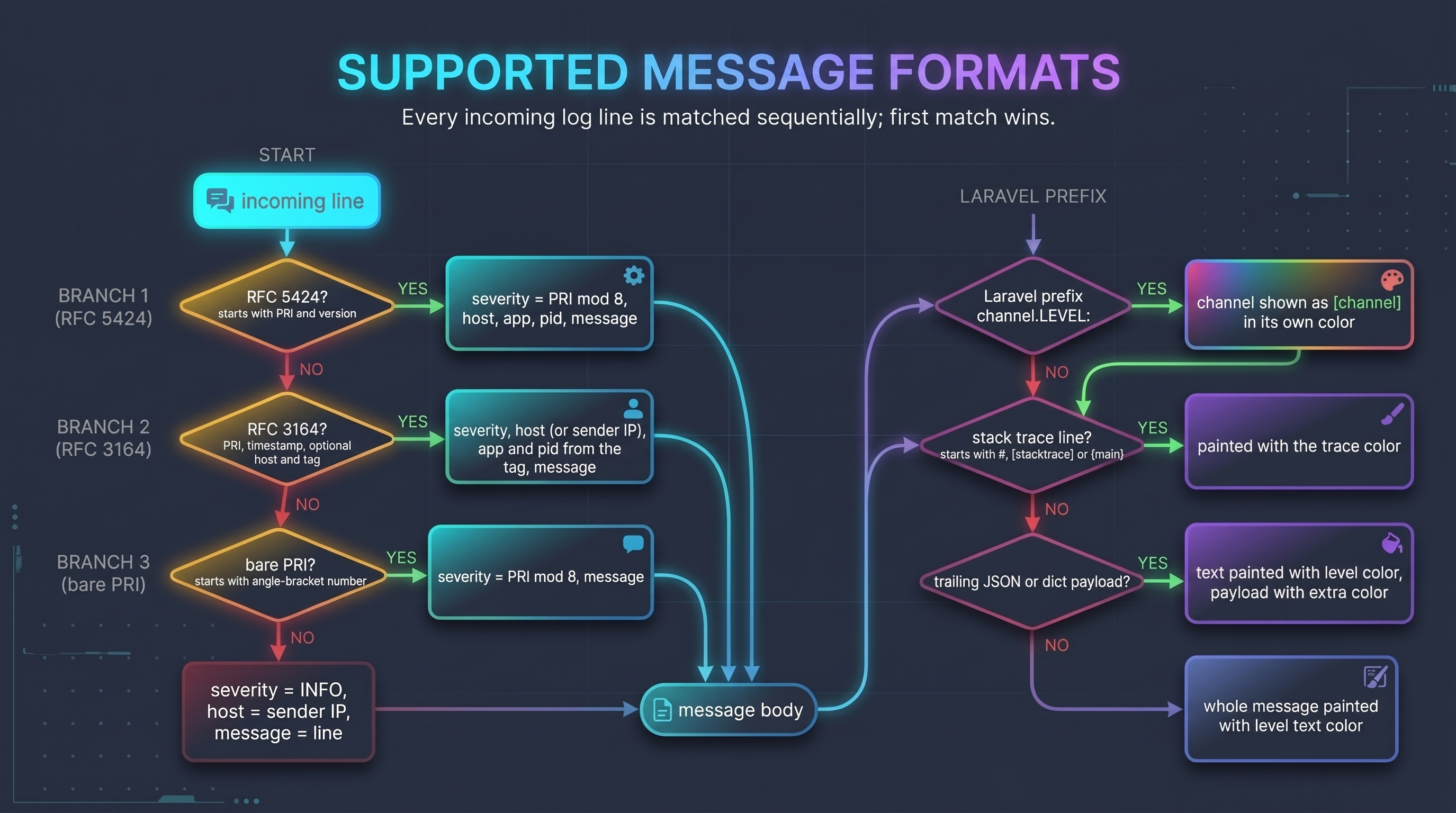
Each incoming line is matched in this order; the first match wins.
flowchart TD
    L["incoming line"] --> Q1{"RFC 5424?  starts with PRI and version"}
    Q1 -->|yes| P1["severity = PRI mod 8, host, app, pid, message"]
    Q1 -->|no| Q2{"RFC 3164?  PRI, timestamp, optional host and tag"}
    Q2 -->|yes| P2["severity, host (or sender IP), app and pid from the tag, message"]
    Q2 -->|no| Q3{"bare PRI?  starts with angle-bracket number"}
    Q3 -->|yes| P3["severity = PRI mod 8, message"]
    Q3 -->|no| P4["severity = INFO, host = sender IP, message = line"]
    P1 --> M["message body"]
    P2 --> M
    P3 --> M
    P4 --> M
    M --> Q4{"Laravel prefix  channel.LEVEL:"}
    Q4 -->|yes| P5["channel shown as [channel] in its own color"]
    Q4 -->|no| Q5
    P5 --> Q5{"stack trace line?  starts with #, [stacktrace] or {main}"}
    Q5 -->|yes| T["painted with the trace color"]
    Q5 -->|no| Q6{"trailing JSON or dict payload?"}
    Q6 -->|yes| E["text painted with level color, payload with extra color"]
    Q6 -->|no| N["whole message painted with level text color"]
Notes:
- Severity is taken from the low 3 bits of the syslog
<PRI>value (the facility is ignored). - RFC 3164 is accepted with the classic
Oct 28 10:00:00timestamp or an RFC 3339 one (Go'slog/syslog), with or without a hostname (Rust'ssyslogcrate omits it; the sender's IP is shown instead), and with an optional space after<PRI>. - Multi-line UDP datagrams are split on
\n. A line that has no<PRI>of its own (a traceback, for instance) inherits the level, host, app and pid of the line before it, in the same datagram or TCP connection. - TCP messages end at a newline or at a NUL byte, so Python's
SysLogHandlerworks as it is. - Trailing
\r,\n, NUL bytes and a leading BOM are stripped.
| Severity | Label shown | Config key |
|---|---|---|
| 0 | EMERG |
emergency |
| 1 | ALERT |
alert |
| 2 | CRIT |
critical |
| 3 | ERROR |
error |
| 4 | WARN |
warning |
| 5 | NOTICE |
notice |
| 6 | INFO |
info |
| 7 | DEBUG |
debug |
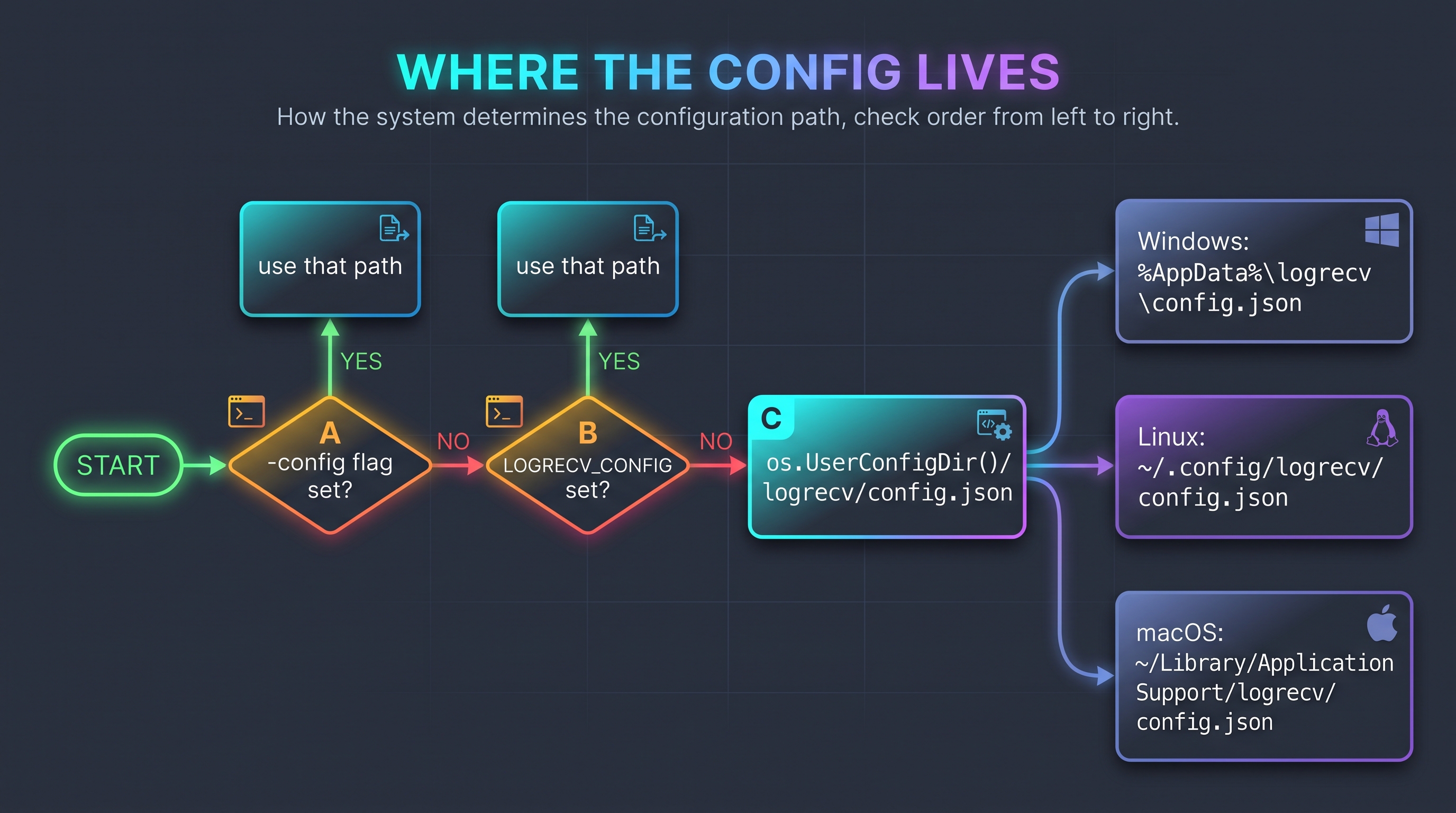
flowchart LR
    S(["start"]) --> A{"-config flag set?"}
    A -->|yes| FA["use that path"]
    A -->|no| B{"LOGRECV_CONFIG set?"}
    B -->|yes| FB["use that path"]
    B -->|no| C["os.UserConfigDir()/logrecv/config.json"]
    C --> W["Windows: %AppData%\\logrecv\\config.json"]
    C --> L["Linux: ~/.config/logrecv/config.json"]
    C --> M["macOS: ~/Library/Application Support/logrecv/config.json"]
Run logrecv path to print the exact path on your machine. A missing or empty file simply means "use the defaults".
config.json is plain JSON (no comments). Any key you leave out keeps its default. Unknown keys are rejected so typos
are caught. Colors are #RRGGBB or #RGB (# optional).
{
  "datetime": "#00AAFF",
  "host":     "#FFFFFF",
  "app":      "#00AA00",
  "pid":      "#E8E8E8",
  "channel":  "#FFFFFF",
  "extra":    "#FFFFFF",
  "trace":    "#FFFFFF",
  "levels": {
    "emergency": { "level": { "fg": "#FFFFFF", "bg": "#AA00FF" }, "text": { "fg": "#FFFFFF", "bg": "#AA00FF" } },
    "alert":     { "level": { "fg": "#FFFFFF", "bg": "#0000FF" }, "text": { "fg": "#FFFFFF", "bg": "#0000FF" } },
    "critical":  { "level": { "fg": "#FFFFFF", "bg": "#005500" }, "text": { "fg": "#FFFFFF", "bg": "#005500" } },
    "error":     { "level": { "fg": "#FFFFFF", "bg": "#FF0000" }, "text": { "fg": "#FFFFFF", "bg": "#FF0000" } },
    "warning":   { "level": { "fg": "#000000", "bg": "#FFFF00" }, "text": { "fg": "#000000", "bg": "#FFFF00" } },
    "notice":    { "level": { "fg": "#000000", "bg": "#00FFFF" }, "text": { "fg": "#00FFFF" } },
    "info":      { "level": { "fg": "#000000", "bg": "#00FF00" }, "text": { "fg": "#00FF00" } },
    "debug":     { "level": { "fg": "#FFFFFF", "bg": "#FF5500" }, "text": { "fg": "#FFFFFF", "bg": "#FF5500" } }
  }
}| Key | Applies to |
|---|---|
datetime |
the timestamp |
host |
the sender host name or IP |
app |
the application / program name |
pid |
the process id, shown as [1234] |
channel |
the Laravel/Monolog channel prefix, shown as [local] |
extra |
trailing JSON / dict payload at the end of a message |
trace |
stack-trace lines (#0 ..., [stacktrace], {main}) |
levels.<name>.level |
the level badge (e.g. ERROR) |
levels.<name>.text |
the message text of that level |
For each level / text object, fg is the foreground and bg the background (either may be omitted). When you
override a level or text object it replaces the default object entirely, so include every field you want.
| Level | Badge (fg on bg) | Message (fg on bg) |
|---|---|---|
| EMERGENCY | #FFFFFF on #AA00FF |
#FFFFFF on #AA00FF |
| ALERT | #FFFFFF on #0000FF |
#FFFFFF on #0000FF |
| CRITICAL | #FFFFFF on #005500 |
#FFFFFF on #005500 |
| ERROR | #FFFFFF on #FF0000 |
#FFFFFF on #FF0000 |
| WARNING | #000000 on #FFFF00 |
#000000 on #FFFF00 |
| NOTICE | #000000 on #00FFFF |
#00FFFF |
| INFO | #000000 on #00FF00 |
#00FF00 |
| DEBUG | #FFFFFF on #FF5500 |
#FFFFFF on #FF5500 |
Datetime is #00AAFF, app is #00AA00, pid is #E8E8E8, and JSON/dict payloads, hosts, channels and traces are #FFFFFF.
logrecv init          # create the config with the defaults (refuses to overwrite)
logrecv init -f       # overwrite an existing config
logrecv path          # print the config path
logrecv show          # path, effective config and a colored preview of all levels
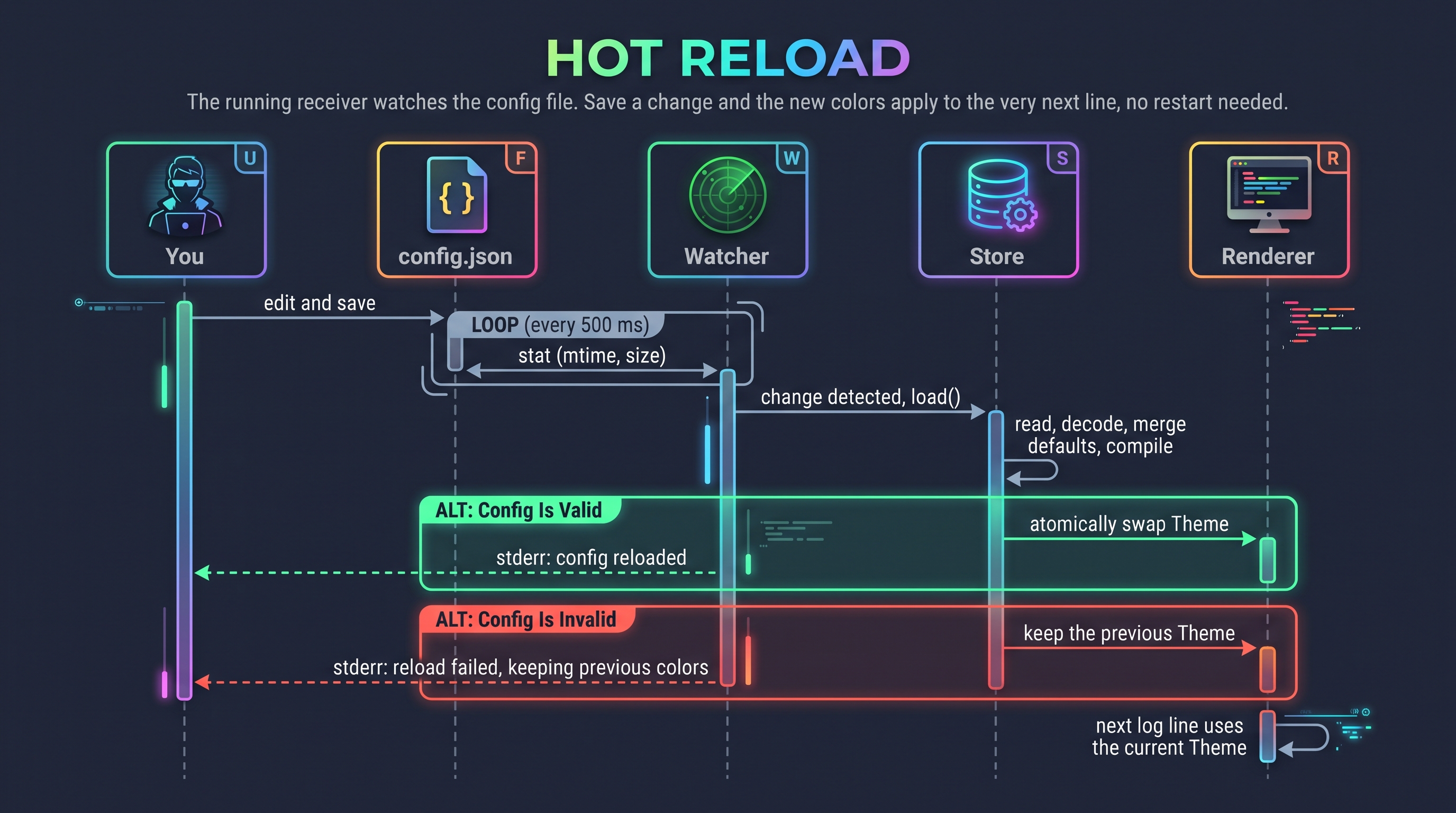
logrecv show -json # only the effective config as JSON (good for scripts)The running receiver watches the config file. Save a change and the new colors apply to the very next line, no restart needed. If the edit is invalid (bad hex, unknown key, broken JSON) the previous colors stay active and a warning is printed to stderr. Deleting the file switches back to the defaults.
sequenceDiagram
    actor U as You
    participant F as config.json
    participant W as Watcher
    participant S as Store
    participant R as Renderer

    U->>F: edit and save
    loop every 500 ms
        W->>F: stat (mtime, size)
    end
    W->>S: change detected, load()
    S->>S: read, decode, merge defaults, compile
    alt config is valid
        S->>R: atomically swap Theme
        W-->>U: stderr: config reloaded
    else config is invalid
        S-->>R: keep the previous Theme
        W-->>U: stderr: reload failed, keeping previous colors
    end
    R->>R: next log line uses the current Theme
The file is polled rather than watched with OS notifications, which keeps the program dependency-free and behaving the same on every platform.
-color auto (the default) picks the best mode for your terminal:
flowchart TD
    S(["-color auto"]) --> N{"NO_COLOR set, TERM=dumb, or stdout not a TTY?"}
    N -->|yes| NONE["no colors"]
    N -->|no| V{"Windows VT mode available?"}
    V -->|no| NONE
    V -->|yes| T{"COLORTERM is truecolor or 24bit, or running on Windows?"}
    T -->|yes| TC["24-bit truecolor"]
    T -->|no| X{"TERM unset?"}
    X -->|yes| TC
    X -->|no| C256["256-color palette"]
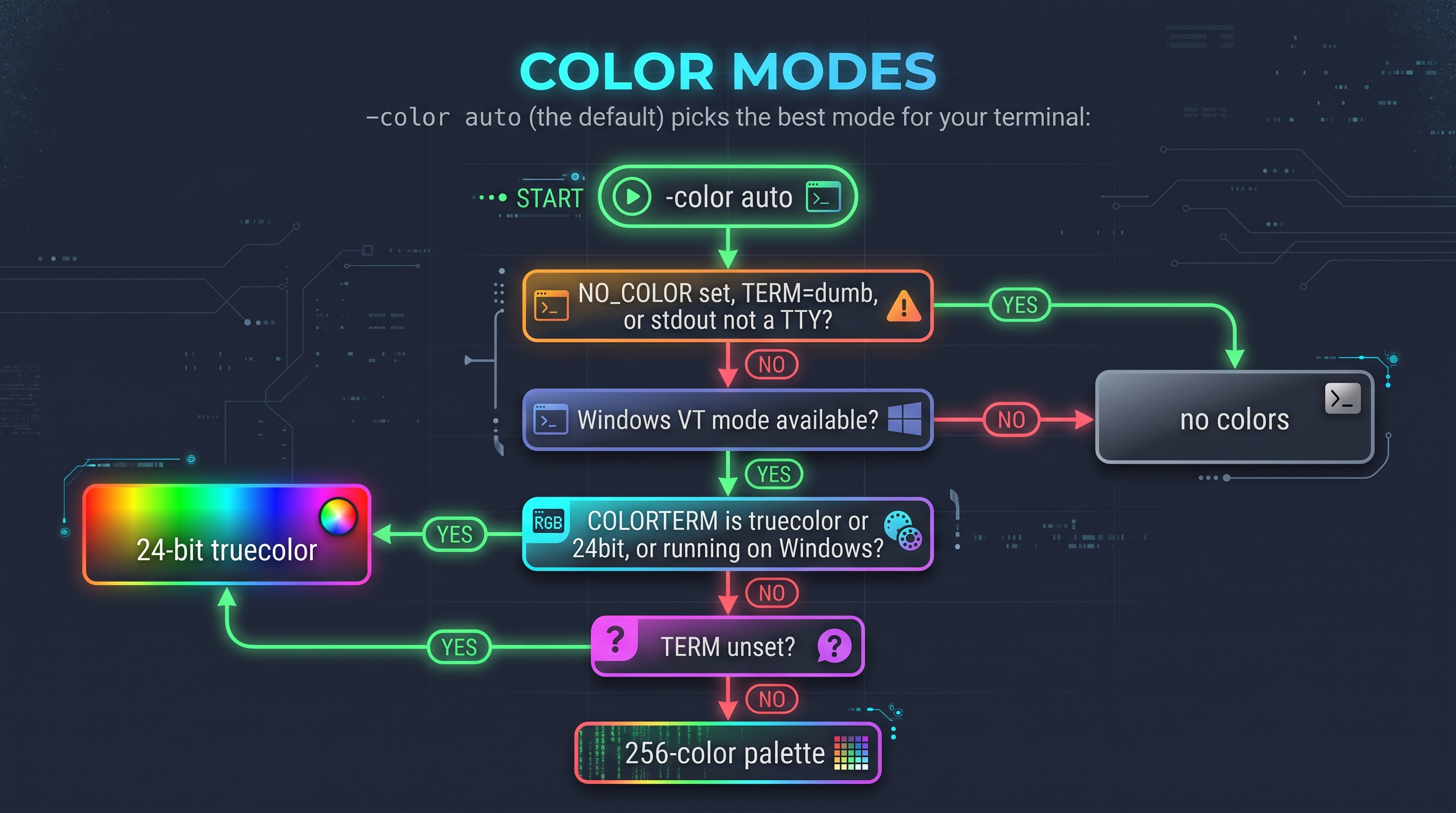
Force a mode with -color always (truecolor), -color 256 or -color never. Use always when you want colors in
a pipe, or in terminals such as Git Bash/mintty that don't look like a console to Go.
Requires Go 1.25 or newer.
git clone https://github.com/cumulus13/logrecv-go
cd logrecv-go
go build -trimpath -ldflags "-s -w -X main.version=1.0.1" -o logrecv .
go test ./...
Cross-compile every release target with the same script CI uses:
bash .github/scripts/build-release.sh v1.0.1 distProject layout:
main.go                entry point, commands, listeners, log parsing and rendering
config.go              config schema, defaults, loading, theme compilation, hot-reload store
color.go               hex parsing, truecolor/256 ANSI, color mode detection
console_windows.go     enables ANSI/VT processing on the Windows console
console_other.go       no-op for other platforms
main_test.go           unit tests
examples/              tested logging examples: laravel/, python/, go/, rust/
.github/targets.txt    release platform list
.github/scripts/       release build script
.github/workflows/     CI and release pipelines
flowchart LR
    PUSH["push / pull request"] --> CI
    subgraph CI["ci.yml"]
        L["lint: gofmt, go vet"]
        T["test: ubuntu, windows, macos + CLI smoke test"]
        XB["cross-compile every target"]
    end

    TAG["git tag vX.Y.Z"] --> REL
    subgraph REL["release.yml"]
        V["verify: gofmt, vet, test"] --> B["build all platforms"]
        B --> SUM["SHA256SUMS"]
        SUM --> GH["publish GitHub Release"]
    end
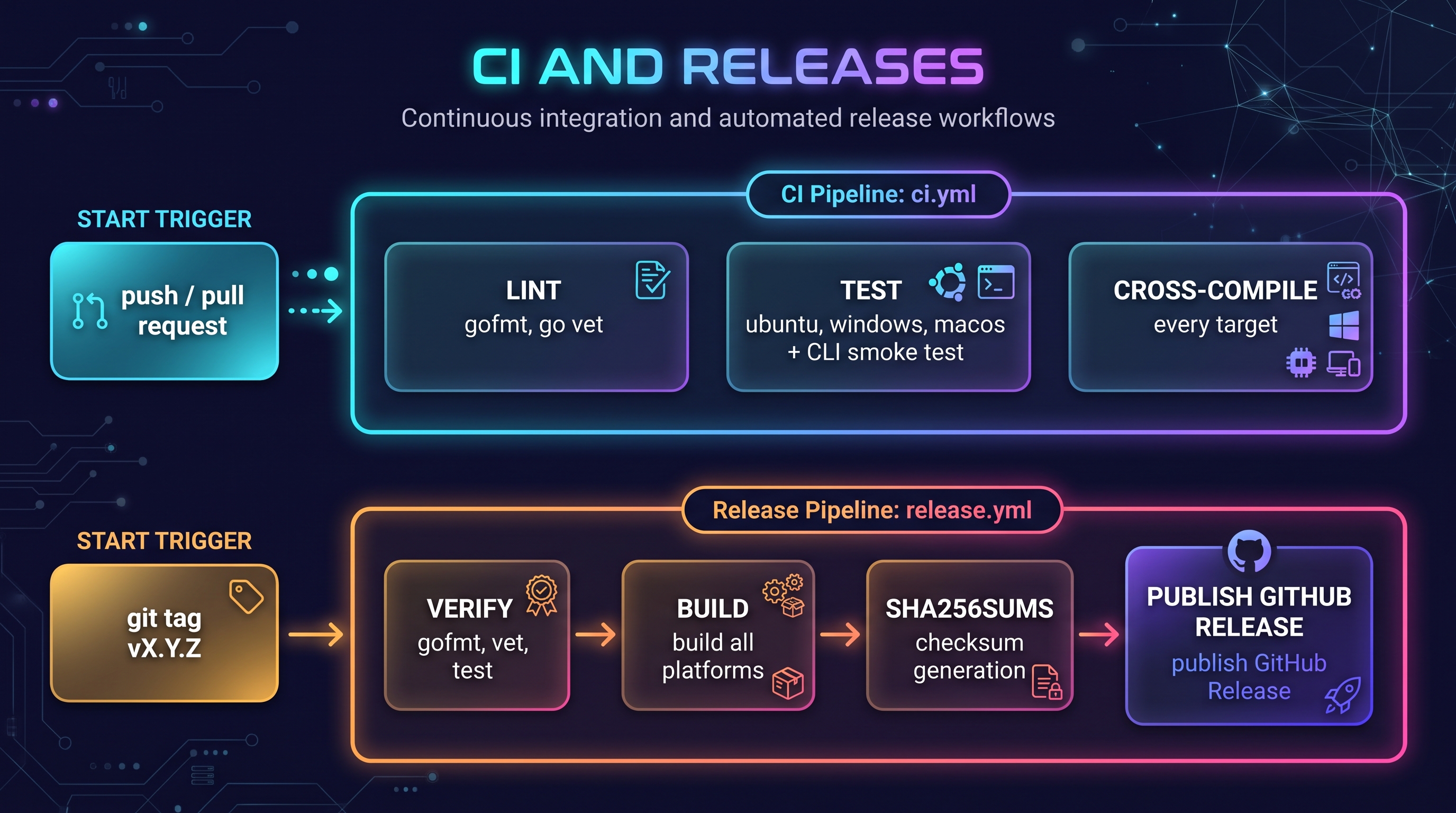
To cut a release:
git tag v1.0.2
git push origin v1.0.2
Tags that contain a hyphen (for example v1.1.0-rc.1) are published as pre-releases.
Release archives are produced for these targets (static binaries, CGO_ENABLED=0). Windows builds are .zip,
everything else .tar.gz.
| OS | Architectures |
|---|---|
| Linux | amd64, 386, arm64, armv6, armv7, riscv64, loong64, ppc64, ppc64le, s390x, mips / mipsle / mips64 / mips64le (hardfloat and softfloat) |
| Windows | amd64, 386, arm64 |
| macOS | amd64 (Intel), arm64 (Apple Silicon) |
| FreeBSD | amd64, 386, arm64, armv7 |
| OpenBSD | amd64, 386, arm64, armv7, ppc64, riscv64 |
| NetBSD | amd64, 386, arm64, armv7 |
| DragonFly BSD | amd64 |
| Solaris / illumos | amd64 |
| AIX | ppc64 |
| Plan 9 | 386, amd64, arm |
udp: listen ... address already in use: another process uses that port. Pick another with-udp :5515, or stop the other one.- Ports below 1024 (e.g. 514) fail with a permission error: run with sufficient privileges or use a high port and point your senders at it.
- No colors in a pipe or in Git Bash: this is intentional in
automode; use-color always. - Colors look wrong or washed out: your terminal may not support truecolor. Try
-color 256. - Some colors look different from the config (for example white text on red or orange turns dark):
logrecvsends the exact 24-bit colors you configured; the terminal is changing them. Windows Terminal's "Automatically adjust lightness of indistinguishable text" (adjustIndistinguishableColors) and VS Code'sterminal.integrated.minimumContrastRatiodarken or lighten any foreground whose contrast against its background is too low (white on#FF0000is about 4:1). Set"adjustIndistinguishableColors": "never"in your Windows Terminal profile (or"terminal.integrated.minimumContrastRatio": 1in VS Code) to show the colors exactly. To confirm what is being sent, runlogrecv showin a terminal without such a feature. - Config edits don't seem to apply: check stderr for
config reload failed; runlogrecv showto see the exact error. - Windows console shows escape codes literally: use Windows Terminal or Windows 10+ console;
logrecvenables VT processing automatically. - Nothing shows up: check the sender's target port/protocol, any
-level/-grepfilter, and your firewall (UDP is silent when dropped).
MIT © Hadi Cahyadi

