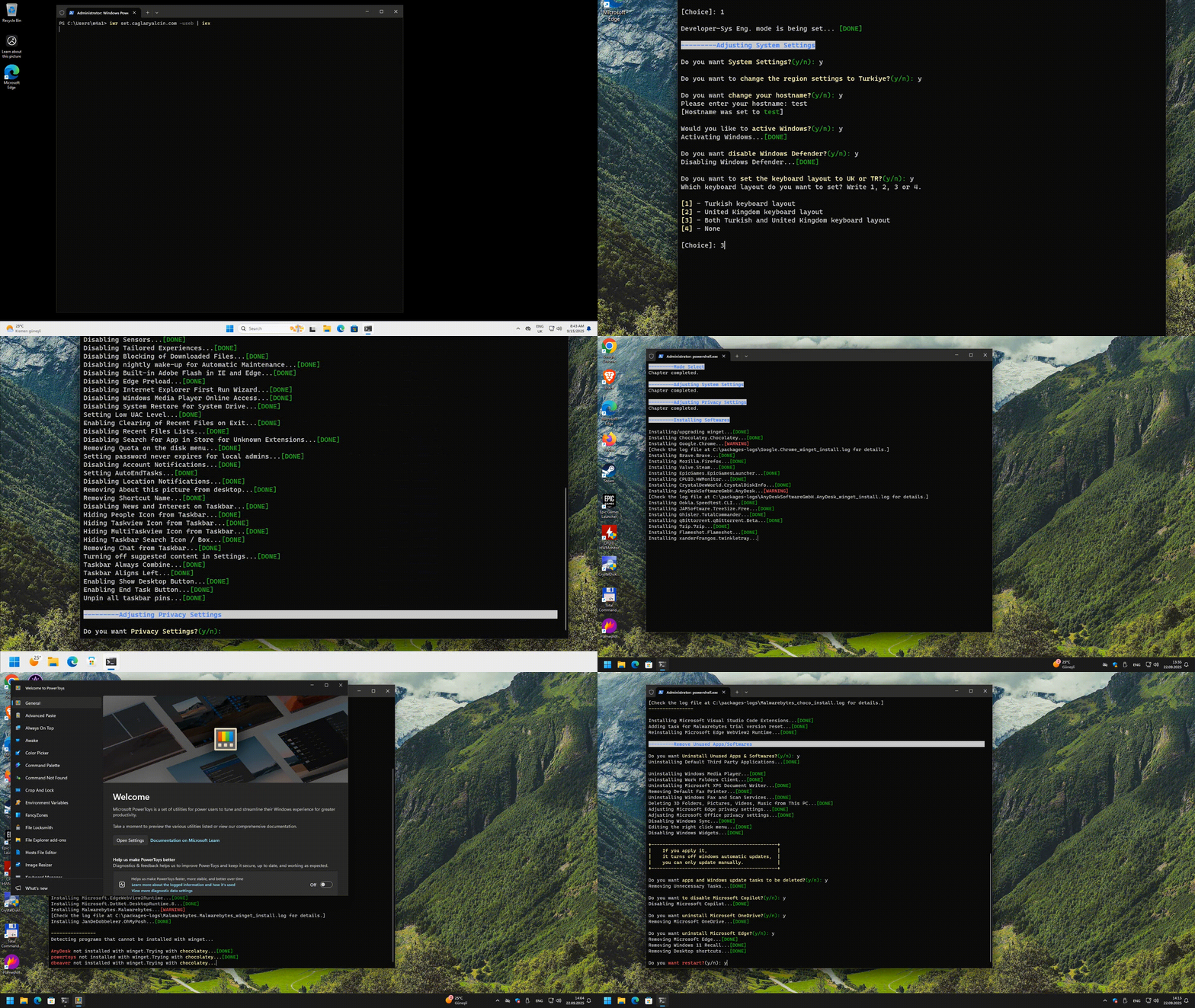

A comprehensive Windows 11 post-installation script that automates system configuration, privacy hardening, software installation, and bloatware removal. The script supports all Windows 11 versions and offers three distinct operation modes tailored to different use cases. Some settings are optional and prompted interactively (y/n).
The script runs in two phases:
set.psm1— Configures system settings, applies privacy tweaks, initiates software installation, and removes bloatware.resume.psm1— Runs after reboot to complete software installation, install VSCode extensions, configure developer tools (WSL, npm, OpenSSL, Claude Code), and perform final cleanup.
Mode Selection
The script starts by asking you to choose one of three modes. All subsequent settings, software installations, and optimizations are configured based on your selection.
| Mode | Description |
|---|---|
| Normal | Standard desktop usage — basic utilities, productivity tools |
| Gaming | Optimized for gaming — game launchers, Discord, NVIDIA tools, performance tweaks |
| Dev-Sys Eng | Full development environment — IDEs, SDKs, languages, CLI tools, containers |

System Settings

- Region change to Turkiye (date/time/currency formats)
- Hostname customization
- Windows activation via Microsoft Activation Scripts
- Windows Update delay configuration

- Windows Defender removal
- Date format and keyboard layout selection (TR/UK)
- Explorer folder view set to "Details" with custom separator settings

- Startup scheduled task creation (recommended)
The script uses NVCleanstall to install NVIDIA graphics drivers without bloatware. Instead of NVIDIA's default installer — which bundles telemetry, GeForce Experience, HD Audio via HDMI, and other unnecessary components — NVCleanstall strips everything down and installs only the pure display driver and essential packages. This results in a cleaner, lighter, and more performant system.
Additionally, NVIDIA Profile Inspector is installed and a pre-configured base profile is imported to optimize driver-level settings for maximum gaming performance. A scheduled task is also created to automatically check for new driver updates at logon and every 4 hours.
In Gaming mode this runs automatically. In Normal and Dev-Sys modes, you will be prompted whether to apply NVIDIA optimizations.
- Classic right-click context menu restoration


- Taskbar left alignment
- Snap windows disabled
- Oh-My-Posh integration for Windows Terminal (Dev-Sys & Normal modes)

- Gallery folder disabled
- Desktop button enabled on taskbar
- News, interest, people icon, task view, multitask view, search, chat, and widgets removed from taskbar
- Category view disabled on taskbar
- Always combine taskbar buttons
- Dark mode for applications and system
- Control panel set to large icons view
- Classic photo viewer restored
- Shortcut name prefix removed

- Hibernate file (
hiberfil.sys) disabled - Display and sleep mode timeouts disabled
- Ultimate Performance power plan enabled
- Memory compression enabled/disabled based on RAM amount
- GPU performance mode set for specific applications
- Storage Sense disabled
- IPv6 stack disabled
- DNS provider selection (Cloudflare, Google, AdGuard) with automatic ping-based optimization
- Virtual ethernet adapters disabled
- SmartScreen filter disabled
- Low UAC level set
- System restore disabled for system drive
- Password never expires for local admins
- Account notifications disabled
- Auto-end task on logout/restart enabled
- Disk quota removed
- Mapped drives enabled in elevated Command Prompt
- Downloaded files blocking disabled
- Automatic maintenance wake-up disabled
- WSL enabled
- Telnet client enabled (Dev-Sys & Normal modes)
- Sudo enabled (Dev-Sys & Normal modes)
- Xbox features disabled (Dev-Sys & Normal modes)
- Unnecessary services stopped and disabled
- NumLock enabled after startup
- Windows beep sound disabled
- Sensors disabled
- Tailored experiences disabled
- Settings sync disabled
- Spotlight disabled
- Toast and lock screen notifications disabled
- Windows Media Player diagnostics disabled
- Bing search in Start Menu disabled
- Windows Media Player online access disabled
- Recent files clearing enabled on exit

- Recent files list disabled
- Start menu tiles unpinned
- Start menu: Recently Added, Recommended, Personalized Sites hidden
- Winsal test with hardware bottleneck test
- Known Windows errors fixed

Privacy Settings
- Telemetry disabled via registry
- Telemetry endpoints blocked in hosts file
- Connected User Experiences and Telemetry service stopped
- Diagnostic data collection disabled
- Diagnostic log collection disabled
- Error reporting disabled
- Handwriting error reports disabled
- Advertising ID disabled
- Activity history disabled
- App launch tracking disabled
- Tailored experiences disabled
- User steps recorder disabled
- Feedback disabled
- Clipboard history disabled
- Clipboard sharing disabled
- Text suggestions for hardware keyboard disabled
- Text message cloud backup disabled
- Password reveal button disabled
- Website access to language list disabled
- Wi-Fi Sense disabled
- Bluetooth advertising disabled
- Location system disabled
- Automatic maps updates disabled
All UWP app access restricted for:
- Voice activation, Notifications, Account info, Contacts, Calendar
- Phone calls, Call history, Email, Tasks, Messaging
- Radios, Other devices, Diagnostic info, File system
- Background access disabled
- UWP swap file disabled
- Automatic restart disabled
- Automatic downloads disabled
- Updates for other Microsoft products disabled
- Application suggestions disabled
- Task scheduler history enabled
Software Installation

💡Packages are installed via winget with automatic Chocolatey fallback for failed installations. The package list depends on the mode selected at the start.

| Category | Packages |
|---|---|
| Browser | Chrome |
| Monitoring | HWMonitor, CrystalDisk Info |
| Utilities | AnyDesk, Speedtest CLI, TreeSize, Lightshot, Twinkle Tray, Rufus, PowerToys |
| Media | VLC, K-Lite Codec Pack Mega |
| Security | Malwarebytes |
| System | FanControl |
| Category | Packages |
|---|---|
| Browser | Chrome |
| Game Launchers | Steam, Epic Games, Battle.net, EA Desktop, Ubisoft Connect |
| Gaming | Discord, FACEIT Client, FACEIT AC, Google Play Games |
| Monitoring | HWMonitor, CrystalDisk Info |
| Utilities | Speedtest CLI, 7-Zip |
| System | FanControl |
| Category | Packages |
|---|---|
| Browsers | Chrome, Brave, Firefox |
| Game Launchers | Steam, Epic Games |
| IDEs & Editors | VSCode (with extensions), Notepad++ |
| Languages & Runtimes | Node.js, Python, Git, Yarn, .NET Desktop Runtime 8, PowerShell |
| SDKs | Windows SDK, OpenSSL |
| Dev Tools | GitHub Desktop, DBeaver, Oh-My-Posh, iPerf3, Claude Code |
| Communication | Signal, Microsoft Teams |
| Monitoring | HWMonitor, CrystalDisk Info |
| Utilities | AnyDesk, Speedtest CLI, TreeSize, Total Commander, qBittorrent, 7-Zip, Flameshot, Twinkle Tray, Rufus, PowerToys, IDM |
| Media | VLC, K-Lite Codec Pack Mega |
| Security | Malwarebytes |
| System | FanControl, EdgeWebView2 Runtime |
Automatically installed after VSCode setup:
- Docker: GitLens, Docker, Docker Explorer, Docker Compose, Remote Containers
- Autocomplete: Auto Close/Rename/Complete Tag, Spell Checker, XML
- Design: Material Icon Theme
- PowerShell: PowerShell, Run in PowerShell, Remote WSL
- Frontend: React Native, CSS Peek, ES7 Snippets, ESLint, Path Intellisense, Prettier, Python, Color Highlight, JSON
- GitHub: Pull Request, Copilot
- Linux: Bash Debug, Bash Beautify, Bash IDE, YAML
- AI: Claude, Gemini
- WSL with Ubuntu installation
- npm global configuration
- OpenSSL PATH configuration
- Claude Code installation
Remove Unused Apps

- Default third-party bloatware applications
- Windows Media Player
- Work Folders Client
- Microsoft XPS Document Writer
- Default fax printer
- Windows Fax and Scan Services
- 3D Object folders
- Windows 11 Recall
- Desktop shortcuts cleanup
- Microsoft Edge privacy settings hardened
- Microsoft Office privacy settings hardened
- Windows sync disabled
- Microsoft Copilot removal
- Microsoft AI features removal
- Unnecessary scheduled tasks removal
- OneDrive uninstallation
- Microsoft Edge uninstallation

Startup Script

The script creates two scheduled tasks in Task Scheduler:
💡Runs 3 minutes after boot, repeats every 3 hours
- Expands File Explorer ribbon
- Removes Sticky Keys and Toggle Keys
- Disables F12 for Snipping Tool
- Removes unnecessary scheduled tasks (updates, etc.)
- Removes Windows Defender icon from taskbar
- Disables unnecessary startup applications (varies by mode)
- Removes Microsoft Edge update tasks
- Removes Google Chrome update tasks
- Enables Show Desktop button
- Syncs Windows local time
💡 Runs 3 minutes after boot
- Updates all installed packages via
winget upgrade --all
Warning
This script makes extensive changes to Windows settings, registry, and services. While carefully tested to avoid breaking OS functionality, use at your own risk.
Note
Approximate execution times with 100 Mbps internet:
| Mode | Duration |
|---|---|
| Normal | ~15 min |
| Gaming | ~30 min |
| Dev-Sys Eng | ~60 min |
Important
PowerShell must be run as Administrator
iwr "set.caglaryalcin.com" -UseB | iex