


lazyconfluence is a terminal-first Confluence document browser. It syncs the Confluence spaces you choose into a local index, then lets you browse and read pages from the terminal without making remote calls during normal navigation. The reader renders headings, tables, code blocks, links, and cached PNG, JPEG, GIF first-frame, and SVG previews, with progressive placeholders when a terminal or media asset cannot show an image preview.
Website: https://bojackduy.github.io/lazyconfluence/
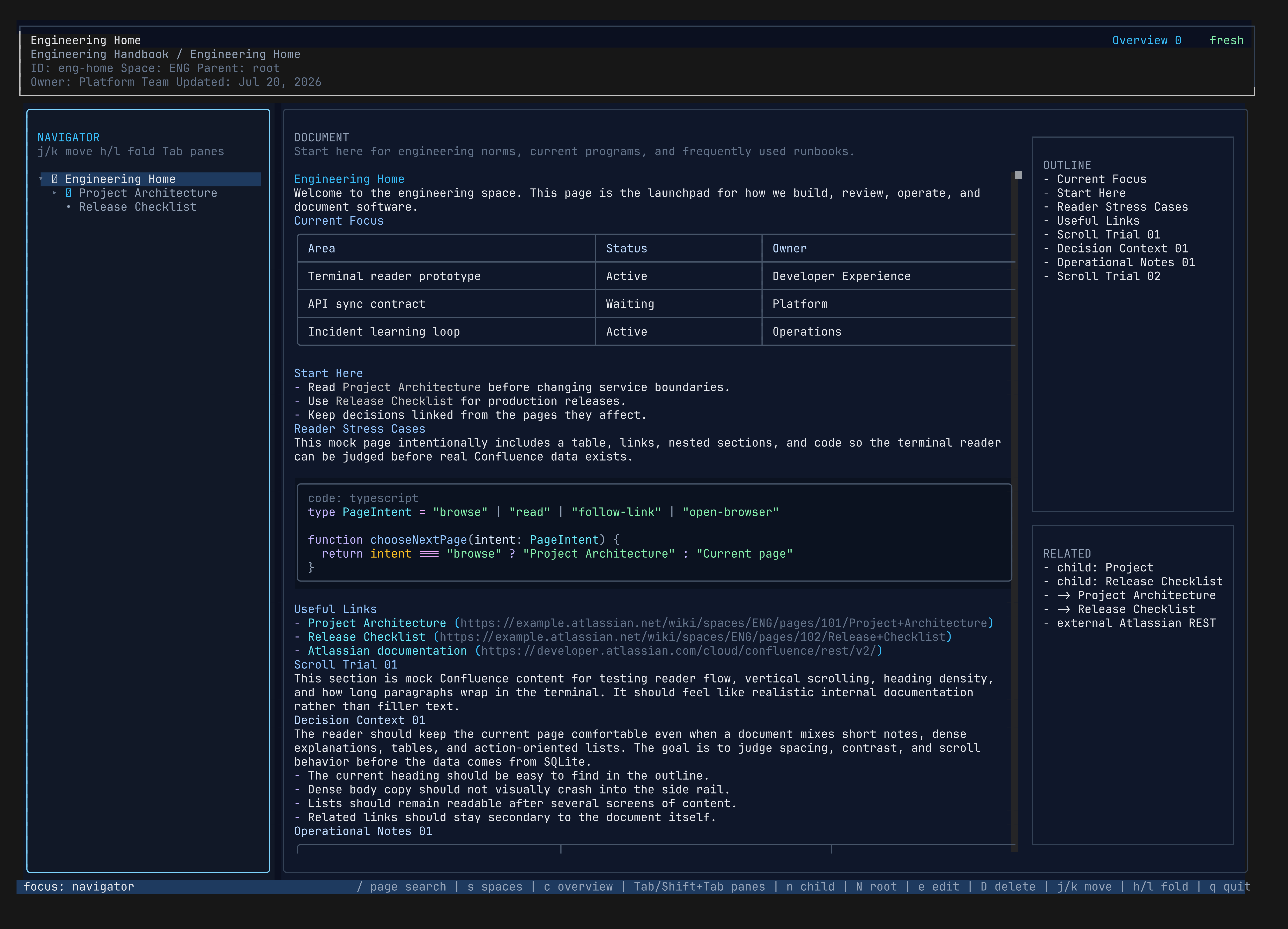

The demo above uses synthetic data from lazyconfluence demo, not real company Confluence content.
- Local-first Confluence browsing after explicit sync.
- Current and archived page views, an ordered page tree, outlines, related links, backlinks, and bounded navigation history.
- Intent-specific search for the active space, all synced spaces, and text in the current rendered document.
- Readable terminal rendering for headings, lists, tables, links, and code blocks.
- Cached PNG and JPEG attachment previews, static first-frame GIF previews, plus SVGs safely rasterized to PNG during sync or page reload.
- Native image viewers for Kitty/Ghostty, WezTerm/iTerm2, and Sixel-capable terminals, with a readable color-cell fallback that needs no image protocol.
- Progressive image handling keeps terminals without image preview support and unsupported media readable through labeled placeholders.
- Local drafts, staged creates, updates, and deletes, plus a review/apply flow that keeps remote Confluence write-back explicit.
- Explicit current-page reload, cross-platform browser open, a command palette, keyboard help, and safe synthetic demo mode.
lazyconfluence runs on Bun, so install Bun first:
curl -fsSL https://bun.sh/install | bashInstall the CLI from npm:
npm install -g @bojackduy/lazyconfluenceRun it:
lazyconfluenceOn a first run, the CLI detects missing or incomplete setup and starts the connection wizard instead of opening an empty reader. The wizard checks the site, account, token, and configured spaces with Confluence before saving them.
To open the safe synthetic demo mode:
lazyconfluence demoYou need four things from Atlassian before syncing Confluence content:
- Your Atlassian site URL, for example
https://example.atlassian.net. - Your Atlassian account email.
- An Atlassian API token for the same account.
- One or more Confluence space keys, for example
ENGorOPS.
Create the API token:
- Open https://id.atlassian.com/manage-profile/security/api-tokens.
- Log in with the Atlassian account that can read the Confluence spaces you want to browse.
- Select
Create API token. - Name it something recognizable, for example
lazyconfluence. - Copy the token immediately. Atlassian only shows it once.
Find a space key:
- Open a page in the Confluence space.
- Look at the URL. Space URLs commonly include
/wiki/spaces/SPACEKEY/.... - Use the
SPACEKEYvalue whenlazyconfluence initasks for space keys.
After opening the TUI, press s and then a to browse remote spaces your account can access.
The API token uses your own Confluence permissions. If your account cannot read a page in Confluence, lazyconfluence cannot sync it either.
Configure local credentials:
lazyconfluence initThe setup prompt asks for:
Atlassian site URL: your site root, for examplehttps://example.atlassian.net.Atlassian account email: the email you use to log in to Atlassian.Space keys: comma-separated space keys, with the first one used as the default space.Atlassian API token: the token you created above.
Credentials are stored in your local user config directory, not in this repository or in the synced page index.
Setup verifies the connection before saving. Common failures are explained directly:
401 Unauthorized: the account email and API token do not match, or the token is expired, revoked, or copied incorrectly.403 Forbidden: the account authenticated but does not have access to Confluence on that site.- Site not found: use the site root such as
https://example.atlassian.net, not a page, space, or REST API URL. - Configured spaces unavailable: verify each space key and that the account can browse it.
- Timeout or network failure: check connectivity and retry when the site is reachable.
Check local config and index state:
lazyconfluence doctorCheck credentials and configured space access explicitly:
lazyconfluence doctor --remoteSync configured spaces:
lazyconfluence syncIn the TUI space switcher, press a to browse remote spaces. The remote picker loads one API page at a time; use Shift+L to load another page, / to filter loaded spaces, Space to mark spaces, and Enter to configure and sync marked spaces before returning to the local switcher.
Sync one space explicitly:
lazyconfluence sync --space ENGAfter syncing, open the terminal UI:
lazyconfluenceNormal browsing reads from the local index. Remote Confluence requests happen only when you explicitly run sync or reload the selected page with r. During sync or reload, lazyconfluence best-effort caches Confluence attachment images and rasterizes SVGs into local PNG previews without fetching media while you browse. When available, local Chromium preserves browser-only SVG features such as foreignObject; otherwise the portable resvg renderer is used. Set LAZYCONFLUENCE_CHROMIUM_PATH to select a Chromium executable.
lazyconfluence                 # open the TUI
lazyconfluence tui             # open the TUI explicitly
lazyconfluence demo            # open the TUI with synthetic demo data only
lazyconfluence tui --demo      # same demo mode through a flag
lazyconfluence init            # configure Atlassian credentials
lazyconfluence theme list      # list built-in and locally installed themes
lazyconfluence theme init my-theme
lazyconfluence theme install ./catppuccin-mocha.json
lazyconfluence theme use catppuccin-mocha
lazyconfluence doctor          # inspect local config and index state
lazyconfluence doctor --remote # verify credentials and configured spaces
lazyconfluence sync            # fetch configured spaces into the local index
lazyconfluence sync --space ENG
lazyconfluence search runbook
lazyconfluence search --all runbook/: search pages in the active space.S: search pages across all synced spaces.f: find text in the current document.s: switch locally indexed spaces; pressain this picker to browse, configure, and sync remote spaces.p,;, or:: open the command palette.r: reload only the selected Confluence page.borEsc: return through local navigation history.o: open the selected page in the browser.B: open a prefilled GitHub bug report.T: preview and choose an installed theme.e: edit the selected current page locally.n/N: stage a child / root page create.D: stage deletion of a synced leaf page.c: review staged changes in the current space.?: open keyboard help.
Use Tab and Shift+Tab to move between reader panes. Archived pages are read-only.
Themes are local JSON files. lazyconfluence never downloads or executes theme code. Create a starter with lazyconfluence theme init my-theme, edit it locally, then select it with lazyconfluence theme use my-theme. To install a file shared by someone else, validate and copy it into the local theme directory with lazyconfluence theme install ./my-theme.json; installed files are never overwritten, so local adjustments remain safe.
Use lazyconfluence theme path to print the directory. A theme can override any reader UI color and Markdown/code syntax color while inheriting unspecified values from a built-in base:
{
  "version": 1,
  "id": "catppuccin-mocha",
  "name": "Catppuccin Mocha",
  "extends": "midnight",
  "colors": {
    "bg": "#1e1e2e",
    "panel": "#181825",
    "overlay": "#181825",
    "overlayInput": "#11111b",
    "warningBg": "#302d41",
    "accent": "#cba6f7",
    "borderActive": "#b4befe",
    "folder": "#cba6f7",
    "imageReady": "#a6e3a1",
    "text": "#cdd6f4"
  },
  "syntax": {
    "keyword": "#cba6f7",
    "string": "#a6e3a1",
    "function": "#cba6f7"
  }
}
Full-app UI tokens are bg, panel, panelAlt, overlay, overlayInput, warningBg, codeBg, codeBorder, border, borderActive, text, codeText, muted, subtle, accent, accentSoft, folder, page, live, canvas, imageReady, imageMissing, good, warn, and danger. Syntax tokens are heading, heading2, heading3, heading4, italic, linkLabel, raw, rawBg, list, quote, comment, keyword, string, number, function, type, property, operator, tag, and attribute. Unspecified tokens inherit from the built-in theme named by extends.
When keyboard input or popup actions do not respond, run the TUI with an explicit diagnostic log path:
LAZYCONFLUENCE_INPUT_DEBUG_LOG=/tmp/lazyconfluence-input.jsonl lazyconfluence demoThe JSONL log records raw terminal bytes, OpenTUI-parsed keys, lazyconfluence command routing, overlay state, and teardown. It is disabled unless LAZYCONFLUENCE_INPUT_DEBUG_LOG is set.
Local draft commands are available, but remote Confluence write-back is still intentionally explicit:
lazyconfluence edit <page-id>
lazyconfluence draft <page-id> --file ./page.md
lazyconfluence drafts
lazyconfluence stage <page-id>
lazyconfluence diff <page-id>
lazyconfluence preview <page-id>
lazyconfluence unstage <page-id>
lazyconfluence discard <page-id>By default, config is stored under your OS user config directory:
- macOS/Linux:
$XDG_CONFIG_HOME/lazyconfluenceor~/.config/lazyconfluence - Windows:
%APPDATA%/lazyconfluence
Useful environment variables:
LAZYCONFLUENCE_CONFIG_HOME: override the config directory.LAZYCONFLUENCE_DB_PATH: override the local SQLite index path.LAZYCONFLUENCE_DEMO=1: open the TUI with synthetic demo data instead of local synced pages.ATLASSIAN_API_TOKEN: provide the API token from the environment instead of the generated credential file.
Install dependencies:
bun installRun from source:
bun run startRun checks:
bun run typecheck
bun test
bun run build
The current product and implementation planning lives in docs/:
docs/README.mdfor product and UX direction.docs/BUILD_PLAN.mdfor implementation direction.docs/OPENTUI_REFERENCE.mdfor terminal UI guidance.docs/TASK_TRACKER.mdfor task status.docs/subagents/*.mdfor parallel work briefs.
lazylens/ is a read-only submodule used only as reference material. Do not edit it.
The static landing page lives in site/ and deploys to GitHub Pages from .github/workflows/pages.yml.
GitHub repository setup:
- Open repository
Settings. - Open
Pages. - Set source to
GitHub Actions. - Push changes to
mainor runDeploy GitHub Pagesmanually.
This repository publishes @bojackduy/lazyconfluence to npm from GitHub Actions using npm trusted publishing. Version tags also create GitHub Releases with generated release notes.
One-time npm setup:
- Open the package on npm:
https://www.npmjs.com/package/@bojackduy/lazyconfluence. - Go to
Settings. - Find
Trusted Publisher. - Select
GitHub Actions. - Set
Organization or usertobojackduy. - Set
Repositorytolazyconfluence. - Set
Workflow filenametonpm-publish.yml. - Leave
Environment nameblank unless the workflow uses a GitHub Environment. - Select
npm publishas an allowed action. - Save the trusted publisher.
Release a new version:
bun run release:patchUse release:minor or release:major when the version bump needs it. The release script runs checks, creates a version commit and tag, pushes both, then GitHub Actions publishes to npm and creates a GitHub Release.
Trusted publishing does not use an NPM_TOKEN GitHub secret. GitHub grants the workflow an OIDC identity via id-token: write, and npm exchanges that identity for a short-lived publish credential. npm automatically generates provenance for public packages published this way.
MIT