
Local-first context hygiene for AI coding sessions.
no default network no daemon dry-run first explicit inputs Apache-2.0
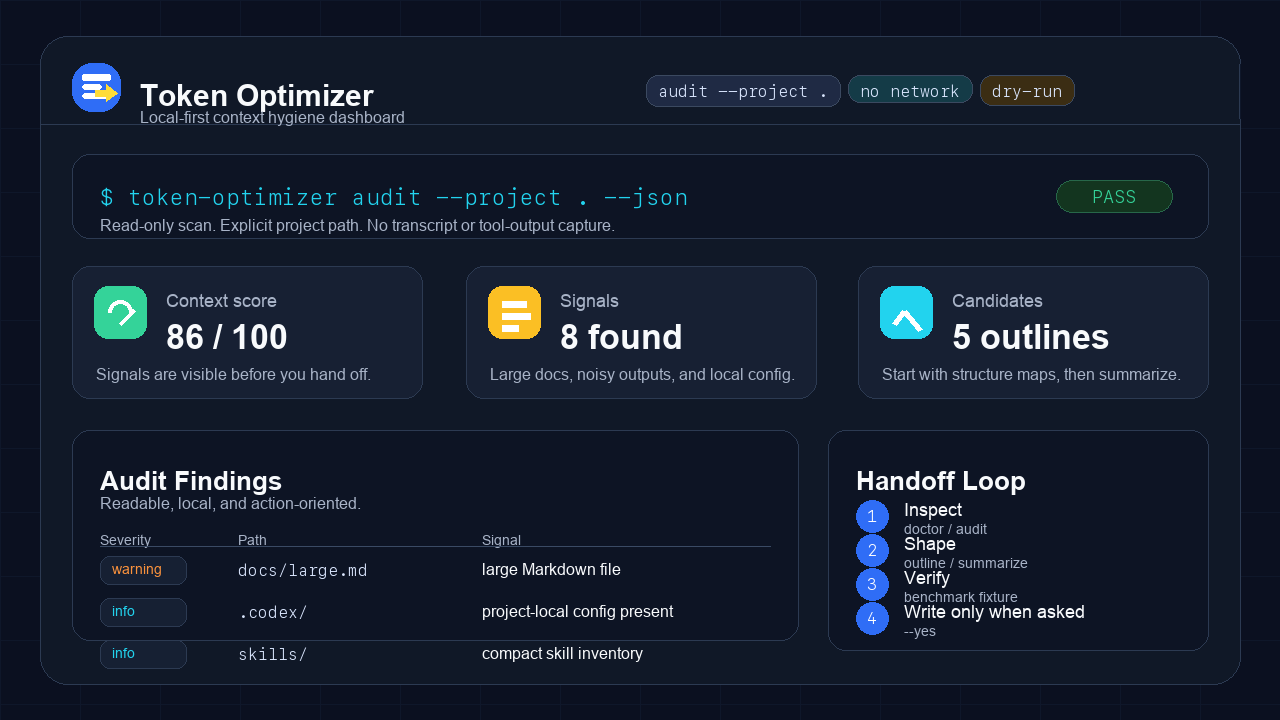
Token Optimizer helps you inspect context bloat, summarize explicit files, generate lightweight handoffs, and benchmark context-shaping workflows without installing invasive global hooks or collecting sensitive session data by default.
| Start Here | Then Check | Deep Dive |
|---|---|---|
| Install | Benchmark Snapshot | Command Reference |
| Quick Start | Safety Model | Release Checks |
| What It Does | Provider Modes | More Docs |
| How It Works |
| Package | token-optimizer |
|---|---|
| CLI | token-optimizer |
| Version | 0.1.0 |
| License | Apache-2.0 |
| Default network calls | none |
| Default daemon/background process | none |
| Default raw transcript capture | none |
| Default raw file/tool-output persistence | none |
| Mutating commands | require explicit --yes |
AI coding sessions get expensive and fuzzy when every handoff starts by rereading the same files, pasting noisy command output, and rediscovering decisions that should have been compacted. Token Optimizer aims to make that hygiene visible and repeatable.
It is not a magic token counter or an always-on recorder. The MVP is deliberately small: inspect, outline, summarize, benchmark explicit fixtures, and write only project-local Token Optimizer state when asked.
Note
Token Optimizer is built for context hygiene, not hidden automation. The
fastest path through the tool is still explicit: inspect first, choose inputs,
then write only when you pass --yes.
| Workflow | Command | What You Get |
|---|---|---|
| Inspect setup | token-optimizer doctor |
Project-local paths, hook state, and safety warnings |
| Find context bloat | token-optimizer audit --project . |
Static signals for large files, noisy artifacts, guidance files, and plugin shape |
| Generate dashboard | token-optimizer dashboard --project . --dry-run |
A plan for a static HTML audit dashboard with Expert mode for raw JSON |
| Outline files | token-optimizer outline <file> |
A structure map before rereading a large Markdown or Python file |
| Summarize files | token-optimizer summarize <files...> |
A compact continuation summary from explicit inputs |
| Benchmark fixture | token-optimizer benchmark --fixture <path> |
Provider-neutral static_estimate comparison |
| Initialize state | token-optimizer config init --project . --dry-run |
Project-local config/data plan |
| Clean up | token-optimizer purge --project . --dry-run |
Token Optimizer-owned cleanup plan |
| Manage hooks | token-optimizer hooks install --project . --dry-run |
Advanced experimental Stop-hook plan |
| Hook MCP control | Token Optimizer plugin hook control | Interactive MCP control with native approval-form fallback for the experimental no-op Stop-hook entry |
With pipx (recommended):
pipx install token-optimizerWith pip:
python3 -m pip install token-optimizerFrom a local checkout:
python3 -m pip install .Verify:
token-optimizer doctorRequires Python 3.11+. Full options in docs/install-cli.md. Claude Code / Codex plugin install is under Plugin Packages.
From a source checkout:
PYTHONPATH=src python3 -m token_optimizer.cli doctor
PYTHONPATH=src python3 -m token_optimizer.cli audit --project .
PYTHONPATH=src python3 -m token_optimizer.cli outline README.md
PYTHONPATH=src python3 -m token_optimizer.cli summarize README.md SECURITY.md
PYTHONPATH=src python3 -m token_optimizer.cli benchmark --fixture benchmarks/fixtures/common-python-cli-session
Installed as a package:
token-optimizer doctor
token-optimizer audit --project .
token-optimizer outline README.md
token-optimizer summarize README.md SECURITY.md
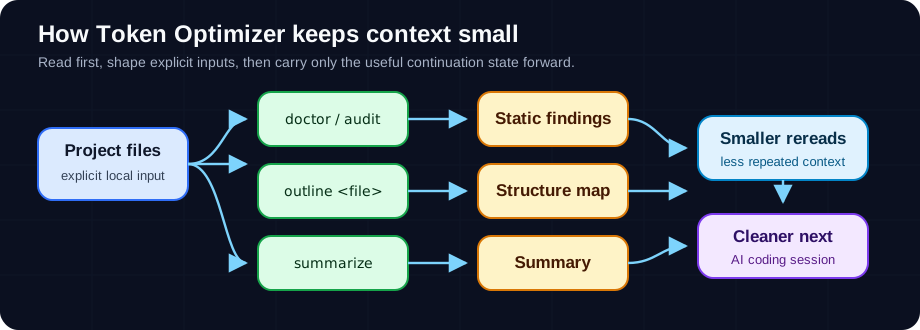
| 1 | Start with read-only inspection. |
| 2 | Require explicit project paths or explicit input files. |
| 3 | Keep default workflows local-only. |
| 4 | Make mutating actions dry-run inspectable. |
| 5 | Store only Token Optimizer-owned project-local files when asked. |
| 6 | Keep provider-specific token numbers separate from static estimates. |
The checked-in fixture models a small Python CLI coding session with baseline context files and optimized outline/summary outputs.
Important
The chart below is a provider-neutral fixture result. It is not exact model tokens, billing usage, live Codex context-window usage, or a universal savings claim.
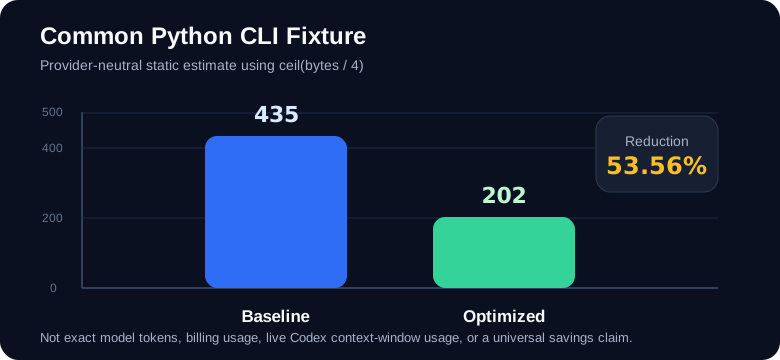
| Baseline estimate | 435 |
|---|---|
| Optimized estimate | 202 |
| Reduction | 233 |
| Reduction percent | 53.56% |
| Preservation checks | all pass |
| Side | File | Bytes | Static Estimate |
|---|---|---|---|
| Baseline | baseline/cli.py | 328 | 82 |
| Baseline | baseline/continuation-note.md | 255 | 64 |
| Baseline | baseline/error-output.txt | 236 | 59 |
| Baseline | baseline/readme.md | 332 | 83 |
| Baseline | baseline/security-model.md | 277 | 70 |
| Baseline | baseline/test-output.txt | 307 | 77 |
| Optimized | optimized/outline-output.txt | 134 | 34 |
| Optimized | optimized/summary-output.txt | 672 | 168 |
These numbers are provider-neutral static_estimate values using
ceil(bytes / 4). They are useful for checking the fixture and
methodology. They are not exact model tokens, not billing numbers, not live
Codex context-window usage, and not a universal savings claim.
| Situation | Why It Helps |
|---|---|
| A session keeps rereading setup files | outline and summarize make the next read smaller and more deliberate |
| Command output is drowning useful facts | audit flags noisy artifacts before they become handoff clutter |
| You want a dashboard without a service | dashboard --dry-run and --yes produce static HTML only, with Expert mode for raw audit JSON |
| You need benchmark discipline | benchmark --fixture separates static estimates from provider-specific counts |
| You are considering hooks | hooks install --dry-run, the plugin hook control app, or the native fallback form shows the exact managed block before any write |
| Area | Default Posture | Opt-In Behavior |
|---|---|---|
| Network | No default network calls | Live provider benchmarks only when explicitly invoked |
| Persistence | No raw transcripts, raw file contents, or raw tool output | Project-local config/data with --yes |
| Hooks | No hook installed by plugin installation | Advanced experimental Stop-hook entry requires dry-run review plus --yes --experimental, hook control app approval, or explicit native-form approval; the installed command is intentionally no-op in 0.1.0 |
| Dashboard | No server or watcher | Static HTML file under .codex/token-optimizer/ |
| Cleanup | No implicit deletes | purge --dry-run, then purge --yes |
Writable Token Optimizer-owned paths are constrained to the selected project.
Dashboard output is constrained to .codex/token-optimizer/.
Hook/config/purge apply paths reject symlinked parent escapes and stale plans
before writing or removing project-owned state.
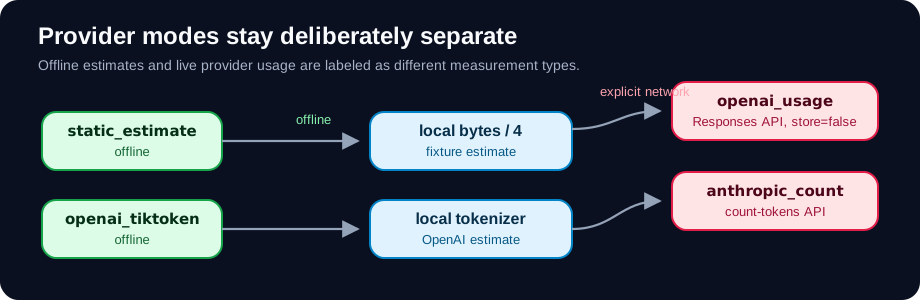
| Mode | Command | Network | Credential | Report Label |
|---|---|---|---|---|
| Static estimate | benchmark --fixture <path> | no | none | static_estimate |
| OpenAI tokenizer | benchmark openai-tiktoken --fixture <path> --model <model> | no | none | openai_tokenizer_estimate |
| OpenAI live usage | benchmark openai-usage --fixture <path> --model <model> | yes | OPENAI_API_KEY | openai_provider_usage |
| Anthropic live count | benchmark anthropic-count --fixture <path> --model <model> | yes | ANTHROPIC_API_KEY | anthropic_count_tokens |
Live provider modes send only the explicit fixture text. OpenAI live usage
sends requests with store=false. Provider benchmark reports are
printed to stdout and are not persisted by Token Optimizer.
| Good Fit | Tradeoff |
|---|---|
| Local-first teams that want inspectable context hygiene | It will not silently watch or optimize every session |
| Repos with repeated handoff and reread overhead | You must choose explicit files or fixtures |
| Users who want dry-run-first project-local changes | Mutating workflows are intentionally a little slower |
| Benchmark methodology work | Static estimates are approximate by design |
| Inert plugin packaging | Active hook automation is intentionally deferred/gated |
Current CLI surface
| Command | Read/Write | Notes |
|---|---|---|
doctor | read | Shows setup status |
doctor --json | read | Stable JSON report |
audit --project . | read | Static context-hygiene findings |
audit --project . --json | read | Stable JSON report |
dashboard --project . --dry-run | read | Shows planned dashboard path/content |
dashboard --project . --yes | write | Writes static HTML under .codex/token-optimizer/; Expert mode reveals raw audit JSON |
outline <file> | read | Markdown and Python structure maps |
summarize <files...> | read | Explicit file summaries only |
handoff <files...> | read | Alias for summarize |
summarize --git-state | read | Adds opt-in local git branch/status/commit context |
benchmark --fixture <path> | read | Provider-neutral fixture estimate |
benchmark --fixture <path> --json | read | Stable JSON report |
config init --project . --dry-run | read | Project-local config/data plan |
config init --project . --yes | write | Creates .codex/token-optimizer.json and .codex/token-optimizer/ |
purge --project . --dry-run | read | Cleanup plan |
purge --project . --yes | write | Removes Token Optimizer-owned state |
hooks install --project . --dry-run | read | Advanced experimental hook plan |
hooks install --project . --yes --experimental | write | Installs an active Stop-hook entry that invokes an intentionally no-op command |
| Plugin hook control app/native fallback | write, after approval | Installs or removes only the Token Optimizer managed no-op Stop-hook entry |
hooks uninstall --project . --yes | write | Removes managed hook state |
Token Optimizer ships native package surfaces for Codex and Claude Code. The Codex package includes the local MCP hook-control surface. The Claude Code package is skill-only in 0.1.0 and guides safe CLI usage without installing hooks, starting MCP servers, or bundling the Python CLI binary.
| Surface | Path | Includes | Does Not Include |
|---|---|---|---|
| Codex | .codex-plugin/, marketplace/plugins/token-optimizer/ | Skill, assets, local MCP hook-control server | Default hook install, daemon, networked service |
| Claude Code | .claude-plugin/marketplace.json, plugins/token-optimizer/ | Skill-only native Claude Code plugin | Hook install, MCP server, daemon, bundled Python CLI |
Install the plugins from GitHub:
codex plugin marketplace add avikahana/token-optimizer --sparse marketplace
codex plugin add token-optimizer@token-optimizer-local

claude plugin marketplace add avikahana/token-optimizer
claude plugin install token-optimizer@token-optimizer
The plugins expect the token-optimizer CLI to be available separately. Install
it first as shown in Install.
Detailed install and support docs:
CLI Install · Codex Install · Claude Code Install · Provider And Surface Support
Validation commands and artifact boundaries
Run these before tagging or publishing artifacts:
PYTHONPATH=src PYTHONDONTWRITEBYTECODE=1 python3 -m unittest discover -s tests -q
python3 scripts/check_release_artifacts.py
PYTHONPATH=/private/tmp/token-optimizer-validator-pyyaml python3 /path/to/validate_plugin.py .
PYTHONPATH=/private/tmp/token-optimizer-validator-pyyaml python3 /path/to/validate_plugin.py marketplace/plugins/token-optimizer
claude plugin validate .
claude plugin validate ./plugins/token-optimizer
For local marketplace install checks, use
docs/local-marketplace-verification.md.
| Artifact | Boundary |
|---|---|
| Wheel | Installable package, metadata, entry points, license |
| Source distribution | Source, tests, benchmark fixtures, release scripts, public docs |
| Codex plugin package | .codex-plugin/, .mcp.json, mcp/, skills/, assets/ only |
| Claude Code plugin package | .claude-plugin/, skills/, and package README only |
Security · Privacy · Terms · Release Notes · Benchmarking · Provider Guide · Persistence Map
Repository:
github.com/avikahana/token-optimizer
Privacy ·
Terms ·
Release Notes
Token Optimizer is licensed under the Apache License 2.0.