
RAG in 3 functions.



Sources → Transforms → Sinks for vector databases.
Zero config. Works with Ollama, OpenAI, Qdrant, Pinecone, or just a JSON file.
RAG (Retrieval-Augmented Generation) is how you give an AI access to your own data. Instead of guessing answers, the AI first searches your documents, finds the relevant parts, and then generates an answer based on what it found.
The problem? Getting your data into a searchable format is painful. You need to:
- Extract text from files, websites, code repos
- Chunk it into smaller pieces (AI can't read a 100-page PDF at once)
- Embed each chunk into numbers (so similar text gets similar numbers)
- Store those embeddings in a vector database
- Search when someone asks a question
RAGPipe does all 5 steps in one pipeline. You tell it where your data is and where it should go. That's it.
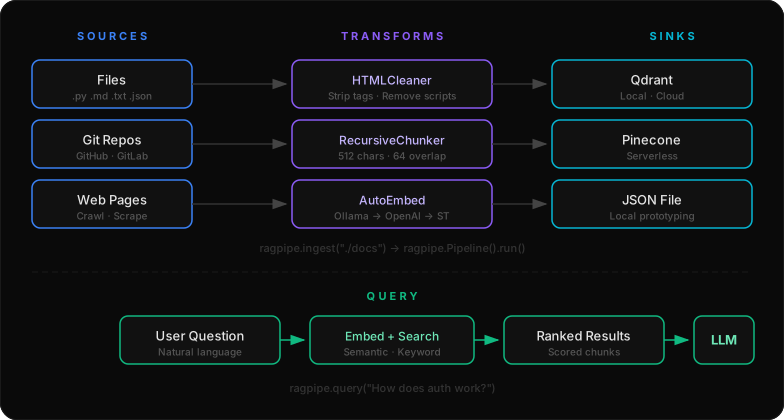
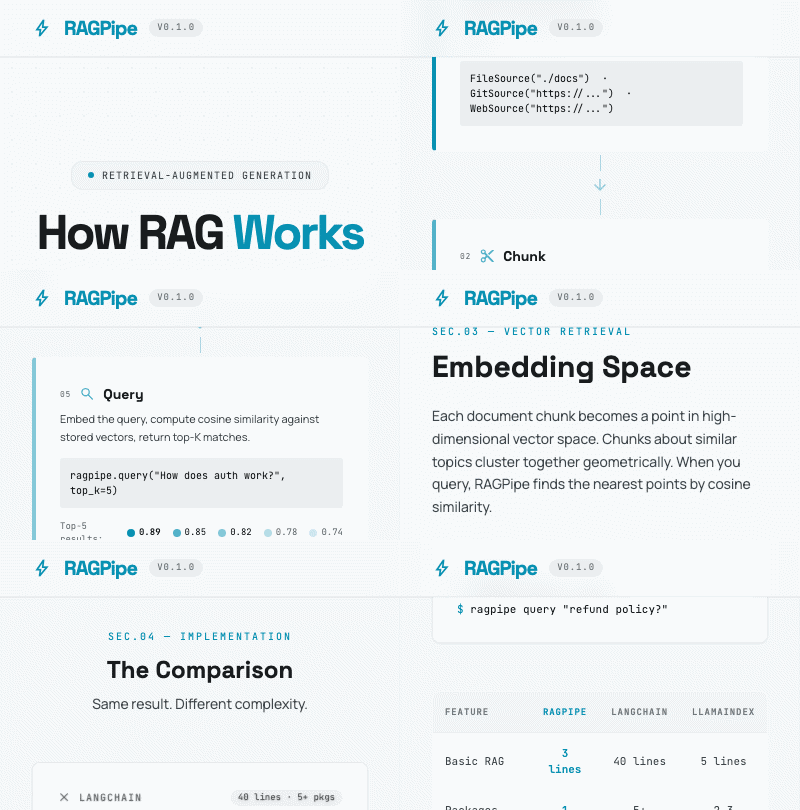
How it works: Your data flows through three stages — Sources pull data in, Transforms process it (clean, chunk, embed), and Sinks store the results in a vector database. When you query, RAGPipe searches the stored embeddings and returns the most relevant chunks.
pip install ragpipe-aiWith extras
pip install 'ragpipe-ai[cli,web]'    # CLI + web scraping
pip install 'ragpipe-ai[qdrant]'      # Qdrant vector DB
pip install 'ragpipe-ai[all]' # everythingimport ragpipe
# 1. Ingest anything — files, git repos, web pages
ragpipe.ingest("./docs", sink="json", sink_path="./my_data.json")
# 2. Query your data
results = ragpipe.query("What is the refund policy?", sink_path="./my_data.json")
print(results[0].content)
# 3. Pipe — full control with the Pipeline API
pipeline = ragpipe.Pipeline()
pipeline.add_source(ragpipe.GitSource("https://github.com/owner/repo"))
pipeline.add_transform(ragpipe.RecursiveChunker(chunk_size=512))
pipeline.add_transform(ragpipe.AutoEmbed())
pipeline.add_sink(ragpipe.QdrantSink("my-repo"))
pipeline.run()That's it. No boilerplate, no frameworks, no config files (unless you want them).

# Create a starter pipeline config
ragpipe init

# Ingest a directory
ragpipe ingest ./docs

# Ingest a GitHub repo
ragpipe ingest https://github.com/owner/repo --embed

# Scrape a website
ragpipe ingest https://docs.example.com

# Query your data
ragpipe query "How does auth work?"

# Run a YAML pipeline
ragpipe run pipeline.yaml# Auto-detect language, ignore node_modules/.git/etc, chunk and store
ragpipe index .
# Watch for changes and auto-reindex
ragpipe watch . --chunk-size 256
# Start a local API server (for VSCode, curl, any tool)
ragpipe serve --port 7642ragpipe search --fzfragpipe git hook . # install
ragpipe git remove . # remove
ragpipe git list . # list installedragpipe vscode tasks . # generates .vscode/tasks.json
ragpipe vscode settings # generates .vscode/settings.jsonragpipe macos spotlight "python files" --path ~/code
ragpipe macos index ~/projects/my-appragpipe linux service --install # install as systemd service
ragpipe linux timer . -i daily # auto-index on scheduleragpipe ingest ./docs --embed --sink qdrant --collection my-kb
ragpipe query "What features are in v2?" --sink qdrantDrop a pipeline.yaml in your project and run it with one command:
source:
  type: git
  repo_url: https://github.com/owner/repo
  file_patterns:
    - "src/**/*.py"
    - "docs/**/*.md"

transforms:
  - type: html_cleaner
  - type: recursive_chunker
    chunk_size: 512
    chunk_overlap: 64
  - type: auto_embed

sinks:
  - type: qdrant
    collection_name: my-repo
    url: http://localhost:6333
    vector_size: 384
ragpipe run pipeline.yamlAutoEmbed tries each backend in order and uses the first available:
| Priority | Backend | Dimensions | Setup |
|---|---|---|---|
| 1 | Ollama (local) | 768 | ollama pull nomic-embed-text |
| 2 | OpenAI | 1536 | Set OPENAI_API_KEY |
| 3 | sentence-transformers (local) | 384 | pip install 'ragpipe-ai[local]' |
Or point to any OpenAI-compatible API:
ragpipe.ingest("./docs", embed=True, embed_base_url="http://localhost:11434/v1", embed_model="nomic-embed-text")| Source | Example | Description |
|---|---|---|
FileSource |
FileSource("./docs") |
Local files and directories |
GitSource |
GitSource("https://github.com/owner/repo") |
Clone git repos |
WebSource |
WebSource("https://example.com") |
Scrape web pages |
| Transform | Description |
|---|---|
RecursiveChunker(chunk_size=512, chunk_overlap=64) |
Split text using hierarchical separators |
FixedSizeChunker(chunk_size=512) |
Split by fixed size |
SemanticChunker(embedding_model=...) |
Split by semantic similarity |
HTMLCleaner() |
Strip HTML to clean text |
PIIRemover() |
Redact emails, phones, SSN, etc. |
AutoEmbed() |
Zero-config embeddings (Ollama → OpenAI → ST) |
EmbeddingTransform(model=..., api_key=...) |
Explicit OpenAI-compatible embeddings |
| Sink | Example |
|---|---|
JSONSink(path="./out.json") |
Write to JSON file |
QdrantSink("collection", url="...", vector_size=384) |
Write to Qdrant |
PineconeSink("index", api_key="...", dimension=384) |
Write to Pinecone |
import ragpipe

pipeline = (
    ragpipe.Pipeline()
    .add_source(ragpipe.WebSource(
        urls=["https://docs.example.com"],
        max_depth=1,
        allowed_domains=["example.com"],
    ))
    .add_transform(ragpipe.HTMLCleaner())
    .add_transform(ragpipe.PIIRemover())
    .add_transform(ragpipe.RecursiveChunker(chunk_size=1024, chunk_overlap=128))
    .add_transform(ragpipe.AutoEmbed())
    .add_sink(ragpipe.QdrantSink(
        collection_name="example-docs",
        url="http://localhost:6333",
        vector_size=384,
    ))
)

stats = pipeline.run()
# {'extracted': 47, 'transformed': 312, 'written': 312}docs = pipeline.dry_run()
for doc in docs:
print(f"[{doc.metadata.get('path', '?')}] {doc.char_count} chars")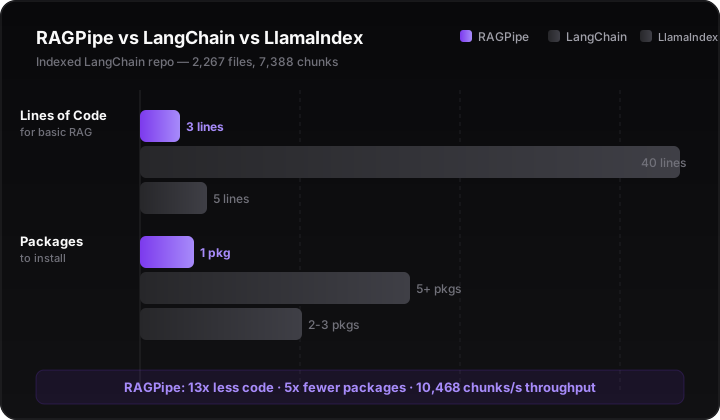
Indexed the LangChain repo (2,267 Python files, 7,388 chunks) on a 64-core Xeon:
| Metric | Result |
|---|---|
| File discovery | 0.32s |
| Chunking | 0.09s |
| JSON persistence (14.8 MB) | 0.29s |
| Total index time | 0.71s |
| Throughput | 10,468 chunks/s |
| Query (keyword, top-5) | 0.20s |
One-liner equivalent:
ragpipe ingest ./langchain --chunk-size 1000
ragpipe query "How does the chain interface work?"How does RAGPipe compare to the existing tools?
LangChain (~40 lines, 5 packages):
from langchain_community.document_loaders import WebBaseLoader
from langchain_text_splitters import RecursiveCharacterTextSplitter
from langchain_openai import OpenAIEmbeddings
from langchain_core.vectorstores import InMemoryVectorStore

loader = WebBaseLoader(web_paths=("https://example.com",))
docs = loader.load()
splits = RecursiveCharacterTextSplitter(chunk_size=1000, chunk_overlap=200).split_documents(docs)
vector_store = InMemoryVectorStore(OpenAIEmbeddings())
vector_store.add_documents(documents=splits)
# ... then wire up a retriever + LLM chain
LlamaIndex (~5 lines, 2 packages):
from llama_index.core import VectorStoreIndex, SimpleDirectoryReader

docs = SimpleDirectoryReader("data").load_data()
index = VectorStoreIndex.from_documents(docs)
response = index.as_query_engine().query("What is task decomposition?")
RAGPipe (3 lines, 1 package, zero config):
pip install ragpipe-ai
ragpipe index ./docs
ragpipe query "What is task decomposition?"
Or in Python:
import ragpipe
ragpipe.ingest("./docs")
results = ragpipe.query("What is task decomposition?")| RAGPipe | LangChain | LlamaIndex | Chroma | Unstructured | |
|---|---|---|---|---|---|
| Basic RAG in 3 lines | CLI + Python | 40 LOC | 5 LOC | N/A | N/A |
| Packages to install | 1 | 5+ | 2-3 | 1 | 1-2 |
| CLI | Built-in | Separate | Separate | Built-in | No |
| YAML config pipelines | Built-in | No | No | No | No |
| Smart project indexing | Built-in | No | No | No | No |
| Git hooks | Built-in | No | No | No | No |
| VSCode tasks | Built-in | No | No | No | No |
| fzf integration | Built-in | No | No | No | No |
| systemd service | Built-in | No | No | No | No |
| REST API server | Built-in | Separate | No | Built-in | No |
| Document loaders | Common formats | 160+ | 300+ | N/A | 15+, best PDF |
| Vector stores | 3 (configurable) | 40+ | 40+ | IS the store | N/A |
| Agent framework | No | LangGraph | Agents | No | No |
| Local-first (no API key) | Yes | No | Partial | Yes | No |
RAGPipe isn't trying to be LangChain. It's ops-native RAG infrastructure — the docker-compose of RAG pipelines.
- LangChain/LlamaIndex are frameworks with 100+ integrations. They're great if you need an obscure vector store or multi-agent orchestration. They require 5+ packages and 40+ lines for basic RAG.
- Chroma is a vector database. It stores embeddings. That's it.
- Unstructured is a document preprocessor. It parses PDFs. That's it.
- RAGPipe is the glue. You point it at data, it handles the rest — with a CLI, git hooks, systemd, VSCode, and fzf baked in.
- Ecosystem breadth — LangChain and LlamaIndex have 100+ integrations each. We have 3 vector stores and 3 sources. (We're opinionated, not exhaustive.)
- Document parsing — Unstructured is best-in-class for PDF/OCR. We read text files.
- Agent orchestration — LangGraph handles stateful multi-step agents. We don't do agents.
- 3 API calls.
ingest(),query(),Pipeline(). That's the whole surface area. - Zero config. Auto-detects files, auto-embeds with whatever you have installed.
- YAML pipelines. Declarative configs like
docker-composefor RAG. - Beautiful CLI. Rich progress bars, tables, and status spinners.
- Any source. Files, git repos, web pages — one interface.
- Any vector DB. Qdrant, Pinecone, or just a JSON file.
- Local-first. Works with Ollama and sentence-transformers. No API keys needed.
- Smart indexing.
ragpipe index .auto-detects your language and ignores the right files. - System integration. Git hooks, VSCode tasks, macOS Spotlight, Linux systemd.
- REST API.
ragpipe serveexposes/search,/health,/chunksfor any tool. - fzf.
ragpipe search --fzffor interactive terminal search. - Typed. Full type annotations, mypy-friendly.
Business Source License 1.1 (BSL 1.1). Non-competing use is Apache 2.0. See LICENSE.
Built by avasis-ai