





InteractiveChecklists is an Android application for viewing and interacting with Markdown and PDF checklists. It is built with Jetpack Compose and follows an MVVM-style architecture.
Development status: This repository is a development version and not an official release. The app is functional but under active development and may contain experimental features.
Note: A preview APK for version 1.1 is planned. If you are not familiar with Android Studio or building apps from source, please wait for the official preview release to test the app.
Table of Contents
- Features
- Screenshots
- Demo Videos
- Installation
- System Requirements
- How to Build & Run
- Key Components
- Contributing
- Support & Contact
- FAQ
- Acknowledgements & Credits
- License
-
Unified File System: Manage files from bundled assets and internal storage in a single hierarchical view.
-
Multilanguage Support: The app supports English, Spanish and German. You can switch the language in the Settings menu. All UI text is available in English.
-
Multi-Tab System: Open multiple documents (MD/PDF) with a scrollable tab bar, quick tab switcher, swipe navigation, and tab persistence.
-
PDF Viewer: PDF viewer with annotations (draw/highlight/erase), pinch-to-zoom, page snapping, and color inversion.
-
Interactive Markdown Checklists: Stateful checkboxes and collapsible sections for interactive checklists.
-
Tagging System: Assign tags to files for filtering and organization.
-
QuickNotes: Persistent notes powered by Room, with search, autosave, and markdown support.
-
Data Persistence: Stores user preferences, annotations, shortcuts, tags, and open tabs locally.
-
DataPad (experimental): Live flight telemetry display (UDP) for DCS World. Streams aircraft telemetry to the app for realtime status and popup details — see docs/EN/features/DATAPAD_FEATURE.md for full details and setup instructions.
-
Tactical Units Tracking (experimental): Live tactical unit markers (aircraft, helicopter, ground, ship) on the map with real-time updates. Marker popups include "Last seen" timestamps and refresh snippets with speed/altitude. A "Live Units Only" filter (shows units seen in the last 10s) is synchronized between the list and the map. See docs/EN/features/TACTICAL_UNITS_TRACKING.md and scripts/DCS-SCRIPTS-FOLDER-Experimental/README_ENTITY_TRACKING.md for setup and details.
-
Aviation Map (experimental): OpenStreetMap-based map viewer with live aircraft position tracking from the DataPad stream. Adds a
MapViewertab showing aircraft position, heading, altitude and basic overlays — see docs/EN/features/AVIATION_MAP_FEATURE.md for details and configuration. -
MapDatabaseTools (Python): A collection of Python utilities for receiving, decrypting (AES-GCM), and visualizing DCS flight telemetry. Includes a PySide6 GUI with an embedded OpenStreetMap/Leaflet map for live aircraft tracking, a marker database, and helper scripts to manage map assets. See
scripts/MapDatabaseTools/README.mdfor usage and configuration. -
Supported maps (marker DB):
| Map | Status | Notes |
|---|---|---|
| Caucasus | Supported | Marker set available in DB |
| Marianas | Supported | Marker set available in DB |
| Germany (CW) | mostly Supported | Marker addition in progress |
DataPad is an experimental feature that receives real-time aircraft telemetry from DCS World via UDP (default port 5010). It is intended for advanced users and requires running the forward_parsed_udp.py script to forward telemetry to your device.
✅ ECDH Handshake Mode - Production-ready secure communication with AES-256-GCM encryption, device authentication via authorized_devices.json, forward secrecy, replay attack protection, and mutual authentication (client ↔ server).
🔒 Server Key Pinning (TOFU) - Trust-On-First-Use server key pinning detects man-in-the-middle attacks after first connection.
🔑 PSK Handshake Manager (optional) - Pre-shared key mode for compatibility and scripted deployments. See docs for 32-byte key generation and distribution.
🛡️ Optional Proof-of-Work (PoW) - Configurable anti-DoS protection for handshake requests using --enable-pow and --pow-difficulty.
Quick Start (Handshake & PoW):
# Python: Enable handshake mode (ECDH + TOFU)
python forward_parsed_udp.py --interval 10 --host 192.168.178.132 --port 5010 --verbose --authorized-devices authorized_devices.json --bind-ip 192.168.178.100

# Python: Enable Proof-of-Work (anti-DoS)
python forward_parsed_udp.py --enable-pow --pow-difficulty 16 --interval 10 --host 192.168.178.132 --port 5010 --verbose --authorized-devices authorized_devices.json --bind-ip 192.168.178.100

# Python: Same-PC testing with handshake port
python forward_parsed_udp.py --repeat-last --interval 3 --host 127.0.0.1 --port 5010 --handshake-port 5011 --use-handshake --authorized-devices authorized_devices.json

# Single wildcard (entire subnet)
python forward_parsed_udp.py --host 192.168.178.* --port 5010

# Multiple specific hosts
python forward_parsed_udp.py --host 192.168.178.100 --host 192.168.178.101 --port 5010

# Mix of specific and wildcard
python forward_parsed_udp.py --host 192.168.178.50 --host 192.168.178.* --port 5010

# Android: Settings → DataPad → Enable "ECDH Handshake Mode" (optional: enable Server Key Pinning / configure Pre-Shared Key)
# Add your device ID to authorized_devices.json on the server
See docs/EN/technical/ECDH_USAGE_GUIDE.md and docs/EN/technical/DATA_FLOW_ANALYSIS.md for setup, PSK guidance, and PoW tuning.
Device registration (recommended options):
- Recommended (easiest): QR-based registration — generate a short-lived token on the server and scan it with the Android DataPad app. Example token generation:
python scripts/DCS-SCRIPTS-FOLDER-Experimental/registration_token.py generate --server-ip <IP> --port 5010On Windows you can also use the launcher to avoid running the command manually: start scripts/DCS-SCRIPTS-FOLDER-Experimental\run.bat and when the forwarder starts you'll see a short interactive prompt — press B within 5 seconds to automatically generate the registration token and display the QR code (this runs the same registration_token.py generate command inside the virtual environment). This makes registration much simpler: you do not need to open a separate shell and run the Python command manually. Use --skip-qr-prompt to disable the interactive prompt. A successful registration will automatically add the device to scripts/DCS-SCRIPTS-FOLDER-Experimental/authorized_devices.json.
- Manual: Alternatively, add your device entry directly to
scripts/DCS-SCRIPTS-FOLDER-Experimental/authorized_devices.json. Manual edits are useful for scripted deployments, headless servers, or environments without QR scanning.
Windows convenience scripts:
For Windows servers we provide helper scripts that set up a Python virtual environment and launch the server with a configuration menu:
- Run
scripts/DCS-SCRIPTS-FOLDER-Experimental\install.batto create and populate a venv and install dependencies. - Run
scripts/DCS-SCRIPTS-FOLDER-Experimental\run.batto open the configuration menu and start the forwarder inside the venv.
The launcher exposes configuration options and can be integrated with Task Scheduler or run as a service to start at boot, which makes the server easier to run and more accessible.
Entity Contacts (tactical units): Enable Entity Tracking and run the forwarder with entity tracking enabled to receive live markers; see scripts/DCS-SCRIPTS-FOLDER-Experimental/README_ENTITY_TRACKING.md and docs/EN/features/TACTICAL_UNITS_TRACKING.md.
See docs/EN/features/DATAPAD_FEATURE.md for full usage, configuration, and troubleshooting.
Phase 1 (experimental): This is Phase 1 of DataPad — future phases will add more telemetry, visualizations, and security improvements.
Next up: 2-way communication (experimental) to enable data flow back to DCS.


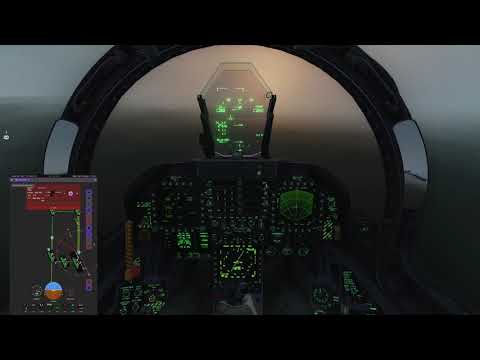
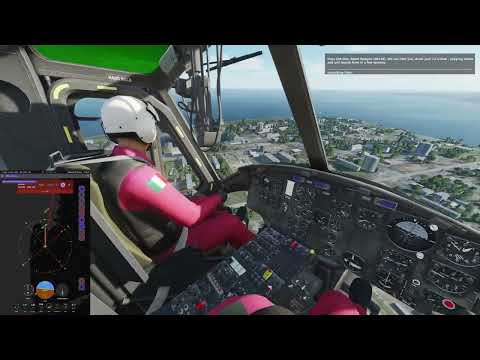
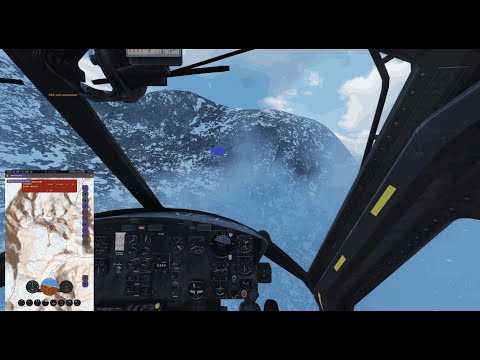
📝 NOTE
This is a test recording to evaluate recording performance, tablet capture workflow, resolution settings, and overall system stability during DCS gameplay. Mission content and pacing are deliberately simple and functional.
Step-by-step instructions to get the project running locally.
-
Prerequisites
- Install Android Studio (Arctic Fox or later recommended).
- Install a compatible JDK (Java 11 or later recommended).
- Configure Android SDK and at least one emulator or use a physical device.
- For Python forwarder scripts (optional): install
qrcodeand cryptography dependencies:pip install qrcode[pil] cryptography cffi(use a virtual environment to avoid system conflicts).
-
Clone the repository
git clone https://github.com/arn-c0de/InteractiveChecklists.git
cd InteractiveChecklists- Build with Gradle (command-line)
./gradlew assembleDebug- Open in Android Studio
- Open the
InteractiveChecklistsdirectory in Android Studio. - Let Gradle sync and allow Android Studio to download any missing SDK components.
- Run the app on an emulator or connected device.
- Open the
- Supported OS: Windows, macOS, Linux (for development).
- Android Studio: Arctic Fox or newer recommended.
- JDK: Java 11+ recommended.
- Android SDK: API level corresponding to the project's
compileSdkandtargetSdk(seebuild.gradle.kts).
- From Android Studio: Open the project, wait for Gradle to finish syncing, then select a target device and click Run.
- From the command line:
./gradlew assembleDebugbuilds an APK; use./gradlew installDebugto install on a connected device.
MainActivity.kt: App entry point and navigation orchestration.data/files/InternalFileManager.kt: Unified file management.ui/files/InternalFilesScreen.kt: File browser and tagging UI.ui/checklist/MarkdownViewer.kt: Interactive markdown checklist viewer.ui/checklist/PdfViewer.kt: PDF viewer and annotation tools.data/quicknotes/QuickNoteManager.kt: QuickNotes data layer.
We welcome contributions. For guidelines, issue workflow, and coding standards, see COLLABORATORS.md.
Quick contribution ideas:
- Improve documentation or add examples.
- Add or extend tests.
- Fix small UI/UX bugs or accessibility issues.
For larger or breaking changes, please open an issue first to discuss design and scope.
Planned features and long-term improvements are tracked in the Roadmap document.
If you encounter issues or have questions:
- Open an issue in this repository.
- For security-sensitive issues, please follow the instructions in SECURITY.md.
- For contribution coordination and discussions, see COLLABORATORS.md.
- Q: How do I run tests?
- A: There are unit tests under
app/src/test. Run them via./gradlew test.
- A: There are unit tests under
- Q: What is the license?
- A: This project is licensed under CC-BY-NC-SA 4.0. See the
LICENSEfile for details.
- A: This project is licensed under CC-BY-NC-SA 4.0. See the
- Q: Where is the documentation?
- A: See the
docs/folder or the Documentation index.
- A: See the
Thanks to all contributors and to the Jetpack Compose and Android open-source ecosystems used in this project.
This project is licensed under the terms in the LICENSE file (CC BY-NC-SA 4.0).