Desqueezer is a Lightroom plugin that batch-applies an anamorphic desqueeze factor to selected DNG files by modifying their metadata using exiftool.
❗Please note: This plugin irreversibly changes the metadata. Please backup your photos before use.

Before running the plugin, make sure the following setup steps are completed:
This plugin uses exiftool to modify DNG metadata.
Install it via Homebrew:
brew install exiftoolFrom the root of the plugin directory, run:
chmod +x ./scripts/desqueezer.shThis plugin only works on DNG files. If your camera does not shoot in DNG format, export your photos to DNG:
- Create a subfolder
- Export the images as DNG
Run the brew:install script located in the package.json file. Those scripts are required for keeping the repository neatly formatted and cleanly written.
To install Desqueezer in Lightroom Classic:
-
Download the newest release of this Plugin.
-
Locate or create your Lightroom Plugins folder. This is usually located in:
- macOS:
~/Library/Application Support/Adobe/Lightroom/Modules/ - Windows:
C:\Users\<YourName>\AppData\Roaming\Adobe\Lightroom\Modules\
- macOS:
-
Copy the entire
Desqueezer.lrdevpluginfolder (including all its contents) into thatModulesdirectory. -
Open Lightroom Classic.
-
Go to:
File → Plug-in Manager... -
Click "Add" (or "Reload Plug-in" if updating), then navigate to the
Desqueezer.lrdevpluginfolder. -
Click Done when the plugin is successfully loaded.
You should now see "Adrian Kulik Anamorphic Utilities → Desqueezer" as an option under:
Library → Plug-in ExtrasFile → Plug-in Extras
💡 If you make changes to the plugin code, you can simply reload it from the Plug-in Manager.
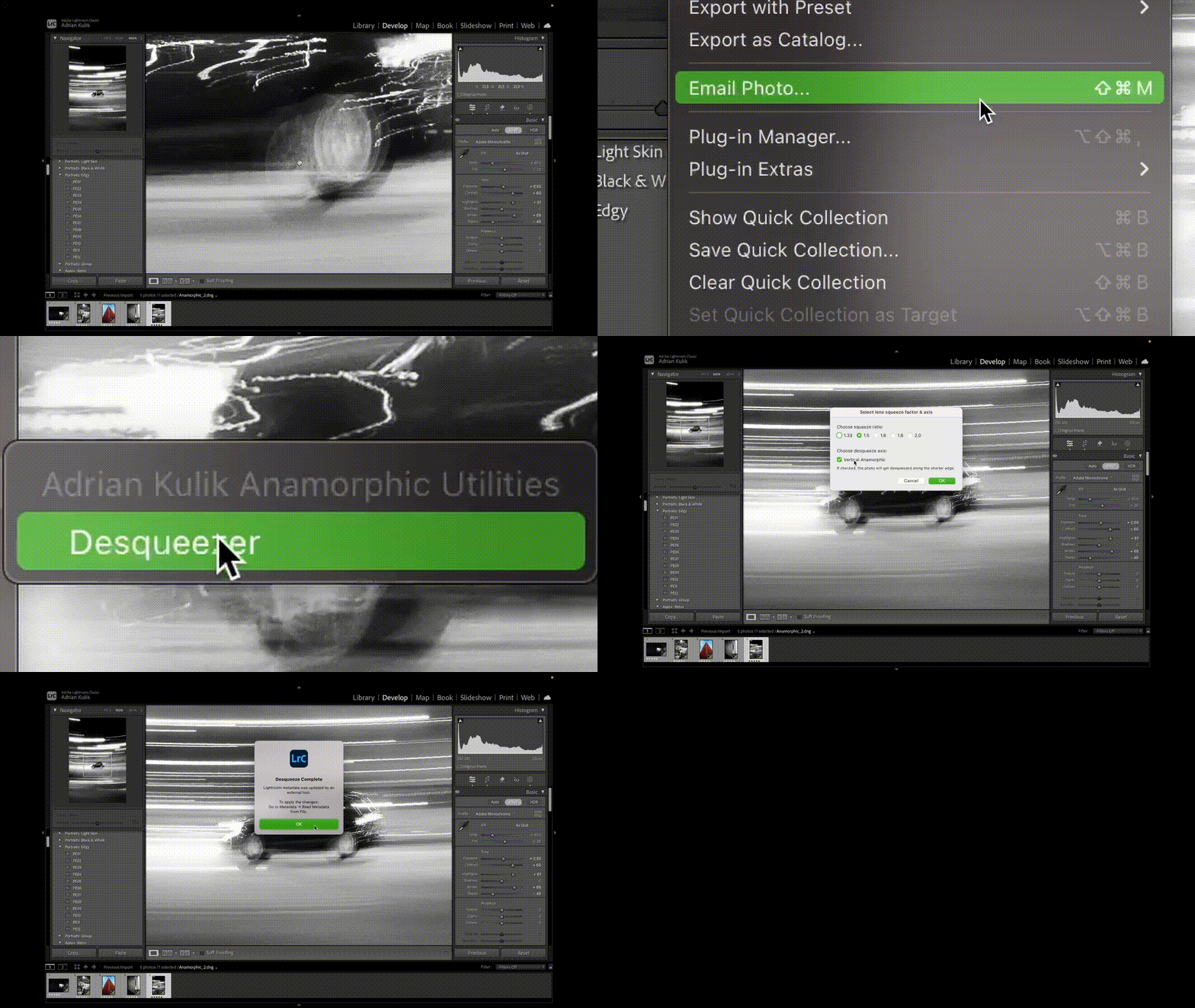
- Select the photos you want to desqueeze.
- Run "Adrian Kulik Anamorphic Utilities → Desqueezer" by clicking one of the following options:
Library → Plug-in Extras.File → Plug-in Extras.
- Choose:
- Your squeeze factor.
- Whether the photo is shot as vertical anamorphic or not.
- Click
Okand wait for the plugin to finish. - In the
Librarytab, navigate toMetadata → Read Metadata from Files. - Photos in the
Developtab are now desqueezed.
-
UI for Squeeze Factor
Allow users to input custom squeeze ratios.
(Currently hardcoded to1.5x, suitable for lenses like Blazar Remus and Atlas Mercury.) -
Orientation Handling
Add support for both horizontal and vertical images.
(Currently assumes vertical anamorphic, resulting in square 1:1 output.) -
Add linting to .sh and .lua files
Unify the code formatting. -
Add a README GIF to ilustrate how this plugin works
Show users how to install and use this plugin in a visual manner. -
Windows Compatibility
Make the plugin functional on Windows machines using PowerShell or.batalternatives.
Licensed under the MIT License. Please retain original author attribution in any distributions or derivatives.
© 2025 Adrian Kulik