
Tuwaiq Academy First Project. To-Do list Android Application
This project represents an android application Tick2Do, which helps the user creates and organize their tasks.
This application was built using the following technologies:
-
Canva
-
Adobe Photoshop
-
Figma
-
Adobe Photoshop
- IntelliJ IDEA for improving code quality.
- Android Architecture Components:Room,LiveData,ViewModel and Data binding.
- Room DataBase.
- RecyclerViews & Adapters.
- Required Libraries
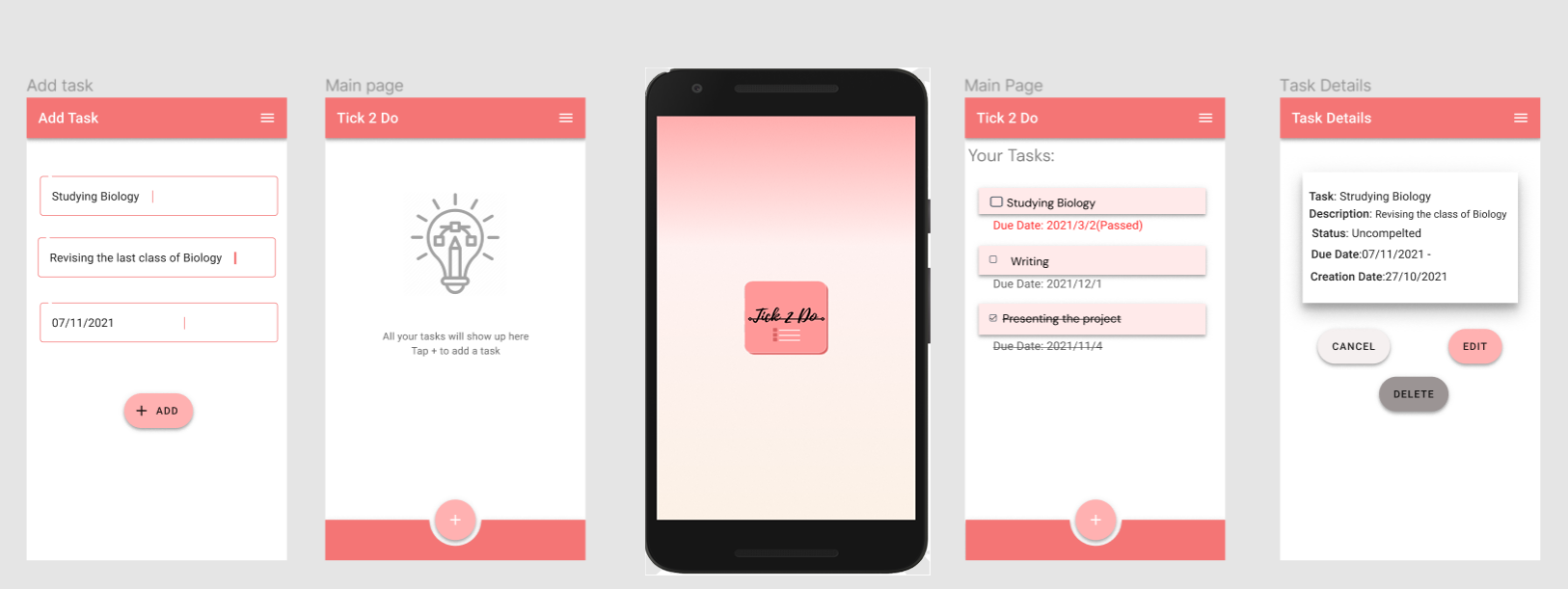
link to Figma Figma Wireframe
-
As a user,I want to display a list so that I can view my tasks.
-
As a user, I would like to be able to create multiplte tasks so that I can organize my workload.
-
As a user I want to add the description so that I can provide additional information to the task.
-
As a user I want to add due date, so that I can keep track of when each of my tasks is the deadline.
-
As a user I would like to be able to delete tasks so that I reduce the number of unwanted tasks and to get confirmation before eliminating them.
-
As a user, I want to be able to edit my tasks so that i can change the details of a certain task (its name,description,due date)
-
As a user ,I want to be provideed with a notification so that i can be informed when the deadline is approaching.
-
As a user ,I want to split the completed tasks from the uncompleted once so that my task can be more organized and less distracted.
Follow the steps below to get started with the project's development environment:
- Install Android Studio from Android Studio
- Clone this repository:
$ git clone https://github.com/WalaaAlshaikh/firstprojectWalaaAlshaikh.git- Navigate to the project directory:
$ cd firstprojectWalaaAlshaikh- List of the depencenceies used in the project:
- for navigation fragments
   dependencies {
   implementation "androidx.navigation:navigation-fragment-ktx:2.3.5"
   implementation "androidx.navigation:navigation-ui-ktx:2.3.5"
}- for notification:
    val core_version = "1.6.0"
    dependencies {
    implementation("androidx.core:core-ktx:$core_version")
}- for ViewModel
    dependencies {
   implementation "androidx.lifecycle:lifecycle-viewmodel-ktx:2.4.0-rc01"
   implementation "androidx.fragment:fragment-ktx:1.3.6"
}- for live data
    dependencies {
   implementation "androidx.lifecycle:lifecycle-livedata-ktx:2.4.0-rc01"
}- for Room Database
    dependencies {
   id 'kotlin-kapt'

   implementation "androidx.room:room-runtime:2.3.0"
   implementation "androidx.room:room-ktx:2.3.0"
   kapt "androidx.room:room-compiler:2.3.0"
}- for coroutines
    dependencies {
   implementation 'org.jetbrains.kotlinx:kotlinx-coroutines-core:1.5.2'
}Firstly, i brainstormed some ideas related to the requirement of to do list app and then took a general idea of the design and the mechanisim of some popular apps from app store Secondly, I designed a logo according to the purpose of the app and gave it name. Thirdly, I designed the screens each of them suitable for a specific action using the Figma and Photoshop,after that I statred programming my app using the android studio: at first, I installed the required libraries and dependencies and sat up the database to store the data of dataModel. For many problems that I faced, I need first to decide the nature of the error (if it's syntax, runtime or logical), and then find the solution accordingly.Such solutions that can be disovered when debugging the error, using (Log.d)to specifty the location of the error, searching for similar cases online in stackoverflow and asking for the help of the experts.
- The problem of view the list with more than 6 items.It would be potentially solved by "DiffUtil" in order to calculate the updates of the list in the RecyclerView Apapter.
- some bugs regarding notification such as deciding the exact time to notify the user rather than being inforemd the whole day, also enable the notification to be run even when the app is closed which can possibly be solved by implementing a BroadcastReceiver or by UpdaterServiceManager.
- some minor issues regarding the enhancment of the design to make the user expereince more dynamic.
- pop up function it is useful when you want to give the user a warning or a confirmation of a certain task.
val aluilder = AlertDialog.Builder(requireContext())
            aluilder.setTitle("Delete Notification")
            aluilder.setMessage("This task will be deleted and it can not be undone \n Are you sure you want to do this")
            aluilder.setPositiveButton("Yes") { dialogInterface, which ->
                toDoViewModel.deleteItem(selectedItem)
                findNavController().popBackStack()
            }

            aluilder.setNegativeButton("No") { dialogInterface, which ->

            }
            val theDialog: AlertDialog = aluilder.create()
            theDialog.setCancelable(false)
theDialog.show()- Date Picker as a dialog with customized style when you put the date in a dialog it would be easeir to the user to pick the date in a separate page and then designed the dialog to match up with general design of the app.
// in class.kt
var day:Int=calender.get(Calendar.DAY_OF_MONTH)
           val dailoge:DatePickerDialog= DatePickerDialog(requireContext(),R.style.abirStyle,
           mDateSet,year,month,day)
           dailoge.window?.setBackgroundDrawable(ColorDrawable(Color.TRANSPARENT))
           dailoge.show()

               }
 /// in style.xml
 <resources>
   <style name="abirStyle" parent="android:Theme.Holo.Light.Dialog.NoActionBar.MinWidth">
       <item name="android:textColor">@color/black</item>
       <item name="android:background">@android:color/transparent</item>
       <item name="android:textColorPrimary">@color/black</item>
       <item name="android:backgroundTint">#FFE4E2</item>
       <item name="android:actionBarItemBackground">@color/black</item>
       <item name="android:colorPrimary">@color/black</item>
       <item name="colorSecondary">@color/Peach</item>
   </style>
</resources>