
(RAMI2D) Robust Alignment of Multichannel Images in 2D consists of two command-line interface(CLI) tools, rami2d-register and rami2d-transform. The first one allows the registration of two images, refered as fixed and moving, in a convenient way by exposing multiple parameters that control the registration output. The second tool transforms images associated to the moving image, e.g. concurrent acquisitions, segmentation masks or annotations, so they are also registered to the fixed image.
These tools together offer three main features: a) CLIs for performing registrations and transformations using the well‑known library ITKElastix, b) background management of itk‑elastix’s configuration maps and algorithms that can be challenging for users unfamiliar with ITK, and c) handling of reading and writing multichannel pyramidal images.
rami2d-register offers 3 pre-defined registration schemes: 1) Rigid, 2) Rigid+Affine 3) Rigid+Affine+Bsplines, each of them providing more geometrical adaptability and thus more control in the final outcome. If the fixed and moving images are very misaligned, e.g. rotated by large angles, mirrored and/or have partially overlapping fields of view, rami2d-register provides an option to estimate an initial alignment by finding keypoints via SIFT and RANSAC algorithms. These keypoints are used to construct an initial alignment map that is applied before the pre-defined registration schemes The main results of the registration are the registered moving image and the transformation maps that can later be applied via rami2d-transform.
- Supported input formats: multi-channel grayscale and single-page RGB saved as ome.tif,tif and any format supported by OpenSlide.
- Multi-modal registration: different microscopy modalities can be registered, H&E,Fluorescence, MALDI, whatever produces pixels in the formats mentioned above.
- Multi-resolution: Fixed and moving images can have different pixel sizes.
- Registration of consecutive slices.
- Sequential multi-step registration scheme: Scheme-1) Rigid, Scheme-2) Rigid->Affine, Scheme-3)Rigid->Affine->Bsplines.
- Outputs: a registered image saved as pyramidal ome.tif, transformation parameters as.txt files, figure with keypoints matches, low-resolution preview of registration results.
- Test mode: check intermediate results in low-resolution before applying them to the full-resolution image and all its channels.
The flowchart below shows how the registration tool processes the images, this workflow is the usual footprint of a registration process and similarly can be found in tools like RegisterVirtualSlices or palom. The initial alignment via SIFT and RANSAC is a standard method firstly shown by Brown, Matthew, and David G. Lowe in "Recognising panoramas".

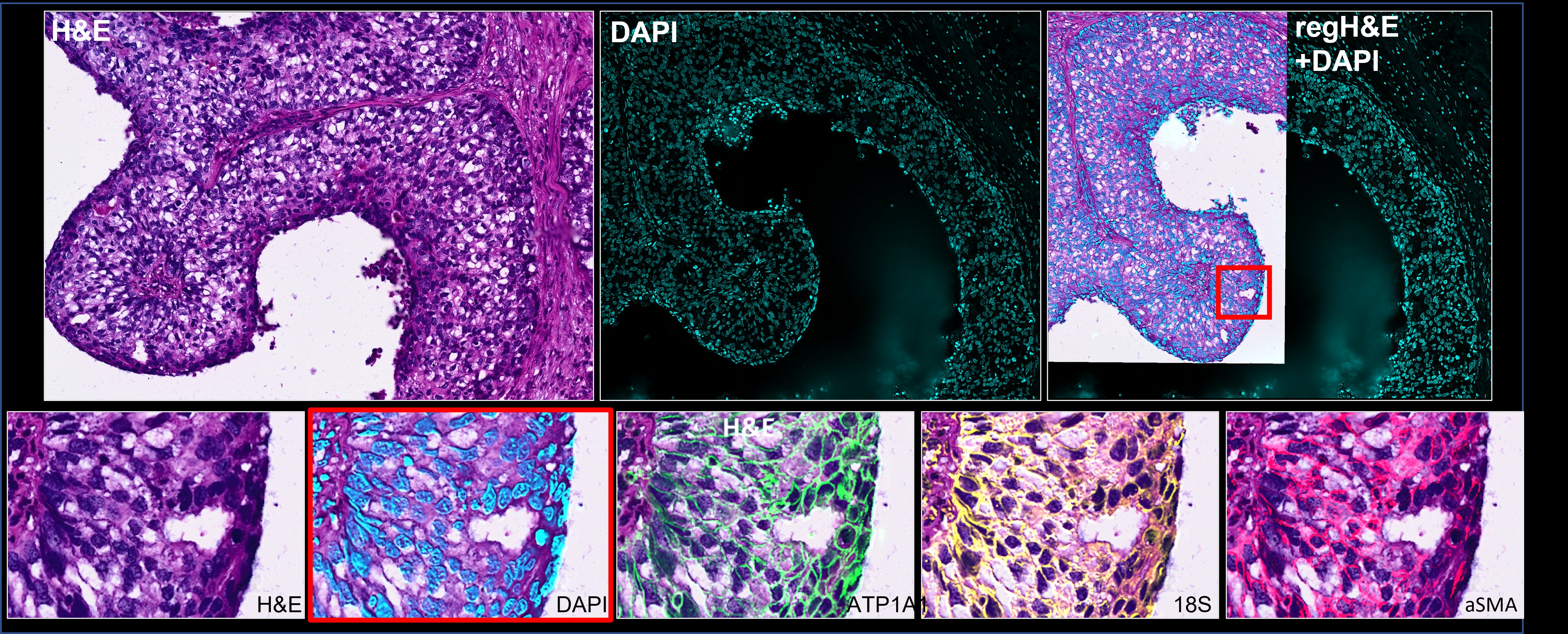
Registration was carried using as reference channels hematoxylin and DAPI. This example illustrates RAMI2D succeding in a complex scenario, i.e. different modalities, slightly different scales, initial misalignment of 90 degrees and different fields of view in both images. A cropped version of this data set is found in here -> imf_he-data and the parameters to run the example here -> imf_he.sh.
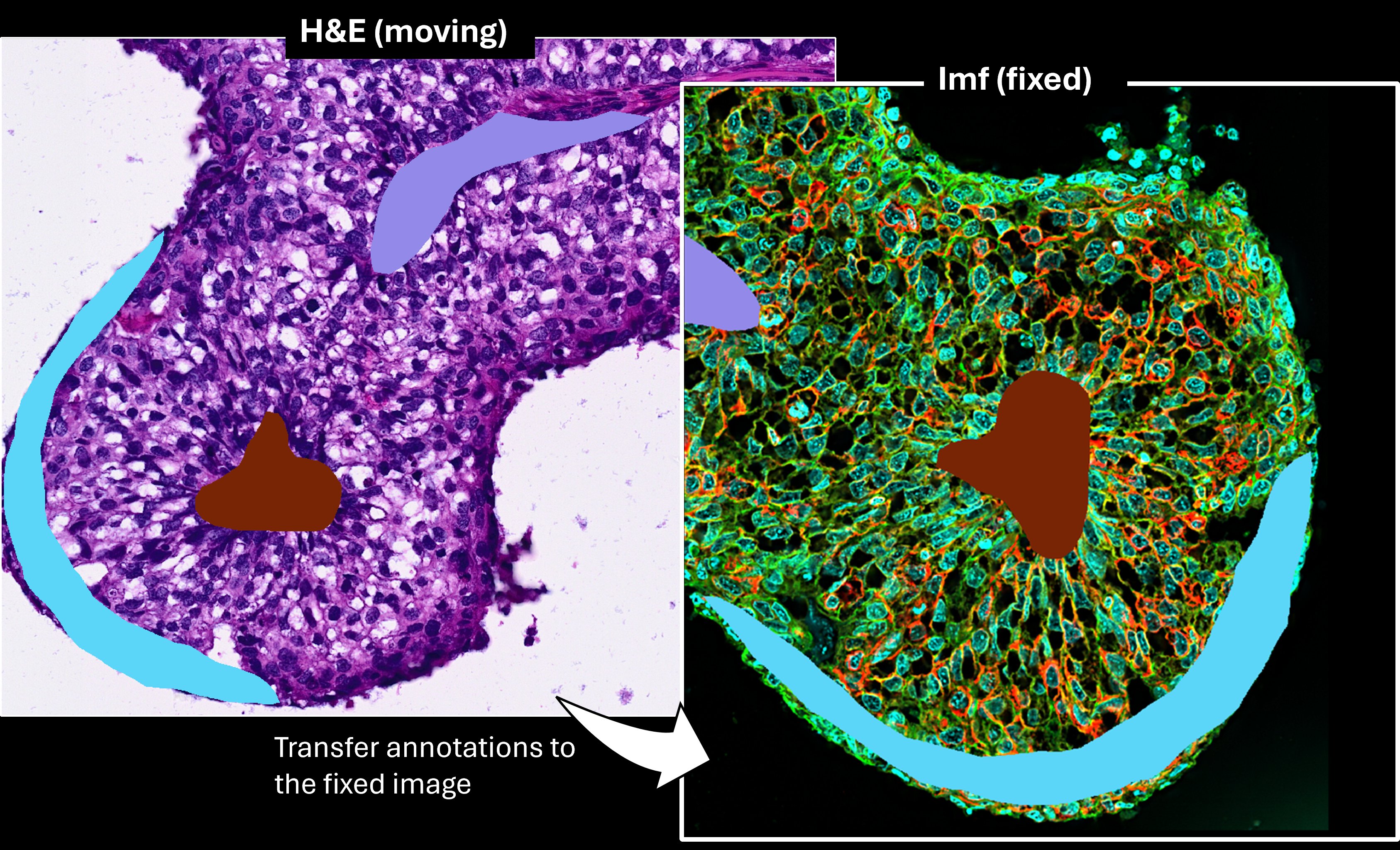
In this use case the transformation files are applied to the image containing the annotations originally made on the H&E image above. The tranformation was done via ramid2d-transform, see example here -> imf_he.sh. The transformation files are obtained after registering the images above with rami2d-register.
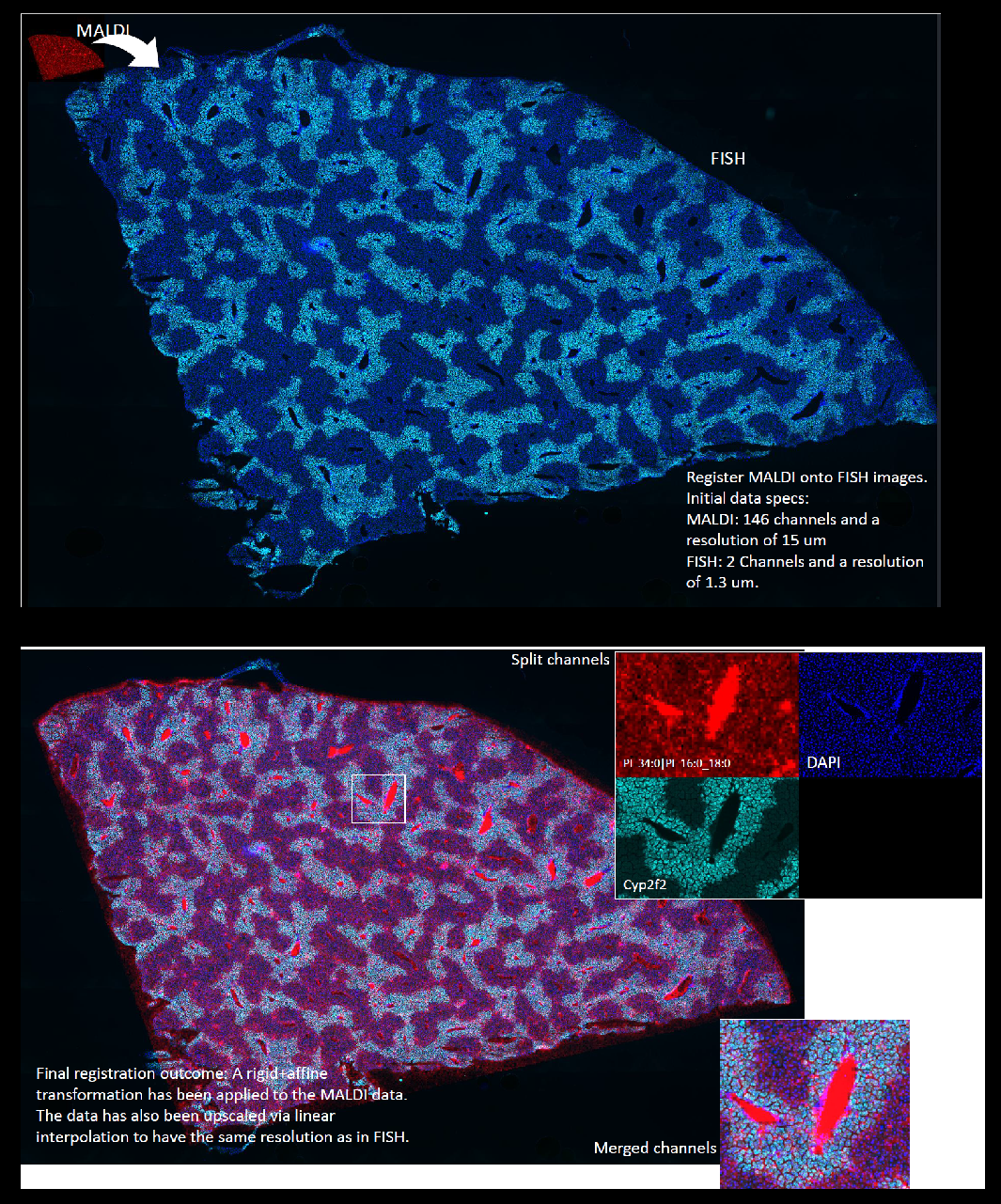
An example of RAMI2D registering two images with very different resolution scales, the MALDI data has a pixel size of 15 microns while the FISH image has 1.3 microns. A resized version of this data can be found here -> fish_maldi-data and the parameters to run this use case are here -> fish_maldi.sh.
- fixed image: image to register against.
- moving image: image that will be transformed to match the structures and dimensions of the fixed image.
- mpp: microns per pixel, i.e. pixel size in micrometers.
- registration map: set of parameters that define how the registration between fixed and moving images will be carried out,e.g. pixel sampling, interpolation order, output bit-depth, transformation, etc.
- transformation map: set of parameters that define one or multiple geometrical transformations (Rigid,Translation,Affine, etc.).
RAMI2D has two cli tools, register and transform.
-
rami2d-register carries out the registration as schematized in the flowchart above, its arguments are:
- Required arguments: -fix, -mpp-fix, -ifix, -mov, -mpp-mov, -imov, -mpp-reg, -o.
- Optional arguments: -a, -fl, -mpp-key, -rsc, -gs, -fn, -pl, -comp, -m, -test.
-
rami2d-transform applies a transformation taking as input the transformation map files(.txt):
- Required arguments: -i, -mpp, -tdir, -o.
- Optional arguments: -labels, -fn, -comp, -m.
- both tools take any file with formats .tif, .ome.tif, or supported by openslide.
-
For rami2d-register the outputs are :
- registered image as pyramidal .ome.tif, the file name is that of the moving image plus the suffix registered.
- qc directory containing three subfolders
- refchns: the log output of itk-elastix for the selected reference channels (-ifix/-imov) and its specified resolution (-mpp-reg).
- keypoints: if keypoint search is activated (-a), this folder contains the figure with the matched keypoints between fixed and moving images.
- fullres_trf: the transformation maps that were applied to the moving image in ordered to register it. The maps are saved a a set of .txt files and are already configured to be directly applied to an image associated to the moving image.
-
For rami2d-transform the output is the registered image as pyramidal ome.tif.
- (1) Install, run the command:
pip install rami2d
- (2) Check installation, run the --help argument to check if installation was successful:
rami2d-register --help
rami2d-transform --help
To provide a better understanding on the arguments they have been grouped below in 4 categories: fixed image, moving image, registration control and output control.
| Argument | Type | Description | Default value | Required |
|---|---|---|---|---|
| -fix | Path | path to fix image | NA | True |
| -mpp-fix | float | pixel-size in micrometers | NA | True |
| -ifix | integer or string h,e,d | 0-based index of channel to be used for registration. If string it converts your H&E into Hematoxylin, Eosin or DAB | NA | True |
| Argument | Type | Description | Default value | Required |
|---|---|---|---|---|
| -mov | Path | path to fix image | NA | True |
| -mpp-mov | float | pixel-size in micrometers | NA | True |
| -imov | integer or string h,e,d | 0-based index of channel to be used for registration. If string it converts your H&E into Hematoxylin, Eosin or DAB | NA | True |
| Argument | Type | Description | Default value | Required |
|---|---|---|---|---|
| -a | Boolean flag | Implement initial alignment by finding keypoints | NA | False |
| -fl | Boolean flag | Flip moving image in case is mirrored respect to the fix image | NA | False |
| -mpp-key | float | image resolution in micrometers to be used for searching keypoints | NA | False |
| -mpp-reg | float | image resolution in micrometers to be used for applying the registration scheme | NA | True |
| -rsc | integer | Select one of the following registration schemes 1,2,3,check the list in features section | 1 | False |
| -gs | two integers | x y size of grid to be used in bsplines in micrometers (only applicable when -rsc 3) | 1000 1000 | False |
| -masked | Boolean flag | (Pilot feature!, use it only for images with very sparse foreground) calculates the registration focusing only on foreground areas | NA | False |
| Argument | Type | Description | Default value | Required |
|---|---|---|---|---|
| -o | Path | path to directory where registered image will be saved | NA | True |
| -fn | string | suffix to append to the registered image | "registered" | False |
| -pl | integer | total number of pyramidal levels in the output image.If the moving image is already pyramidal the output will have same number of levels and this argument will be ignored | 8 | False |
| -comp | string | compression algorithm, by default greyscale are compressed with lzw and rgb with jpeg2000 | "default" | False |
| -m | Path | Path to a csv file with a column named marker_name, each row is the name of the channel in the ome metadata of the output image | NA | False |
| -test | Boolean flag | Activate test mode to skip writting the final full resolution image, you can still check the registration results on the -mpp-reg resolution in the qc folder | NA | False |
This cli was designed to take the transformation maps produced by rami2d-register, they are found in the outputdir/qc/fullres_trf folder. If you are familiar with configuring transformation maps in itk-elastix you can write your own transformation maps as a list of .txt files and use rami2d-transform to apply a custom transformation to your multichannel image.
| Argument | Type | Description | Default value | Required |
|---|---|---|---|---|
| -i | Path | path to image | NA | True |
| -mpp | float | pixel-size in micrometers | NA | True |
| -tdir | Path | path to folder with transformation map files (.txt) | NA | True |
| -o | Path | path to directory where registered image will be saved | NA | True |
| Argument | Type | Description | Default value | Required |
|---|---|---|---|---|
| -labels | Boolean flag | path to fix image | NA | False |
| -fn | string | suffix to append to the output image | "transformed" | False |
| -comp | string | compression algorithm, by default greyscale are compressed with lzw and rgb with jpeg2000 | "default" | False |
| -m | Path | Path to a csv file with a column named marker_name, each row is the name of the channel in the ome metadata of the output image | NA | False |
There are three sample data sets in this repository branch -> sample_data:fish_maldi,imf_he and imf_imf.Download the images by:
- clicking here or
- by executing in your terminal the command:
curl -L --output data.zip https://github.com/VictorDidier/RAMI2D/archive/refs/tags/data-v1.zip
Find in the folder in this link -> examples the corresponding scripts (.sh) to each sample data set. You will find there examples to run rami2d-register and rami2d-transform after installing the package via pip. Just give the paths to your data in your local volume, copy and paste the commands into your terminal, e.g.:
# Specify local path to the imf_and_imf data
data_dir="C:/MyLocalVolume/imf_and_imf"
# Specify local path to the output folder
output_dir="C:/MyLocalVolume/output"

fixed_img="${data_dir}/imf_timepoint1.ome.tif"
moving_img="${data_dir}/imf_timepoint2.ome.tif"
rami2d-register -fix ${fixed_img} -ifix 0 -mpp-fix 2 -mov ${moving_img} -imov 1 -mpp-mov 2 -o ${output_dir} -mpp-reg 2 -mpp-key 3 -a
Pull the container via Singularity or Docker:
Singularity
singularity pull docker://ghcr.io/VictorDidier/rami2d:v1.0.0
Docker
docker pull ghcr.io/VictorDidier/rami2d:v1.0.0
The script container_usage.sh shows execution examples using the container on the imf_he data.
The following recomendations are given within the scope of bioimaging, in which resolutions are usually in the range of 0.150 to 10^1 microns.
-
As general recommendation, a registration is usually applied on a downsized version of the image. To achieve this the -mpp-reg argument should have a value larger than the smallest mpp between the fixed or moving image.
-
For a good registration accuracy, the -mpp-reg argument should be such that is at least 2 or 3 times smaller than your registration feature, e.g. if DAPI is your reference marker and the nuclei of your cells is expected to be about 5 µm then -mpp-reg should be 1 or 2 microns for a good registration outcome.
-
If you require the initial alignment (-a) via key-points matching then choose a channel (-ifix/-imov) for your registration that has some "texture" on it, the keypoint search via SIFT+RANSAC will fail if the intensity distribution is too homogeneous. To illustrate this, look at the sample data fish_maldi, the first channel in these two images is an example of images with no "texture", i.e. hardly recognizable landmarks in the foreground. On the other hand, the second channel of both images is "texture" rich, which will facilitate the discovery of keypoints for the alignment.
-
The initial alignment argument (-a) also requires that the -mpp-key argument is given, this will be the pixel-size of the images at which keypoints will be searched. I found that typical values for this argument should be between 5 to 10 microns.
-
rami2d-register downsizes the images based on the values of -mpp-reg and mpp-key, if your input images are pyramidal, running the tool will take less time than when they are not. This is because the sub-levels of the pyramid provide a starting point closer to the requested resolution (-mpp-reg) while for a non-pyramidal level the downsized image will be calculated from the original full resolution level.
-
fish_maldi:Data was collected by Dr. Veronika Saharuka (Metabolomics Core Technology Platform, Heidelberg University) and Dr. James Cleland (Division of Regulatory Genomics and Cancer Evolution, DKFZ).
-
imf_he: modified from https://www.10xgenomics.com/datasets/xenium-ffpe-human-breast-biomarkers.
-
imf_imf: Data available on Synapse: https://www.synapse.org/Synapse:syn51449054 from Wünnemann, F., Sicklinger, F., Bestak, K. et al. Spatial multiomics of acute myocardial infarction reveals immune cell infiltration through the endocardium. Nat Cardiovasc Res 4, 1345-1362 (2025). https://doi.org/10.1038/s44161-025-00717-y.
This tool was developed during my time in the SchapiroLab in Heidelberg – I'm grateful for the opportunity and setting that made it possible. Particular thanks to Sebastian Gonzalez for initial discussions on effective strategies for the registration of whole slide images.