
View ToAPIs model pricing and current rates →
Choose image, video and text models for your workload. Query prices available to your API Key. Rates vary by model, specification and Key; case quotations, calculated costs and final settlement are labelled separately. Sign up and integrate
Updated 2026-10-27: VIP SKUs are withdrawn from current promotion and new tutorial runs. Display retirement does not establish that all existing keys have stopped working. Recommended models: gpt-image-2 and gpt-image-2.5-flare. Historical model IDs, outputs and charges are preserved, never relabelled.
| Model / preset | Current rate | Case date | Actual charge |
|---|---|---|---|
| gpt-image-2 / 1K | $0.015/image | 2026-10-27 | Not confirmed; quote is not settlement |
| gpt-image-2.5-flare / high / 1K | $0.0225/image | 2026-10-27 | Not confirmed; quote is not settlement |
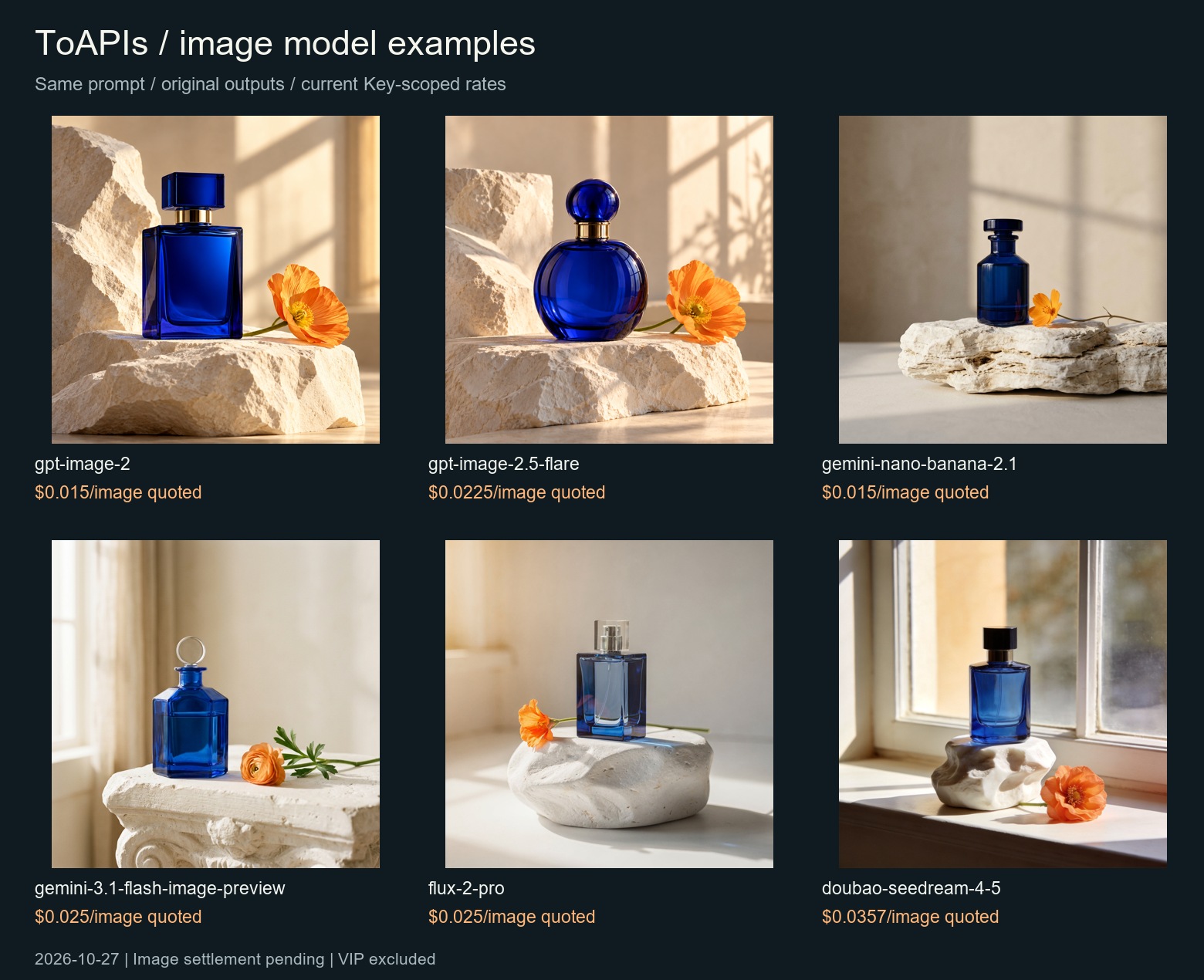
These are shared same-prompt API examples, not a native Provider/UI acceptance claim for this product.
Other image models / current prices / original outputs · Gallery · Key-scoped pricing API
$env:TOAPIS_API_KEY="YOUR_PRIVATE_KEY"
python toapis-models/unified_client.py --model gpt-image-2 --prompt "Original product photograph, no text" --max-usd .10
# Review price, then add --live. Flare is also available:
python toapis-models/unified_client.py --model gpt-image-2.5-flare --prompt "Original product photograph, no text" --max-usd .10 --live
One Python script, three API workflows. Call a chat model, create an image, or submit a video generation task through ToAPIs. No third-party Python packages are required.
Built for developers connecting models to applications and recurring workflows. Start with one verified request, inspect actual usage, then plan your production integration. High-volume integration enquiries should include your models, estimated monthly usage, peak concurrency, and launch timeline.
Start with
--dry-run: it shows the endpoint and request body without an API key or billable call. Live calls require a key and may incur charges. Model availability and prices can change; check the current pricing page.
Tested on Oct 12: MeiGen local MCP with a community patch and TongFlow plugin image-gen CLI. Each guide includes a real PNG, pinned version, reproduction steps and dated pricing.
| Workflow | Model used in this example | API behavior |
|---|---|---|
| Text | gpt-6.1-sol |
Synchronous chat completion |
| Video | seedance-2 (4 s, 720p, no audio) |
Submit task, then poll for result URL |
The script follows the official quickstart. ToAPIs also lists Suno music generation; this quickstart has no Suno example because its request and task response still need a verified API contract. It does not cover TTS.
Install Python 3.10 or newer, clone this repository, then run:
python examples/quickstart.py chat --dry-run
python examples/quickstart.py image --prompt "A paper crane on an orange background" --dry-run
python examples/quickstart.py video --prompt "A paper crane unfolds on a desk, cinematic light" --dry-run
On Windows, py may be used in place of python.
Create a ToAPIs API key in your account. Store it as an environment variable. Do not paste it into a source file or commit it to GitHub.
macOS / Linux:
export TOAPIS_API_KEY="YOUR_API_KEY"
python examples/quickstart.py chat --prompt "Explain an API gateway in one sentence."
PowerShell:
$env:TOAPIS_API_KEY = "YOUR_API_KEY"
python .\examples\quickstart.py chat --prompt "Explain an API gateway in one sentence."
For users served by the China endpoint, set TOAPIS_BASE_URL=https://toapis.cn (or pass --base-url https://toapis.cn). The script appends /v1 automatically.
The prior model-specific section is preserved in the dated guide. Use the current non-VIP examples above for new runs.
This is a single-request quickstart, not a batch runner. For production use, add bounded concurrency, persistent task IDs, result storage, and a workload budget in your application. Check account limits and model-specific parameters before increasing volume. After an interrupted generation request, inspect the existing task before resubmitting to avoid duplicate work and charges.
For integration planning, request 1:1 support with your use case, models, estimated monthly usage, peak concurrency, and launch timeline. Capacity and dedicated support scope are assessed for the project.
For API troubleshooting, send the endpoint, model, HTTP status, task/request ID, and redacted reproduction. Use repository Issues for example-code defects; contact support privately for account and billing questions. Never share API keys.
The prior model-specific section is preserved in the dated guide. Use the current non-VIP examples above for new runs.
POST /v1/chat/completions
POST /v1/images/generations
GET  /v1/images/generations/{task_id}
POST /v1/videos/generations
GET  /v1/videos/generations/{task_id}
The default base is https://toapis.com. See the API documentation for parameters, response formats, and other models. Browse the model catalog before changing the model IDs in the script.
| Symptom | First check |
|---|---|
TOAPIS_API_KEY error |
Set the variable in the same terminal session. |
| HTTP 401 | Check that the key is active and copied correctly. |
| HTTP 400 | Check model availability and request parameters in the current docs. |
| HTTP 429 | Check your account limits and retry later. |
| Task times out | Use the printed task ID to inspect status; video can take longer than the default wait. |
python -m unittest discover -s testsThe automated tests check request shapes and do not make paid calls. Manual live smoke checks completed on 2026-10-09 for the default chat, image, and video workflows. Issues and pull requests that keep the examples aligned with the official docs are welcome.
Documentation checked: 2026-10-09. License: MIT.
Browse 10 real API asset tutorials and cost notes
Browse model types and example costs for 25 tutorials
The prior model-specific section is preserved in the dated guide. Use the current non-VIP examples above for new runs.