Simple Agentic Kit for Operations
Start simple. Keep your agents coordinated.
- Get started with coding agents. Begin with one agent, one task, and a simple workflow.
- Work with multiple agents in parallel. Give each agent a clear piece of work and keep the effort coordinated.
- Bring clarity to an existing project. Work with your agent to organize what is unfinished and choose a useful next step.
One command to install. Plain files in your project. Works alongside your agents, planner, and tests, with hooks for Claude Code and Codex on supported clients.
Alpha · Get started · See it in use · Documentation · MIT
Commands and file formats can change in any 0.x release.
Open two agent sessions in your usual coding tool for a small change. One handles the code; the other writes the usage guide. SAKO keeps their tasks and progress visible, so the next session has a place to continue.
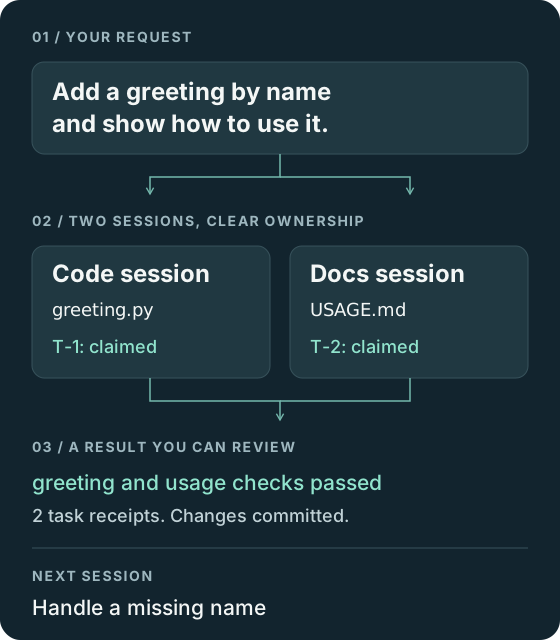
Illustrated from a scripted run with real SAKO output. The sessions share one repository. You choose the work and review what they build.
You need a Git project, Python 3.10+, Git 2.31+, uv, and a coding agent that can run commands. From your project:
uvx sako initSet verify_command in .sako/config.json, keeping its other settings.
For a Python project using unittest:
{
  "verify_command": [
    "python3", "-B",
    "-m", "unittest"
  ]
}
Use your own project's command. On Windows, use python and follow the
platform notes.
Open a fresh session in your coding tool and ask for one small change. The agent checks in with SAKO, then follows the installed instructions to record, claim, check, and hand back the work. You decide whether the result meets your needs.
The installer selects hooks for detected clients. Codex hooks need your trust; Codex on Windows uses explicit commands. The client guide explains setup and how to confirm the hooks ran.
- Start from an idea. The small default planner helps you and your agent choose a useful first task.
- Bring an existing project. Turn your notes, issues, or plan into clear tasks.
- Add parallel work. Use separate task scopes to coordinate sessions in one repository and its worktrees. For work across machines, follow the tracker migration guide.
- Choose where records live. Keep them local, give them a separate Git repository, or share them with your code. See the storage choices.
- Keep evidence visible. Review the task, its check result, and the changes together. You decide what good work means.
- Give each fact one home. Your plan holds intent, the task records hold ownership and evidence, and Git holds the changes.
- Keep everyday use simple. Bring your agent, planner, and checks. The runtime is one Python file using the standard library, with no service or telemetry.
- Make adoption reversible. The default install changes no tracked files. Update or remove SAKO while keeping your task records.
SAKO coordinates existing agent sessions. You or your agent platform launch and direct them. The agents share a Markdown task ledger. A finish gate checks their work against three rules: Recorded, Proven, and Committed. Closed tasks leave receipts for review and future sessions.
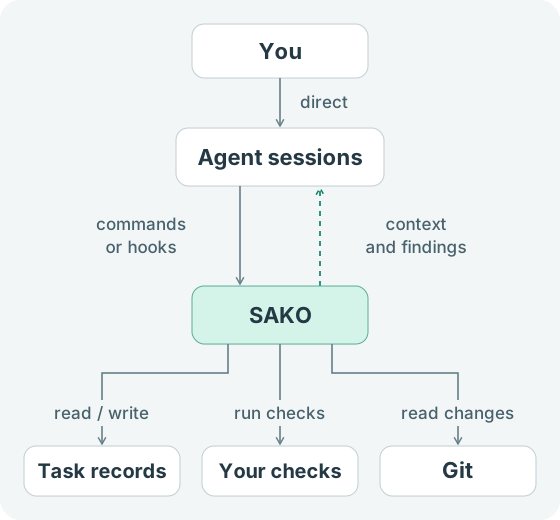
The gate flags missing records, stale or missing check evidence, and finished work awaiting a commit. It prompts correction; you still review the result. A repeated stop or a hook error can let a session end. Read the exact rules or walk through a finish.
Method · Compatibility · Limits · Validation · Glossary
Questions and discoveries are welcome in issues. See contributing to help, security to report a vulnerability, and the MIT license.