macOS 状态栏显示实时网速的小工具, macOS menubar app to monitor internet speed.
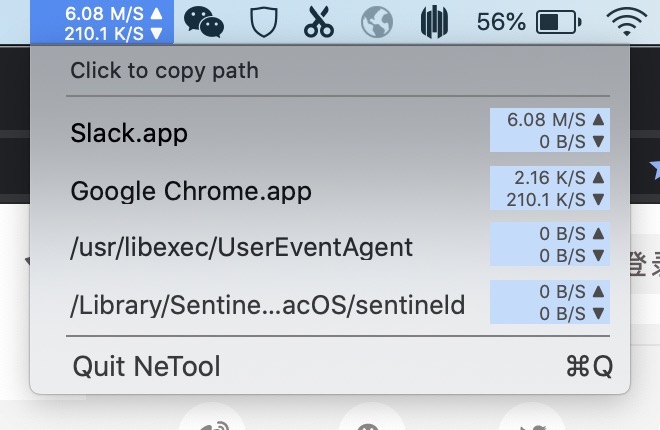
Shows an icon in the top menu bar displaying total upload/download speed. Click to reveal a dropdown listing the top 4 apps by network bandwidth with per-app upload/download rates.
Only Xcode Command Line Tools (xcode-select --install) are needed:
./build.sh
open build/NeTool.app
The build script uses swiftc to compile all sources directly — no .xcodeproj, no storyboard, no XIB files required.
Uses the macOS nettop command to sample accumulated bytes per process at regular intervals. Speed is computed by taking the difference between consecutive samples.
nettop -x -t wifi -t wired -J time,bytes_in,bytes_out -P -l 1
| File | Purpose |
|---|---|
main.swift |
Entry point — creates NSApplication, minimal menu (just Quit), sets LSUIElement |
AppDelegate.swift |
Wires up NSStatusBar item, menu, and NetSpeedMonitor |
NetSpeedMonitor.swift |
Core logic: polls nettop, parses output, computes per-process speeds |
StatusBarView.swift |
Custom NSControl rendered in the menu bar showing ▲▼ rates |
SpeedInfoView.swift |
Dropdown panel (pure code, no XIB) showing top 4 apps |