
Merge SRT, ASS, SUP, audio, chapters, and fonts into MKV in bulk. Scan a folder, auto-match companion files, and batch-remux with bundled mkvmerge — no MKVToolNix install required.
Created by S. Hunter Sablich — Syenar.
Also: File Renamer by Syenar — batch-clean scene-release names (Title (Year), S01E02) for Plex and Jellyfin.
Watch the File Renamer/ BatchSubMux demo on YouTube
Windows 64-bit (recommended): Download BatchSubMux_Setup.exe (v1.0.8)
Windows portable ZIP: BatchSubMux_1.0.8_portable.zip
Linux AppImage: Download BatchSubMux-1.0.8-x86_64.AppImage
| Download | Link |
|---|---|
| Installer (x64) | BatchSubMux_Setup.exe |
| Portable ZIP | BatchSubMux_1.0.8_portable.zip |
| Linux AppImage (x86_64) | BatchSubMux-1.0.8-x86_64.AppImage |
| All releases | GitHub Releases |
Full download page: DOWNLOAD.md
- Anime / TV libraries — hundreds of
.mkvfiles with matching.srtor.asssidecars - Plex / Jellyfin users — add soft subtitle and audio tracks without re-encoding
- Collectors — mux external subs, chapters, and fonts; strip or keep embedded tracks
- 3D Blu-ray rips — optional packed Full SBS / Top-Bottom PGS fix (vault copy; source safe)
If you need one manual mux job, use MKVToolNix. If you need fix subtitle timing, use Subtitle Edit first, then mux here. To clean scene-release filenames first (Title (Year), S01E02), use File Renamer by Syenar. See Comparison vs similar tools.
- Run BatchSubMux_Setup.exe (link above) and launch BatchSubMux.
- Select Folder (or drag a folder anywhere on the window).
- Mux All.
Output goes to BatchSubMux Vault by default — originals untouched.
Official user manual: docs/USER_MANUAL.md · Quick start (3 steps) · FAQ
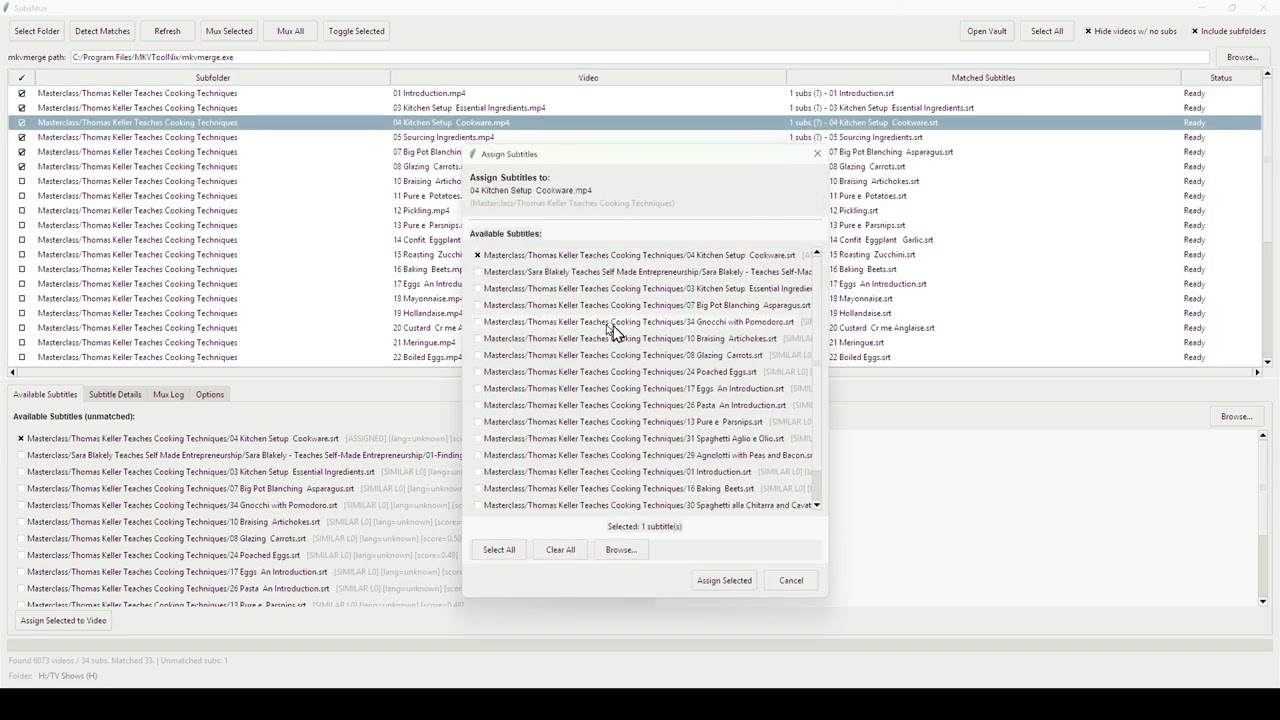
Folder scan with videos matched to sidecar subtitles, then Mux All:

Options — default language, Vault output, and mux flags:

About — in-app manual, licenses, and quick start:

| Need | Best tool |
|---|---|
| Batch mux subs into a whole folder | BatchSubMux |
| Single-file manual mux | MKVToolNix GUI |
| Custom encode + filter pipelines | FFmpeg |
| Fix subtitle sync / OCR | Subtitle Edit → BatchSubMux |
| Compress / transcode video | HandBrake |
| Batch-rename movie/TV files for Plex | File Renamer by Syenar |
Full comparison table → (MKVToolNix, FFmpeg, Subtitle Edit, StaxRip, HandBrake, FileBot, File Renamer)
- Folder scan + auto-match — fuzzy pairing of videos with
.srt,.ass,.sup,.smi, audio, chapter XML, fonts - Batch remux — no video re-encode; fast copy mux via mkvmerge
- Embedded track control — include, exclude, or edit subtitle/audio track flags
- Multiple outputs — Vault (default), beside original, or replace original
- Presets, Media Info, chapter editor, extract embedded subs, dark mode
- Optional 3D PGS — scan, Apply PGS fix, single-pass normalize — 3D guide
Supported formats: docs/FEATURES.md
Bug reports and questions: benderclawbot@gmail.com · SUPPORT.md
- App terms: APP_TERMS.txt
- Third-party licenses (mkvmerge GPL v2): docs/THIRD_PARTY_LICENSES.md
- Source availability: docs/SOURCE_CODE.md
This repository is public for downloads and user documentation. BatchSubMux application source is not published here.
BatchSubMux is a Windows batch subtitle muxer: merge SRT into MKV, add ASS/SUP/audio/chapters in bulk, remux without re-encoding, and add soft subtitles for Plex or Jellyfin. Folder scan, auto-match sidecars, strip or keep embedded subs, optional anime/TV library mux. Same kind of job as MKVToolNix — for a whole folder, not one file at a time.
Messy scene names first? File Renamer by Syenar batch-renames Movie.Name.2024.1080p…-GROUP.mkv into Movie Name (2024) 1080p…mkv, then mux here.