📦 Amazon Product Studio — Open-Source AI Product Photography & Ad Creative SaaS (Free Flair AI / Booth AI Alternative)
Generate studio-quality product photos and ad creatives from reference images in seconds. A production-ready, self-hostable Next.js SaaS boilerplate with multi-image upload (up to 14 references), preset templates, aspect ratio control, webhook-backed async delivery, and built-in Stripe billing. A free open-source alternative to Flair AI, Booth AI, Photoroom, and Pebblely — powered by the MuAPI AI engine.
Tech stack: Next.js 14 (App Router) · Prisma · PostgreSQL · NextAuth (Google OAuth) · Stripe · Tailwind CSS · MuAPI · Webhook-backed async delivery Use cases: Amazon sellers · E-commerce product photography · DTC brand marketing · Shopify store owners · Ad creative teams · Product listing optimization · Dropshippers · Social media product ads
GitHub Repository: github.com/SamurAIGPT/amazon-product-studio
Live Demo Preview: amazon-product-studio.vercel.app
Amazon Product Studio is a production-ready, highly-optimized AI web application. Out of the box, it seamlessly manages User Authentication, Credits & Billing, Image Persistence, and asynchronous AI scene rendering using a sleek Next.js (App Router) architecture. It empowers e-commerce store owners, marketing designers, and brand managers to create stunning studio-quality product photos in seconds — all without expensive photoshoots.
Why use Amazon Product Studio?
- Production-Ready SaaS — Complete with Google OAuth and Stripe Checkout workflows built-in.
- AI Scene Studio — Upload up to 14 product reference photos, select aspect ratios, choose presets or enter custom prompts, and see results instantly.
- Webhook-Backed AI Delivery — MuAPI async webhook delivers results directly into the database (
/api/webhooks/ai), keeping API routes non-blocking and preventing request timeouts. - Creations History Gallery — All generated ad scenes are saved to PostgreSQL. Users can review, compare, download, and track their designs on the main workspace page.
- Responsive Screen-Fitting — Designed with a fluid layout that fits perfectly on all screens (mobile, tablet, desktop) using stacked adaptive grids on mobile and viewport-locked scrolling on desktop.
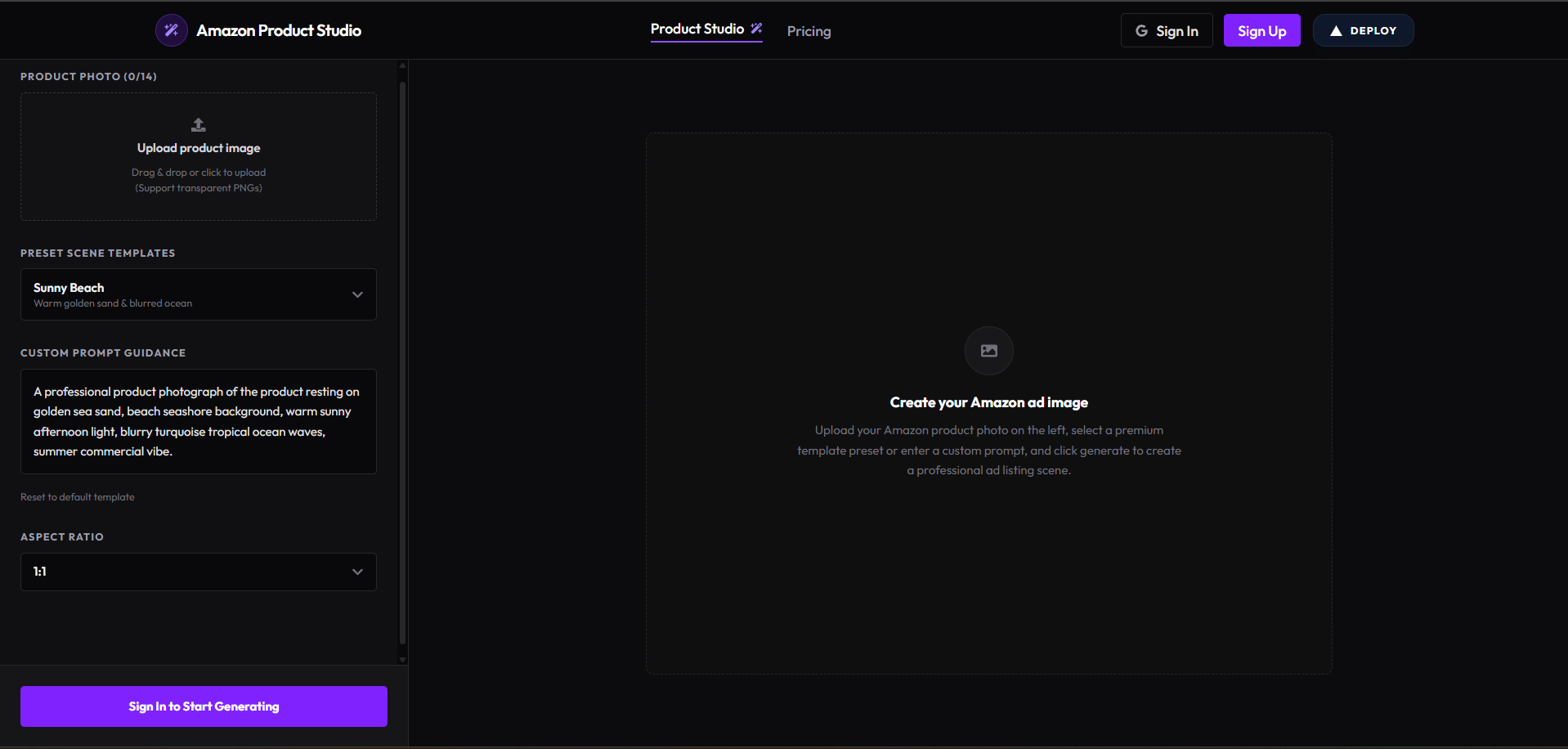
- Multi-image reference uploads supporting up to 14 photos (ideal for transparent product PNGs or standard reference images). Real-time preview thumbnails with delete action.
- Custom dropdown for Aspect Ratio: 1:1 (Square), 4:3 (Landscape), 3:4 (Portrait), 16:9 (Widescreen), 9:16 (Story).
- 7 pre-designed scene templates (presets) including: Minimalist Marble, Luxury Spotlight, Rustic Wood, Granite Countertop, Sunny Beach, Forest Moss, and Modern Office.
- Reset to default template button to quickly clear or restore baseline prompt directions.
- Cost: 18 credits per AI generation.
- Bottom horizontal thumbnail grid of all generated product listing scenes.
- Cards show a thumbnail and indicators for status (
processing/completed/failed). - Active creation details: prompt overlay, selected aspect ratio, download high-res button, and floating thumbnail references.
- Auto-polls every 4 seconds for processing gallery items, plus 3 seconds active generation polling.
- Four credit packs based on a $1 = 200 credits conversion rate:
- Basic Pack ($5 / 1,000 credits — up to 55 generations)
- Standard Pack ($10 / 2,000 credits — up to 111 generations)
- Pro Pack ($20 / 4,000 credits — up to 222 generations — Most Popular)
- Business Pack ($50 / 10,000 credits — up to 555 generations)
- No recurring subscriptions — pay once, use at your own pace.
- Credit balance is automatically topped up via Stripe webhook on checkout completion.
- NextAuth Google provider with Prisma adapter — user sessions, credit balances, and galleries are all persisted per account.
- Credits displayed live in the Navbar with a coin icon.
This architecture is engineered explicitly for Vercel serverless environments.
Live App: amazon-product-studio.vercel.app
To successfully deploy and run, you must populate the following environment variables in your Vercel project settings:
| Service | Variable | Description & Source |
|---|---|---|
| Database | DATABASE_URL |
PostgreSQL connection string (Supabase or Neon) |
DIRECT_URL |
Non-pooling direct PostgreSQL URL (for migrations) | |
| NextAuth / Google | NEXTAUTH_SECRET |
Secure random string generated via openssl rand -base64 32 |
NEXTAUTH_URL |
Your production domain (e.g. https://my-app.vercel.app) |
|
WEBHOOK_URL |
Public URL for MuAPI async callbacks (same as NEXTAUTH_URL in production) |
|
GOOGLE_CLIENT_ID |
Get from Google Cloud Console | |
GOOGLE_CLIENT_SECRET |
Get from Google Cloud Console | |
| Stripe Billing | STRIPE_SECRET_KEY |
Get from Stripe Dashboard |
NEXT_PUBLIC_STRIPE_PUBLISHABLE_KEY |
Get from Stripe Dashboard | |
STRIPE_WEBHOOK_SECRET |
Webhook secret for resolving credit purchases | |
| AI Generation | MU_API_KEY |
Create an account and get key from muapi.ai/access-keys |
| Theme | NEXT_PUBLIC_THEME |
Theme selection (default dark) |
- Database Provisioning: Create a new Postgres database (via Supabase or Neon). Retrieve the connection string (
DATABASE_URL). - Project Creation: Import your GitHub fork into the Vercel dashboard.
- Configure Environment Variables: Copy the variables above into the Vercel project settings environment tab.
- Deploy: Hit "Deploy". Vercel will automatically run the build steps (
npm run build). - Database Push: Run
npx prisma db pushto synchronize database models before launching. - Integrations Setup:
- Establish a Google Cloud OAuth app, enabling the callback URL:
https://your-app.vercel.app/api/auth/callback/google - Setup a Stripe Webhook, pointing to
https://your-app.vercel.app/api/stripe/webhookand selecting thecheckout.session.completedevent. - Register a MuAPI Webhook pointing to
https://your-app.vercel.app/api/webhooks/aito receive async generation results.
- Establish a Google Cloud OAuth app, enabling the callback URL:
Ready to iterate locally? Setup is straightforward.
- Node.js (v18 or higher)
- A local PostgreSQL instance or a free cloud Database URL.
- ngrok (optional, for local MuAPI webhook testing)
# 1. Clone the repository
git clone https://github.com/SamurAIGPT/amazon-product-studio
cd amazon-product-studio

# 2. Install dependencies
npm install

# 3. Setup Environment
cp .env.example .env
# Open .env and insert your specific keys.

# 4. Initialize Database Schema
# Note: Because the database is shared, see the Safety Warning below!
npx prisma generate
npx prisma db push

# 5. Start the Development Server
npm run dev
The console should now be active on http://localhost:3000.
Webhook Tip: For local MuAPI webhook testing, run
ngrok http 3000and setWEBHOOK_URLto the generated HTTPS URL in your.env.
The workspace database is shared with other applications. Running npx prisma db push on a clean, empty schema will drop tables belonging to other applications. Always follow the Pull-Declare-Push-Cleanup sequence:
- Run
npx prisma db pullto fetch all database tables. - Declare your
AmazonProductCreationtable and update the relations on theUsermodel. - Run
npx prisma db pushto add your changes safely. - Clean up
schema.prismato keep only NextAuth models,AmazonProductCreation, and the updatedUserrelations. - Run
npx prisma generateto rebuild the type-safe client.
amazon-product-studio/
├── prisma/
│   └── schema.prisma                  # PostgreSQL models (User, Account, Session, AmazonProductCreation)
├── src/
│   ├── app/                           # Next.js App Router
│   │   ├── page.js                    # Main Studio Workspace (Uploads, Aspect Ratio, Presets, Prompts)
│   │   ├── pricing/                   # Pricing page with 4 credit billing plans
│   │   │   └── page.js
│   │   ├── globals.css                # Global CSS configurations (Tailwind 4)
│   │   ├── layout.js                  # App router top-level layout
│   │   └── api/
│   │       ├── auth/                  # NextAuth credentials handling
│   │       │   └── [...nextauth]/
│   │       │       └── route.js
│   │       ├── creations/             # GET (fetch history & polling) and POST (submit new scene tasks)
│   │       │   └── route.js
│   │       ├── download/              # GET proxy to force-download high-res generated images
│   │       │   └── route.js
│   │       ├── upload/                # Proxy to forward images securely to MuAPI
│   │       │   └── route.js
│   │       ├── stripe/                # Stripe billing routes
│   │       │   ├── checkout/
│   │       │   │   └── route.js       # Create checkout session
│   │       │   └── webhook/
│   │       │       └── route.js       # Stripe event fulfillment callback
│   │       └── webhooks/              # MuAPI webhooks
│   │           └── ai/
│   │               └── route.js       # Async generation completion callback
│   ├── components/
│   │   ├── Providers.jsx              # SessionProvider wrapper
│   │   └── saas/
│   │       ├── AuthButtons.jsx        # Google Login & Logout controls
│   │       ├── CreditBadge.jsx        # Navbar credit status coin indicator
│   │       └── Navbar.jsx             # Sticky layout navbar header
│   └── lib/
│       ├── auth.js                    # NextAuth adapter configuration
│       ├── config.js                  # Central environment configurations
│       ├── prisma.js                  # Cached Prisma Client instance
│       ├── stripe.js                  # Stripe client initialization
│       └── services/
│           ├── ai.js                  # Submit task, check status, and process callbacks
│           ├── billing.js             # Checkout creation and webhook processing
│           └── user.js                # Add, deduct, and refund credit balances
MIT Licensed.
Amazon Product Studio: A premium, high-contrast, fully responsive AI product photography studio built for e-commerce store owners, digital brands, and marketing teams.