🎨 AI Logo Studio — Open-Source AI Logo & Brand Identity Generator SaaS (Free Looka / Brandmark Alternative)
Design professional brand logos from text prompts or sketch references in seconds. A production-ready, self-hostable Next.js SaaS boilerplate with text-to-logo and image-to-logo generation, brand identity concepts, and built-in Stripe billing. A free open-source alternative to Looka, Brandmark.io, LogoAI, Wix Logo Maker, and Canva AI — powered by the MuAPI Nano Banana Pro engine.
Tech stack: Next.js 14 (App Router) · Prisma · PostgreSQL · NextAuth (Google OAuth) · Stripe · Tailwind CSS · MuAPI Nano Banana Pro Use cases: Startup branding · Small business logos · Freelance designers · Agency rapid prototyping · Product launch identity · App icon design · Social media branding · Ecommerce store branding
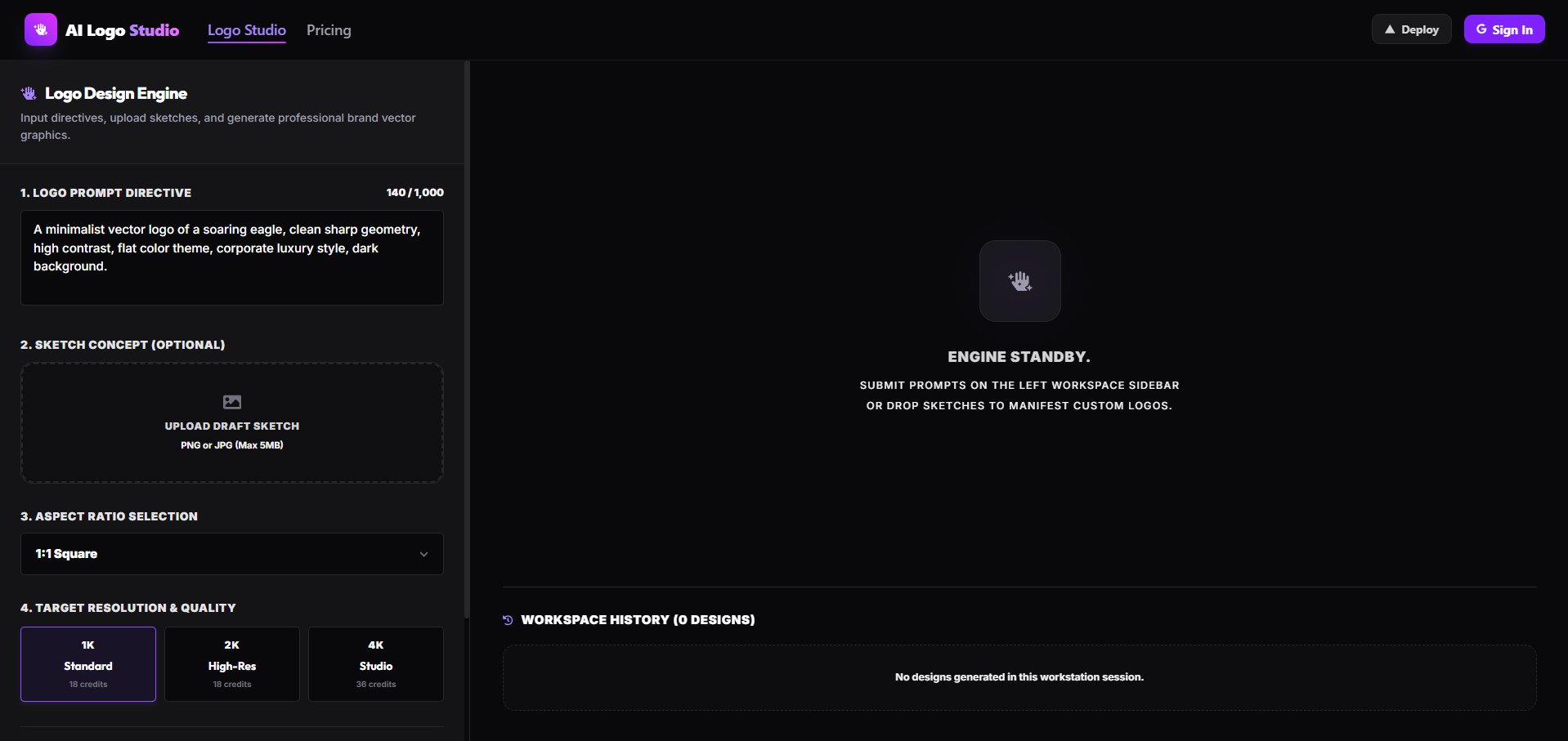
Hosted Demo: ai-logo-studio-rho.vercel.app
Experience the full dark-mode, responsive interface. Sign in with Google to explore the Logo Generation Workstation, advanced aspect ratio options, custom sketch overlay uploads, and credit tiers directly from your browser.
AI Logo Studio is a production-ready, highly-optimized AI web application. Out of the box, it seamlessly manages User Authentication, Credits & Billing, Creations Persistence, and asynchronous AI logo generation using a sleek Next.js (App Router) architecture. It empowers you to build professional-grade AI workflows with built-in mobile optimization, making it the perfect starting point for your next AI SaaS.
Why use AI Logo Studio?
- Production-Ready SaaS — Complete with Google OAuth and Stripe Checkout workflows built-in.
- Advanced Logo Workstation — Input text prompt descriptors, select custom resolution sizes (1K, 2K, 4K), choose aspect ratios (1:1, 16:9, 9:16, 4:3, 3:4, 21:9), and toggle Smart Prompt Expansion.
- Sketch-to-Logo Engine — Upload your own draft concepts or sketch ideas to guide the generation (routed automatically to
nano-banana-pro-edit). - History Archive & Live Viewer — Review previously generated logos in a unified grid, view draft inputs alongside final results in the detail panel, and download high-resolution outputs.
- Responsive UX — Custom styled dropdowns, micro-animations, loading state counters, and mobile-ready overlays.
- Logo Workstation — Convert textual ideas into professional brand identities. Automatically routes to Nano Banana Pro for text inputs and Nano Banana Pro-Edit when a reference sketch or image is uploaded.
- Resolution & Credits Tiering — Generate 1K Standard or 2K High-Res logos for 18 credits per request, or go up to 4K Studio resolution for 36 credits.
- Interactive Sketch Uploads — Easily drag-and-drop or select JPG/PNG files up to 5MB to serve as logo layouts. High-end comparison detail modal renders the sketch concept overlaid on the generated final logo for perfect visual validation.
- Creations History — Persist all generation details, input images, status states, and final images to PostgreSQL. Real-time background polling handles async callbacks from MuAPI automatically.
- Credit Billing — Fully integrated Stripe checkout workflows. Top up account credits through flexible, tier-based pricing packs ($1 = 200 credits) to support continuous logo creation.
- Beautiful & Dynamic UI — Dark-mode glassmorphic dashboard styled with Tailwind CSS, complete with custom styled dropdown selectors and full mobile menu navigation.
Deploying an instance of AI Logo Studio to the web requires minimal configuration. The architecture is engineered explicitly for Vercel serverless environments.
To successfully deploy and run, populate the following environment variables in your Vercel project settings:
| Service | Variable | Description & Source |
|---|---|---|
| Database | DATABASE_URL |
PostgreSQL connection string (Supabase or Neon) |
DIRECT_URL |
Direct DB connection for Prisma migrations | |
| NextAuth / Google | NEXTAUTH_SECRET |
Secure random string generated via openssl rand -base64 32 |
NEXTAUTH_URL |
Your production domain (e.g. https://your-app.vercel.app) |
|
GOOGLE_CLIENT_ID |
Get from Google Cloud Console | |
GOOGLE_CLIENT_SECRET |
Get from Google Cloud Console | |
| Stripe Billing | STRIPE_SECRET_KEY |
Get from Stripe Dashboard |
NEXT_PUBLIC_STRIPE_PUBLISHABLE_KEY |
Get from Stripe Dashboard | |
STRIPE_WEBHOOK_SECRET |
Webhook secret for resolving credit purchases | |
| AI Generator | MUAPIAPP_API_KEY |
Create an account and get key from muapi.ai/access-keys |
WEBHOOK_URL |
Public domain URL (e.g. https://your-app.vercel.app) for async generation webhooks |
- Database Provisioning: Create a new Postgres database (via completely free tiers on Vercel Postgres, Supabase, or Neon). Retrieve the pooling connection string (
DATABASE_URL) and direct connection string (DIRECT_URL). - Project Creation: Import your GitHub fork into the Vercel dashboard.
- Configure Environment Variables: Copy the variables above into the Vercel project settings environment tab.
- Deploy: Hit "Deploy". Vercel will automatically run the build steps (
npm run build). - Database Push: Since Prisma does not automatically migrate via Vercel builds by default, you may want to append
npx prisma db push &&to your Vercel build command, or manually run it locally pointing to your production database URL. - Integrations Setup:
- Establish a Google Cloud OAuth app, enabling the callback URL:
https://your-app.vercel.app/api/auth/callback/google - Setup a Stripe Webhook, pointing to
https://your-app.vercel.app/api/stripe/webhookand selecting thecheckout.session.completedevent to grab your webhook signing secret. - Configure a webhook receiver on your app at
/api/webhook/muapifor async AI generation updates.
- Establish a Google Cloud OAuth app, enabling the callback URL:
Ready to iterate locally? Setup is straightforward.
- Node.js (v18 or higher)
- A local PostgreSQL instance or a free cloud Database URL.
# 1. Clone the repository
git clone https://github.com/SamurAIGPT/ai-logo-studio
cd ai-logo-studio

# 2. Install dependencies
npm install

# 3. Setup Environment
cp .env.example .env
# Open .env and insert your specific keys. You can use a local DB or your dev cloud DB.

# 4. Initialize Database Schema
npx prisma generate
npx prisma db push

# 5. Start the Development Server
npm run dev
The workstation should now be running on http://localhost:3000.
⚠️ Database Safety Warning: This application shares a single PostgreSQL database instance on Supabase with other applications in this workspace. Follow the cycle below to synchronize models safely:
- Pull all existing tables:
npx prisma db pull(introspects all active tables)- Declare relation changes: Inject the
LogoCreationmodel in your localschema.prismaand link it inside theUsermodel.- Push to database: Run
npx prisma db pushto merge changes safely.- Local Schema Cleanup: Strip away other applications' models from your local
schema.prisma, leaving onlyAccount,Session,User,VerificationToken, andLogoCreation.- Compile local client: Run
npx prisma generateto build your local Prisma client.
This application decouples visually rich UI elements from core business logic layers, emphasizing modularization.
ai-logo-studio/
├── prisma/
│   └── schema.prisma           # Postgres tables: Users, Accounts, Sessions, LogoCreations
├── src/
│   ├── app/                    # Next.js App Router
│   │   ├── api/                # Backend API Routes
│   │   │   ├── auth/           # NextAuth credentials handling
│   │   │   ├── logo/           # Credit deduction and MuAPI generation trigger
│   │   │   ├── logos/          # GET (fetch history) and DELETE creations endpoints
│   │   │   ├── upload/         # Proxy uploads for image sketches
│   │   │   └── stripe/         # Stripe checkout sessions & webhook routing
│   │   ├── dashboard/          # Detailed gallery dashboard for user creations
│   │   ├── pricing/            # Interactive subscription & packaging tiers
│   │   ├── globals.css         # Styling system and Tailwind directives
│   │   ├── layout.js           # Core layout configuration
│   │   └── page.js             # Main Workstation logo generator page
│   ├── components/
│   │   ├── layout/
│   │   │   └── Navbar.jsx      # Sticky responsive navigation component
│   │   └── Providers.js        # NextAuth SessionProvider wrapper
│   └── lib/
│       ├── prisma.js           # Shared ORM client singleton
│       ├── auth.js             # NextAuth adapter configuration
│       ├── config.js           # Central config mapping Google, Stripe, MuAPI keys
│       ├── stripe.js           # Stripe instance initializer
│       └── services/
│           ├── user.js         # Credit management service
│           └── billing.js      # Stripe checkout and webhook event parser
├── next.config.mjs             # Next Configuration
└── package.json
Check out other open-source SaaS templates from the same ecosystem:
| Template | Description | GitHub |
|---|---|---|
| My Podcast Studio | Lifelike voice narration and speech generator SaaS | github.com/SamurAIGPT/my-podcast |
| TryOn AI | AI Virtual Try-On & Outfit Fitting SaaS | github.com/SamurAIGPT/ai-tryon |
| AI Social Post Generator | High-conversion AI social feed manager | github.com/SamurAIGPT/social-post |
| AI Kissing Video Generator | Photorealistic romance video generator | github.com/SamurAIGPT/ai-kissing-video-generator |
| Nano Banana Generator | Multi-model AI image generator platform | github.com/SamurAIGPT/nano-banana-generator |
MIT Licensed. Fork it, brand it, and start earning.
AI Logo Studio: A premium, dark-mode, fully responsive AI vector brand logo workstation built for agencies, designer professionals, and brand builders.