

A native Kubernetes desktop client that installs nothing in your cluster.


macOS · brew tap sametkum/klustr && brew install klustr
Arch / CachyOS / Manjaro · paru -S klustr-bin
Debian / Ubuntu · sudo apt install ./klustr_*_amd64.deb (download first)
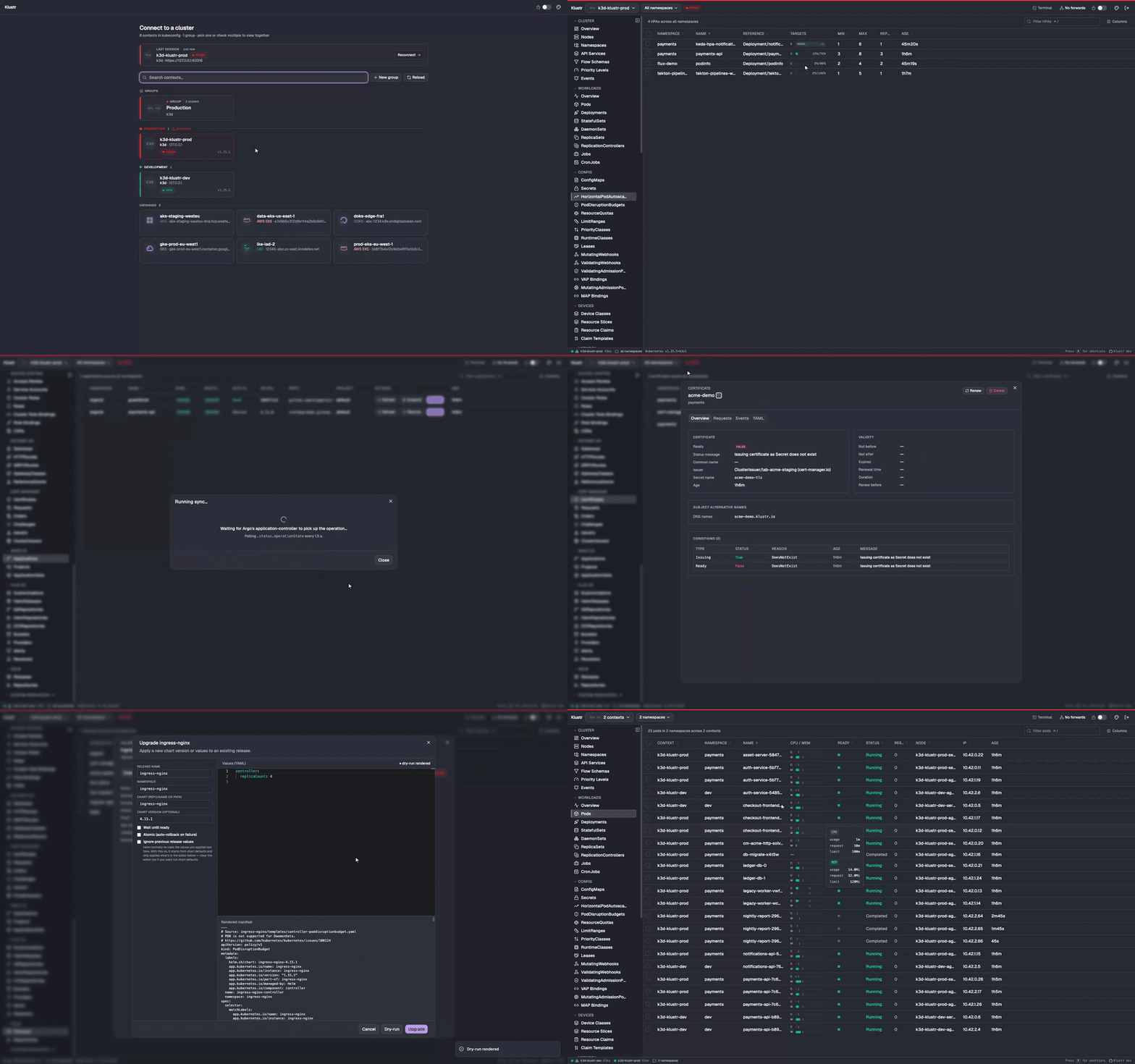
▶ Watch the full-quality video
Klustr is a cross-platform Kubernetes desktop client for working across clusters. It reads your existing ~/.kube/config, connects directly to the Kubernetes API and uses the permissions your contexts already have. Browse resources, troubleshoot workloads and manage ecosystem tools from one app, without the argocd, flux, tkn or helm CLI.
- Helm. Install, upgrade, roll back and uninstall Helm v3 releases. Preview install and upgrade manifests with a dry-run diff, manage repositories and search charts — no
helmCLI required. - Argo CD. Sync, Refresh, Rollback and cascade-aware Delete through the Kubernetes API — no
argocd-server,argocdCLI or Argo login. - Flux CD. Kustomizations, HelmReleases, GitRepositories, HelmRepositories, OCIRepositories, Buckets, Providers, Alerts and Receivers, plus ImageRepositories, ImagePolicies and ImageUpdateAutomations. Inspect scanned tags, selected images and digests, and automation Git commits; follow repository references across namespaces. Reconcile and Suspend/Resume where the resource API supports them, without the
fluxCLI. - Managed by. Follow a resource to its Argo CD Application, Flux Kustomization or HelmRelease, or Helm release — including Applications in another active context. YAML edit and Scale warn before changes the owner will revert, honoring Argo CD
ignoreDifferences, Flux ignore rules and per-object opt-outs. - Tekton. PipelineRuns, TaskRuns, Pipelines and Tasks. A task table joins the resolved pipeline with TaskRuns and skipped tasks; a graph shows dependency order, and step logs open on the running or failed step. Start a Pipeline from its params and workspaces, Cancel and Rerun without
tkn. Triggers support includes EventListeners, Triggers, TriggerTemplates and (Cluster)TriggerBindings.
- Gateway API. Listener tables, per-rule match → backend → weight matrices and
RouteParentStatusexpose misrouted parents andRefNotPermittedbackends. Vendor-neutral, with typed informers. - cert-manager. Certificates, Issuers / ClusterIssuers and the full CertificateRequest → Order → Challenge chain, with readiness, expiry and links between resources. One-click Renew without
cmctl. - Istio. Gateways, VirtualServices, DestinationRules, ServiceEntries, Sidecars, AuthorizationPolicies, RequestAuthentications and PeerAuthentications. Follow hosts and destinations to Services, subsets to pods, and policies to workloads; reads use the discovered served API version.
- Cilium. Dedicated views for network policies, endpoints, nodes, identities, CIDR groups, LoadBalancer IP pools, L2 announcement and egress gateway policies, and BGP configuration. Inspect policy rules, IP allocation and reported BGP peer status, with links to referenced resources.
- Karpenter. NodePools, NodeClaims and AWS EC2NodeClasses with provisioning conditions, resolved subnets, security groups, AMIs, requirements and IAM configuration. Follow pools and claims to their node class; the Disruption tab on nodes and NodeClaims explains blockers such as
do-not-disruptpods, PDBs, active budgets andconsolidateAfter. - KEDA. ScaledObjects, ScaledJobs and (Cluster)TriggerAuthentications with triggers, Ready / Active / Fallback state and authentication references, without reading secret values. Pause at the current or a given replica count and Resume; KEDA-managed HPAs map
s0-…metrics back to their triggers. - Kyverno. ClusterPolicies, Policies, PolicyExceptions, every CEL policy kind (validating, image-validating, mutating, generating and deleting, with their namespaced variants) and
wgpolicyk8s.iopolicy reports. Follow policy failures to resources and inspect each resource's own report in its Policy tab.
- Pure client. Connect directly with your existing kubeconfig and permissions; no in-cluster agent required.
- Live resource lists.
client-goinformers keep resource lists current. Metrics and Events refresh periodically. - Multi-context aggregation. View two or more clusters in one table, with per-context status and latency in the status bar.
- Context groups and tags. Save named context groups for one-click reconnect and use color tags to identify environments in the top bar.
- Built-in resources. Workloads, networking, storage, config, admission, autoscaling and the full RBAC set under a dedicated Access Control sidebar group.
- Access Review. A subject → effective-permissions GVR × verb matrix traces each permission through its binding and role. Wildcards and
cluster-adminare flagged; reviews update live without--asimpersonation or extra API traffic. - Custom resources. CRDs are discovered on connect and grouped by API group. Resources without a dedicated integration get live lists with their printer columns and YAML details.
- Cluster overviews. CPU, memory and pod capacity, workload health and recent warnings for a single cluster or an aggregated session.
- Logs. Stern-style streaming across pods with per-pod ANSI colors, follow, save, regex filtering, a line-count picker and previous container logs.
- In-app exec. Open a shell in a container over SPDY.
- Node shell. Open a root shell through a temporary privileged
nsenterpod that is removed when the session ends — no SSH or preinstalled tooling. - Terminal. A local shell drawer stays pinned to a context with
KUBECONFIGset, alongside support for external terminal apps. - Cordon and drain. Cordon/uncordon and a live-progress drain through the Eviction API, respecting PDBs and skipping DaemonSet and mirror pods.
- YAML edit. Monaco editor with a server-side dry-run diff before apply.
- Scale, restart and pause/resume. Replica controls, rolling restart, deployment pause/resume and inline HPA min/max editing.
- In-place pod resize. Change CPU and memory requests and limits through
pods/resizewithout recreating the pod, with Deferred / Infeasible status displayed live. - Rollout history and rollback. Compare revision templates side by side and revert Deployments, StatefulSets and DaemonSets.
- Port-forwarding. Suggested local ports, a persistent header indicator and click-to-open in the browser.
- Inspector. Open details beside the live list without losing its filter or page. Resize the panel and step through results with
Alt+↑/Alt+↓. - Cross-resource navigation. Follow workload → pod → node links, inspect related resources and return through the back stack.
- Themes and shortcuts. Multiple light and dark themes, command palette (
⌘K), pod search (⌘P), namespace search (⌘N) and a keyboard cheatsheet (?).
See the documentation for integration guides and workflows.
The release build is signed with a Developer ID Application certificate and notarized by Apple, so Gatekeeper opens it directly — even offline.
brew tap sametkum/klustr
brew install klustr
After the initial brew tap, future updates are just brew upgrade klustr (or brew upgrade for everything), and brew search klustr / brew info klustr start finding it.
Download the latest darwin-arm64 tarball from the Releases page, then:
tar -xzf klustr-*-darwin-arm64.tar.gz
mv klustr.app /Applications/
open /Applications/klustr.appThe Linux binary links against webkit2gtk-4.1 + gtk-3. Ubuntu 24.04+, Fedora 39+, Arch and most other modern distros ship those runtime libraries by default; on Ubuntu 22.04 install libwebkit2gtk-4.1-0 libgtk-3-0 first.
paru -S klustr-bin
# or
yay -S klustr-bin
The klustr-bin PKGBUILD uses the prebuilt release tarball, so install completes in seconds. paru -Syu keeps it up to date.
The .deb pulls in the runtime dependencies automatically and registers a klustr desktop entry.
VERSION="$(curl -fsSL https://api.github.com/repos/SametKUM/klustr/releases/latest | grep -oP '"tag_name":\s*"\K[^"]+')"
DEB="klustr_${VERSION#v}_amd64.deb"
curl -LO "https://github.com/SametKUM/klustr/releases/download/${VERSION}/${DEB}"
sudo apt install "./${DEB}"Download the latest linux-amd64 tarball from the Releases page, then:
tar -xzf klustr-*-linux-amd64.tar.gz
install -Dm755 klustr ~/.local/bin/klustr
klustrDownload the latest windows-amd64 zip from the Releases page, extract it and run klustr.exe. Klustr is tested on Windows 11, which ships the WebView2 runtime it renders with.
The Windows build is not code-signed yet. On first launch SmartScreen shows "Windows protected your PC": choose More info, then Run anyway. With Smart App Control on, Windows blocks unsigned apps outright.
- Klustr reads
~/.kube/configat launch. - On first run, pick a context — or check two or more to view them aggregated as one cluster. Save a recurring selection as a named group for one-click reconnect, and toggle Auto-connect on a card to pin it as the default.
- Browse via the sidebar, click any row to open it in the inspector beside the list, use
⌘Kto open the command palette, or⌘Pto search pods by name. The header's Disconnect button drops you back to the picker at any time.
Captured from two kind clusters with realistic workloads and deliberate failures. See the full screenshot gallery for more workflows and themes.
 |
 |
| Multiple clusters — pods from two clusters and three namespaces in one table | Workload debugging — one log stream across a Deployment, with pod colors and a live regex filter |
 |
 |
| Helm upgrade — review values and the dry-run manifest before applying | Tekton — inspect failed, skipped and completed pipeline tasks |
Task-focused guides live at klustr.dev/docs (source: SametKUM/klustr.dev):
- Getting started — contexts, namespaces, read-only mode
- Multi-context & aggregated mode — many clusters as one, groups, tags
- Credential helpers — aws-vault and other exec plugins under a GUI launch
- Cluster & workloads overviews — capacity donuts, workload health, events feed
- Workloads & debugging — logs, exec, port-forward, node shell
- Terminal — the built-in shell drawer and external terminal apps
- Helm · GitOps: Argo CD & Flux · Tekton Pipelines · Gateway API · Kyverno & policy reports · Platform integrations · Custom Resources
mise install          # installs Go, Node and the wails3 CLI pinned in .mise.toml
cd frontend && npm ci && cd ..
wails3 dev            # dev session: Vite hot reload, rebuilds on Go changes

# or a release build for your host platform, into build/bin
wails3 task build
On Linux the build needs the GTK3 / WebKit2GTK 4.1 development headers (libgtk-3-dev libwebkit2gtk-4.1-dev on Debian and Ubuntu).
| Layer | Choice |
|---|---|
| Desktop | Wails v3 (Go + native webview) |
| Backend | Go 1.27 + client-go (typed clientset + dynamic) + sigs.k8s.io/gateway-api |
| Frontend | React 19 · TypeScript · Vite |
| UI | Tailwind CSS · shadcn/ui |
| State | Zustand (real-time) · TanStack Query (mutations only) |
| Tables | TanStack Table |
| Live data | client-go informers → Wails events → Zustand → React |
Full design notes, conventions and the "add a new resource kind" recipe live in AGENTS.md.
Bug reports and focused pull requests are welcome.
- Read
AGENTS.mdfirst — it's the architecture + conventions contract. - Use Conventional Commits (
feat:,fix:,refactor:…) and prefer small, logically scoped commits. - Before opening a PR, run:
go test klustr/internal/... && go vet ./...
cd frontend && npm test && npm run lint && npm run typecheck
- New user-facing features should include a screenshot or short clip in the PR description.
Full guide: CONTRIBUTING.md. Bug reports go through the bug_report.yml issue template so the version / OS / cluster details we need actually land in the report. Found a security issue? Please report it privately — see the security policy.
Klustr is licensed under the Apache License 2.0. The screenshots, demo video and other documentation under docs/ are licensed under CC BY 4.0.
Built on the shoulders of: Wails, client-go, React, shadcn/ui, Tailwind CSS, TanStack Table / Query, xterm.js, Monaco Editor, Zustand, Vite, mise.