


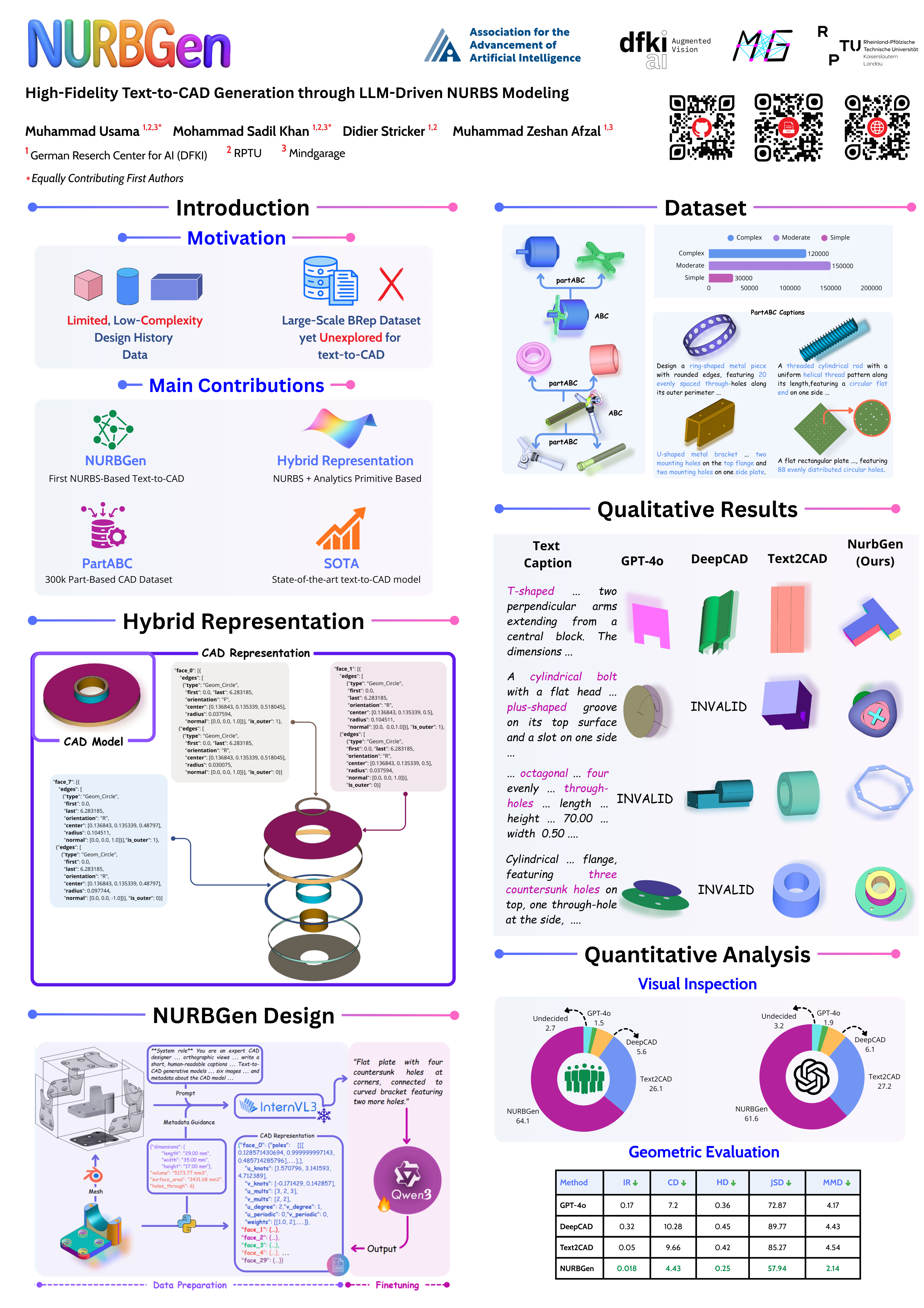
The first framework to generate industry-standard NURBS surfaces directly from text prompts, producing editable, parametric CAD models convertible to STEP format.
Muhammad Usama1,2,3 * · Mohammad Sadil Khan1,2,3 * † · Didier Stricker1,2 · Muhammad Zeshan Afzal1,3
1DFKI Kaiserslautern · 2RPTU Kaiserslautern-Landau · 3MindGauge
* Equally contributing first authors · † Corresponding author
| Component | |
|---|---|
| ✅ | Pre-trained Model Weights |
| ✅ | Inference Scripts |
| ✅ | Reconstruction Scripts |
| ⬜ | Training Scripts |
| ⬜ | Data Preparation Scripts |
| ⬜ | PartABC Dataset |
conda env create -f environment.yaml
conda activate nurbgenFlash Attention must be installed from the pre-built wheel after the environment is created, as it is tied to your specific CUDA and PyTorch versions:
# https://github.com/Dao-AILab/flash-attention/releases/tag/v2.8.0.post2
pip install flash_attn-2.8.0.post2+cu12torch2.7cxx11abiTRUE-cp311-cp311-linux_x86_64.whl
Pre-built wheels for other CUDA/PyTorch combinations are available at flash-attention releases. To build from source instead:
pip install flash-attn --no-build-isolation
git clone https://github.com/tpaviot/pythonocc-utils
cd pythonocc-utils
pip install -e .# Install kaolin (https://kaolin.readthedocs.io/en/latest/notes/installation.html)
pip install kaolin==0.18.0 -f https://nvidia-kaolin.s3.us-east-2.amazonaws.com/torch-{TORCH_VER}_cu{CUDA_VER}.html
# Structural Losses (PointFlow implementation)
git clone https://github.com/stevenygd/PointFlow/tree/master/metrics/pytorch_structural_losses
cd pytorch_structural_losses
pip install -e .
# Point cloud utilities (for evaluation metrics like Hausdorff Distance)
pip install point-cloud-utilsCLI Reference
| Flag | Default | Description |
|---|---|---|
--prompt / -p |
— | Inline single prompt string |
--input / -i |
— | Path to .txt, .json, or .jsonl |
--output_dir / -o |
./nurbgen_outputs |
Directory for output .txt files |
--batch_size |
4 |
Prompts per inference batch |
--max_new_tokens |
8192 |
Maximum tokens to generate |
--temperature |
0.3 |
0 = greedy decoding |
--save_summary |
off | Also write results_summary.json |
# For single prompt, use the --prompt flag:
python -m src.infer_nurbgen --prompt "Socket head cap screw with a large countersunk washer. Features a hexagonal socket drive and a cylindrical threaded shank. Dimensions: length 92.96 mm, width 79.38 mm, height 43.66 mm. Ensure smooth curvature at transitions." --output_dir ./results

# For batch processing with file outputs, create a text file (e.g., prompts.txt) with one prompt per line:
python -m src.infer_nurbgen --input prompts.txt --output_dir ./results

# For json input [{"uid", "caption"},{"uid", "caption"}], create a jsonl file (e.g., prompts.jsonl):
python -m src.infer_nurbgen --input prompts.jsonl --output_dir ./results

# Step 2: Convert generated JSON to STEP/STL files:
cd src/nurbs_representation
python export.py --input_dir ../../results --output_dir ../../step_files
from swift.llm import PtEngine, RequestConfig, InferRequest

engine = PtEngine(
    "Qwen/Qwen3-4B",
    adapters=["SadilKhan/NURBGen"],
    use_hf=True,
    torch_dtype="bfloat16",
    device_map="auto",
    attn_impl="flash_attn_2",
    use_cache=True,
)

response = engine.infer(
    [InferRequest(messages=[{
        "role": "user",
        "content": "Generate NURBS for the following: Design a rectangular plate with dimensions 330.20 mm x 233.40 mm x 6.00 mm. Include two square through-holes near each end."
    }])],
    request_config=RequestConfig(
        max_tokens=8192,
        temperature=0.3,
    ),
)

print(response[0].choices[0].message.content)You need to install vllm to use the VllmEngine, which is much faster and more memory efficient than the PtEngine for long generations. See ms-swift docs for installation instructions. pip install vllm==0.11.0
import torch
from swift.infer_engine import VllmEngine
from swift.llm import InferRequest, RequestConfig

engine = VllmEngine(
    "Qwen/Qwen3-4B",
    adapters=["SadilKhan/NURBGen"],   # one LoRA adapter
    use_hf=True,
    torch_dtype=torch.bfloat16,
    max_model_len=8192,               # set only as large as you need
    gpu_memory_utilization=0.9,
    max_num_seqs=8,                   # useful if you batch multiple requests
    max_lora_rank=64,                 # increase if your LoRA rank is >16
)

requests = [
    InferRequest(
        messages=[{
            "role": "user",
            "content": (
                "Generate NURBS for the following: "
                "Design a rectangular plate with dimensions "
                "330.20 mm x 233.40 mm x 6.00 mm. "
                "Include two square through-holes near each end."
            )
        }]
    )
]

config = RequestConfig(
    max_tokens=8192,      # much faster than 8192 unless you truly need that length
    temperature=0.3,     # greedy decode = faster
)

responses = engine.infer(requests, config)
print(responses[0].choices[0].message.content)import torch
from transformers import AutoTokenizer, AutoModelForCausalLM
from peft import PeftModel
tokenizer = AutoTokenizer.from_pretrained("Qwen/Qwen3-4B")
model = AutoModelForCausalLM.from_pretrained(
"Qwen/Qwen3-4B", torch_dtype=torch.bfloat16, device_map="auto"
)
model = PeftModel.from_pretrained(model, "SadilKhan/NURBGen")
model.eval()
messages = [{"role": "user", "content": "Generate NURBS for the following: Design a rectangular plate with dimensions 330.20 mm x 233.40 mm x 6.00 mm. Include two square through-holes near each end. "}]
text = tokenizer.apply_chat_template(messages, tokenize=False, add_generation_prompt=True)
inputs = tokenizer(text, return_tensors="pt").to(model.device)
with torch.no_grad():
outputs = model.generate(**inputs, max_new_tokens=8192, do_sample=False)
print(tokenizer.decode(outputs[0][inputs.input_ids.shape[1]:], skip_special_tokens=True))# For single STEP file:
python extract.py --step_file part.step --output_json out.json
# For batch processing with directory of STEP files:
python extract.py --input_dir step_files/ --output_dir json_outputs/ --num_workers 4Download the training jsonl
cd src/evaluation
python eval.py --pred_step_dir pred_steps/ --gt_step_dir gt_steps/ --output_dir eval_results/If you find NURBGen useful in your research, please cite:
@inproceedings{usama2026nurbgen,
  title={NURBGen: High-Fidelity Text-to-CAD Generation through LLM-Driven NURBS Modeling},
  author={Usama, Muhammad and Khan, Mohammad Sadil and Stricker, Didier and Afzal, Muhammad Zeshan},
  booktitle={Proceedings of the AAAI Conference on Artificial Intelligence},
  volume={40},
  number={12},
  pages={9603--9611},
  year={2026}
}Contact: mdsadilkhan99@gmail.com