
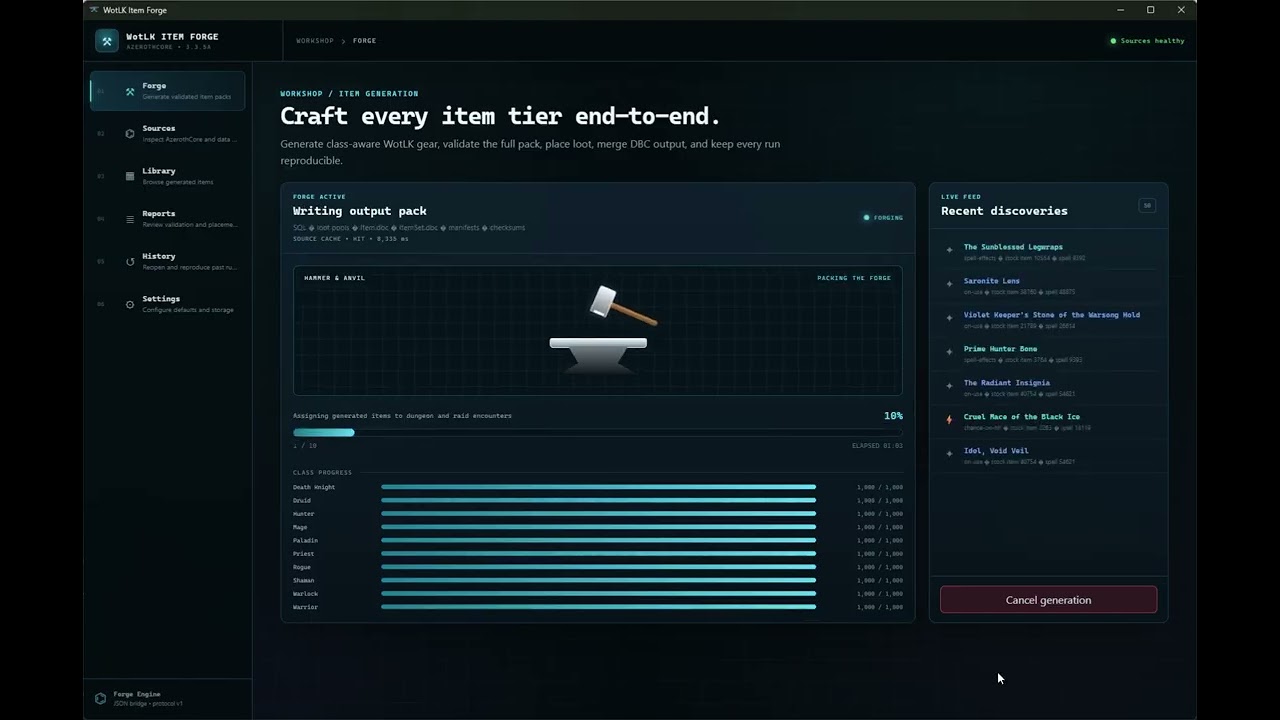
A Tauri desktop workbench for deterministic AzerothCore / World of Warcraft: Wrath of the Lich King 3.3.5a (build 12340) item generation.
The app reads local WotLK DBC/SQL sources, generates reviewable SQL and client/server DBC output, and keeps each run reproducible. It never connects to or modifies a live database.
- Windows for the packaged desktop build
- A local WotLK DBC/SQL source bundle; use
Data/in a source checkout or choose another folder in Settings - An AzerothCore source checkout for source-backed encounter and reward discovery
- A writable output folder
On startup, the app scans required and optional sources. Forge stays blocked until required data, the AzerothCore source root, DBC baselines, and the output location are ready.
- Sources scans source health, shows required versus optional inputs, and lets you select paths or clear/rebuild the source cache.
- Forge configures expansion (
Classic,TBC,Wrath, orAll), classes, item count, seed, effects, loot destinations, sets, sockets, Legendaries, disenchant data, and advanced overrides. - Run records the configuration and source fingerprints, then launches the generator sidecar. Live progress, discoveries, validation, errors, and cancellation are shown in the app.
- Review indexes completed output into the local Library and report index. Library, Reports, and History remain available without changing the generated files.
The other screens are:
- Library - searchable, read-only generated item metadata and item details
- Reports - validation, placement, encounter, set, distribution, manifest, and source-audit reports
- History - prior configurations, source drift, output folders, and reproducible regeneration
- Settings - default paths and generation values, appearance, cache/index maintenance
The React/TypeScript UI calls typed Tauri commands in the Rust backend. Rust owns the local SQLite app.db, source fingerprints, report/index maintenance, dialogs, cancellation, and sidecar lifecycle; the webview does not spawn processes directly.
The Python generator remains the generation authority. Rust translates the Forge configuration into generator arguments and starts wotlk-item-forge-engine with --ui json. The engine emits protocol-v1 newline-delimited JSON events on stdout; Rust validates and forwards them to the UI while capturing diagnostics in the app-local log. A completed event triggers indexing of items.ndjson and known report files. Expensive source mappings are cached locally and can be rebuilt from Sources.
creature.sql
creature_loot_template.sql
creature_template.sql
disenchant_loot_template.sql
DungeonMap.dbc
instance_encounters.sql
Item.dbc
item_template.sql
ItemSet.dbc
Map.dbc
MapDifficulty.dbc
reference_loot_template.sql
Spell.dbc
spell_proc.sql
spell_script_names.sql
SpellItemEnchantment.dbc
Item.custom.dbc
gameobject.sql
gameobject_template.sql
gameobject_loot_template.sql
Each run creates generated-<seed>/, including:
sql/andsql/IMPORT_ORDER.txtclient/Item.dbcand optionalclient/ItemSet.dbcserver/dbc/ItemSet.dbcadditem_commands/validation_report.json,manifest.csv, and placement reports00_SCHEMA_CHECK.sql00_PREIMPORT_COLLISION_CHECK.sql99_REMOVE_GENERATED_ITEMS.sql- a self-contained generated
README.md
- Back up
acore_world. - Run
00_SCHEMA_CHECK.sql. - Run
00_PREIMPORT_COLLISION_CHECK.sql; stop if any collision count is non-zero. - Import the files listed in
sql/IMPORT_ORDER.txt. - Copy the generated server
ItemSet.dbcwhen sets are enabled. - Package the generated client DBCs under
DBFilesClient/. - Restart worldserver; clear
Cache/WDB/<locale>/itemcache.wdbif names or icons are stale.
npm install
npm run tauri dev
The development app uses the staged Windows engine in src-tauri/binaries/. To build the complete Windows release, install the sidecar build dependencies and run:
py -m pip install -r engine/requirements-build.txt
.\scripts\build-windows-release.ps1
The release script validates the project, builds the Nuitka engine sidecar, stages it for Tauri, and creates the NSIS installer. An installed app still needs access to your own DBC/SQL and AzerothCore source directories.
py engine/generate_pack.py --help
npm test
npm run build
npm run check:tauri-config
See LICENSE.md for the MIT license.