A modern logging library using {fmt} library for Arduino.
- Modern Formatting: Built-in support for fmtlib
- Multiple Log Levels: TRACE, DEBUG, INFO, WARN, ERROR with compile time and run time filtering
- Compile-time Configuration: Zero-overhead for disabled log levels
- Flexible Timestamps: Microseconds, milliseconds, or formatted time (HH:MM:SS:MS)
- ANSI Color Support: Configurable colored output for different log levels
- Source Location: Optional filename, line number, and function name logging
- File Storage: Buffered writes with automatic log rotation (LittleFS, SPIFFS, SD, SdFat)
- Benchmarking: Scoped and manual timing utilities with millisecond and microsecond precision
- Stream Support: Works with any Arduino Stream (Serial, Serial1, etc.)
- Assert & Check Macros: Debug assertions and non-fatal condition checks
- Memory Efficient: Smart buffer management with configurable static buffer size
- Type Safety: Compile-time format string validation and type checking
- Custom Preambles: Fully customizable log message formatting
#include <Arduino.h>
#include "FormatLog.h"

void setup() {
    LOG_BEGIN(9600);
    LOG_INFO("Hello {}", "World!");
}

void loop() {
    LOG_DEBUG("millis: {}", millis());
    delay(1000);
}FormatLog uses compile-time macros for configuration, ensuring zero overhead for disabled features.
If no configuration is provided, FormatLog uses the following defaults:
#define LOG_LEVEL LOG_LEVEL_TRACE              // Trace level and above
#define LOG_TIME LOG_TIME_DISABLE              // No timestamps
#define LOG_COLOR LOG_COLOR_DISABLE            // No color output
#define LOG_LEVEL_TEXT_FORMAT LOG_LEVEL_TEXT_FORMAT_SHORT  // 4 character level names
#define LOG_FILENAME LOG_FILENAME_ENABLE       // Filename only (no line/function)
#define LOG_STATIC_BUFFER_SIZE 128             // 128 byte static buffer
#define LOG_STREAM Serial                      // Default to Serial output
#define LOG_STORAGE_ENABLE 0                   // File storage disabled
#define LOG_PRINT_ENABLE 1                     // Print macros enabled
These defaults provide a basic logging setup that works out of the box. You can override any of these settings by defining them before including FormatLog.h.
The recommended way to use this library is to use the pre configured FmtLog.h or create a Log.h file in your project and define all settings before including FormatLog.h. Then include Log.h instead of FormatLog.h across your project.
#pragma once

// Log level filtering
#define LOG_LEVEL LOG_LEVEL_TRACE

// Timestamps before logs
#define LOG_TIME LOG_TIME_HHHHMMSSMS

// Colors based on log level
#define LOG_COLOR LOG_COLOR_ENABLE

// Source location info
#define LOG_FILENAME LOG_FILENAME_LINENUMBER_FUNCTION_ENABLE

// Log level text length
#define LOG_LEVEL_TEXT_FORMAT LOG_LEVEL_TEXT_FORMAT_LETTER

// Size of buffer before dynamic memory is used
#define LOG_STATIC_BUFFER_SIZE 128

// Serial output
#define LOG_STREAM Serial

#include <FormatLog.h>#define LOG_LEVEL LOG_LEVEL_DEBUGAvailable levels (in order of severity):
LOG_LEVEL_TRACE- Most verbose, includes all messagesLOG_LEVEL_DEBUG- Debug information and aboveLOG_LEVEL_INFO- General information and aboveLOG_LEVEL_WARN- Warnings and errors onlyLOG_LEVEL_ERROR- Errors onlyLOG_LEVEL_DISABLE- No logging
#define LOG_TIME LOG_TIME_MILLISOptions:
LOG_TIME_DISABLE- No timestampsLOG_TIME_ENABLE- Alias forLOG_TIME_MILLISLOG_TIME_MICROS- Microseconds since bootLOG_TIME_MILLIS- Milliseconds since bootLOG_TIME_HHMMSSMS- Time since boot format:HH:MM:SS:MSLOG_TIME_HHHHMMSSMS- Time since boot format:HHHH:MM:SS:MSLOG_TIME_LOCALTIME- System local time format:YYYY-MM-DD HH:MM:SS:MScan be overridden usingLOG_TIME_LOCALTIME_FORMAT
#define LOG_LEVEL_TEXT_FORMAT LOG_LEVEL_TEXT_FORMAT_SHORTOptions:
LOG_LEVEL_TEXT_FORMAT_LETTER- Single letter:[T],[D],[I],[W],[E]LOG_LEVEL_TEXT_FORMAT_SHORT- Short:[TRAC],[DEBG],[INFO],[WARN],[EROR]LOG_LEVEL_TEXT_FORMAT_FULL- Full:[TRACE],[DEBUG],[INFO],[WARN],[ERROR]
#define LOG_COLOR LOG_COLOR_ENABLEOptions:
LOG_COLOR_ENABLELOG_COLOR_DISABLE
Enables ANSI color codes:
- TRACE: Bright White
- DEBUG: Green
- INFO: Cyan
- WARN: Yellow
- ERROR: Red
PlatformIO
To see ANSI colors when using PlatformIO's serial monitor, add the following to your
platformio.ini:monitor_filters = direct # Needed for colors in terminal
#define LOG_FILENAME LOG_FILENAME_LINENUMBER_FUNCTION_ENABLEOptions:
LOG_FILENAME_DISABLE- No file informationLOG_FILENAME_ENABLE- Filename only (without extension)LOG_FILENAME_LINENUMBER_ENABLE- Filename and line numberLOG_FILENAME_LINENUMBER_FUNCTION_ENABLE- Filename, line number, and function name
#define LOG_STATIC_BUFFER_SIZE 128Sets the static buffer size for log messages. Messages shorter than this size use stack memory, while longer messages dynamically allocate memory as needed.
#define LOG_PRINT_ENABLE 0Controls whether LOG_PRINT and LOG_PRINTLN macros are active. When disabled (0), all calls are compiled out completely. Enabled by default.
You can fully customize the log message preamble by defining your own format string and arguments. This allows you to control exactly how timestamps, log levels, and file information appear in your logs.
#define LOG_PREAMBLE_FORMAT "[{}][{}] "
#define LOG_PREAMBLE_ARGS(level, filename, linenumber, function) \
    fmtlog::logLevelText(level, LOG_LEVEL_TEXT_FORMAT), \
    fmtlog::formatFilename(filename, linenumber, function, LOG_FILENAME)
At compile time, the library expands your macro definitions into the actual formatting call:
log(LogLevel level, char *filename, int linenumber, char *function){
// Your macro definitions expand to:
fmt::format_to(buffer, "[{}][{}] ",
    fmtlog::logLevelText(level, LOG_LEVEL_TEXT_FORMAT),
    fmtlog::formatFilename(filename, linenumber, function, LOG_FILENAME));
}
This gives you complete control over the log message structure while maintaining the performance benefits of compile-time configuration.
FormatLog supports writing logs to files with buffered writes and automatic log rotation. It works with LittleFS, SPIFFS, SD, FFat, and SdFat filesystems. The filesystem type is auto-detected.
#define LOG_STORAGE_ENABLE 0                          // Enable file storage (default: 0)
#define LOG_STORAGE_LEVEL LOG_LEVEL_WARN              // Minimum level for storage (default: WARN)
#define LOG_STORAGE_FILE_PATH "/log.txt"              // Log file path (default: "/log.txt")
#define LOG_STORAGE_MAX_BUFFER_SIZE 4096              // Write buffer size (default: 4096)
#define LOG_STORAGE_MAX_FILE_SIZE 102400              // Max file size before rotation (default: 100KB)
#define LOG_STORAGE_MAX_FILES 3                       // Rotated backups to keep (default: 3, 0 = no rotation)
#define LOG_STORAGE_NEW_FILE_ON_BOOT 0                // Rotate on first write (default: 0)
Storage has its own preamble that can be customized independently:
#define LOG_STORAGE_PREAMBLE_FORMAT "[{}][{}] "
#define LOG_STORAGE_PREAMBLE_ARGS(level, filename, linenumber, function) ...#include <LittleFS.h>
void setup() {
LOG_BEGIN(115200);
LittleFS.begin(true);
LOG_SET_STORAGE(LittleFS); // Auto detect type (will work with any supported FS)
LOG_WARN("This goes to serial AND file storage");
LOG_TRACE("This goes to serial only (below storage level)");
LOG_FLUSH_STORAGE(); // Flush buffer to file
LOG_CLOSE_STORAGE(); // Close the file
}Supported filesystems:
// LittleFS
LittleFS.begin(true);
LOG_SET_STORAGE(LittleFS);

// SPIFFS
SPIFFS.begin(true);
LOG_SET_STORAGE(SPIFFS);

// SD
SD.begin(SS, SPI);
LOG_SET_STORAGE(SD);

// FFat
FFat.begin(true);
LOG_SET_STORAGE(FFat);

// SdFat
SdFat sd;
sd.begin(SS);
LOG_SET_STORAGE(sd);For lightweight logging without buffering or rotation, use createSimpleStorage. Each write is buffered directly in the filesystem:
#include <LittleFS.h>

void setup() {
    LOG_BEGIN(115200);
    LittleFS.begin(true);

    auto sink = fmtlog::createSimpleStorage(LittleFS, "/log.txt");
    FmtLog.setStorage(sink);
}You can create a custom storage sink by implementing the IFileSink interface:
#include "Storage/Sinks/IFileSink.h"

class MyCustomSink : public fmtlog::IFileSink {
public:
    bool write(const char *data, size_t size) override { /* write data */ }
    void flush() override { /* flush to storage */ }
    void close() override { /* release resources */ }
    void setFilePath(const char *path) override { /* update path */ }
    std::string getFilePath() const override { /* return current path */ }
};
Then pass it to the logger:
auto sink = std::make_shared<MyCustomSink>();
FmtLog.setStorage(sink);FormatLog includes built-in timing utilities for profiling code sections.
Automatically logs elapsed time when the scope exits:
void sensorRead() {
    LOG_BENCHMARK();          // Logs "[sensorRead] elapsed 150 ms" on return
    delay(150);
    LOG_INFO("Sensor value: {}", analogRead(5));
}Time specific sections within a function:
void processData() {
    LOG_BENCHMARK_BEGIN(parse);
    delay(50);
    LOG_BENCHMARK_END(parse);     // Logs "[parse] elapsed 50 ms"

    LOG_BENCHMARK_BEGIN(transform);
    delay(75);
    LOG_BENCHMARK_END(transform); // Logs "[transform] elapsed 75 ms"
}For timing fast operations:
void fastOperation() {
    LOG_BENCHMARK_MICRO_BEGIN(compute);
    delayMicroseconds(200);
    LOG_BENCHMARK_MICRO_END(compute); // Logs "[compute] elapsed 200 us"
}Manual stopwatch for custom timing:
void calibrate() {
    auto sw = LOG_CREATE_STOPWATCH();

    delay(100);
    LOG_INFO("time: {} ms", sw.elapsedMs());

    delay(200);
    LOG_INFO("time: {}", sw.elapsedTime()); // HH:MM:SS:MS format
}
A MicroStopwatch class is also available for microsecond precision with elapsedUs(), elapsedMs(), and elapsedTime() (HH:MM:SS:mmm:uuu format).
#define LOG_BENCHMARK_LOG LOG_DEBUG                    // Log macro for benchmark output (default: LOG_DEBUG)
#define LOG_BENCHMARK_FORMAT "[{}] elapsed {} ms"      // Format for ms benchmarks
#define LOG_BENCHMARK_MICRO_FORMAT "[{}] elapsed {} us" // Format for us benchmarksThe FmtLog macro provides direct access to the singleton logger instance. This allows you to call logger methods directly:
FmtLog.setLogLevel(fmtlog::LogLevel::DEBUG);
FmtLog.println("value: {}", value);
FmtLog.flush();LOG_TRACE(format, ...) // Trace level messages
LOG_DEBUG(format, ...) // Debug level messages
LOG_INFO(format, ...) // Info level messages
LOG_WARN(format, ...) // Warning level messages
LOG_ERROR(format, ...) // Error level messagesLOG_BEGIN(baud) // Initialize serial communication
LOG_END() // End serial communication
LOG_PRINT(format, ...) // Print using fmtlib without newline
LOG_PRINTLN(format, ...) // Print using fmtlib with newline
LOG_FLUSH() // Flush serial output buffer
LOG_SET_LOG_LEVEL(level) // Change log level at runtime
LOG_GET_LOG_LEVEL() // Get current log levelASSERT(condition) // Assert with automatic message
ASSERT(condition, message) // Assert with custom message
LOG_SET_PANIC_HANDLER(handler) // Set callback function called when assert failsAssertions are enabled by default (LOG_ASSERT_ENABLE 1). When an assertion fails, it logs the error, flushes all outputs, and calls the panic handler. You can customize the panic handler:
void customPanic() {
    while(true) {
        digitalWrite(RED_LED, !digitalRead(RED_LED));
        delay(1000);
    }
}

// Set at compile time
#define LOG_PANIC_HANDLER customPanic

// Or set at runtime
LOG_SET_PANIC_HANDLER(customPanic);Non-fatal condition checks that log a warning and return from the calling function:
CHECK_OR_RETURN(condition)                // Log and return void
CHECK_OR_RETURN(condition, message)       // Log with message and return void
CHECK_OR_RETURN_VALUE(condition, value)   // Log and return a value
CHECK_OR_RETURN_VALUE(condition, value, message) // Log with message and return a value
int divide(int a, int b) {
CHECK_OR_RETURN_VALUE(b != 0, -1, "Division by zero");
return a / b;
}
void connectToSensor(int pin) {
CHECK_OR_RETURN(pin >= 0, "Invalid pin number");
LOG_INFO("Connected to sensor on pin {}", pin);
}When assertions are disabled (LOG_ASSERT_ENABLE 0), CHECK_OR_RETURN and CHECK_OR_RETURN_VALUE still perform the condition check and return, but skip the log output.
LOG_SET_STORAGE(fs)                  // Initialize storage with a filesystem
LOG_SET_STORAGE_LOG_LEVEL(level)     // Change storage log level at runtime
LOG_GET_STORAGE_LOG_LEVEL()          // Get current storage log level
LOG_FLUSH_STORAGE()                  // Flush buffer to file
LOG_CLOSE_STORAGE()                  // Close the log file
LOG_SET_STORAGE_FILE_PATH(path)      // Change the log file path
LOG_GET_STORAGE_FILE_PATH() // Get the current log file path- Arduino Framework
- STL
- FmtLib
FormatLog uses {fmt} for modern C++ formatting. Here are common formatting patterns:
Quick Reference: fmtlib cheat sheet
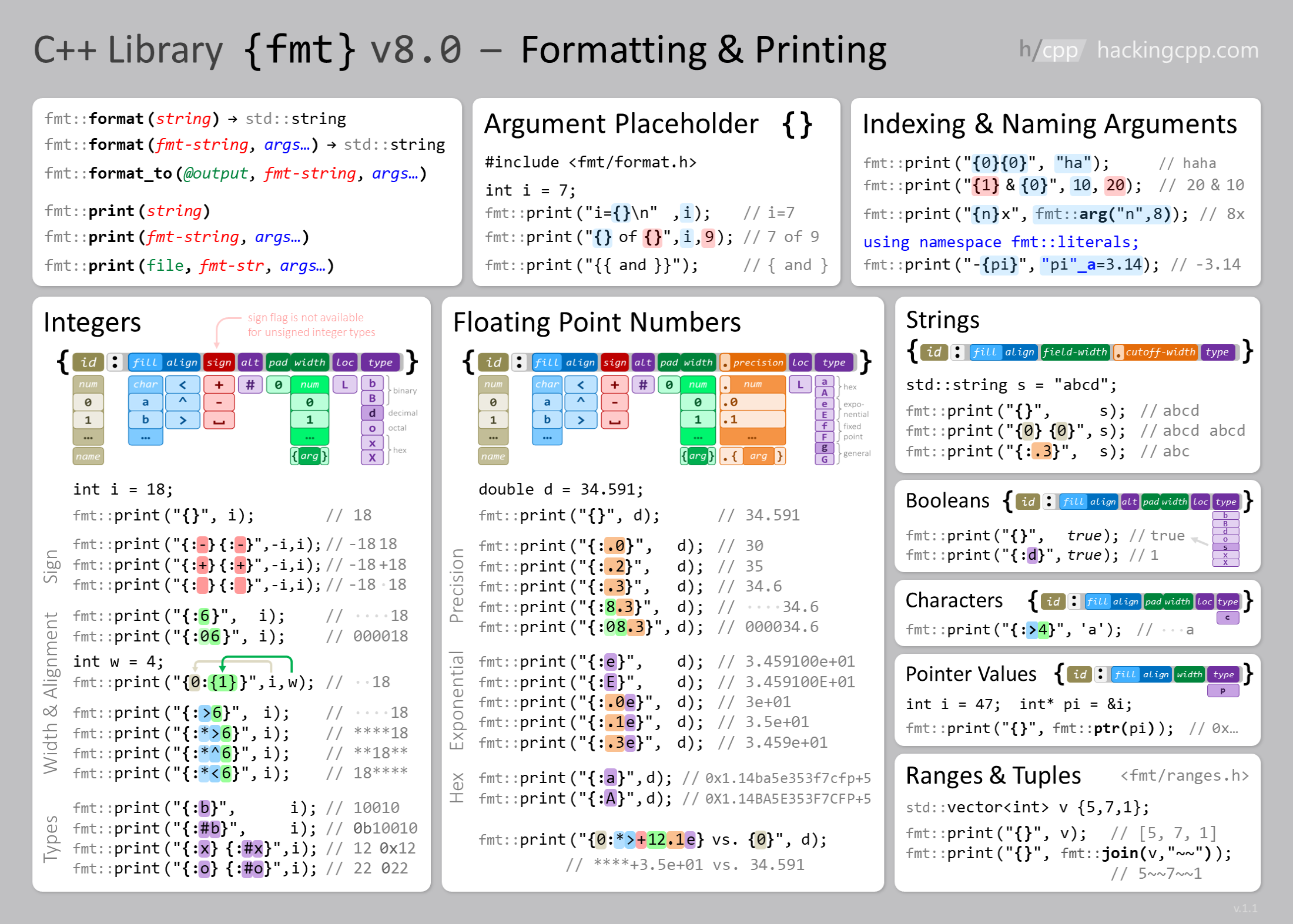
LOG_INFO("Hello {}", "World");           // String substitution
LOG_INFO("Number: {}", 42);              // Integer
LOG_INFO("Float: {:.2f}", 3.14159);      // Float with 2 decimal places
LOG_INFO("Hex: 0x{:X}", 255);            // Hexadecimal (uppercase)
LOG_INFO("Binary: {:b}", 15); // Binary representationLOG_INFO("Left: '{:<10}'", "text"); // Left-aligned, width 10
LOG_INFO("Right: '{:>10}'", "text"); // Right-aligned, width 10
LOG_INFO("Center: '{:^10}'", "text"); // Center-aligned, width 10
LOG_INFO("Zero-pad: '{:05d}'", 42); // Zero-padded numbersSimple logging setup with default configuration.
Advanced configuration with runtime log level changes and STL container formatting.
Demonstrates customizing the log preamble and formatting.
Assertions, check macros, and custom panic handlers.
File storage with LittleFS, SPIFFS, SD, and SdFat.
Scoped benchmarks, named sections, microsecond timing, and stopwatch usage.