

Self-hosted media manager & on-demand Usenet push companion bridging multi-provider watchlists, Newznab indexers, and cloud or local downloaders.



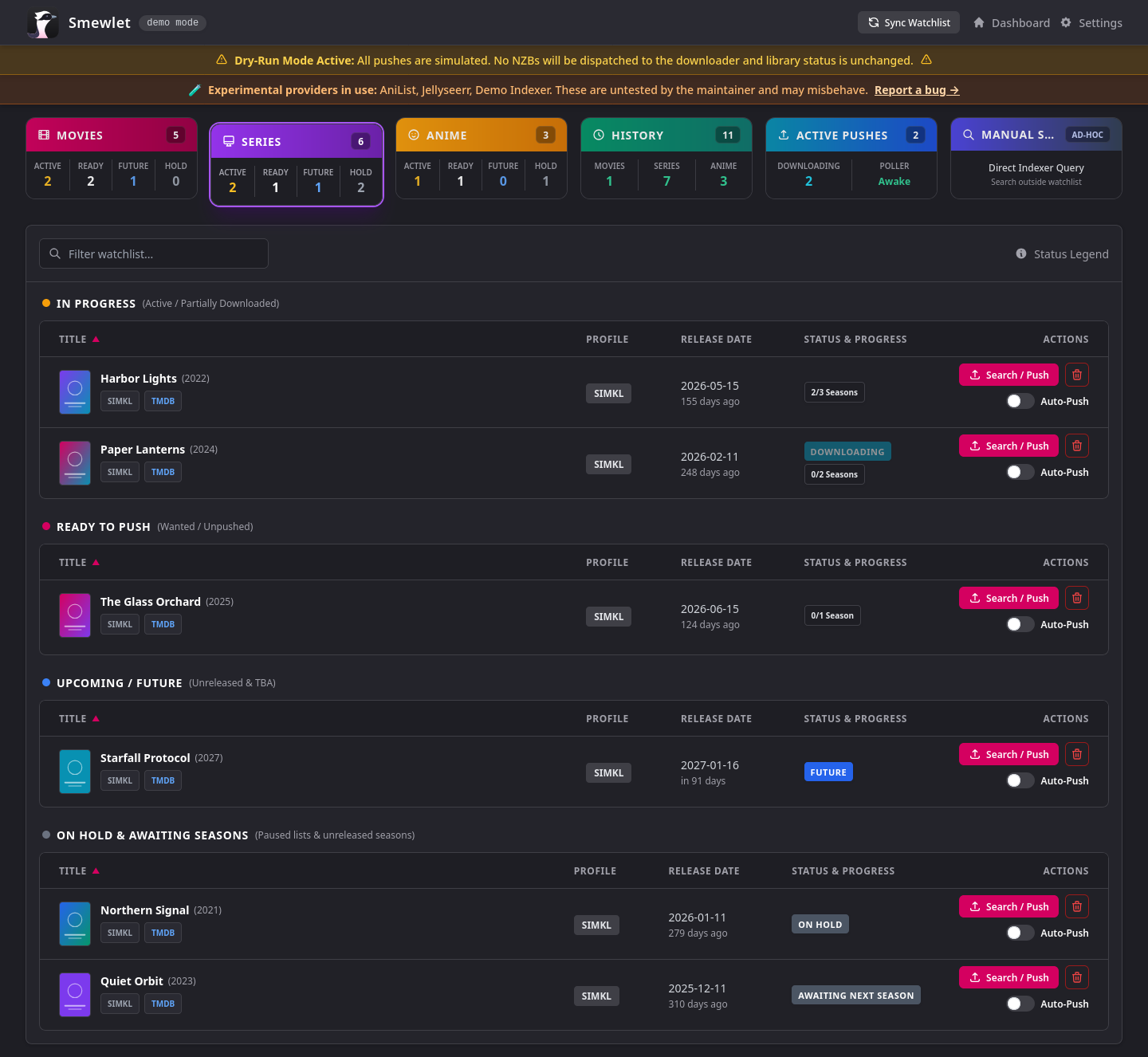
Dashboard: watchlist categories, season and movie progress, and a per-title Auto-Push switch
Smewlet connects your watchlists, metadata sources, Newznab Usenet indexers and your downloader in one lightweight web app, and only does work when you ask it to.
It keeps your Movies, TV Series and Anime in sync with your watchlists and tracks release dates, episode air dates and chronological anime watch orders. It performs zero background indexer polling: your indexer API limits and downloader storage are untouched until you decide to push a movie, season or episode. At that point Smewlet searches your indexers, vets and scores the releases, sends the best NZB to your downloader, monitors the transfer, and replaces it automatically if it fails.
- Multi-Provider Watchlists: Sync Simkl, AniList, Plex, MyAnimeList, Jellyseerr and Overseerr simultaneously, with cross-provider deduplication and furthest-progress tracking.
- Five Watch States & On Hold: Plan to watch, watching, on hold, completed and dropped are tracked from every provider. Paused lists and fully watched series waiting for a new season move to an "On Hold & Awaiting Seasons" dashboard section and are never auto-pushed. A series only counts as awaiting once its latest released season is fully downloaded; until then it stays ready to push. On the Movies tab the section is titled "On Hold" and only appears for movies on a paused list.
- Anime Title Language: Choose romaji, English or native titles in Settings; dashboard search matches every language, including the seasons and movies inside a franchise.
- Smart On-Demand Acquisition: 1-click auto-push, a preset-governed season pack matrix, opt-in air-date auto-pushes, and time-bounded episode upgrades.
- 3-Layer Security & Fake Detection: Layer 1 filters indexer metadata, Layer 2 inspects the NZB XML in memory before dispatch, and Layer 3 verifies the downloader's filelist, with an unpack grace period for archives.
- Live Transfer Monitoring & Auto-Recovery: Real-time speed and ETA via an Alpine poller, a stalled-transfer watchdog, and automated candidate replacement. Dashboard cards refresh on their own while transfers run.
- Ad-Hoc Multi-Tier Search: Search any title, IMDb ID, or TMDB/AniList ID and grab releases without adding anything to a watchlist, or push a whole season or series episode by episode in one click.
- Release Scoring & Presets: Scoring by codec, source, HDR and bitrate density, plus a primary/fallback language hierarchy, all tunable through reusable search presets.
- Service Outage Resilience: When an indexer or downloader returns a server error, times out or serves an HTML error page, affected pushes pause automatically and retry after 10, 20, then 30 minutes (up to 5 attempts) before failing. A red dashboard banner shows the outage with a Resume Queue button, manual searches offer Retry Search, and optional outage alerts can be enabled in Settings.
- Library Delivery (optional): Finished TorBox, Premiumize and SABnzbd downloads can be filed into your Movies, Shows and Anime folders with your own naming templates, then Plex or Jellyfin is refreshed. A queue pauses and resumes by itself when the NAS goes offline. See Delivery.
- Global Dry-Run Sandbox: Simulate entire push pipelines with zero remote mutations.
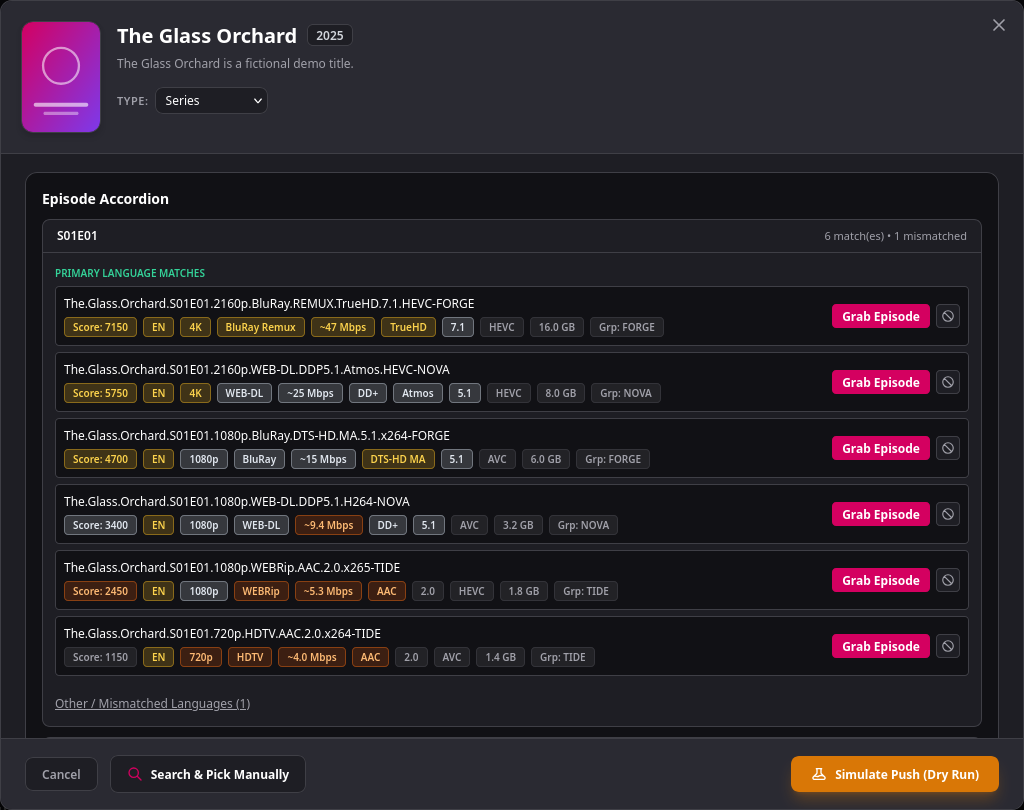 Push modal: scored releases, presets and language rules |
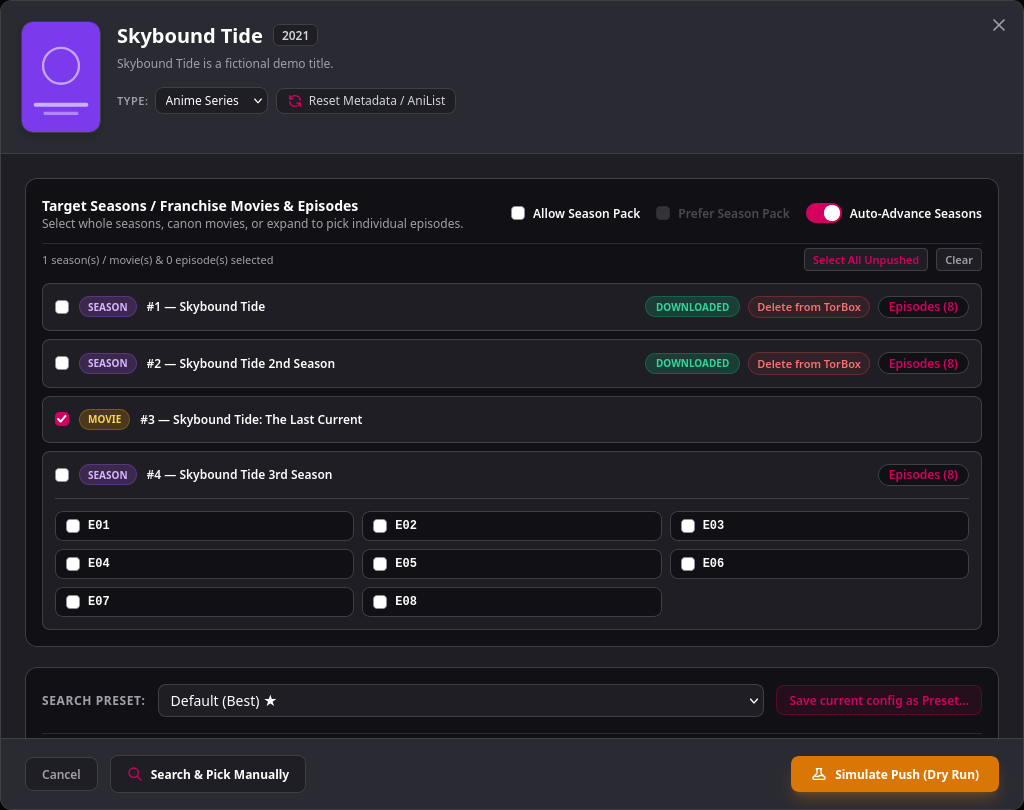 Anime franchises: pick whole seasons, canon movies, or expand a season for single episodes |
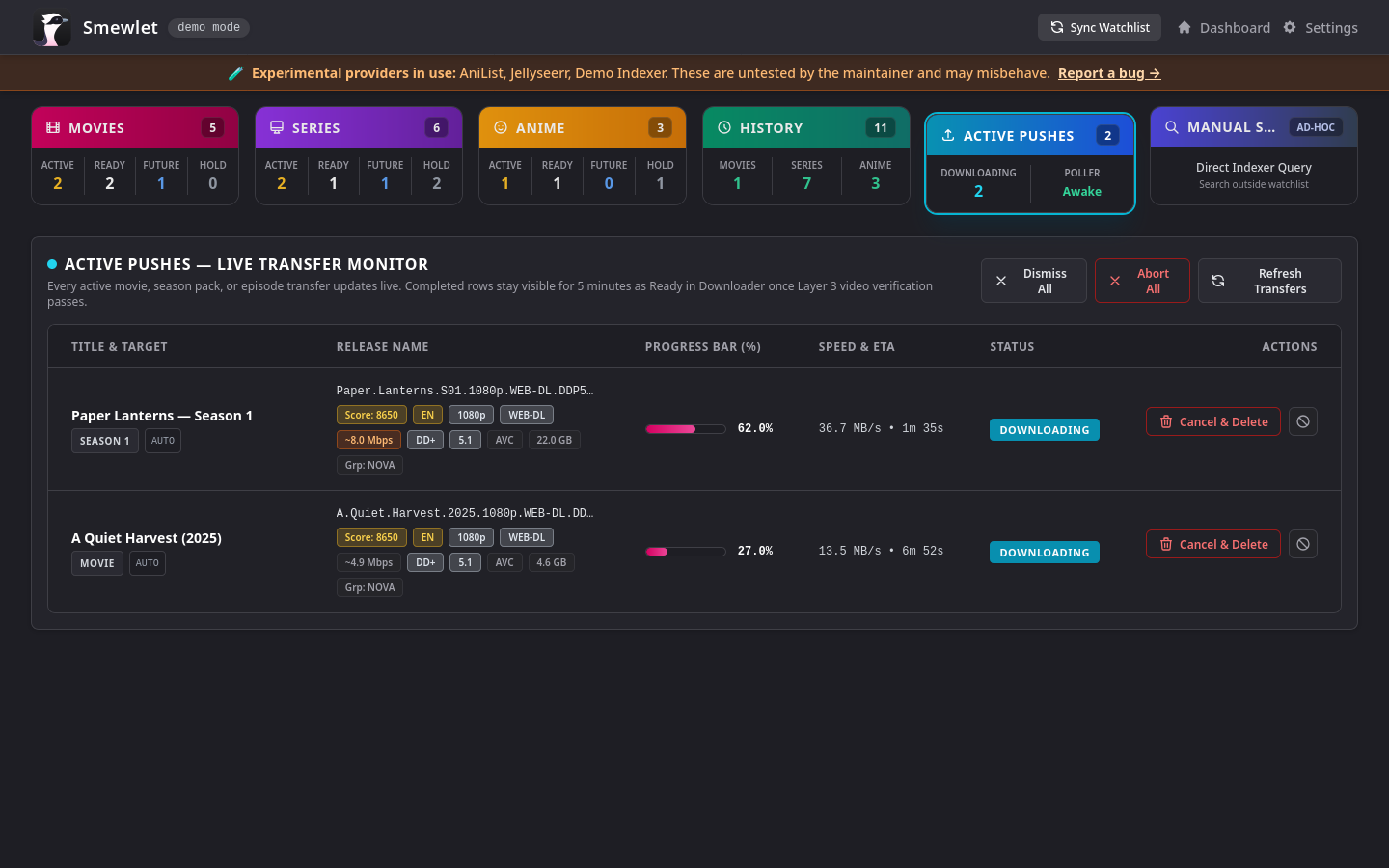 Live transfer monitor: progress, speed and ETA per transfer |
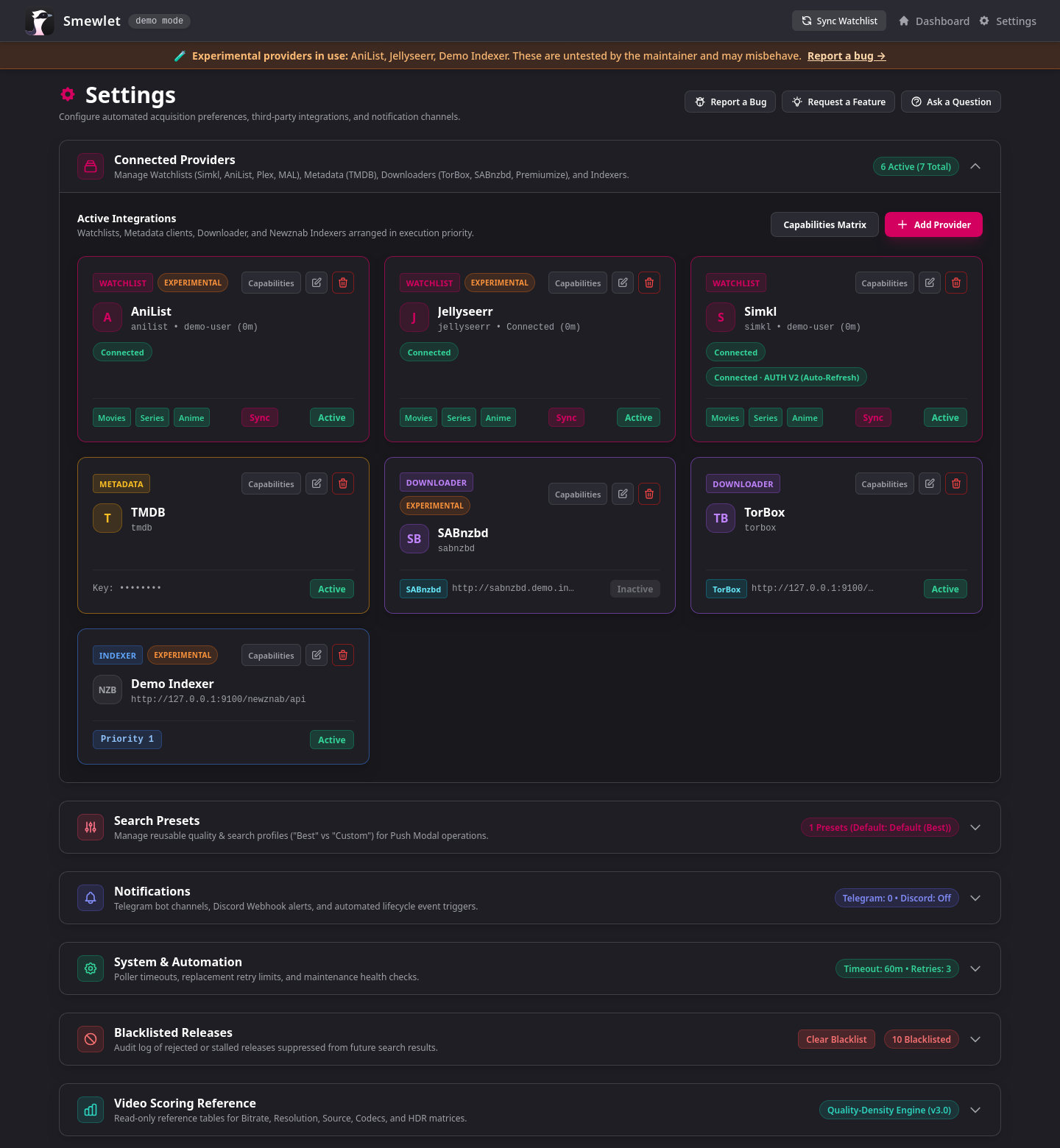 Connected providers: watchlists, metadata, downloaders, indexers |
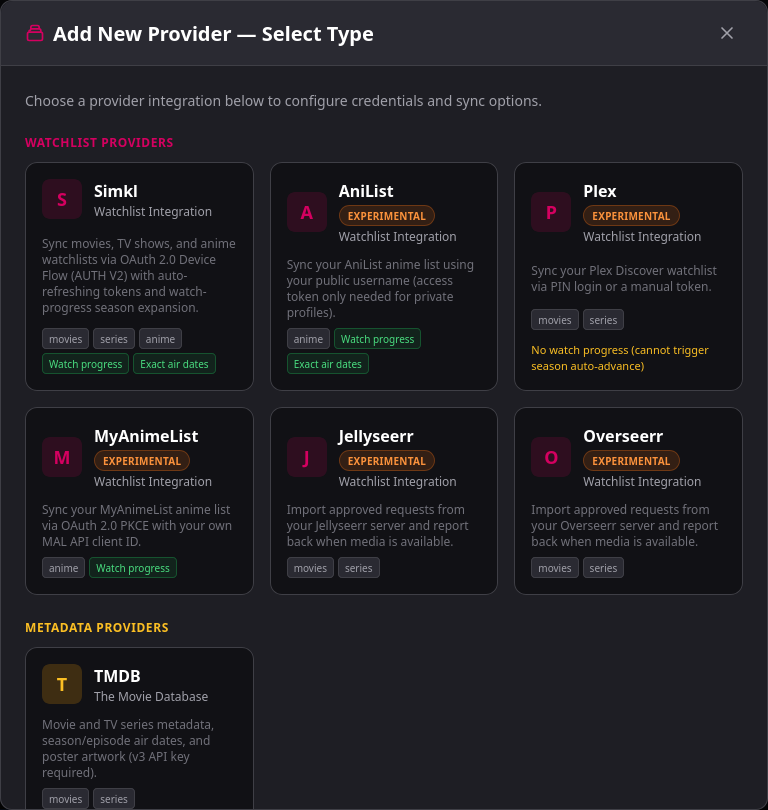 Add a provider: capability pills and Experimental flags up front |
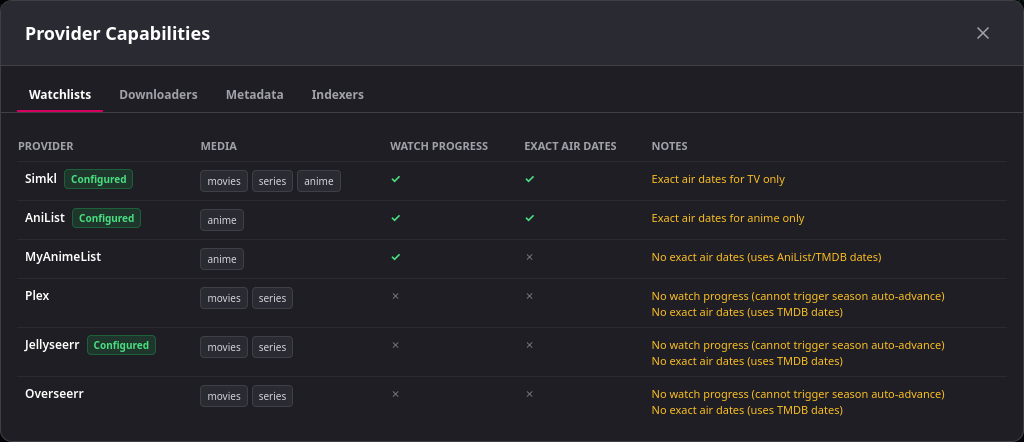 Capabilities Matrix: what each watchlist provider supports |
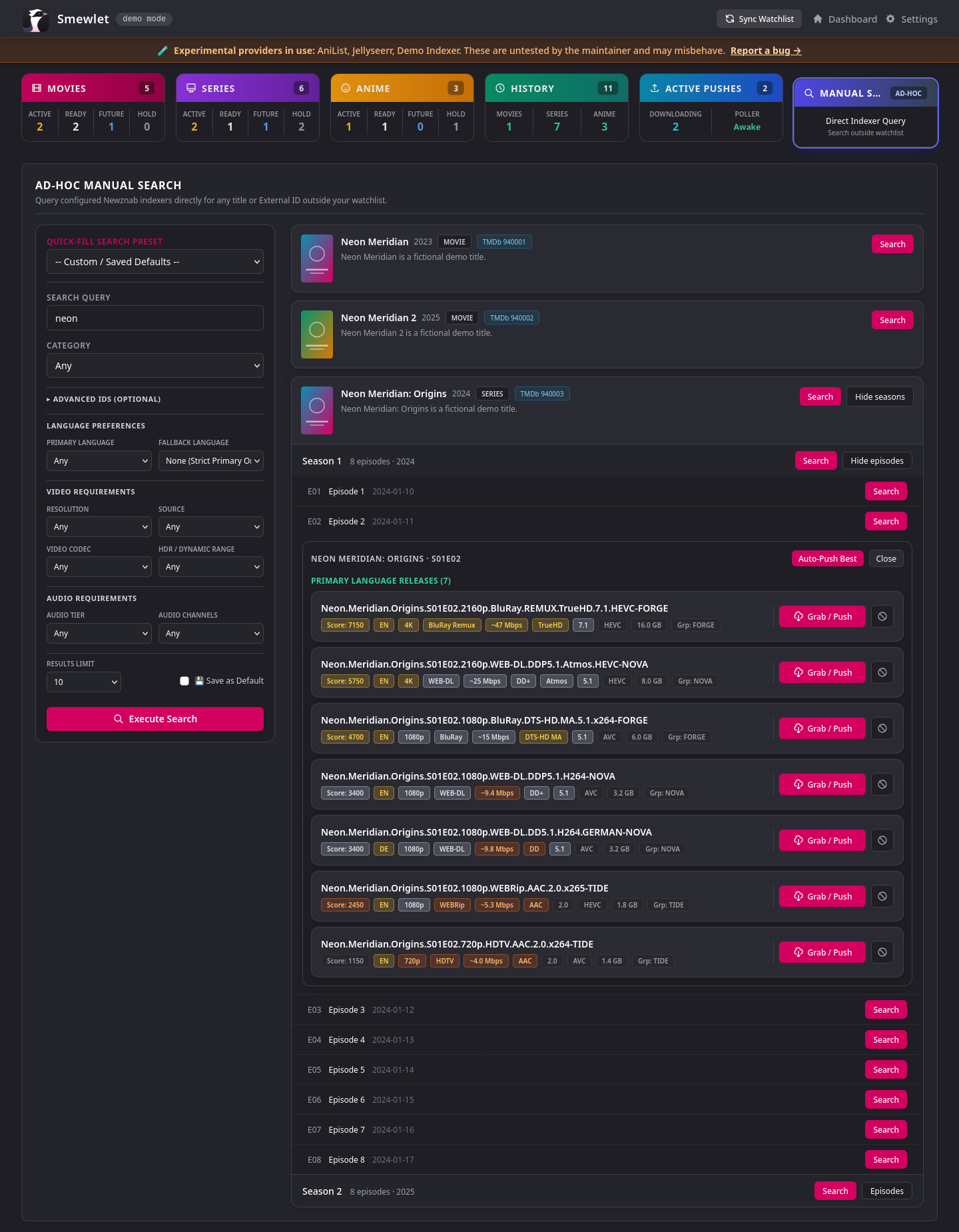
Ad-hoc search: filters, scored releases and one-click Auto-Push Best for any title outside your watchlist

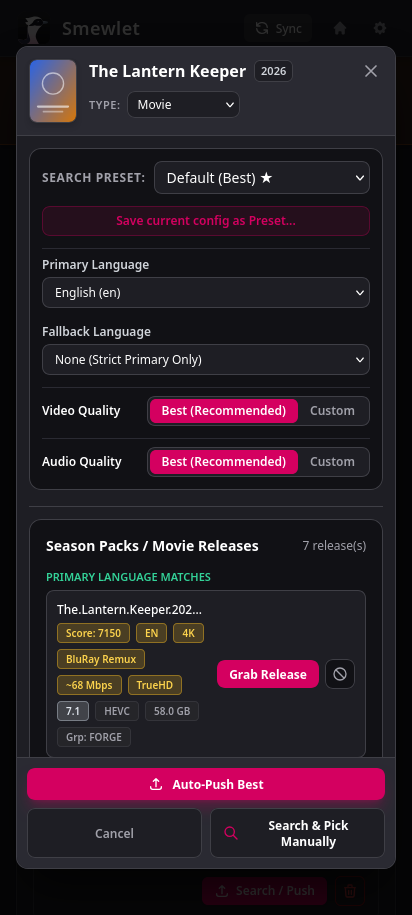
Mobile-friendly: the full dashboard and the push modal work on your phone
| Category | Service | Auth / Type | Status | Notes & Capabilities |
|---|---|---|---|---|
| Watchlists | Simkl | OAuth 2.0 Device Flow | ✅ Tested | Movies, Series, Anime; watch progress & device login |
| AniList | Username / Personal Token | 🧪 Experimental | Anime & Anime Movies; franchise consolidation & airing schedules | |
| Plex | PIN Flow or Auth Token | 🧪 Experimental | Movies, Series, Anime watchlist sync | |
| MyAnimeList | OAuth 2.0 PKCE | 🧪 Experimental | Anime watchlist sync with watch progress | |
| Jellyseerr / Overseerr | Server URL + API Key | 🧪 Experimental | Approved requests (movies, series, per-season); tells the server when media is available | |
| Metadata | TMDB | API Key | ✅ Tested | Release dates, artwork, and TV episode air dates |
| AniList | Public GraphQL (No Key) | 🧪 Experimental | Anime chronological hierarchy, OVA/movie bridges & airing times | |
| Downloaders | TorBox | Cloud Usenet (API Key) | ✅ Tested | Multipart NZB upload, cloud unpacking, active transfer telemetry |
| SABnzbd | Local Usenet (API Key) | 🧪 Experimental | Local NZB download & queue management via LAN | |
| Premiumize | Cloud Usenet (API Key) | 🧪 Experimental | Cloud Usenet transfers with automated fair-use queue handling | |
| Indexers | 10 Curated Presets | API Key / URL | ✅ TreasureMaps 🧪 Other 9 |
DrunkenSlug, NZBGeek, NzbPlanet, AltHUB, NinjaCentral, etc. |
| Custom Newznab | API Key / URL | 🧪 Experimental | Any Newznab-compatible indexer with custom category mappings |
🧪 Experimental means the maintainer has not tested that integration against the live service. It is implemented and covered by automated tests, but may have rough edges. These providers carry an Experimental pill in Settings, so please report any problems.
An integration becomes ✅ Tested once the maintainer has verified a live end-to-end sync or transfer, or at least two independent users have reported it working via GitHub issues or discussions.
MyAnimeList requires its redirect URI,
<your Smewlet base URL>/settings/provider/mal/auth/callback(shown in the provider dialog), to be registered in your MAL API app. SABnzbd must be reachable from the Smewlet container via its LAN IP, notlocalhost(inside the container,localhostis Smewlet itself).host.docker.internalalso works if you addextra_hosts: ["host.docker.internal:host-gateway"]to the compose service. Only one downloader is active at a time.
Open Settings → Capabilities Matrix in the app for the same comparison. Season Auto-Advance needs a linked watchlist source that reports watch progress (Simkl, AniList or MyAnimeList); for Plex-, Jellyseerr- or Overseerr-only titles the toggle is disabled.
| Provider | Category | Media | Watch progress | Exact air dates | Notes |
|---|---|---|---|---|---|
| Simkl | Watchlist | Movies, series, anime | ✓ | ✓ (TV) | |
| AniList | Watchlist | Anime | ✓ | ✓ (anime) | |
| MyAnimeList | Watchlist | Anime | ✓ | ✗ | Uses AniList/TMDB dates |
| Plex | Watchlist | Movies, series | ✗ | ✗ | No season auto-advance; uses TMDB dates |
| Jellyseerr | Watchlist | Movies, series | ✗ | ✗ | No season auto-advance; uses TMDB dates |
| Overseerr | Watchlist | Movies, series | ✗ | ✗ | No season auto-advance; uses TMDB dates |
| TMDB | Metadata | Movies, series | ✗ | ✗ | AniList provides anime air dates |
| Downloader | Kind | Unpack verification | Remote delete | Category mapping |
|---|---|---|---|---|
| TorBox | Cloud | ✓ | ✓ | ✗ |
| Premiumize | Cloud | ✗ (reported by Premiumize) | ✓ | ✗ |
| SABnzbd | Local | ✓ | ✓ | ✓ |
All indexers (presets and custom Newznab) are searched for movies, series and anime, and support custom category overrides.
- Docker & Docker Compose (recommended) or Python 3.12+
- A TMDB API key, at least one Newznab-compatible indexer, and at least one downloader.
Until these are configured, Smewlet shows a Setup Required screen and background jobs stay idle. Without a connected watchlist provider it runs in Ad-Hoc mode: only the Ad-Hoc Search card is shown and watchlist sync is disabled.
(Optional) A Discord webhook or Telegram bot for push and completion notifications.
1. Create a compose.yaml and start the container (image: ghcr.io/reimaris/smewlet:latest):
services:
  smewlet:
    image: ghcr.io/reimaris/smewlet:latest
    container_name: smewlet
    restart: unless-stopped
    ports:
      - "8000:8000"
    volumes:
      - ./config:/app/config
    environment:
      - TZ=UTC
docker compose up -d2. Open http://localhost:8000/ and complete the guided first-run setup wizard. All configuration lives in the web UI and auto-saves; no .env file is needed.
3. Open the dashboard to sync your watchlists, or start grabbing right away via Ad-Hoc search.
Upgrading
On first start after upgrading from v1.1.x, Smewlet migrates the database to provider-neutral column names. A backup is written automatically to config/smewlet.db.pre-m59.bak (once; an existing backup is never overwritten) before any change is made. The migration is one-way: older builds cannot open an upgraded database. To roll back, stop the container, restore the .bak file over config/smewlet.db, and start the older image.
Installs without a TMDB key, indexer or downloader will see the Setup Required screen until they are added in Settings.
Running locally with Python
git clone https://github.com/Reimaris/Smewlet.git
cd Smewlet
mkdir -p config
python3 -m venv .venv
source .venv/bin/activate
pip install -r requirements.txt
uvicorn app.main:app --host 0.0.0.0 --port 8000Smewlet can optionally move finished downloads into your media library. It is off until you add the Local directory provider under Settings → Providers → Add Provider (it is created inactive; switch it on once the paths are set). Smewlet still never downloads Usenet content itself: delivery is a separate step after your downloader finishes.
- Four paths and naming templates for movies, shows, anime and anime movies; show episodes carry their TMDB episode title, anime are filed per entry.
- Cloud downloaders (TorBox, Premiumize) stream files into the library; SABnzbd files are hardlinked (same filesystem required).
- Per push: a Deliver to Library toggle, plus Deliver to Library, Retry Delivery and Abort on Active Pushes and History.
- Offline storage: if the library storage (for example a NAS) goes offline, deliveries pause, a dashboard banner appears and the queue resumes by itself.
- Media server refresh (optional): Plex (Experimental) or Jellyfin rescans new title folders after each delivery batch.
Mount your library folders into the container (see the commented example in compose.yaml). The container runs as UID 1000, so that user needs write access to the mounted folders. Everything else (paths and mounts, path maps, templates, aborting, the offline queue, troubleshooting) is in DELIVERY_SETUP.md.
- Backend: Python 3.12, FastAPI, SQLAlchemy 2.0 (Async), APScheduler
- Database: SQLite in WAL mode (stored persistently in
./config/smewlet.db) - Release Verification & Scoring: GuessIt + custom 3-layer fake detection pipeline, archive unpack grace monitor, and weighted release scoring engine
- Frontend: Jinja2, HTMX, Alpine.js, TailwindCSS (mobile-optimized card and deck layouts)
- Questions & Ideas: Ask in GitHub Discussions (Q&A). Use Issues for reproducible bugs and concrete feature requests.
- Feedback Helper: Report a Bug / Request a Feature / Ask a Question buttons on the Settings page open a launcher with privacy-safe diagnostics (version, Python, OS, deployment, active provider types; no keys, URLs or names). Smewlet never contacts GitHub itself. Security issues go through GitHub Private Vulnerability Reporting.
- Export Sanitized DB: Settings → System Diagnostics & Health (and the Bug Report tab of the feedback launcher) downloads a copy of your database with API keys, tokens, bot credentials and webhooks removed, for attaching to bug reports when I ask. Your library and server URLs stay in the file, so review it first, and zip it because GitHub rejects
.dbattachments.
This project is licensed under the GNU Affero General Public License v3.0 (AGPL-3.0). See the LICENSE file for details.