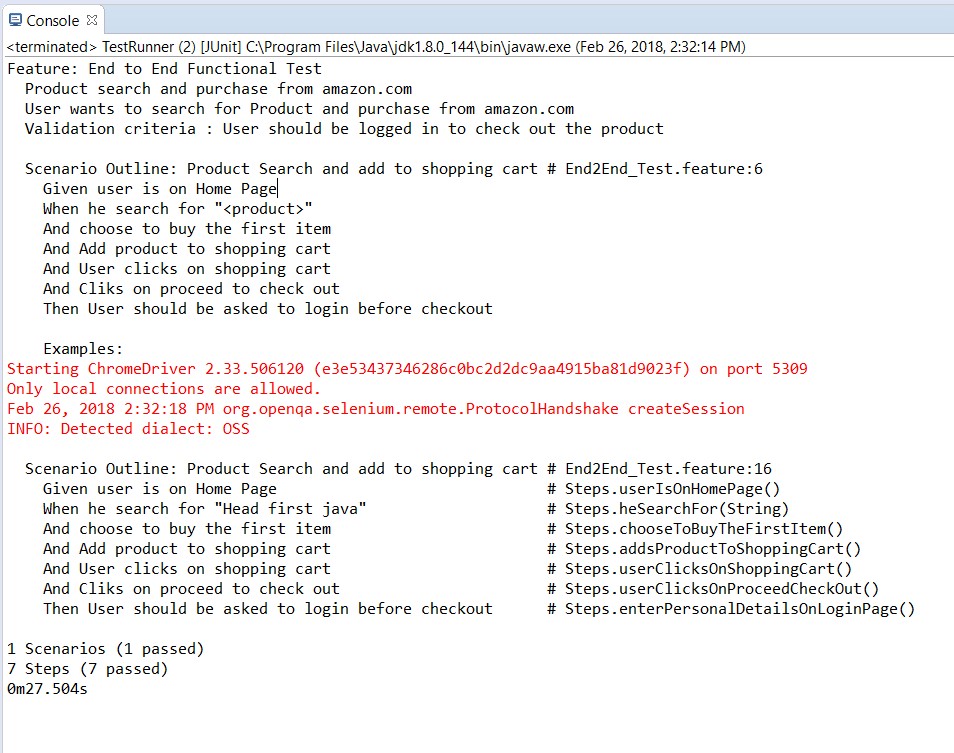
As a client I want to search for a product and add to the shopping cart of www.Amazon.com. And User should be asked to login when user proceeds to check out the product from shopping cart.
Based on the above user story, to automate the end to end testing, Cucumber test automation framework is developed using java and selenium
Cucumber Test automation Framework can be a robust one when framework is developed by applying the below steps
The main advantage of Page Object Model is that if the UI or any HTML object changes for any page, the test does not need any fix. Only the code within the page objects will be impacted but it does not have any impact to the test.
Page Object Design Pattern
Can you image the line of the code in project where you will deal with 100+ tests and that will have multiple stepDefiniions files? The whole project code will become unmanageable and unmaintainable. To better manage the code and to improve the re-usability, this pattern suggests us to divide an application in different pages or a single page in to sub-pages.
The Page Object Pattern technique provides a solution for working with multiple web pages and prevents unwanted code duplication and enables an uncomplicated solution for code maintenance. In general, every page in our application will be represented by a unique class of its own and the page element inspection will be implemented in every class.
Selenium PageFactory: Page Factory is an inbuilt Page Object Model concept for Selenium WebDriver and it is more optimized.
PageFactory is used to Initialize Elements of a Page class without having to use ‘FindElement‘ or ‘FindElements‘. Annotations can be used to supply descriptive names of target objects to improve code readability.
@FindBy Annotation
As the name suggest, it helps to find the elements in the page using By strategy. @FindBy can accept TagName, PartialLinkText, Name, LinkText, Id, Css, ClassName, XPath as attributes. An alternative mechanism for locating the element or a list of elements. This allows users to quickly and easily create PageObjects.
@FindBy(how = How.CSS, using = “.username“)]
private WebElement userName;
The above code will create a PageObject and name it as UserName by finding it using its CSS locator.
InitElements
This Instantiate an Instance of the given class. This method will attempt to instantiate the class given to it, preferably using a constructor which takes a WebDriver instance as its only argument or falling back on a no-arg constructor. An exception will be thrown if the class cannot be instantiated.
PageFactory.initElements(WebDriver, PageObject.Class);
Parameters:
In the case of multiple step definition files, we will be creating object of Pages again and again. Which is against the coding principle. To avoid this situation, we can create a Page Object Manager. Purpose of the Page Object Manager is to create the page’s object and also to make sure that the same object should not be created again and again. But to use single object for all the step definition files.
The main responsibilities are:
It is dangerous to store hard coded values in the project, also it is against the coding principles. With the help of properties file, we can eliminate these hard coded values in the project
What is a Property file in Java
.properties files are mainly used in Java programs to maintain project configuration data, database config or project settings etc. Each parameter in properties file are stored as a pair of strings, in key-value pair format, where each key is on one line. You can easily read properties from some file using object of type Properties. This is a utility provided by Java itself.
java.util.Properties;
Advantages of Property file in Java
If any information is changed from the properties file, you don’t need to recompile the java class. In other words, the advantage of using properties file is we can configure things which are prone to change over a period of time without need of changing anything in code.
For E.g. We keep application Url in property file, so in case you want to run test from on other test environment, just change the Url in property file and that’s it. You do not require to build the whole project again.
Sometimes it’s appropriate to have exactly one instance of a class we have ConfigReaderFile, which should be accessed globally. But later on we will be having many more file readers. So it is better to have a File Reader Manager above all the File Readers. And it is better to make the manager class as singleton
What is Singleton Design Patter?
The Singleton’s purpose is to control object creation, limiting the number of objects to only one. Since there is only one Singleton instance, any instance fields of a Singleton will occur only once per class, just like static fields.
How to implement Singleton Pattern?
To implement Singleton pattern, we have different approaches but all of them have following common concepts.
• Public static method that returns the instance of the class, this is the global access point for outer world to get the instance of the singleton class.
Why do we need WebDriver Manager or some called it as WebDriver Factory or Browser Factory? Till now we have been creating driver with in the Step file and we kind of explicitly tell our script to start Chrome Driver. Which means later if we need to change Chrome to Firefox, we have to go into every test script to change the same. Which is like bhrrhhhhhhh. On top of it our test is handling the logic of creating WebDriver. Test should not be worried about how to start the driver. Test should just need a driver to execute the script. So let’s bring the WebDriver Manager in between to handle this task for us.
Cucumber inherently supports Data Driven Testing using Scenario Outline. There are different ways to use the data insertion with in the Cucumber and outside the Cucumber with external files.
Data Driven Testing in Cucumber
Data Driven Testing in Cucumber using Scenario Outline
Data Driven Testing in Cucumber using External Files
Scenario Outline – This is used to run the same scenario for 2 or more different set of test data. E.g. In our scenario, if you want to register another user you can data drive the same scenario twice.
Examples – All scenario outlines have to be followed with the Examples section. This contains the data that has to be passed on to the scenario.
What are Hooks in Cucumber?
Cucumber supports hooks, which are blocks of code that run before or after each scenario. You can define them anywhere in your project or step definition layers, using the methods @Before and @After. Cucumber Hooks allows us to better manage the code workflow and helps us to reduce the code redundancy. We can say that it is an unseen step, which allows us to perform our scenarios or tests.
Why Cucumber Hooks?
In the world of testing, you must have encountered the situations where you need to perform the prerequisite steps before testing any test scenario. This prerequisite can be anything from:
Things to note
• An important thing to note about the after hook is that even in case of test fail, after hook will execute for sure.
How to run Cucumber Tests in Groups using Cucumber Tags?
For this, Cucumber has already provided a way to organize your scenario execution by using tags in feature file. We can define each scenario with a useful tag. Later, in the runner file, we can decide which specific tag (and so as the scenario(s)) we want Cucumber to execute. Tag starts with “@”. After “@” you can have any relevant text to define your tag like @SmokeTests just above the scenarios you like to mark. Then to target these tagged scenarios just specify the tags names in the CucumberOptions as tags = {“@SmokeTests”}.
Tagging not just specifically works with Scenarios, it also works with Features. Means you can also tag your features files. Any tag that exists on a Feature will be inherited by Scenario, Scenario Outline or Examples.
Now we know that if we need to do anything before of after the test, we can use @Before & @After hooks. But this scenario works till the time our prerequisites are same for all the scenarios. For example till the time prerequisite for any test is to start the browser, hooks can solve our purpose. But what if we have different perquisites for different scenarios. And we need to have different hooks for different scenarios.
Again, Cucumbers has given feature of Tagged Hooks to solve the above situation where we need to perform different tasks before and after scenarios.
Hooks can be used like @Before(“@TagName”). Create before and after hooks for every scenario.
Note: We learned that @Before & @After hooks runs before & after every Scenario. But @Before(“@First”) will run only before the first scenario and like wise other tagged hooks.
Order hooks to run in a particular sequence is easy to do. As we already know the way to specify hooks in cucumber like putting an annotation just above the scenario. Ordering also works the same way but the only difference is that it required an extra parameter. This extra parameter decides the order of execution of the certain hook.
For example @Before, and if you want to specify the order it will become @Before(value = 1).
Same goes with any Tags or Hooks available in Cucumber including Tagged Hooks as well.
How to set the Order or Priority of Cucumber Hooks?
The very important thing to note here is:
• @Before(order = int) : This runs in increment order, means value 0 would run first and 1 would be after 0.
• @After(order = int) : This runs in decrements order, means apposite of @Before. Value 1 would run first and 0 would be after 1.
Background in Cucumber
Background in Cucumber is used to define a step or series of steps which are common to all the tests in the feature file. It allows you to add some context to the scenarios for a feature where it is defined. A Background is much like a scenario containing a number of steps. But it runs before each and every scenario where for a feature in which it is defined.
Background with Hooks
This is so interesting to see the working of Background with Hooks. The background is run before each of your scenarios but after any of your @Before hook.
A scenario in Cucumber is a series of steps which gets executed one after one. Each step in scenario may have some state which can be required by other step in the scenario. In other way you can also say that each step depends on previous steps. This means that we must be able to share state between steps.
Also when you out grow your test steps or feature files, Keeping all the steps in a single Step Definition class quickly becomes impractical, so you use many classes. Now you have a new problem – objects you create in one step class will be needed in the other step classes as well.
SO we have to share the Test Context / Scenario Context / Test State with all the Step Definitions file. This is why Cucumber supports several Dependency Injection (DI) Containers – it simply tells a DI container to instantiate your step definition classes and wire them up correctly. One of the supported DI containers is PicoContainer.
But still lot more refactoring can be done based on the project requirement.