Releases: RMEx/orms
Old RPG Maker Style (orms) v1.1.4

Make a RM2K(3)-like game with RMVXAce!
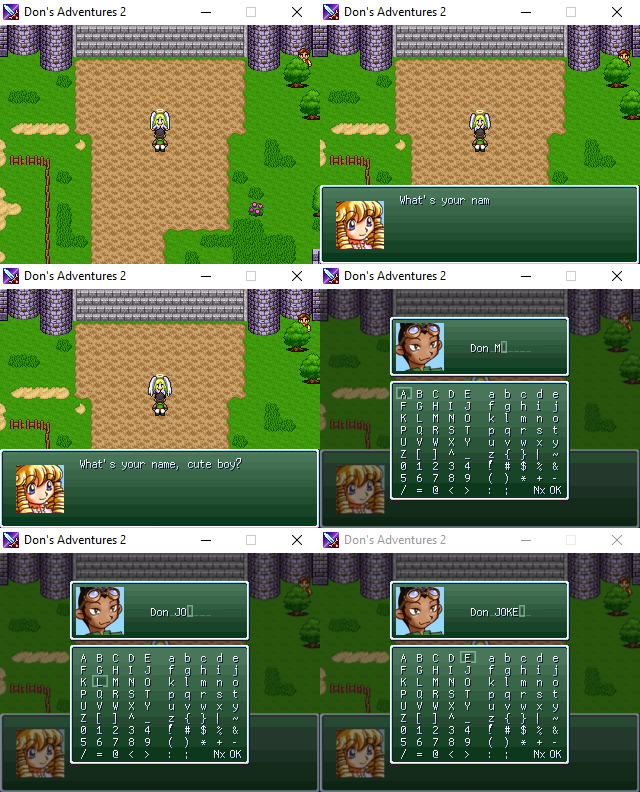
Installation
- You don't need to download the Source code (automatically added by GitHub)
- Copy-paste the orms.rb content in
▼ Materials(preferably after the others) - Put Font.png and Font_color.png in the
Graphics/System/folder
Configuration / Features
Go read the README.rb, or just see the ORMS_CONFIG module in the script, and its comments!
ChangeLog (v1.1.4)
- Fix keyboard shortcuts for Windows 10+
Old RPG Maker Style (orms) v1.1.2
Make a RM2K(3)-like game with RMVXAce!
Installation
- You don't need to download the Source code (automatically added by GitHub)
- Copy-paste the orms.rb content in
▼ Materials(preferably after the others) - Put Font.png and Font_color.png in the
Graphics/System/folder
Configuration / Features
Go read the README.rb, or just see the ORMS_CONFIG module in the script, and its comments!
ChangeLog (v1.1.2)
- Fix
BITMAP_FONTcache - Fix weird tab issue
- Fix name input window (line_height, Nx/Pr instead of Page)
- Fix right arrow in equip status
- Show a non-identified square instead of a blank space for wrong characters
- Full compatibility with RME
- Improve performance for both RME::
ScreensEffects&& orms::PIXELATE_SCREEN
Old RPG Maker Style (orms) v1.1.1 (bug fixes)
Make a RM2K(3)-like game with RMVXAce!


Installation
- You don't need to download the Source code (automatically added by GitHub)
- Copy-paste the orms.rb content in
▼ Materials(preferably after the others) - Put Font.png and Font_color.png in the
Graphics/System/folder
Configuration / Features
Go read the README.rb, or just see the ORMS_CONFIG module in the script, and its comments!
ChangeLog (v1.1.1)
- Fix
TOGGLE_FULLSCREENandPIXELATION_SHORTCUTissues
Old RPG Maker Style (orms) v1.1.0
Make a RM2K(3)-like game with RMVXAce!
Installation
- You don't need to download the Source code (automatically added by GitHub)
- Copy-paste the orms.rb content in
▼ Materials(preferably after the others) - Put Font.png and Font_color.png in the
Graphics/System/folder
Configuration / Features
Go read the README.rb, or just see the ORMS_CONFIG module in the script, and its comments!
ChangeLog (v1.1.0)
- Fix
USE_OLD_RM_...(did not double the size when the HUE was changed) - Fix
OLDSCHOOL_CHOICE_LIST(the box wasn't displayed when there were no message displayed before) - Add
Orms.set(feature, state),Orms.activateandOrms.deactivateingame methods for users - Change
TOGGLE_SCREEN_INPUTto newTOGGLE_FULLSCREENandTOGGLE_WINDOW_MODEfeatures that allow to specify which shortcut you want to set - The shortcuts defined above now change also the
Fullscreen++shortcuts - Implement dynamic frame skipping for the
PIXELATE_SCREENfeature! - Implement additional FPS displayer which takes into account the dynamic frame skipping! Display it with
F2! - Add
PIXELATION_SHORTCUTfeature to set a shortcut that activate/deactivate the screen pixelation ingame! - Add
BACKDROP_ALIGN_TOPfeature to align Battlebacks to top instead of center (for RM2K backdrops)
Old RPG Maker Style (orms) v1.0.4
Make a RM2K(3)-like game with RMVXAce!
Installation
- Copy-paste the script in
▼ Materials(preferably after others) - Put Font.png and Font_color.png in the
Graphics/System/folder
Configuration / Features
Just see the ORMS_CONFIG module in the script, and its comments
ChangeLog
1.0.0 => 06/02/2018 First release
1.0.1 => 08/02/2018 RME + Fullscreen++ compatibility
1.0.3 => 09/02/2018 Change RME issue + clean toggle_screen_input + add wrong version number \o/
1.0.4 => 16/02/2018 Fix transitions + missing update for pixelate_screen
Watch out!
Wait for the next release if you wan't to use the PIXELATE_SCREEN feature, it causes performance issues for now. See the todo-list in README.rb.