Skip to content
This repository was archived by the owner on Oct 17, 2024. It is now read-only.

adding 3 files#28

Open
narismadz wants to merge 1 commit into
OfficeDev:masterfrom
narismadz:narismadz-update
Open

adding 3 files#28
narismadz wants to merge 1 commit into
OfficeDev:masterfrom
narismadz:narismadz-update

Conversation

@narismadz
Copy link
Copy Markdown

@narismadz narismadz commented Sep 19, 2020

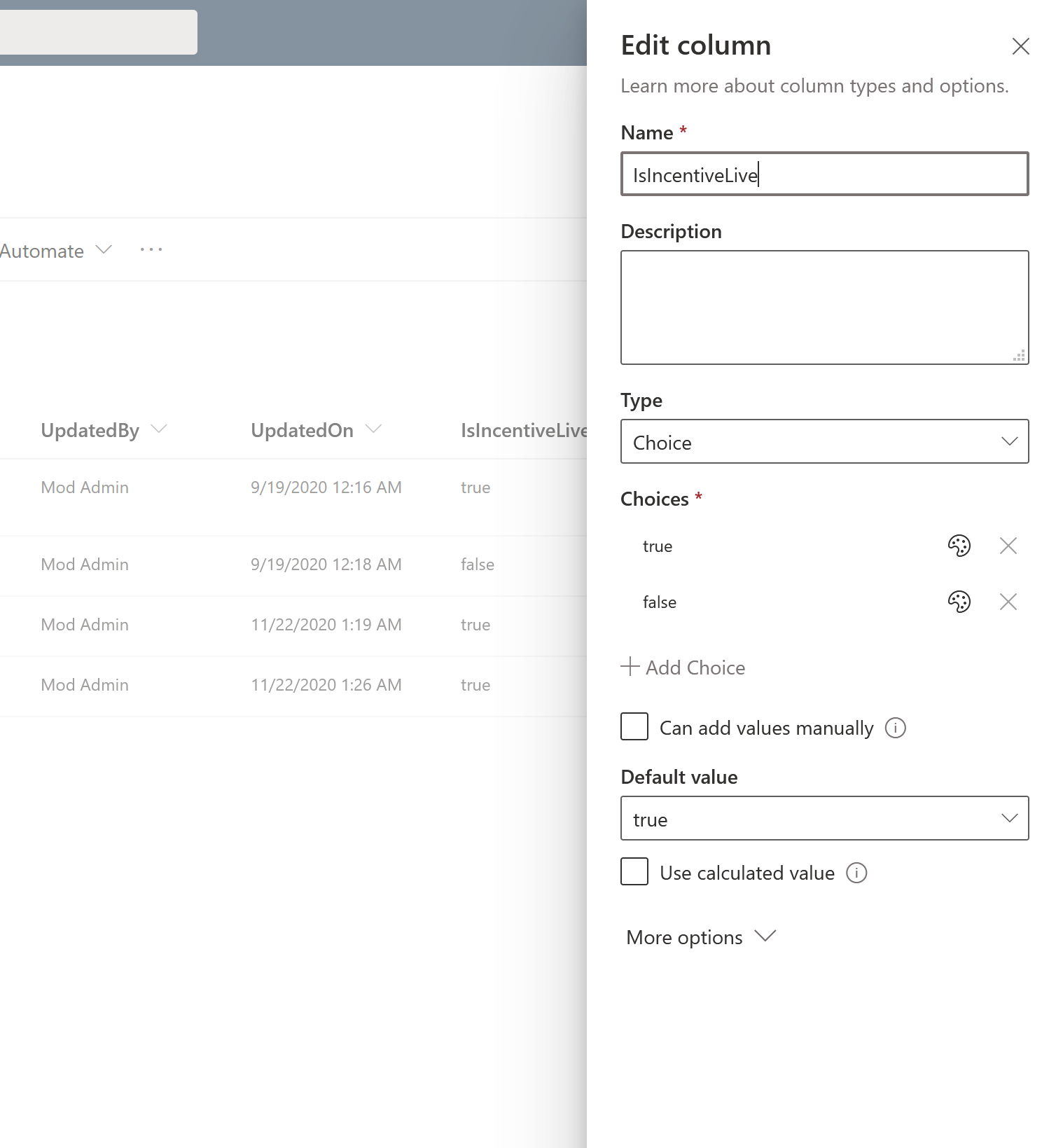
  • Modify column "IsIncentiveLive" column from "yes/no" to "Choice" type in Create-Incentive-SharePointList.ps1
  • Comment on line Title and Attachment column in all SPO lists in Create-Incentive-SharePointList.ps1
  • Add PowerShell script for MFA-tenant name "MFA-tenant-Create-Incentive-SharePointList.ps1"
  • fixed dependency in PowerApps on Gallery to accept Choice value to fix PowerApps confusion and delegation on yes/no
  • Replace toggle switch with dropdown since IsIncentiveLive is not boolean anymore

@ghost
Copy link
Copy Markdown

ghost commented Sep 19, 2020

CLA assistant check
All CLA requirements met.

@Ixinho
Copy link
Copy Markdown

Ixinho commented Nov 23, 2020

  • Modify column "IsIncentiveLive" column from "yes/no" to "Choice" type in Create-Incentive-SharePointList.ps1
  • Comment on line Title and Attachment column in all SPO lists in Create-Incentive-SharePointList.ps1
  • Add PowerShell script for MFA-tenant name "MFA-tenant-Create-Incentive-SharePointList.ps1"
  • fixed dependency in PowerApps on Gallery to accept Choice value to fix PowerApps confusion and delegation on yes/no
  • Replace toggle switch with dropdown since IsIncentiveLive is not boolean anymore

How did you fix dependency in Powerapps? I changed the type of column in sp list itself, but what do i need to do in PowerApps in order to make that switch "Is live" work properly?

@narismadz
Copy link
Copy Markdown
Author

  • Modify column "IsIncentiveLive" column from "yes/no" to "Choice" type in Create-Incentive-SharePointList.ps1
  • Comment on line Title and Attachment column in all SPO lists in Create-Incentive-SharePointList.ps1
  • Add PowerShell script for MFA-tenant name "MFA-tenant-Create-Incentive-SharePointList.ps1"
  • fixed dependency in PowerApps on Gallery to accept Choice value to fix PowerApps confusion and delegation on yes/no
  • Replace toggle switch with dropdown since IsIncentiveLive is not boolean anymore

How did you fix dependency in Powerapps? I changed the type of column in sp list itself, but what do i need to do in PowerApps in order to make that switch "Is live" work properly?

I changed SP List column "IsIncentiveLive" to choice type but have only 2 option (true, false)
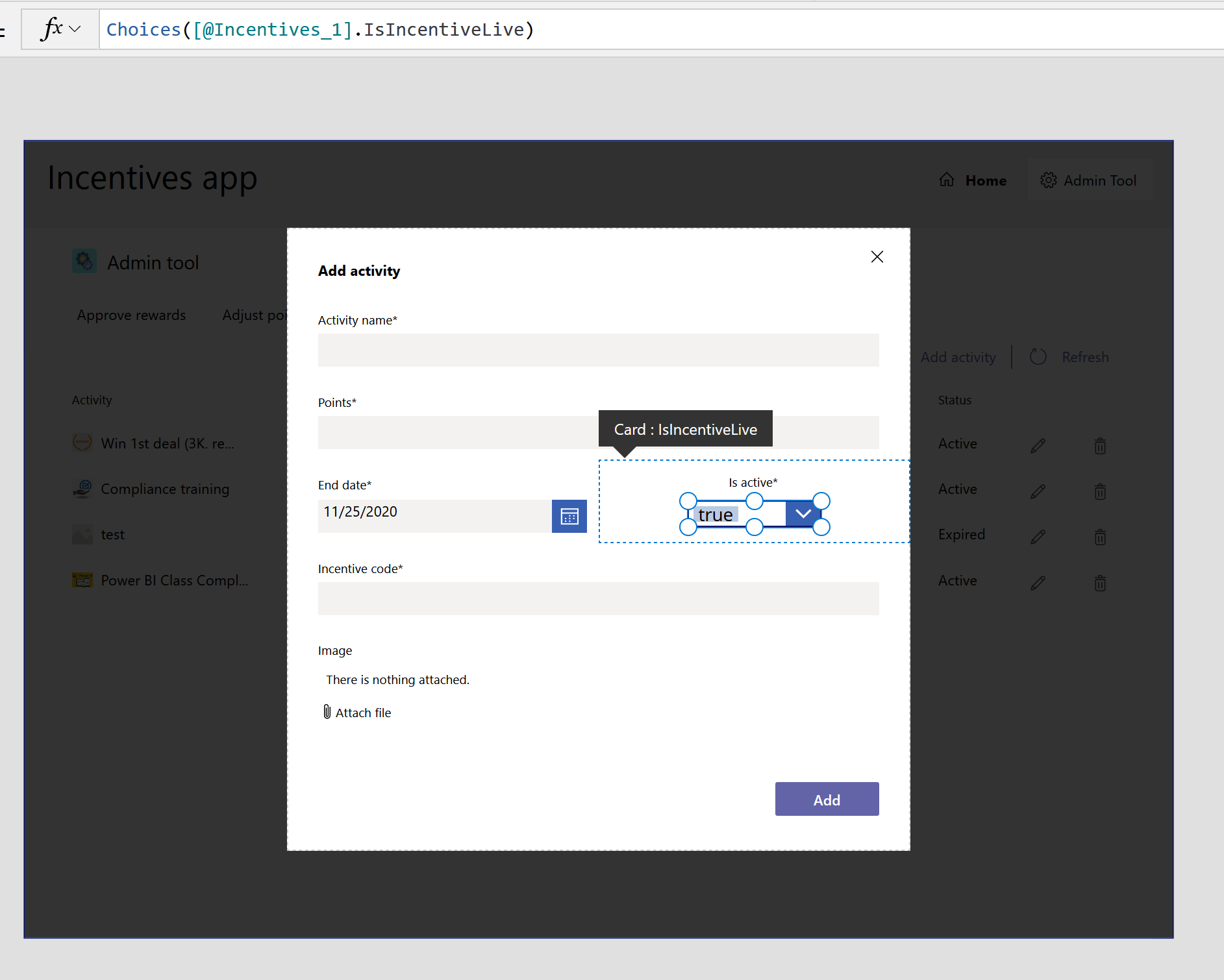
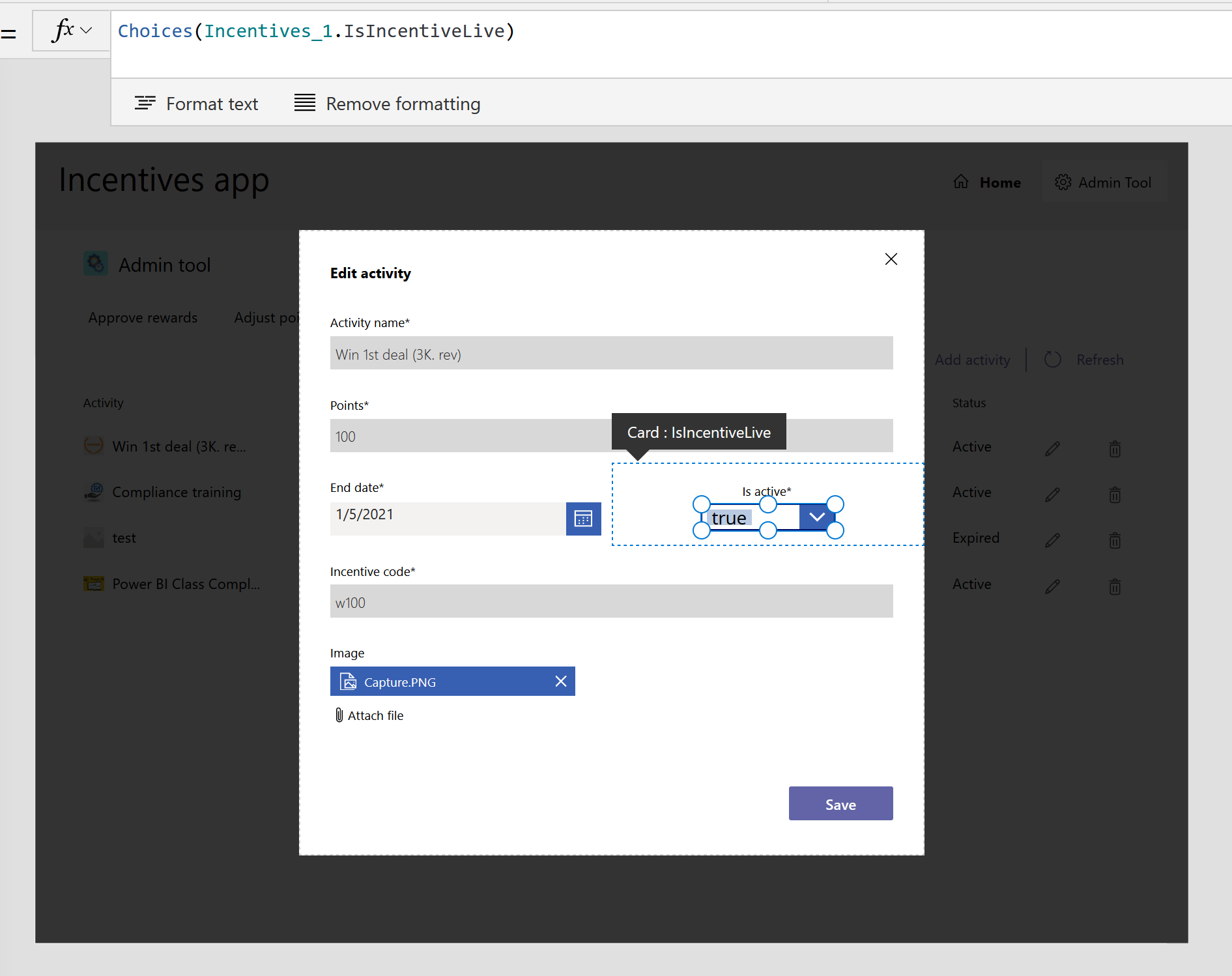
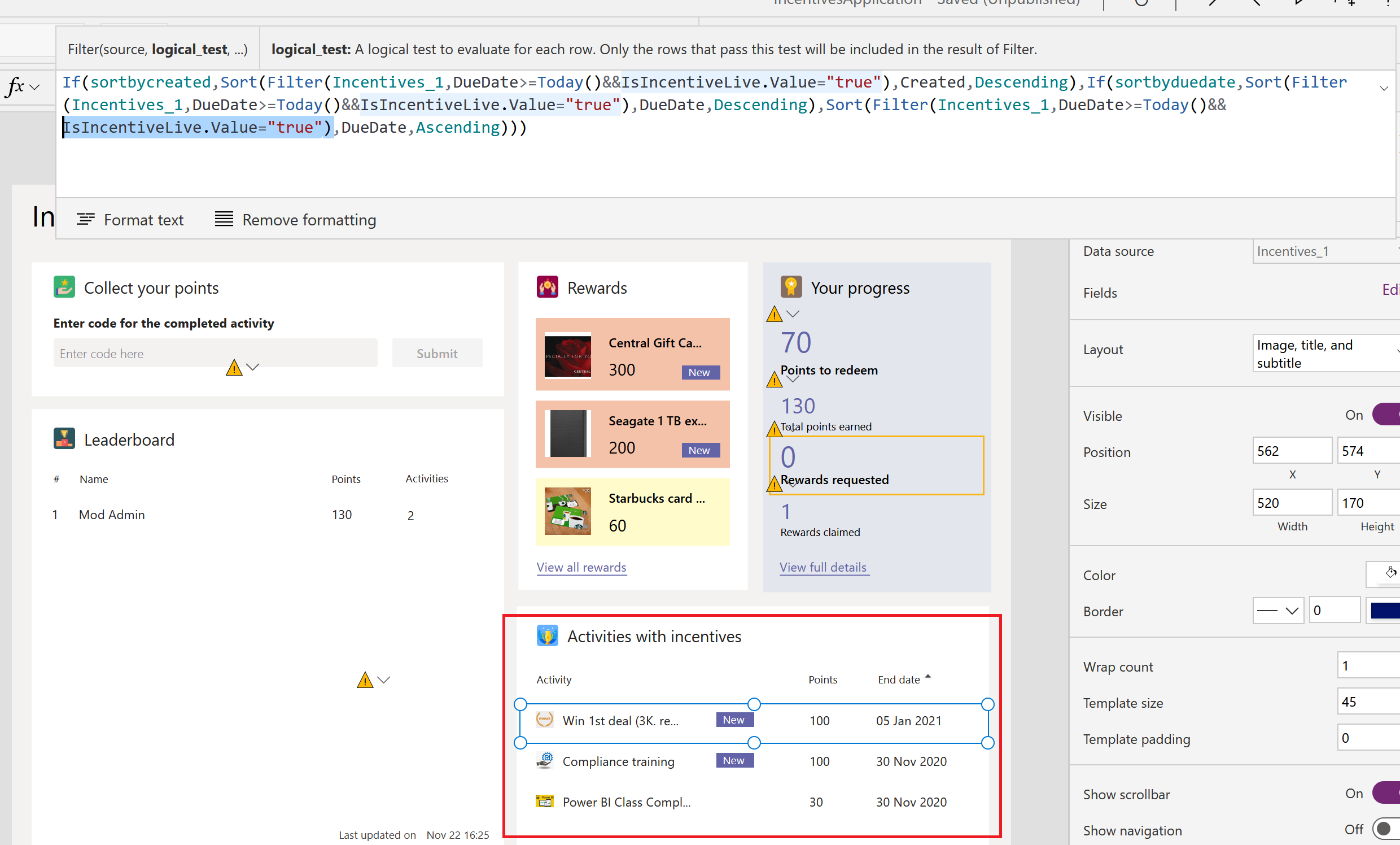
Then I fixed the code in PowerApps change Is active toggle switch to be dropdown based on IsIncentiveLive's choice
image

Like "Items" property of dropdown

add activity
image

edit activity
image

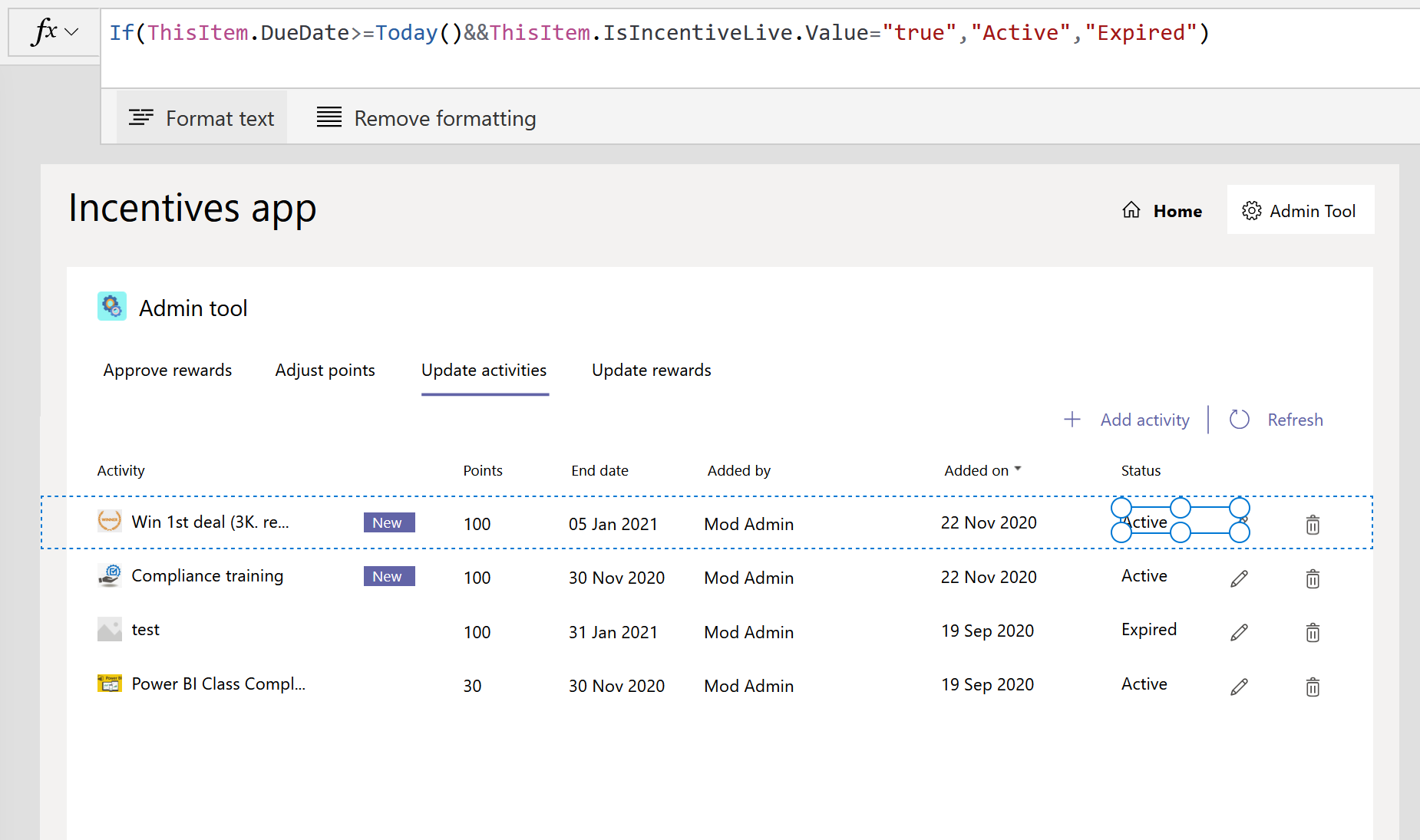
Then modify gallery's display image
image
image

@Ixinho
Copy link
Copy Markdown

Ixinho commented Nov 24, 2020

  • Modify column "IsIncentiveLive" column from "yes/no" to "Choice" type in Create-Incentive-SharePointList.ps1
  • Comment on line Title and Attachment column in all SPO lists in Create-Incentive-SharePointList.ps1
  • Add PowerShell script for MFA-tenant name "MFA-tenant-Create-Incentive-SharePointList.ps1"
  • fixed dependency in PowerApps on Gallery to accept Choice value to fix PowerApps confusion and delegation on yes/no
  • Replace toggle switch with dropdown since IsIncentiveLive is not boolean anymore

How did you fix dependency in Powerapps? I changed the type of column in sp list itself, but what do i need to do in PowerApps in order to make that switch "Is live" work properly?

I changed SP List column "IsIncentiveLive" to choice type but have only 2 option (true, false)
Then I fixed the code in PowerApps change Is active toggle switch to be dropdown based on IsIncentiveLive's choice
image

Like "Items" property of dropdown

add activity
image

edit activity
image

Then modify gallery's display image
image
image

Amazing, gonna test it out as soon i as i do my daily work :) Thank you a lot.
Since i see you are very very experienced with this app, would you mind answering another question of mine? Do you think it's possible to show a picture of an activity when you redeem points for the activity? Currently there is a pop up with a picture of medal along with number of points (congrats you completed blabla), but since we have cool activity pictures, i thought it would be great to show the activity picture (the one attached when creating a new activity). What do you think?

@Ixinho
Copy link
Copy Markdown

Ixinho commented Nov 24, 2020

Also another very quick question related to the original question.
In edit mode of this app, in Tree View, i can navigate between User Screen and Admin Screen, but on Admin Screen i see only the main dashboard, how do i actually preview "Update Activities" tab in edit mode?

@narismadz
Copy link
Copy Markdown
Author

narismadz commented Nov 24, 2020

Also another very quick question related to the original question.
In edit mode of this app, in Tree View, i can navigate between User Screen and Admin Screen, but on Admin Screen i see only the main dashboard, how do i actually preview "Update Activities" tab in edit mode?

Just press play and do actual click edit or add activity and when it pops out stop play mode then you can edit an object

For replacing the pic instead of medal on "congrats" pop out box i think it possible to do. Maybe need to set some source of variables for picture reference

@Ixinho
Copy link
Copy Markdown

Ixinho commented Nov 24, 2020

Also another very quick question related to the original question.
In edit mode of this app, in Tree View, i can navigate between User Screen and Admin Screen, but on Admin Screen i see only the main dashboard, how do i actually preview "Update Activities" tab in edit mode?

Just press play and do actual click edit or add activity and when it pops out stop play mode then you can edit an object

For replacing the pic instead of medal on "congrats" pop out box i think it possible to do. Maybe need to set some source of variables for picture reference

Let me know if you re willing to give it a try and do it , and we can talk about your hourly rate :) Cheers

@Ixinho
Copy link
Copy Markdown

Ixinho commented Dec 6, 2020

Also another very quick question related to the original question.
In edit mode of this app, in Tree View, i can navigate between User Screen and Admin Screen, but on Admin Screen i see only the main dashboard, how do i actually preview "Update Activities" tab in edit mode?

Just press play and do actual click edit or add activity and when it pops out stop play mode then you can edit an object

For replacing the pic instead of medal on "congrats" pop out box i think it possible to do. Maybe need to set some source of variables for picture reference

Managed to do it on my own, thanks for the heads up :)
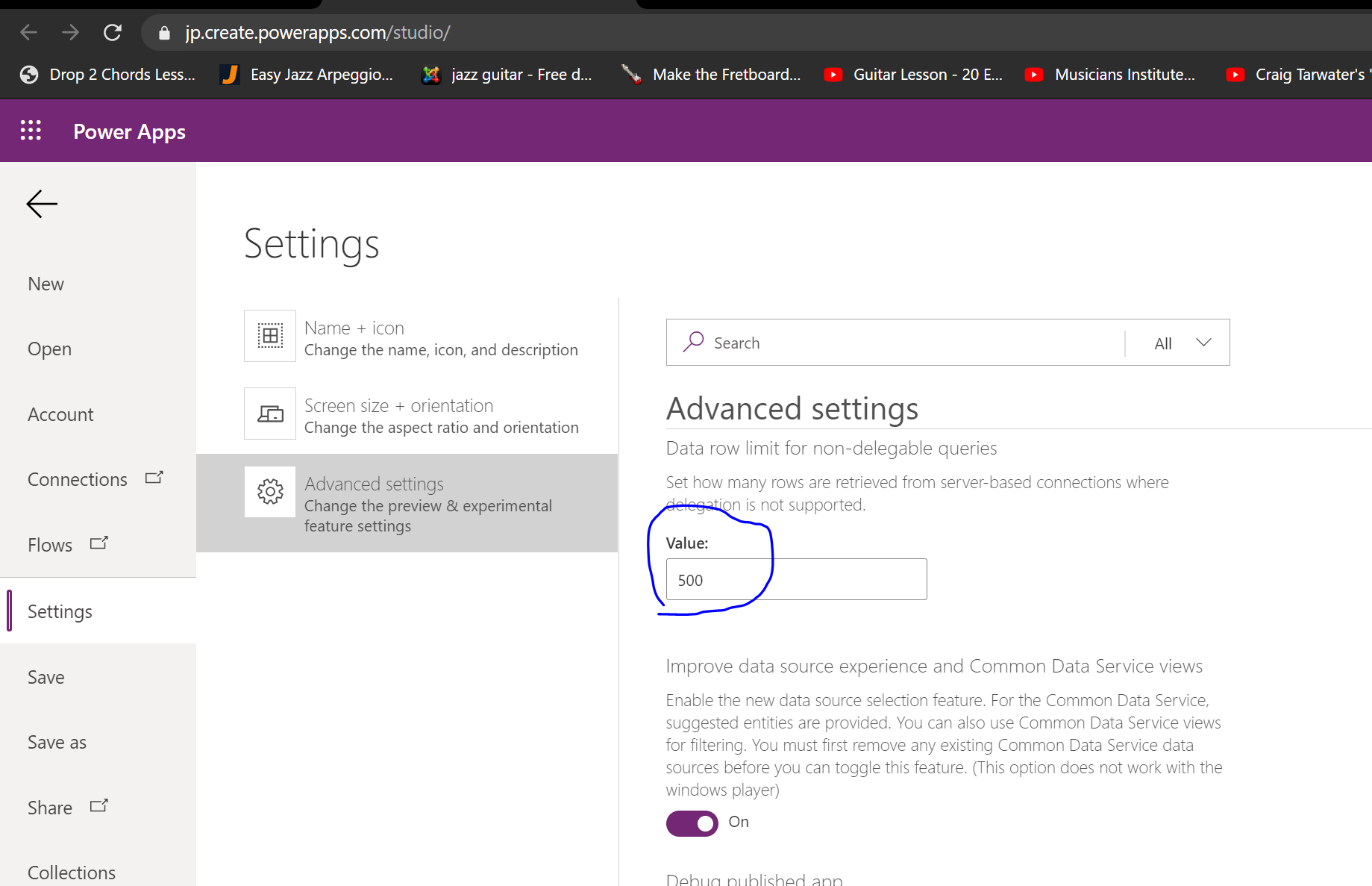
Last question. I see a lot of people complained that the app stops working once there are 500 items in the lists, and some people suggested to increase the dataset from 500 to 2000. Could you please help me and tell me where and how do i increase it? We should start using this app in few days in our team, prepared all activities and awards, but 500 items will be created very fast, so i need to increase it :) Thank you in advance

@narismadz
Copy link
Copy Markdown
Author

Also another very quick question related to the original question.
In edit mode of this app, in Tree View, i can navigate between User Screen and Admin Screen, but on Admin Screen i see only the main dashboard, how do i actually preview "Update Activities" tab in edit mode?

Just press play and do actual click edit or add activity and when it pops out stop play mode then you can edit an object
For replacing the pic instead of medal on "congrats" pop out box i think it possible to do. Maybe need to set some source of variables for picture reference

Managed to do it on my own, thanks for the heads up :)
Last question. I see a lot of people complained that the app stops working once there are 500 items in the lists, and some people suggested to increase the dataset from 500 to 2000. Could you please help me and tell me where and how do i increase it? We should start using this app in few days in our team, prepared all activities and awards, but 500 items will be created very fast, so i need to increase it :) Thank you in advance

This one I think

image

@Ixinho
Copy link
Copy Markdown

Ixinho commented Dec 14, 2020

Also another very quick question related to the original question.
In edit mode of this app, in Tree View, i can navigate between User Screen and Admin Screen, but on Admin Screen i see only the main dashboard, how do i actually preview "Update Activities" tab in edit mode?

Just press play and do actual click edit or add activity and when it pops out stop play mode then you can edit an object
For replacing the pic instead of medal on "congrats" pop out box i think it possible to do. Maybe need to set some source of variables for picture reference

Managed to do it on my own, thanks for the heads up :)
Last question. I see a lot of people complained that the app stops working once there are 500 items in the lists, and some people suggested to increase the dataset from 500 to 2000. Could you please help me and tell me where and how do i increase it? We should start using this app in few days in our team, prepared all activities and awards, but 500 items will be created very fast, so i need to increase it :) Thank you in advance

This one I think

image

Perfect, thank you.

Sign up for free to subscribe to this conversation on GitHub. Already have an account? Sign in.

Labels

None yet

Projects

None yet

Development

Successfully merging this pull request may close these issues.

2 participants