Skip to content
/ tyr Public

Intelligent file organization powered by machine learning.

License

Notifications You must be signed in to change notification settings

Nurysso/tyr

Folders and files

NameName
Last commit message
Last commit date

Latest commit

Β 

History

17 Commits
Β 
Β 
Β 
Β 
Β 
Β 
Β 
Β 
Β 
Β 
Β 
Β 
Β 
Β 
Β 
Β 
Β 
Β 
Β 
Β 
Β 
Β 
Β 
Β 
Β 
Β 

Repository files navigation

Tyr

Intelligent file organization powered by machine learning

Rust License: GPL-3 Platform Made with Rust

Features β€’ Installation β€’ Usage β€’ Configuration β€’ Documentation


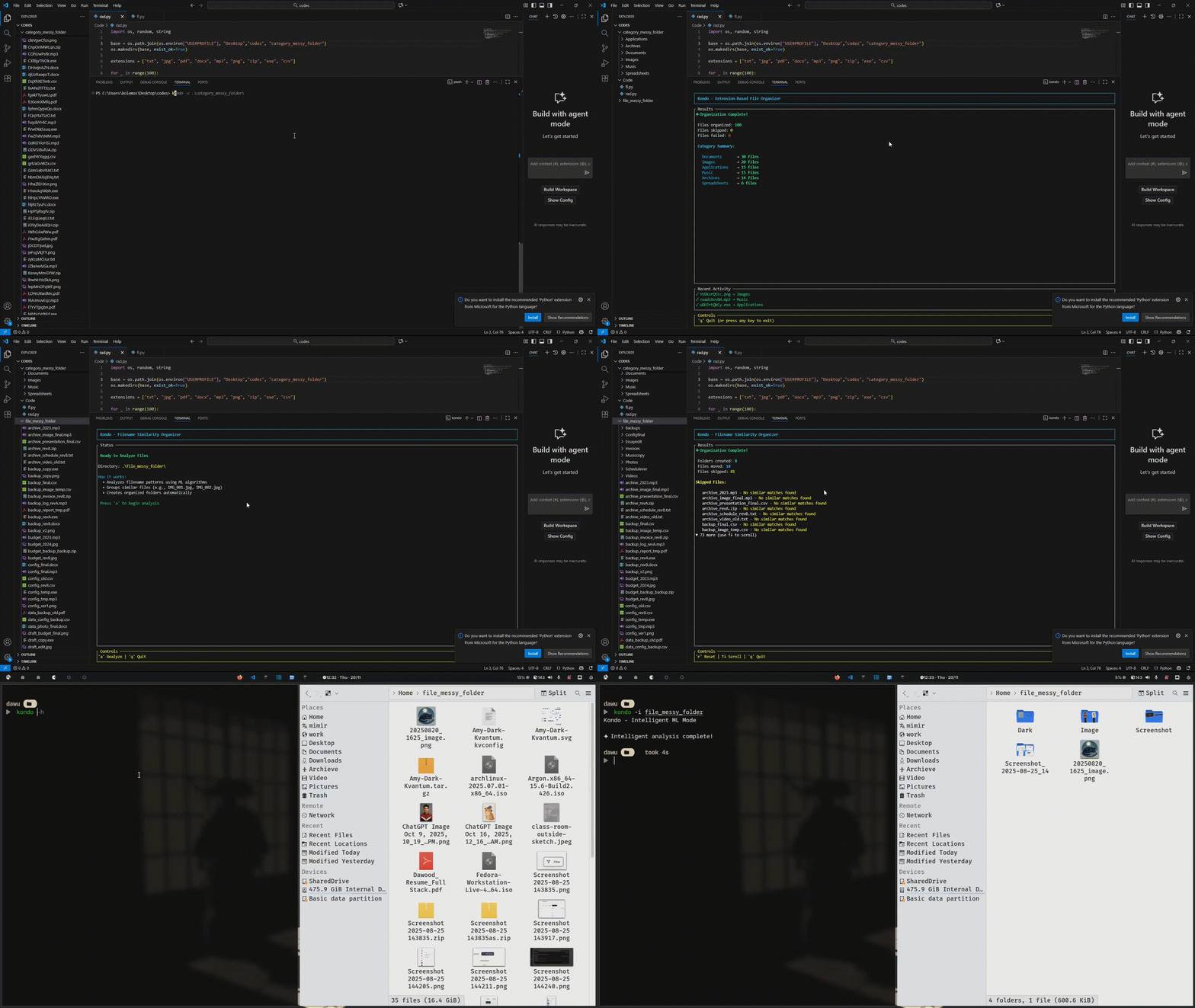
Demo

Overview

Tyr is a blazingly fast file organizer built in Rust that automatically categorizes and groups your files. Unlike traditional organizers that only look at file extensions, Tyr uses machine learning algorithms to understand relationships between files and intelligently organize them.

// Organize in seconds
tyr ~/Downloads

// Features
βœ“ ML-powered grouping
βœ“ Parallel processing
βœ“ Beautiful TUI
βœ“ Safe operations

Features

Intelligent Organization

β”Œβ”€β”€β”€β”€β”€β”€β”€β”€β”€β”€β”€β”€β”€β”€β”€β”€β”€β”€β”€β”€β”€β”€β”€β”€β”€β”€β”€β”€β”€β”€β”€β”€β”€β”
β”‚  Extension-based categorization β”‚
β”‚  10+ default categories         β”‚
β”‚  Unlimited custom categories    β”‚
β””β”€β”€β”€β”€β”€β”€β”€β”€β”€β”€β”€β”€β”€β”€β”€β”€β”€β”€β”€β”€β”€β”€β”€β”€β”€β”€β”€β”€β”€β”€β”€β”€β”€β”˜
        ↓
β”Œβ”€β”€β”€β”€β”€β”€β”€β”€β”€β”€β”€β”€β”€β”€β”€β”€β”€β”€β”€β”€β”€β”€β”€β”€β”€β”€β”€β”€β”€β”€β”€β”€β”€β”
β”‚  ML-powered smart grouping      β”‚
β”‚  Levenshtein + Jaccard          β”‚
β”‚  Automatic version detection    β”‚
β””β”€β”€β”€β”€β”€β”€β”€β”€β”€β”€β”€β”€β”€β”€β”€β”€β”€β”€β”€β”€β”€β”€β”€β”€β”€β”€β”€β”€β”€β”€β”€β”€β”€β”˜

Capabilities:

  • Groups file versions (file_v1, file_v2)
  • Detects related files (project_code, project_docs)
  • Customizable similarity thresholds

High Performance

β”Œβ”€β”€β”€β”€β”€β”€β”€β”€β”€β”€β”€β”€β”€β”€β”€β”€β”€β”€β”€β”€β”€β”€β”€β”€β”€β”€β”€β”€β”€β”€β”€β”€β”€β”€β”
β”‚  Performance Metrics             β”‚
β”œβ”€β”€β”€β”€β”€β”€β”€β”€β”€β”€β”€β”€β”€β”€β”€β”€β”€β”€β”€β”€β”€β”€β”€β”€β”€β”€β”€β”€β”€β”€β”€β”€β”€β”€β”€
β”‚  1000 files     β†’  2.1 seconds   β”‚
β”‚  Parallel       β†’  3-5x speedup  β”‚
β”‚  Memory usage   β†’  ~8-12 MB      β”‚
β”‚  Syscalls       β†’  reduced alot  β”‚
β””β”€β”€β”€β”€β”€β”€β”€β”€β”€β”€β”€β”€β”€β”€β”€β”€β”€β”€β”€β”€β”€β”€β”€β”€β”€β”€β”€β”€β”€β”€β”€β”€β”€β”€β”˜

Speed:

  • 600x faster than manual sorting
  • Optimized with Rayon parallelism
  • Lazy directory creation
  • Memory-efficient batch operations

Installation

Linux/Mac

curl -fsSL https://raw.githubusercontent.com/aelune/tyr/main/install.sh | bash

Windows

Invoke-WebRequest -Uri "https://raw.githubusercontent.com/aelune/tyr/main/install.ps1" -OutFile "install.ps1"
.\install.ps1

Manual

git clone https://github.com/Aelune/tyr.git
cd tyr
make install

Requirements: Rust 1.70+


Usage

Quick Start

# Organize current directory
tyr

# Organize specific directory
tyr ~/Downloads

# Organize any path
tyr /path/to/folder

Terminal Controls

Key Action
s Start organizing
d Dry run (preview)
q Quit application

Visual Example

β”Œβ”€β”€β”€β”€β”€β”€β”€β”€β”€β”€β”€β”€β”€β”€β”€β”€β”€β”€β”€β”€β”€β”€β”€β”€β”€β”€β”€β”€β”€β”€β”€β”€β”€β”€β”€β”€β”€β”€β”€β”€β”€β”€β”€β”€β”€β”€β”€β”€β”€β”€β”€β”€β”€β”€β”€β”€β”€β”€β”€β”€β”€β”€β”€β”€β”
β”‚                         BEFORE                                 β”‚
β”œβ”€β”€β”€β”€β”€β”€β”€β”€β”€β”€β”€β”€β”€β”€β”€β”€β”€β”€β”€β”€β”€β”€β”€β”€β”€β”€β”€β”€β”€β”€β”€β”€β”€β”€β”€β”€β”€β”€β”€β”€β”€β”€β”€β”€β”€β”€β”€β”€β”€β”€β”€β”€β”€β”€β”€β”€β”€β”€β”€β”€β”€β”€β”€β”€β”€
β”‚  Downloads/                                                    β”‚
β”‚  β”œβ”€β”€ report_v1.pdf                                             β”‚
β”‚  β”œβ”€β”€ report_v2.pdf                                             β”‚
β”‚  β”œβ”€β”€ report_v3.pdf                                             β”‚
β”‚  β”œβ”€β”€ vacation.jpg                                              β”‚
β”‚  β”œβ”€β”€ song.mp3                                                  β”‚
β”‚  └── data.xlsx                                                 β”‚
β””β”€β”€β”€β”€β”€β”€β”€β”€β”€β”€β”€β”€β”€β”€β”€β”€β”€β”€β”€β”€β”€β”€β”€β”€β”€β”€β”€β”€β”€β”€β”€β”€β”€β”€β”€β”€β”€β”€β”€β”€β”€β”€β”€β”€β”€β”€β”€β”€β”€β”€β”€β”€β”€β”€β”€β”€β”€β”€β”€β”€β”€β”€β”€β”€β”˜
                               ↓
                    tyr ~/Downloads
                               ↓
β”Œβ”€β”€β”€β”€β”€β”€β”€β”€β”€β”€β”€β”€β”€β”€β”€β”€β”€β”€β”€β”€β”€β”€β”€β”€β”€β”€β”€β”€β”€β”€β”€β”€β”€β”€β”€β”€β”€β”€β”€β”€β”€β”€β”€β”€β”€β”€β”€β”€β”€β”€β”€β”€β”€β”€β”€β”€β”€β”€β”€β”€β”€β”€β”€β”€β”
β”‚                    AFTER (Category Mode)                       β”‚
β”œβ”€β”€β”€β”€β”€β”€β”€β”€β”€β”€β”€β”€β”€β”€β”€β”€β”€β”€β”€β”€β”€β”€β”€β”€β”€β”€β”€β”€β”€β”€β”€β”€β”€β”€β”€β”€β”€β”€β”€β”€β”€β”€β”€β”€β”€β”€β”€β”€β”€β”€β”€β”€β”€β”€β”€β”€β”€β”€β”€β”€β”€β”€β”€β”€β”€
β”‚  Downloads/                                                    β”‚
β”‚  β”œβ”€β”€ Documents/                                                β”‚
β”‚  β”‚   β”œβ”€β”€ report_v1.pdf                                         β”‚
β”‚  β”‚   β”œβ”€β”€ report_v2.pdf                                         β”‚
β”‚  β”‚   └── report_v3.pdf                                         β”‚
β”‚  β”œβ”€β”€ Images/                                                   β”‚
β”‚  β”‚   └── vacation.jpg                                          β”‚
β”‚  β”œβ”€β”€ Audio/                                                    β”‚
β”‚  β”‚   └── song.mp3                                              β”‚
β”‚  └── Spreadsheets/                                             β”‚
β”‚      └── data.xlsx                                             β”‚
β””β”€β”€β”€β”€β”€β”€β”€β”€β”€β”€β”€β”€β”€β”€β”€β”€β”€β”€β”€β”€β”€β”€β”€β”€β”€β”€β”€β”€β”€β”€β”€β”€β”€β”€β”€β”€β”€β”€β”€β”€β”€β”€β”€β”€β”€β”€β”€β”€β”€β”€β”€β”€β”€β”€β”€β”€β”€β”€β”€β”€β”€β”€β”€β”€β”˜
                               ↓
              enable_smart_grouping = true
                               ↓
β”Œβ”€β”€β”€β”€β”€β”€β”€β”€β”€β”€β”€β”€β”€β”€β”€β”€β”€β”€β”€β”€β”€β”€β”€β”€β”€β”€β”€β”€β”€β”€β”€β”€β”€β”€β”€β”€β”€β”€β”€β”€β”€β”€β”€β”€β”€β”€β”€β”€β”€β”€β”€β”€β”€β”€β”€β”€β”€β”€β”€β”€β”€β”€β”€β”€β”
β”‚                 AFTER (Smart Grouping Mode aka filename)       β”‚
β”œβ”€β”€β”€β”€β”€β”€β”€β”€β”€β”€β”€β”€β”€β”€β”€β”€β”€β”€β”€β”€β”€β”€β”€β”€β”€β”€β”€β”€β”€β”€β”€β”€β”€β”€β”€β”€β”€β”€β”€β”€β”€β”€β”€β”€β”€β”€β”€β”€β”€β”€β”€β”€β”€β”€β”€β”€β”€β”€β”€β”€β”€β”€β”€β”€β”€
β”‚  Downloads/                                                    β”‚
β”‚  β”œβ”€β”€ Documents/                                                β”‚
β”‚  β”‚   └── report_group_001/    ← Grouped by ML                  β”‚
β”‚  β”‚       β”œβ”€β”€ report_v1.pdf                                     β”‚
β”‚  β”‚       β”œβ”€β”€ report_v2.pdf                                     β”‚
β”‚  β”‚       └── report_v3.pdf                                     β”‚
β”‚  β”œβ”€β”€ Images/                                                   β”‚
β”‚  β”‚   └── vacation.jpg                                          β”‚
β”‚  β”œβ”€β”€ Audio/                                                    β”‚
β”‚  β”‚   └── song.mp3                                              β”‚
β”‚  └── Spreadsheets/                                             β”‚
β”‚      └── data.xlsx                                             β”‚
β””β”€β”€β”€β”€β”€β”€β”€β”€β”€β”€β”€β”€β”€β”€β”€β”€β”€β”€β”€β”€β”€β”€β”€β”€β”€β”€β”€β”€β”€β”€β”€β”€β”€β”€β”€β”€β”€β”€β”€β”€β”€β”€β”€β”€β”€β”€β”€β”€β”€β”€β”€β”€β”€β”€β”€β”€β”€β”€β”€β”€β”€β”€β”€β”€β”˜

Configuration

Configuration File: ~/.config/tyr/tyr.toml

Basic Settings

# Batch processing size
batch_size = 100

# Enable ML grouping
enable_smart_grouping = false

# Skip these files
skip_patterns = [
    ".DS_Store",
    "Thumbs.db",
    ".git*"
]

Custom Categories

[categories.my_category]
extensions = [
    "ext1",
    "ext2",
    "ext3"
]
folder_name = "My Custom Folder"

Similarity Tuning

[similarity_config]
levenshtein_threshold = 0.7      # Character similarity (0.0 - 1.0)
jaccard_threshold = 0.5          # Token overlap (0.0 - 1.0)
levenshtein_weight = 0.6         # Weight for character matching
jaccard_weight = 0.4             # Weight for token matching
min_similarity_score = 0.65      # Overall threshold for grouping

Use Cases

Photography

β”Œβ”€β”€β”€β”€β”€β”€β”€β”€β”€β”€β”€β”€β”€β”€β”€β”€β”€β”€β”€β”€β”€β”€β”€β”€β”€β”€β”€β”€β”€β”€β”€β”
β”‚  RAW + JPG pairs grouping     β”‚
β”‚  Shoot session organization   β”‚
β”‚  Sequential numbering         β”‚
β”‚  Multi-format support         β”‚
β””β”€β”€β”€β”€β”€β”€β”€β”€β”€β”€β”€β”€β”€β”€β”€β”€β”€β”€β”€β”€β”€β”€β”€β”€β”€β”€β”€β”€β”€β”€β”€β”˜

Software Development

β”Œβ”€β”€β”€β”€β”€β”€β”€β”€β”€β”€β”€β”€β”€β”€β”€β”€β”€β”€β”€β”€β”€β”€β”€β”€β”€β”€β”€β”€β”€β”€β”€β”
β”‚  Source file organization     β”‚
β”‚  Language-agnostic sorting    β”‚
β”‚  Config file detection        β”‚
β”‚  Project-based grouping       β”‚
β””β”€β”€β”€β”€β”€β”€β”€β”€β”€β”€β”€β”€β”€β”€β”€β”€β”€β”€β”€β”€β”€β”€β”€β”€β”€β”€β”€β”€β”€β”€β”€β”˜

Document Management

β”Œβ”€β”€β”€β”€β”€β”€β”€β”€β”€β”€β”€β”€β”€β”€β”€β”€β”€β”€β”€β”€β”€β”€β”€β”€β”€β”€β”€β”€β”€β”€β”€β”
β”‚  Version tracking             β”‚
β”‚  Project-based grouping       β”‚
β”‚  Multi-format support         β”‚
β”‚  Archive organization         β”‚
β””β”€β”€β”€β”€β”€β”€β”€β”€β”€β”€β”€β”€β”€β”€β”€β”€β”€β”€β”€β”€β”€β”€β”€β”€β”€β”€β”€β”€β”€β”€β”€β”˜

Downloads Cleanup

β”Œβ”€β”€β”€β”€β”€β”€β”€β”€β”€β”€β”€β”€β”€β”€β”€β”€β”€β”€β”€β”€β”€β”€β”€β”€β”€β”€β”€β”€β”€β”€β”€β”
β”‚  Automatic categorization     β”‚
β”‚  Weekly organization runs     β”‚
β”‚  Clutter-free workspace       β”‚
β”‚  Smart conflict resolution    β”‚
β””β”€β”€β”€β”€β”€β”€β”€β”€β”€β”€β”€β”€β”€β”€β”€β”€β”€β”€β”€β”€β”€β”€β”€β”€β”€β”€β”€β”€β”€β”€β”€β”˜

Make Commands

Build & Install

make install
make uninstall
make clean

Run & Test

make run
make test

Configuration

make config-edit
make config-path

Backup & Reset

make config-backup
make config-reset

Built With

Rust

Rust

Systems Language

Ratatui

Ratatui

Terminal UI

Crossterm

Crossterm

Terminal Control

Rayon

Rayon

Parallelism

Serde

Serde

Serialization


Roadmap

Planned Features

  • Content-based similarity (file hashing)
  • Date-based organization
  • Duplicate file detection
  • Undo functionality
  • Watch mode (auto-organize on changes)

What it dosen't do

  • Cloud storage integration
  • Image content analysis
  • Audio fingerprinting

Contributing

Contributions are welcome! We especially appreciate help with:

β”Œβ”€β”€β”€β”€β”€β”€β”€β”€β”€β”€β”€β”€β”€β”€β”€β”€β”€β”€β”€β”€β”€β”€β”¬β”€β”€β”€β”€β”€β”€β”€β”€β”€β”€β”€β”€β”€β”€β”€β”€β”€β”€β”€β”€β”€β”€β”¬β”€β”€β”€β”€β”€β”€β”€β”€β”€β”€β”€β”€β”€β”€β”€β”€β”€β”€β”€β”€β”€β”€β”
β”‚  New Algorithms      β”‚  Performance Tuning  β”‚  File Type Support   β”‚
β”œβ”€β”€β”€β”€β”€β”€β”€β”€β”€β”€β”€β”€β”€β”€β”€β”€β”€β”€β”€β”€β”€β”€β”Όβ”€β”€β”€β”€β”€β”€β”€β”€β”€β”€β”€β”€β”€β”€β”€β”€β”€β”€β”€β”€β”€β”€β”Όβ”€β”€β”€β”€β”€β”€β”€β”€β”€β”€β”€β”€β”€β”€β”€β”€β”€β”€β”€β”€β”€β”€β”€
β”‚  Documentation       β”‚  Bug Fixes           β”‚  Testing             β”‚
β””β”€β”€β”€β”€β”€β”€β”€β”€β”€β”€β”€β”€β”€β”€β”€β”€β”€β”€β”€β”€β”€β”€β”΄β”€β”€β”€β”€β”€β”€β”€β”€β”€β”€β”€β”€β”€β”€β”€β”€β”€β”€β”€β”€β”€β”€β”΄β”€β”€β”€β”€β”€β”€β”€β”€β”€β”€β”€β”€β”€β”€β”€β”€β”€β”€β”€β”€β”€β”€β”˜

Comparison

Feature Tyr Traditional Organizers
ML-based grouping βœ… ❌
Parallel processing βœ… ❌
Interactive TUI βœ… ⚠️ Some
External configuration βœ… ⚠️ Some
Dry run mode βœ… ⚠️ Some
Cross-platform βœ… ⚠️ Varies

License

This project is licensed under the GPL-3 License - see the LICENSE file for details.


Made with Rust

Star on GitHub Fork on GitHub

⬆ back to top

About

Intelligent file organization powered by machine learning.

Resources

License

Stars

Watchers

Forks

Packages

No packages published