A Multimodal Governance System for Enterprise Content Consistency
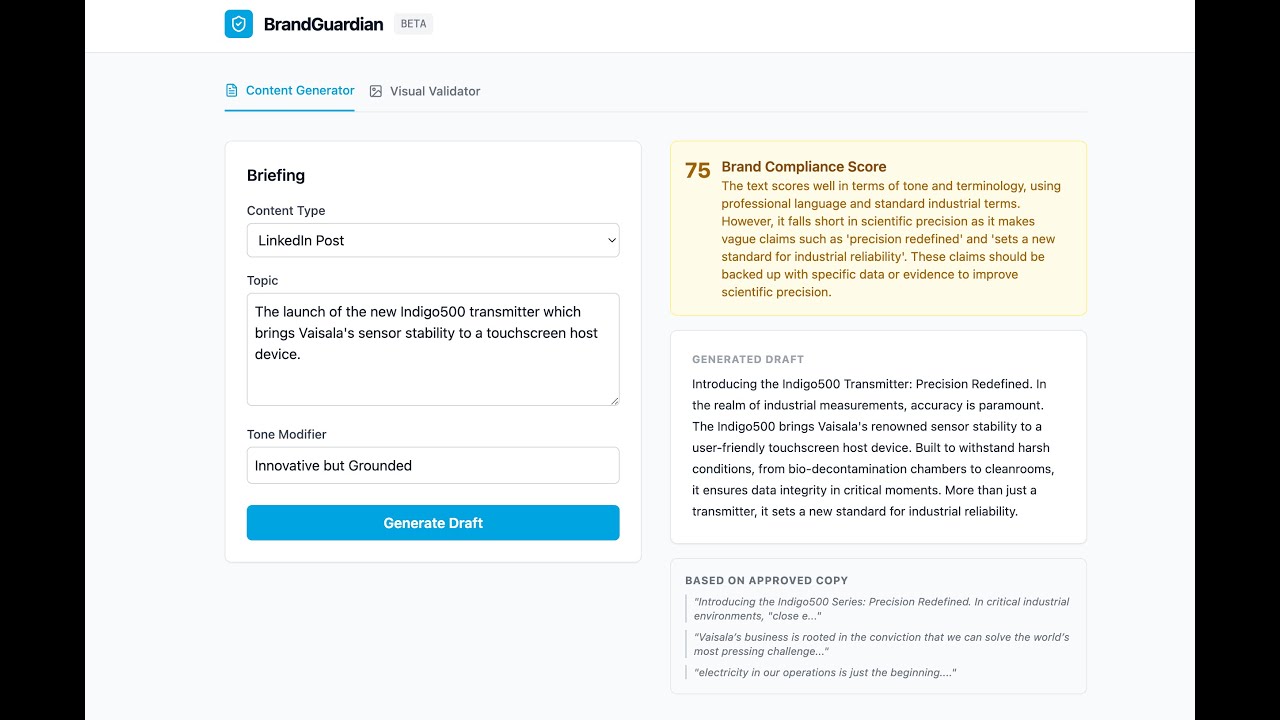
📺 Watch the System Demo featuring RAG Style Transfer and Visual Validation.



BrandGuardian is a multimodal AI agent designed to enforce corporate identity at scale. Unlike standard generative tools that produce generic marketing copy, BrandGuardian employs a Governance-First Architecture. It combines Retrieval-Augmented Generation (RAG) for textual tone enforcement and Computer Vision for visual palette compliance, ensuring every asset aligns with Vaisala’s scientific standards.
Standard LLMs default to "marketing fluff"—excessive emojis, hyperbole, and vague claims. For a high-precision science company like Vaisala, this is unacceptable. Additionally, maintaining visual consistency (using the correct "Vaisala Blue") across decentralized teams is a manual, error-prone process.
We moved beyond simple prompting to a Constrained Retrieval & Validation Architecture.
The Logic:
- Textual Governance (The Brain): instead of asking the LLM to "be professional," we use Maximal Marginal Relevance (MMR) search to retrieve approved Vaisala copy from a Vector Database (
ChromaDB). These examples are injected into the prompt (Few-Shot), forcing the LLM to mimic the specific syntax and vocabulary of the brand. - Visual Governance (The Eyes): We do not rely on LLM vision (which hallucinates colors). We implement a deterministic K-Means Clustering algorithm (
Pillow+NumPy) to mathematically calculate the Euclidean distance between an image's dominant colors and the approved hex palette.
- Ingest: The system loads "Gold Standard" texts (e.g., Sustainability Reports, Product Manuals) into
ChromaDB. - Retrieve: User requests a "LinkedIn Post about Mars Sensors." The Agent retrieves semantically similar approved past posts.
- Generate: The LLM synthesizes the new content using the retrieved style as a template.
- Grade: A secondary Governance Agent scores the draft (0-100) based on specific rules (Scientific Precision, No Hyperbole) before showing it to the user.
- Validate (Vision): If an image URL is provided, the Vision Service extracts the dominant color palette and validates it against
palette.json.
To verify the system's governance capabilities, use the following test cases in the UI.
Input:
Topic: "The launch of the new Indigo500 transmitter." Tone Modifier: "Innovative but Grounded"
- Why this matters: Generic AI would use phrases like "Game Changer!" or "Revolutionary!".
- Success Indicator: BrandGuardian should produce text using precise terms like "Reliability," "Data Integrity," and "Industrial Environments," utilizing the retrieved context. The Brand Compliance Score should be >85.
Input:
Image URL:
https://placehold.co/600x400/00A3E0/FFFFFF.png(Blue/White abstract image)
Image URL:
https://placehold.co/600x400/FF0000/000000.png(Bright Red image)
- Why this matters: This tests the deterministic math of the Vision Service. Red is not a primary Vaisala brand color.
- Success Indicator: The system must return a Red Alert: "Brand Violation Detected: Dominant colors deviate significantly from Vaisala identity guidelines."
- Frontend: React 18 + TypeScript + TailwindCSS (Vite)
- Backend: FastAPI (Async Python 3.11)
- Orchestration: LangChain v0.2 + OpenAI GPT-4
- Knowledge Base: ChromaDB (Local Embedded Vector Store)
- Vision Engine: Pillow (PIL) + NumPy (Vector Math)
- DevOps: Docker Compose (Microservices)
- Testing: Pytest (Backend) + Vitest (Frontend) - 100% Coverage
- Docker & Docker Compose
- OpenAI API Key
-
Clone the repository
git clone https://github.com/Nibir1/BrandGuardian.git cd BrandGuardian -
Configure Environment
cp backend/.env.example backend/.env # Edit backend/.env and paste your OPENAI_API_KEY -
Ingest Brand Knowledge (Build the Brain)
make ingest # This loads the "Gold Standard" text into the Vector DB -
Launch System
make up
# Frontend: http://localhost:3000
# Backend API: http://localhost:8000/docs
We maintain a strict 100% Test Coverage policy. The suite mocks external APIs (OpenAI, HTTPX) to ensure zero-cost, deterministic testing.
make test-all
| Command | Description |
|---|---|
make up |
Start the full stack (Backend + Frontend) in Docker |
make ingest |
Run the ETL pipeline to update the Vector Database |
make test-backend |
Run Python unit/integration tests with coverage |
make test-frontend |
Run React component tests via Vitest |
make clean |
Remove cache, bytecode, and coverage artifacts |
brand-guardian/
├── backend/
│   ├── src/
│   │   ├── core/           # Agent Logic (RAG & Guardrails)
│   │   ├── services/       # Vision & Ingestion Services
│   │   ├── models/         # Pydantic Schemas
│   │   └── app.py          # FastAPI Entrypoint
│   ├── tests/              # Pytest Suite (100% Cov)
│   └── data/               # ChromaDB & Brand Rules
├── frontend/
│   ├── src/                # React Components (App.tsx)
│   └── vite.config.ts      # Vite & Vitest Config
├── docker-compose.yml      # Orchestration
└── Makefile                # Automation Scripts
Architected by Nahasat Nibir