
A Home Assistant integration that decides which time of day applies right now. Instead of many timed automations there is one daily schedule: freely named times of day, day models such as workday or weekend, a week plan and exceptions for single days. When your rhythm changes, you change only the schedule.
Beta. This version contains the first part of Maestro, the times of day. Light rules with motion sensors, memory for manual settings and fades such as a wake-up light follow in the next versions.
- Rhythms. A rhythm is its own daily schedule, for example for the flat, a terrarium or a child's room. Several rhythms run side by side.
- Your own times of day. Each has a name, an icon and a color. Its key stays the same when you rename it, so automations keep working.
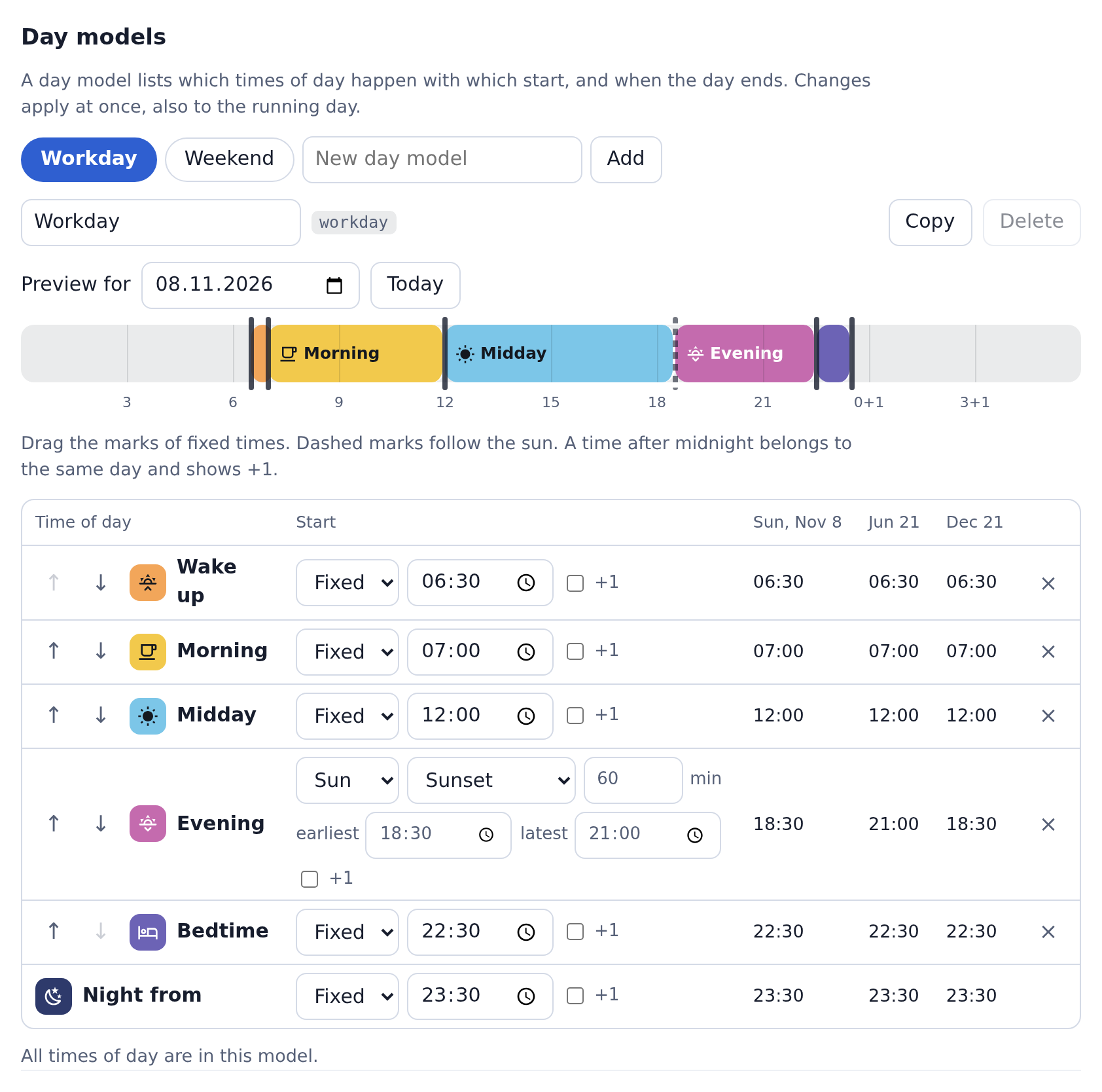
- Day models. Start times fixed or following the sun, with an offset and the bounds earliest and latest. Times may lie after midnight, for example a party until 06:00.
- Week plan and calendar. Every weekday gets a model. A calendar from Home Assistant can override single dates, for example on public holidays, for shift work or on holiday.
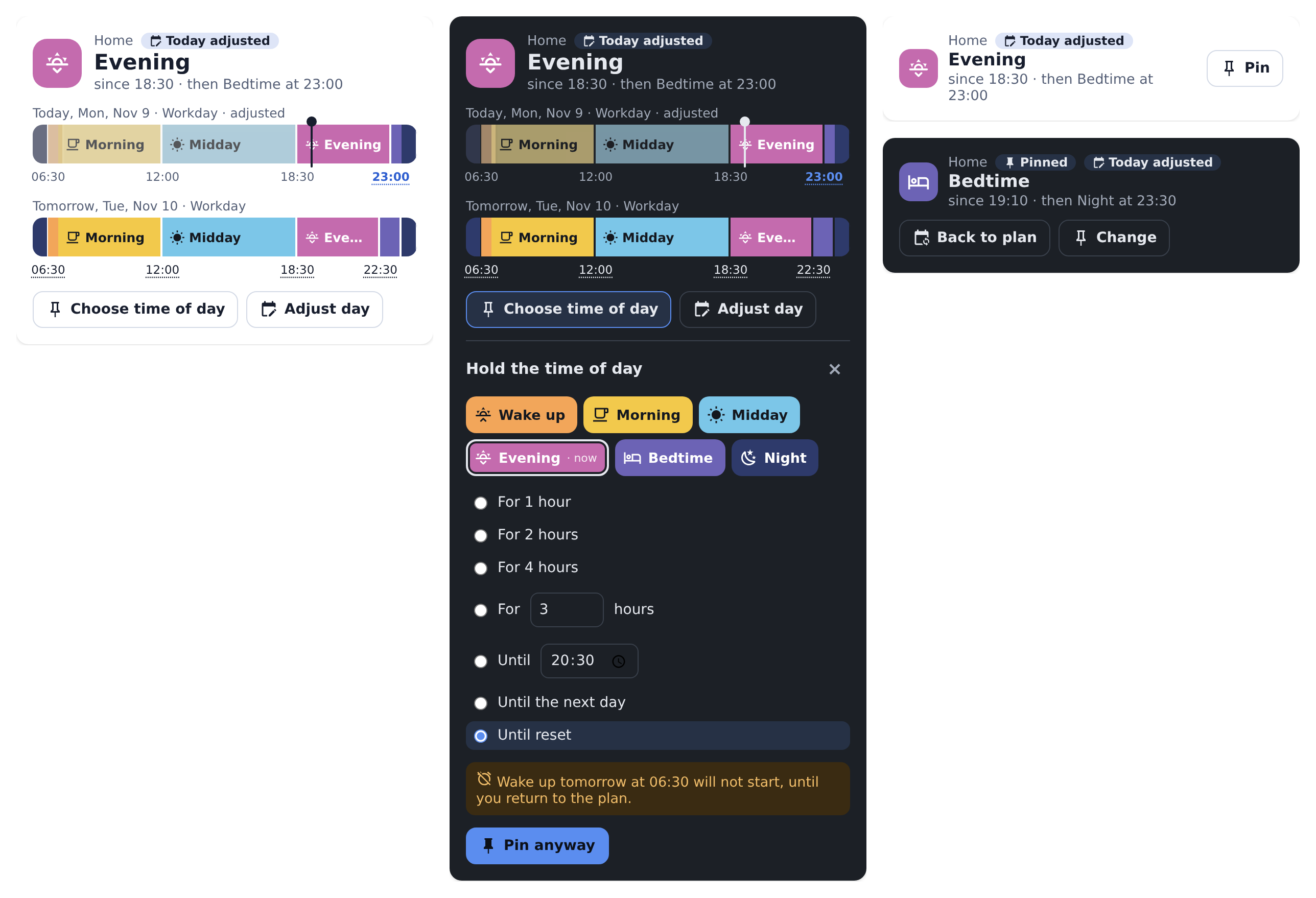
- Pin. Set a time of day now, earlier or later in the day, until the next change, for a duration, until a time, until the next day or until you reset it. A duration or a time ends when the next day begins at the latest, so your wake-up is never skipped unnoticed.
- Adjust a day. Another model or other times for a single date, also in advance: “bedtime at 23:30 tonight”.
- For automations. Every rhythm is a device with sensors, triggers, conditions, actions and an event at every change.
- A card and a settings page, no YAML needed. English and German.
Home Assistant 2026.11 or newer (Marketplace)

- Use the button above, or go to Settings → Marketplace and add
https://github.com/MadisonMedia/cloudless-maestroby link. This needs a connection to GitHub, which the Marketplace asks for. - While Maestro is in beta, switch on pre-releases for the repository, then install it.
Home Assistant 2026.10 or older (HACS)
- In HACS, open the menu at the top right and choose Custom repositories.
- Add
https://github.com/MadisonMedia/cloudless-maestrowith the type Integration. - Install Cloudless Maestro and restart Home Assistant.
Requires Home Assistant 2026.2 or newer.

Go to Settings → Devices & services → Add integration → Cloudless Maestro, enter a name and choose how to start: a typical day with wake up, morning, midday, afternoon, evening and bedtime, or a single time of day to build your own. Maestro then appears in the sidebar. Set everything up there and add more rhythms.
- A day runs from the start of its first time of day to its day end. In between days the base state applies, for example “Night”. There is no fixed change of day at midnight.
- Each time of day lasts until the next one starts. If the next day begins before the previous one ends, the next day wins.
- If a computed start lies before the previous one or after the day end, that time of day does not happen on that date. The settings page shows this in its preview.
- Sun times use the location of Home Assistant or a location per rhythm. If an event does not happen on a date, for example in polar day, the bound you set applies.
- All times are local. A time that does not exist when the clocks go forward moves to the next valid minute. A doubled time when they go back counts the first time.
- Today is the day that is running. In the base state it is the coming day. At 05:00 before wake-up you can therefore already pin “Wake up”.
| End | Meaning |
|---|---|
| Until the next change | Until the plan begins a time of day that comes after the chosen one, or the day ends |
| For a duration | 1, 2 or 4 hours or any, at most until the next day begins |
| Until a time | At most until the next day begins |
| Until the next day | Until the first time of day of the next day begins |
| Until reset | No end. The card shows beforehand which change will not happen. |
A new pin replaces the previous one. Back to plan ends it. A day adjustment stores only what differs: when you later change the day model, that applies to all other times on that date. Pins and day adjustments survive a restart. If the time of day changed during a restart, there is exactly one change.
Every rhythm is a device with these entities:
| Entity | State |
|---|---|
| Time of day | Key of the current time of day, with name, color, since, until and the next time of day as attributes |
| Choose time of day | A choice pins the time of day until the next change |
| Day model | Key of today's model and where it comes from |
| Next change | When the time of day changes next |
| Progress | How far the current time of day has run, in percent |
| Overridden | On while a time of day is pinned or today is adjusted |
In the automation editor the device offers the triggers A time of day begins, A time of day ends and The time of day changes, and the conditions The time of day is one of and The plan is overridden. At every change, the event cloudless_maestro_changed fires with from, to and the reason.
| Action | Purpose |
|---|---|
cloudless_maestro.pin |
Pin a time of day, with an end |
cloudless_maestro.resume |
Back to the plan |
cloudless_maestro.adjust_day |
Adjust a date: another model, other start times, another day end |
cloudless_maestro.clear_day |
Remove a day adjustment |
cloudless_maestro.refresh_calendars |
Read the linked calendars again at once |
# Bedtime later tonight
action: cloudless_maestro.adjust_day
target:
  entity_id: sensor.home_time_of_day
data:
  times:
    bedtime: "23:30"
end: "00:30+1"Edit a dashboard, add a card and choose Maestro. The full variant shows the current time of day, the day as a timeline and, if you like, tomorrow. Tap a coming time to move that change on that date only. The compact variant shows only the time of day and pinning.
pip install -r requirements_test.txt
pytest -q
ruff check .
tests/frontend/harness.html runs the real card and settings page against a simulated Home Assistant, with data from the real backend. Serve the repository's root with any local web server and open this file. MAESTRO_WRITE_HARNESS=1 pytest tests/test_harness_data.py refreshes the data.
MIT