OptPilot is a lightweight orchestration layer for iterative optimization studies. It connects a user-owned method to a user-owned environment, runs candidate solutions, records objective metrics, and keeps an auditable evidence trail.
OptPilot is not an optimizer, simulator, RL framework, or LLM agent framework. Those pieces remain yours. OptPilot standardizes the loop around them:
- A method proposes one or more candidates.
- OptPilot validates and materializes each candidate.
- An environment evaluates the candidate and reports metrics.
- OptPilot records trials, observations, saved output files, method calls, and run metadata.
- The method can use the accumulated evidence to propose the next candidates.
flowchart LR
  Env["Environment\nwhat can be evaluated"]
  Method["Method\nhow candidates are produced"]
  Study["Study\nobjective + budget + execution"]
  Runner["OptPilot runner\nvalidate + materialize + evaluate"]
  Evidence["Evidence\nobservations + artifacts"]

  Study --> Env
  Study --> Method
  Env --> Runner
  Method --> Runner
  Runner --> Evidence
  Evidence --> Method
The boundary between environment and method is the candidate contract. Start with docs/candidate-contracts.md after the quickstart if you are adding a new integration.
Users author three public YAML config files:
config: environment: candidate contract, evaluator, metrics, trial workspace, saved output-file rules, and optional records.config: method: method entrypoint, protocol, settings, compatibility requirements, and optional method runtime.config: study: the concrete run binding an environment config to a method config with objective, budget, execution, and evidence settings.
OptPilot validates those YAML files with packaged JSON Schemas, compiles them into an internal StudySpec, and writes the compiled spec into every run directory.
Included in the core CLI/SDK:
- JSON Schema validation for public environment, method, and study configs
- package validation for folders that contain environments, methods, resources, and studies
- parameter, file, and opaque candidate contracts
- Python and command environment evaluators
- Python and command methods with batch protocol, plus Python session protocol
- local thread, local subprocess, and Docker/Podman-compatible environment execution
- Docker/Podman-compatible command-method runtime isolation
- local JSONL evidence store with run summaries, trials, observations, candidate records, saved output files, method calls, and events
Included in a source checkout:
- runnable job-shop scheduling tutorial package with shared validation cases, a shared objective, parameter/file candidate variants, JobShopLib-backed method wrappers, Stable-Baselines3 RL, and LLM file-candidate examples
- OptPilot Studio, a local UI for browsing reusable catalogs, opening workspaces, checking compatibility, launching studies, inspecting runs, and optionally using an OpenHands-backed assistant
Not included:
- production Bayesian optimization, RL, LLM, or metaheuristic frameworks
- remote execution backends
- automatic dependency inference for study runtimes
- multi-user Studio authentication
OptPilot currently supports Python 3.10 and newer.
Before running the examples below, install:
- Python 3.10+
uv
Use the PyPI package when you want the Python SDK and CLI in your own project. This path does not install OptPilot Studio, OpenHands, Code Server, or the bundled example catalog.
python -m pip install optpilot
optpilot --help
optpilot package validate path/to/package
optpilot validate path/to/package/studies/my_study.yaml
optpilot run path/to/package/studies/my_study.yaml
Use a source checkout when you want the bundled tutorial package, full local Studio, docs, and contributor workflow:
git clone https://github.com/MINDS-THU/OptPilot.git
cd OptPilot
uv sync --all-packages --group examples --group docs
uv run optpilot --helpStart with the job-shop parameter baseline from a source checkout. It is the recommended first run, works after the full source sync above, and does not require API keys or external solvers.
The job-shop examples are the main tutorial comparison set: environments declare what they can evaluate, methods declare how they produce candidates, and study files bind one environment, one method, objective, budget, and execution policy.
Run the job-shop parameter baseline:
uv run optpilot run catalog/example_package/studies/job_shop_rule_parameters_baseline.yamlValidate a config without running it:
uv run optpilot validate catalog/example_package/studies/job_shop_rule_parameters_baseline.yamlAfter the first run succeeds, open Studio:
uv run optpilot ui --open-browser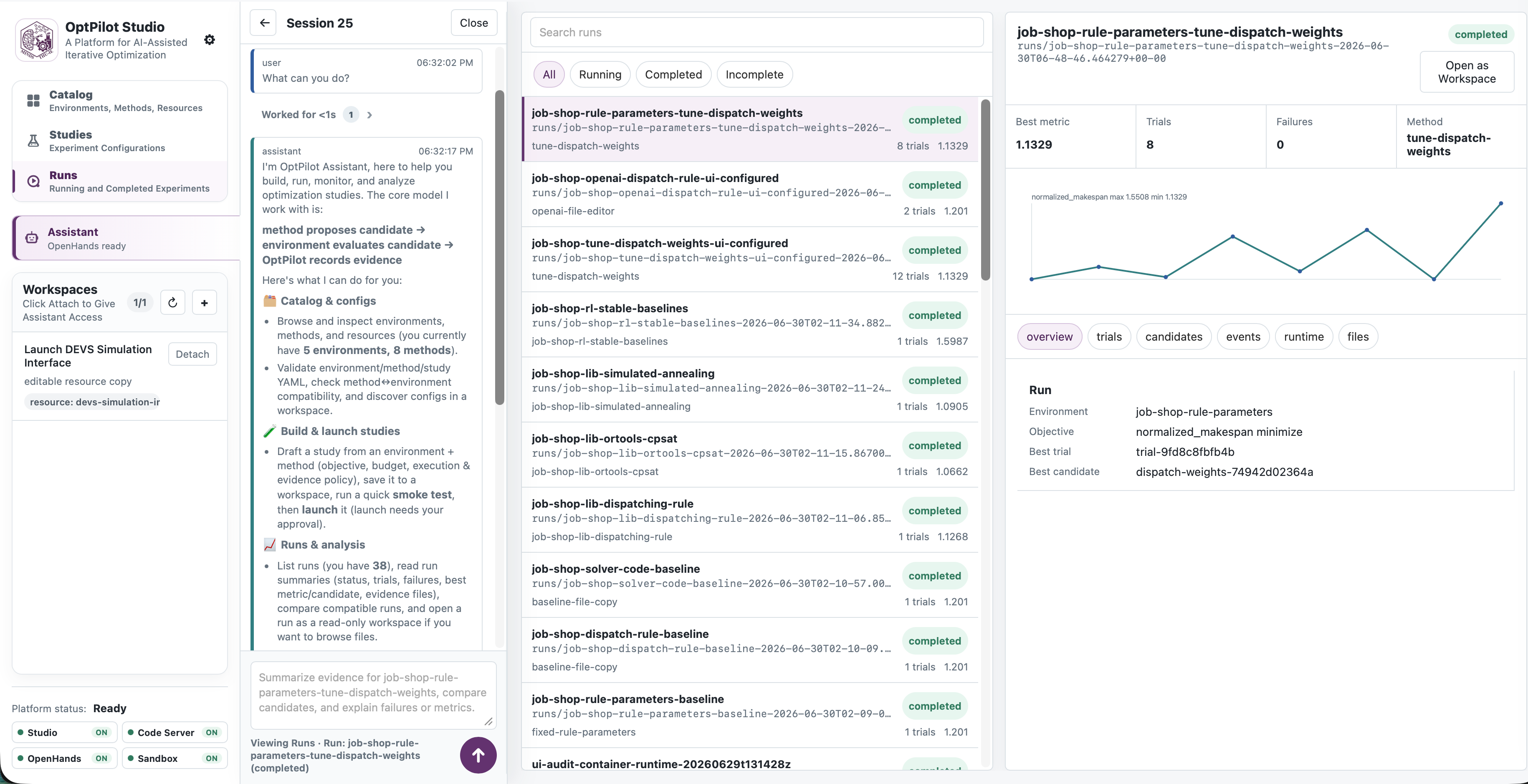
Studio scans packages under catalog/ by default. Stop the local server with
Ctrl-C in the terminal when you are done.
For the assistant-enabled Studio workflow with OpenHands, embedded Code Server, and per-workspace containers, see OptPilot Studio.
Some examples, such as the JobShopLib and Stable-Baselines method wrappers, require optional dependencies. Use the dependency-free job-shop baseline first, then continue with the example-specific docs.
The first tutorial shows the full environment, method, and study YAML files for a runnable job-shop baseline:
catalog/example_package/environments/job_shop_scheduling/environment_rule_parameters.yamlcatalog/example_package/methods/fixed_rule_parameters/method.yamlcatalog/example_package/studies/job_shop_rule_parameters_baseline.yaml
Read First Job-Shop Run for the full configs and the explanation of how the three files fit together. Python evaluator references use module:function; Python method references use module:Class.
OptPilot ships one package at catalog/example_package/. When Studio registers
user-owned files, it creates catalog/local_package/ on demand. Add future
packages as additional siblings under catalog/; they should not overwrite
existing packages.
catalog/
  example_package/
  local_package/
  another_package/
Each package can contain environments/, methods/, resources/, and
studies/. Environment and method directories own reusable implementation code
and reusable config variants. Resources are reusable reference folders or
launchable apps. Study configs are concrete run plans.
Run an environment evaluator in a container by declaring the component runtime on the environment config:
runtime:
  sandbox: container
  container:
    image: python:3.11-slim
    executable: docker
    network: disabled
The study still owns trial policy:
execution:
  parallelism: 1
  timeoutSeconds: 300
Run a command method in its own container:
entrypoint:
  command: [python, my_agent.py, "{input_file}", "{output_file}"]
  protocol: batch

runtime:
  sandbox: container
  container:
    image: my-agent-image:latest
    executable: docker
    network: disabled
    build:
      context: .
      dockerfile: Dockerfile.agent
      tag: my-agent-image:latest
envFromHost: [OPENAI_API_KEY]- Installation
- First Job-Shop Run
- OptPilot Core
- Candidate Contracts
- Methods
- Packages and Catalogs
- Configuration Reference
- How a Run Works
- Evidence
- Job-Shop Tutorial Map
- Job-Shop Environment
- OptPilot Studio
- Workspace Management
- OptPilot Assistant
Build the docs locally:
uv run --group docs mkdocs serveuv run python -m unittest discover -s tests -p 'test_*.py'
uv run python -m compileall src/optpilot
uv run python -m compileall studio/src/optpilot_studio
./scripts/smoke_test.shOptPilot is licensed under the Apache License 2.0. See LICENSE.