
A patch companion for Anthropic's Claude Code VS Code extension.

Better session management, status indicators, search, filters, and a one-click YOLO mode — applied on top of the official extension, not as a fork.

Orbit downloads the official anthropic.claude-code VSIX from the Marketplace, surgically patches the bundled webview, and installs the result. The patched version looks and works exactly like the original — plus everything below.
| ⭐ Pin & Star sessions | Right-click any session to pin, star, or archive. Sections sort automatically: starred → pinned → active → archived. |
| 🗂 Archive instead of delete | Hover-action button archives; archived sessions sink to a collapsible folder. Permanent delete only available once archived. |
| 🔍 Search & filter | Inline search box plus a filter menu by type (pinned / starred / running / waiting) and age (1h / 24h / 7d / 30d). Hides untitled empty sessions by default. |
| 🟢 Live status dots | Status indicator on the left of each session: idle, running (spinner), waiting for input (pulse), or done (blue). |
| 📝 Activity text | See what each session is actually doing — "Editing foo.ts", "Running ls", "Thinking…" — instead of a static timestamp. |
| ⚡ YOLO mode toggle | One button in the sessions header flips permission prompts off. Live-applies to all loaded sessions. |
📊 Quick /usage button |
One click in the sessions panel header opens the account & usage screen. |
| ↔ Resizable sessions panel | Drag the divider; width adapts to your panel. Auto-collapses only when truly tiny. |
| 🕒 Readable time | "2 days ago" instead of "2d"; "1 hr ago" instead of "1h". |
| 🎨 Theme-aware | Every style hooks into VS Code's CSS variables. Light, dark, high-contrast — all just work. |
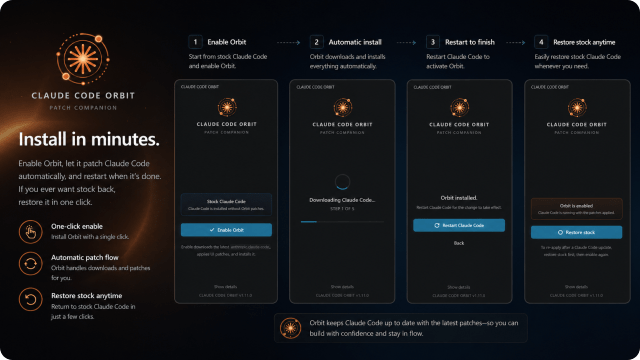
- Grab the latest VSIX from
builds/ - In VS Code: Ctrl+Shift+P → Extensions: Install from VSIX… → pick the file
- Click the Claude Code Orbit icon in the activity bar
- Hit Enable Orbit — Orbit downloads the latest official VSIX, patches it, installs the result
- Click Restart Claude Code when prompted
Requirements: VS Code 1.94+ and Python 3 on PATH (the patcher runs locally on your machine).
Orbit updates the patcher from GitHub: Install newest pulls the latest patcher and patches the newest Claude Code. Use Check for updates in the Orbit sidebar to get new patcher releases without reinstalling the VSIX.
If a release ever misbehaves, Previous versions installs an earlier one from the rollback registry — each entry pinned to the Claude Code version it was certified against, so every rollback is a known-good (patcher, Claude) pair.
Wrapper/sidebar fixes are also published through GitHub as
latest/claude-code-orbit.vsix, so the sidebar can offer an Orbit wrapper
update instead of requiring a manual local VSIX reinstall.
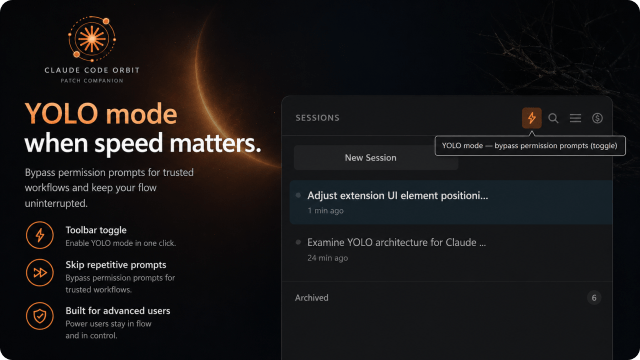
A ⚡ lightning-bolt button lives in the sessions panel header. Click it to flip permission prompts off.
- Off: dim, blends in. Permission prompts behave normally.
- On: orange-tinted background and bright orange bolt — hard to miss, hard to forget about.
- Live-applies to every loaded session immediately; new sessions default to
bypassPermissionswhile it's on. - Always starts off on every reload — opt in deliberately each session.
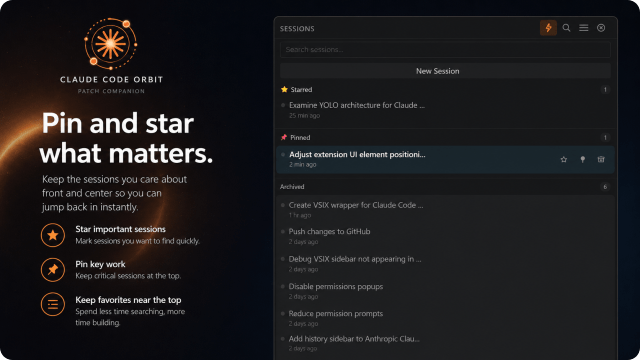
Right-click any session for the pin / star / archive menu, or use the hover actions. Sessions self-sort into collapsible Starred → Pinned → Active → Archived sections with counts in each header.
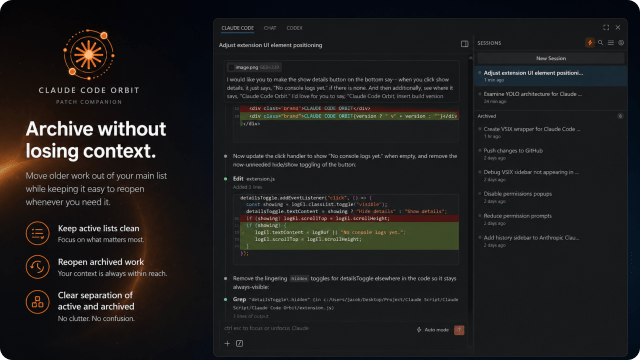
The default hover action is Archive, not Delete. Archived sessions sink to a collapsible folder at the bottom; only there does the permanent-delete action appear. Hard to delete a session by accident.
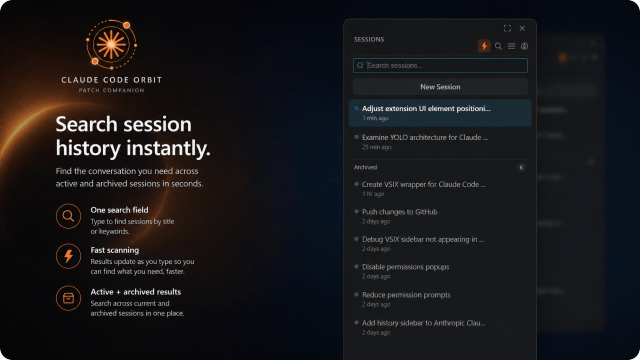
Click the 🔍 in the sessions header — an inline search row slides down. Filters session titles live as you type, across every section. Esc to dismiss.

Filter by type (Pinned / Starred / Running / Waiting), age (Last hour / 24h / 7d / 30d), and a Hide → Untitled chats toggle that keeps empty new-session rows out of your sidebar (on by default). Click the filter button again to dismiss.
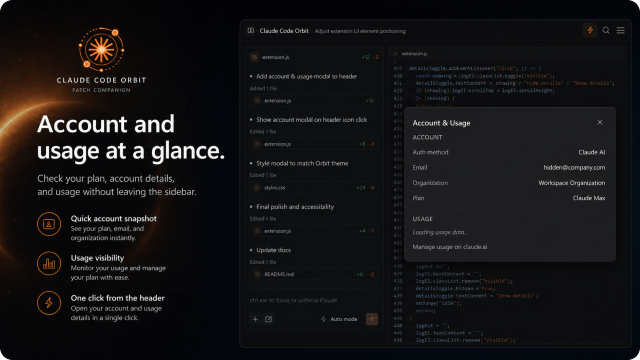
The $ button in the sessions header opens Claude Code's Account & Usage panel directly — no command palette, no slash command. Shows your auth method, plan, and rolling usage windows.
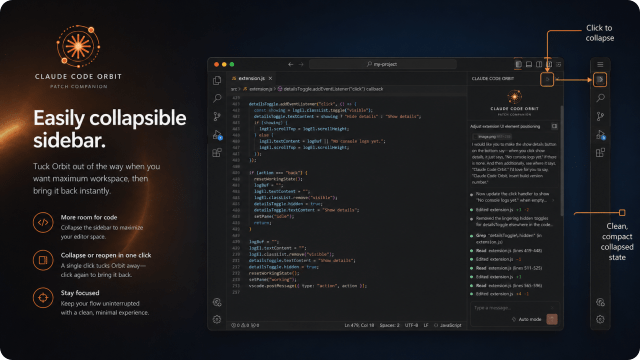
Drag the left edge of the sessions panel to resize. Width is clamped to 55% of the container so it can't push the chat off-screen. Toggle the panel off with the sidebar button in the top toolbar — the chat snaps back to full width.
Click Restore stock in the Orbit sidebar at any time. Orbit downloads the unmodified Marketplace VSIX, installs it via file URI (skipping the marketplace install dialog), and prompts you to restart. Your sessions, settings, and chat history are untouched — Orbit only modifies the webview's UI layer.
| Claude Code | tested against 2.1.147 – 2.1.150 |
| VS Code | 1.94.0+ |
| Python | 3.8+ (stdlib only) |
| OS | Windows, macOS, Linux |
If a Claude Code release breaks one of the patch anchors, the patcher refuses to install rather than producing a broken extension. 48 anchors are verified before any output VSIX is written.
The Orbit wrapper is licensed under the PolyForm Noncommercial License 1.0.0 — you're free to copy, use, and modify it for any noncommercial purpose, but you may not sell it or use it commercially for profit. Patches operate on Anthropic's distribution, which remains © Anthropic PBC under its own Commercial Terms of Service. Orbit does not redistribute the Anthropic VSIX — it downloads it from the Marketplace on the user's machine at install time.
Built by lunawerx · Source on GitHub · UI inspiration from Cursor and GitHub Copilot