
Airport API Service is a REST API for managing airports, airplanes, routes, flights, crews, orders, and tickets. It supports JWT authentication, role-based access, flight search, and seat booking with validation against duplicate reservations.
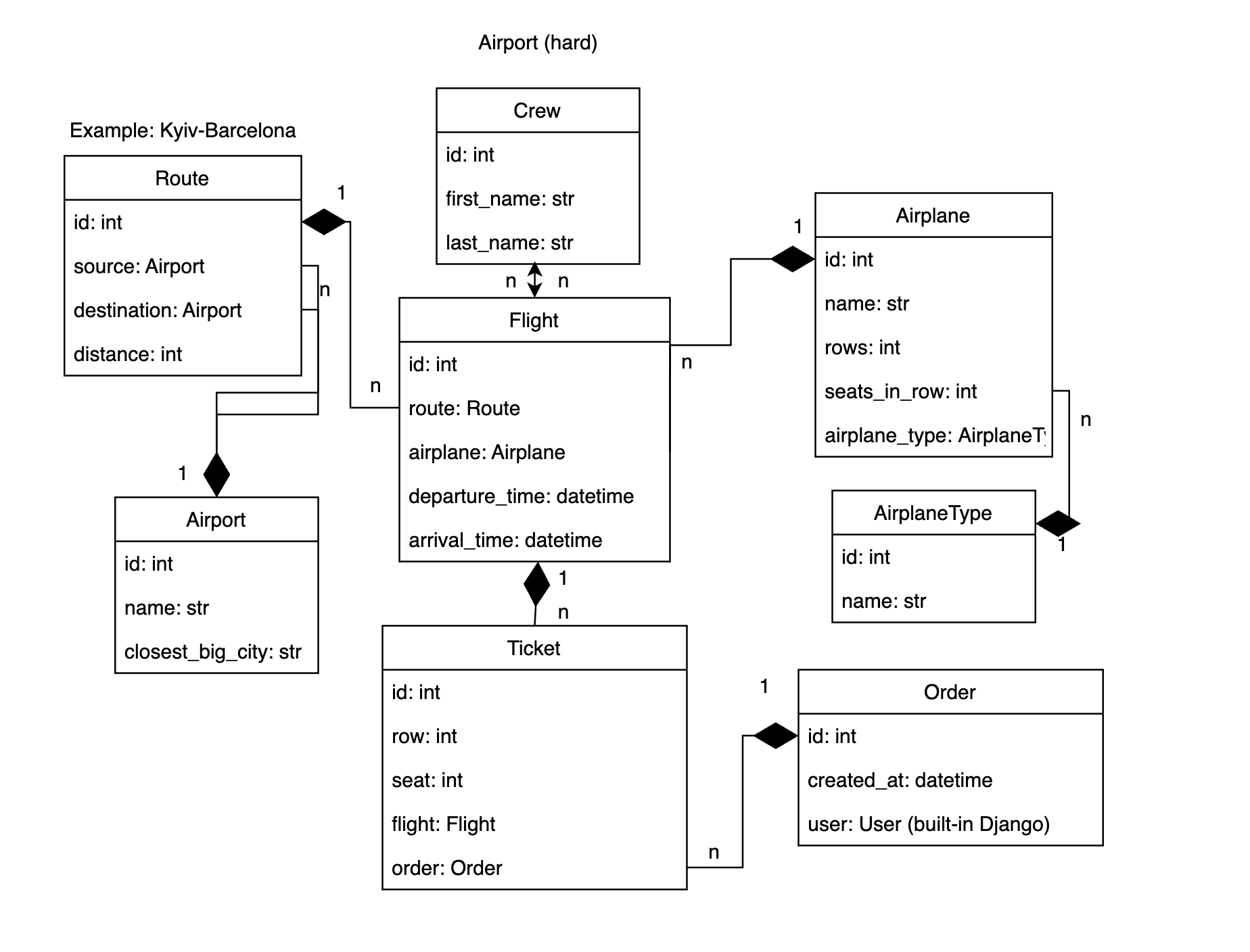
This is a learning project built as part of the Mate Academy Python course. The task and the database diagram below were provided by the course.
- User registration and JWT authentication
- Airport, airplane type, airplane, crew, route, and flight management
- Route filtering by source and destination airports
- Flight filtering by route, airplane, airports, and departure/arrival dates
- Orders containing one or more tickets
- Validation of airplane row and seat limits
- Protection against booking the same seat twice
- Atomic order creation and update
- User-specific orders and tickets
- Admin-only write access to airport data
- Interactive Swagger and ReDoc documentation
- PostgreSQL database
- Dockerized development environment
- Python 3.12
- Django 6
- Django REST Framework
- PostgreSQL 16
- Simple JWT
- drf-spectacular
- Docker and Docker Compose
The main relationships are:
- an
Airplanebelongs to anAirplaneType; - a
Routeconnects a source airport and a destination airport; - a
Flightbelongs to a route and uses one airplane; - a flight can have multiple crew members;
- an
Orderbelongs to a user; - an order contains one or more tickets;
- a
Ticketreserves a row and seat on a particular flight.
The combination of flight, row, and seat is unique, so the same seat cannot be booked twice for one flight.
git clone https://github.com/Lemonch1ks/Airport-API-Service.git
cd Airport-API-ServiceCopy the template and fill in the values:
cp .env.sample .envPOSTGRES_DB=airport_db
POSTGRES_USER=airport_user
POSTGRES_PASSWORD=change_me
POSTGRES_HOST=db
POSTGRES_PORT=5432
SECRET_KEY=your-secret-key
DEBUG=TrueSECRET_KEY is required: Django will not start without it. POSTGRES_HOST must be db when the application is started with Docker Compose because db is the database service name.
docker compose up --buildThe application waits for PostgreSQL and applies migrations automatically. It will then be available at:
http://127.0.0.1:8000/
To start the containers in the background:
docker compose up --build -dTo stop them:
docker compose downTo stop the project and remove the database volume:
docker compose down -vRemoving the volume permanently deletes the local database data.
docker compose exec app python manage.py createsuperuserThe administrator can manage all resources through the API and through Django Admin:
http://127.0.0.1:8000/admin/
After starting the project, the generated documentation is available at:
| Documentation | URL |
|---|---|
| Swagger UI | http://127.0.0.1:8000/api/schema/swagger-ui/ |
| ReDoc | http://127.0.0.1:8000/api/schema/redoc/ |
| OpenAPI schema | http://127.0.0.1:8000/api/schema/ |
POST /api/user/register/Example request:
{
  "email": "user@example.com",
  "password": "strong-password"
}POST /api/user/token/{
"email": "user@example.com",
"password": "strong-password"
}The response contains access and refresh tokens. Send the access token with protected requests:
Authorization: Bearer <access-token>Additional authentication endpoints:
| Method | Endpoint | Description |
|---|---|---|
POST |
/api/user/token/refresh/ |
Refresh an access token |
POST |
/api/user/token/verify/ |
Verify a token |
GET, PUT, PATCH |
/api/user/me/ |
View or update the current user |
In Swagger UI, click Authorize and enter:
Bearer <access-token>
| User | Read airport data | Modify airport data | Manage orders | View tickets |
|---|---|---|---|---|
| Anonymous | Yes | No | No | No |
| Authenticated user | Yes | No | Own orders only | Own tickets only |
| Staff/admin | Yes | Yes | All orders | All tickets |
Airport data includes airports, airplane types, airplanes, crews, routes, and flights.
All resource endpoints support detail URLs in the form /api/airport/<resource>/<id>/.
| Endpoint | Supported operations | Description |
|---|---|---|
/api/airport/airports/ |
CRUD | Airports |
/api/airport/airplanes/types/ |
CRUD | Airplane types |
/api/airport/airplanes/ |
CRUD | Airplanes |
/api/airport/crews/ |
CRUD | Crew members |
/api/airport/routes/ |
CRUD | Routes between airports |
/api/airport/flights/ |
CRUD | Flights |
/api/airport/orders/ |
CRUD | Authenticated user's orders |
/api/airport/tickets/ |
Read only | Tickets visible to the current user |
Write operations for airport data require a staff/admin account.
Routes can be filtered by airport ID, airport name, or closest big city:
/api/airport/routes/?source=London
/api/airport/routes/?destination=Paris
/api/airport/routes/?source=1&destination=2
Supported flight filters:
| Parameter | Example |
|---|---|
route or route_id |
?route=1 |
airplane or airplane_id |
?airplane=2 |
source |
?source=London |
destination |
?destination=Paris |
departure_date or departure_time |
?departure_date=2026-07-25 |
arrival_date or arrival_time |
?arrival_date=2026-07-25 |
Several numeric values can be passed as a comma-separated list:
/api/airport/flights/?route=1,2&airplane=1,3
Creating an order requires authentication. The user is taken from the JWT token and must not be included in the request body.
POST /api/airport/orders/
Authorization: Bearer <access-token>
Content-Type: application/json
{
"tickets": [
{
"flight": 1,
"row": 3,
"seat": 2
},
{
"flight": 1,
"row": 3,
"seat": 3
}
]
}The API rejects:
- an empty ticket list;
- duplicate seats in the same request;
- a seat already booked for the selected flight;
- rows or seats outside the airplane layout;
- rows and seats smaller than 1.
If airport_test_data.json is located in the project root, load it with:
docker compose exec app python manage.py loaddata /app/airport_test_data.jsonLoading fixtures into an empty database is recommended to avoid primary-key or booked-seat conflicts.
Run the complete test suite inside the application container:
docker compose exec app python manage.py testRun only the airport application tests:
docker compose exec app python manage.py test airport.testsOpen a shell inside the application container:
docker compose exec app shOpen the PostgreSQL console:
docker compose exec db psql -U airport_user -d airport_dbView container logs:
docker compose logs -f appApply migrations manually if needed:
docker compose exec app python manage.py migrate