Repository navigation
Plotting
Scen-Opt produces two kinds of graphical output:
-
Web interface results: after you press Solve, the Result panel shows a results table and, for relaxed or regularized programs, interactive graphs of risk and cost against
$\rho$ or$\tau$ . Everything can be downloaded. -
Benchmark figures: each benchmark in
benchmarks/has aplot.pyscript that draws its figure with matplotlib.
For how to set up and solve a problem in the browser, see First Example: Web Interface. For what the plotted quantities mean, see Scenario Theory.
After a solve, the Result card shows up to four tabs. Which ones appear depends on the formulation chosen in the program's option menu:
| Tab | Shown for | Contents |
|---|---|---|
| Results Table | all formulations | One column of results per solved instance, plus the Download .JSON and Download .MAT buttons |
| ρ Graph | Relaxation, Regularization + Relaxation | Risk bounds and cost against |
| τ Graph | Regularization, Regularization + Relaxation | Risk bounds and cost against |
| Program JSON | all formulations | The problem definition in the Upload Program format, plus Download Program (.JSON) |
So a Robust problem shows two tabs, and Regularization + Relaxation shows all four. If the request fails as a whole (for example, an input the server cannot read), a red error box with the server's message appears instead of the tabs.
You can enter several comma-separated values for Value1, Value2, ...). Columns are ordered by
| Row | Meaning |
|---|---|
| Optimal Cost |
|
| Optimal x | The optimal decision vector |
| Optimal ζ | The optimal slacks |
| Relaxation Parameters ρ |
|
| Regularization Parameters τ |
|
| Confidence | The overall confidence after the union bound over all columns. The label reads |
| Risk Bounds ε |
[N/A, 0.1414]. |
| Degeneracy Detected? | Yes or No. If Yes, the lower bound in the row above is not certified and is shown as N/A; use only the upper bound. |
| Complexity (support list size) | |
| Number of data samples | |
| Total Constraints | The |
| Optimization Time (s) | Wall-clock time of the solver call. This includes the support-list computation, which re-solves reduced problems. |
| Risk Computation Time (s) | Time spent in quantify_risk. The first column is often slower, because JAX compiles the function on its first call. |
| Error |
None, or the error message for that column. The other columns are still computed. MOSEK licence problems are reported as "MOSEK license cannot be located or is incorrect." |
Numbers are rounded for display only:
- Values with
$|v| < 5\times10^{-5}$ or$|v| \ge 10^7$ are shown in scientific notation. - Values below 10 are shown with 4 decimals.
- Values from 10 up to
$10^7$ are shown with 2 decimals. - The exception is the Confidence row: values between 0.9999 and 1 are shown with all their digits, so
$1 - 10^{-6}$ appears as 0.999999 rather than 1.0000.
Risk Bounds, Total Constraints and Optimization Time (like Optimal Cost) have a ? icon that explains the row on hover. The downloads keep full precision.
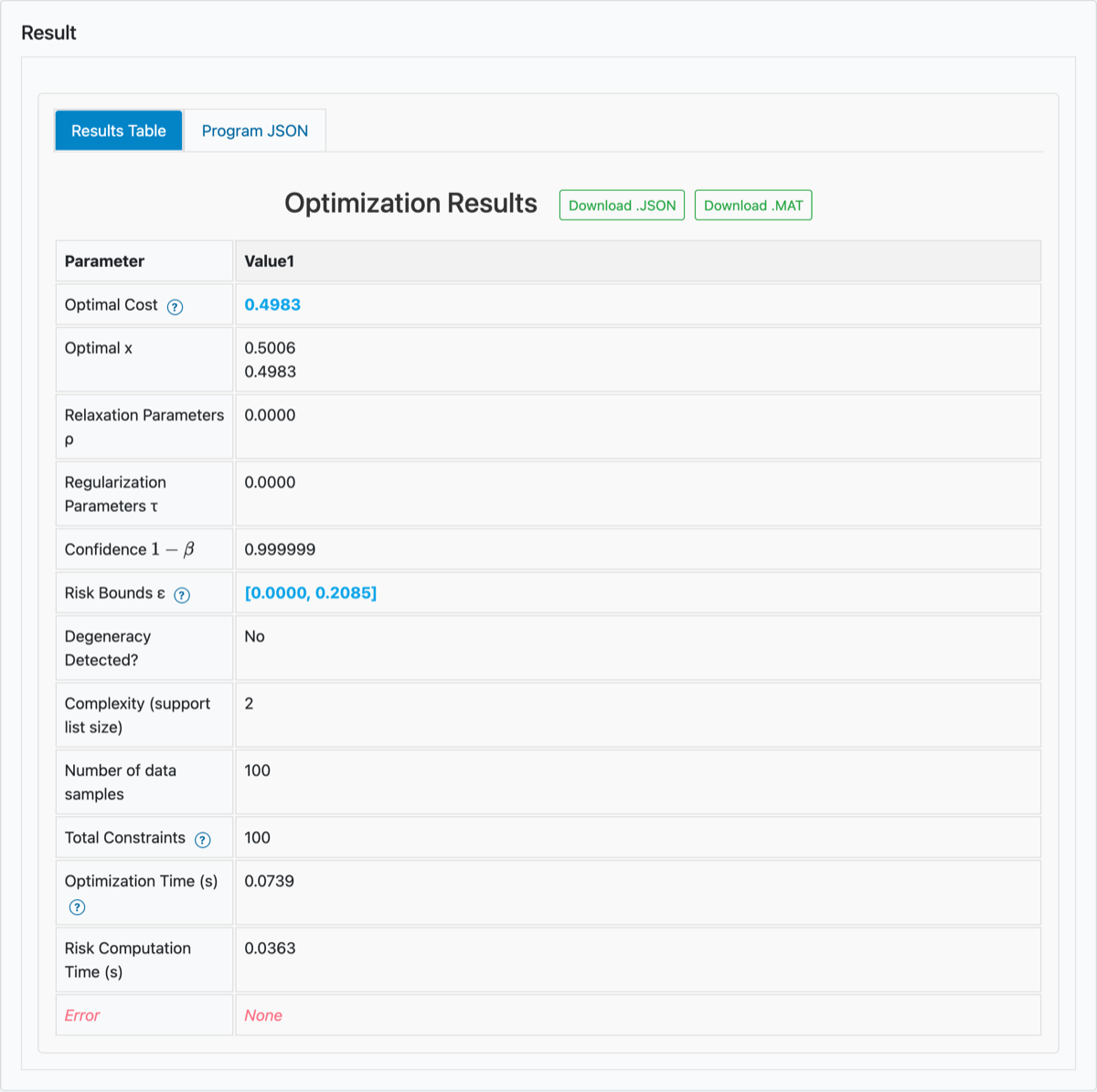
Results table for the smallest-enclosing-interval benchmark (robust LP, β = 10⁻⁶). The robust option shows two tabs: Results Table and Program JSON.
With several
-
ρ Graph: fix
$\tau$ with the Select τ menu, and plot against$\rho$ on the x-axis ("Relaxation Term (ρ)"). -
τ Graph: fix
$\rho$ with the Select ρ menu, and plot against$\tau$ on the x-axis ("Regularization Term (τ)"). - The menu is hidden when there is only one value to choose from.
Each graph has two y-axes:
- Left, "Risk (ε)": "Risk Lower Bound (εₗ)" (green) and "Risk Upper Bound (εᵤ)" (blue), with the band between them shaded.
- Right, "Cost": "Cost" (black), the value from the Optimal Cost row.
Hovering over the graph shows all three values at that x-position.
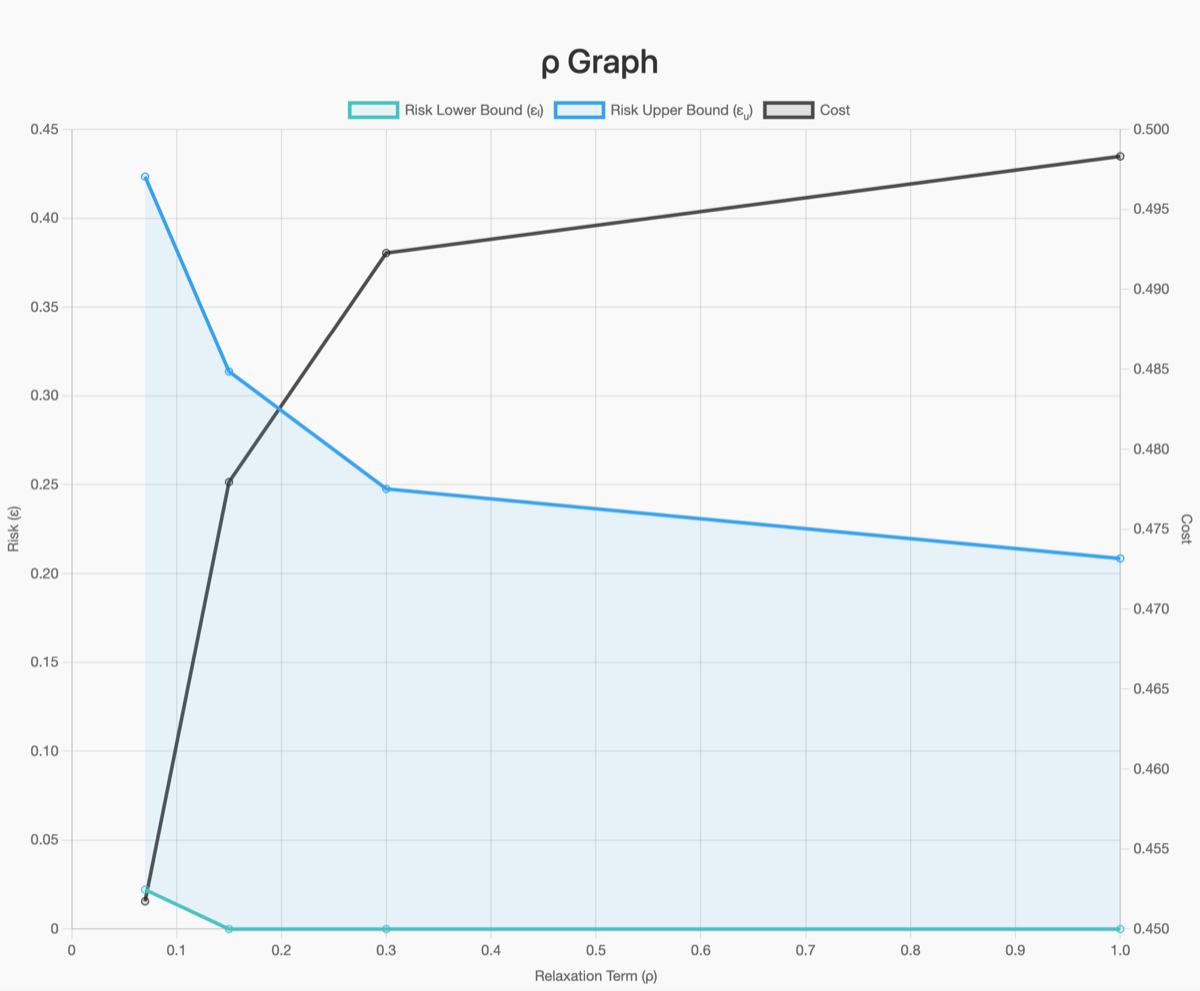
ρ Graph for the smallest-enclosing-interval benchmark with relaxation and ρ = 0.07, 0.15, 0.3 and 1. As ρ grows, fewer scenarios are violated: the cost rises and the risk bounds fall. With a single τ value, the menu that fixes τ is hidden.
Some practical points:
-
Order. Points are joined in the order you entered the values, so enter
$\rho$ and$\tau$ in increasing order. - Failed runs. A run that failed (see the Error row) has no point on the graph.
- Degeneracy. For runs flagged as degenerate, the lower bound is not certified, so the green curve has no point there (a gap). The upper bound and the cost are still plotted.
- Internet access. The graphs use Chart.js and the formulas use MathJax, both loaded from a CDN. When you run Scen-Opt locally, the browser still needs internet access for them.
- Saving a graph. There is no export button. Use your browser's Save image as on the chart, or re-plot from the downloaded JSON (Section 3).
| Button | Tab | File | Contents |
|---|---|---|---|
| Download .JSON | Results Table | results.json |
All result fields, generated in the browser |
| Download .MAT | Results Table | results.mat |
The same fields, converted by the server (POST /download-mat, scipy.io.savemat). Results missing from failed runs are stored as NaN. |
| Download Program (.JSON) | Program JSON | program.json |
The problem definition, which you can re-load with Upload Program |
results.json and results.mat have one entry per solved instance, in table-column order. The fields are:
| Field | Content |
|---|---|
optimal_x, optimal_s
|
|
optimal_cost |
Optimal Cost for each run (penalty terms excluded) |
risk |
degeneracy before using it. |
degeneracy |
Degeneracy flag for each run |
active_con |
Complexity |
num_deltas, tot_con
|
|
rho_, tau_
|
Parameters of each run |
conf |
Overall confidence |
n_attempts |
Number of runs |
solve_time, risk_time
|
Seconds for each run (rounded to 4 decimals) |
errorcode |
"None" or the error message for each run |
For example, a sweep of 4
-
risk: 8×2 -
optimal_x: 8×2×1 -
optimal_s: 8×100 -
rho_,tau_,optimal_cost,active_conand the times: 1×8 -
confandn_attempts: 1×1
program.json contains:
- the matrices (
A_d,b_d,F_d,G,h,E,c,Q); -
x_ref,rho,tau,confidence(that is,$\beta$ ),p,optionandmode; - the dimension fields.
It does not contain the scenario file or the solver choice. Keep the scenarios file next to it.
The JSON download contains everything the graphs show. This script redraws a ρ-slice with matplotlib. It skips failed runs, leaves out the lower bound of degenerate runs (as the web graphs do) and sorts the points by
import json
import matplotlib.pyplot as plt

res = json.load(open("results.json"))           # file from "Download .JSON"
tau_fixed = 0.0                                 # the slice to plot, like "Select τ"

runs = [i for i, t in enumerate(res["tau_"])
        if t == tau_fixed and len(res["risk"][i]) == 2]     # skip failed runs
runs.sort(key=lambda i: res["rho_"][i])
rho = [res["rho_"][i] for i in runs]
lo = [float("nan") if res["degeneracy"][i] else res["risk"][i][0]
      for i in runs]                                        # not certified if degenerate
up = [res["risk"][i][1] for i in runs]
cost = [res["optimal_cost"][i] for i in runs]

fig, ax = plt.subplots()
ax.fill_between(rho, lo, up, alpha=0.2)
ax.plot(rho, lo, "o-", label="risk lower bound")
ax.plot(rho, up, "o-", label="risk upper bound")
ax.set_xlabel(r"$\rho$")
ax.set_ylabel(r"risk $\varepsilon$")
ax2 = ax.twinx()
ax2.plot(rho, cost, "k.-", label="cost")
ax2.set_ylabel("cost")
fig.legend(loc="upper center", ncol=3)
fig.savefig("rho_slice.png", dpi=200, bbox_inches="tight")
For a τ-slice, swap the roles of rho_ and tau_. To produce the same numbers without the browser, see the sweep example on First Example: Python Calls.
Each benchmark folder has a plot.py that draws the figure used in the paper. You need matplotlib, which is not in requirements.txt (each script says so in a comment at the top); the other imports (NumPy, SciPy, pandas) are already installed:
pip install matplotlib
cd benchmarks/LP_half_width_2d
python run.py --solver CLARABEL   # optional: re-solve; overwrites results/metrics.json
python plot.py                    # writes results/half_width.png (300 dpi) and results/half_width.pdf
What plot.py does:
- It reads
results/metrics.jsonand the files indata/. -
metrics.jsonships with the repository, soplot.pyworks without first runningrun.py. - It overwrites the figure files in
results/.
run.py uses MOSEK by default, which produced the published results; pass --solver to use another solver (see First Example: Python Calls).
Most figures have three panels, and panel (b) is the same in every benchmark. It draws quantify_risk over a range of
| Benchmark folder | Figure in results/
|
Panels (a) and (c) |
|---|---|---|
LP_half_width_2d |
half_width |
Smallest enclosing interval; data distribution |
LP_growth_bound_12d |
growth_bound |
Reachable set (X–Y plane); state growth distribution |
LP_inventory_11d |
inventory |
Order quantities vs. mean demand; usable supply vs. demand |
LP_portfolio_cvar_13d |
portfolio_cvar |
Optimal portfolio allocation; portfolio return distribution |
LP_power_dispatch_120d |
power_dispatch |
Generation dispatch schedule; renewable generation scenarios |
QP_Iris_minimal_3d |
iris_svm |
SVM classification; feature distribution by class |
QP_cbf_robot_navigation_118d |
cbf_navigation |
QP robot navigation; wall clearance profile |
QP_radiation_therapy_50d |
prostate_brachytherapy_robust_planning |
Dose-volume histogram; dwell-position intensities |
SDP_LPV_stability_3d |
lpv_stability |
Stabilising trajectories (two panels only) |
SDP_Quadratic_Stability_6d |
quadratic_stability |
Stabilising trajectories; stability margin over parameter space |
SDP_covariance_wine_15d |
robust_covariance_wine |
|
SDP_ellipsoid_enclosure_15d |
minimum_enclosing_ellipsoid |
Ellipsoid containment (2D projection); containment profile |
Each figure is saved as both .png and .pdf. A few folders contain extra scripts:
-
QP_Iris_minimal_3d/plot_data_only.pywritesiris_data_only.png/.pdf(the data without the classifier). -
SDP_LPV_stability_3d/plot_data_only.pywriteslpv_trajectories_only.png/.pdf. -
QP_cbf_robot_navigation_118d/animate.pywritesresults/trajectory_animation.gifwith matplotlib'sPillowWriter.
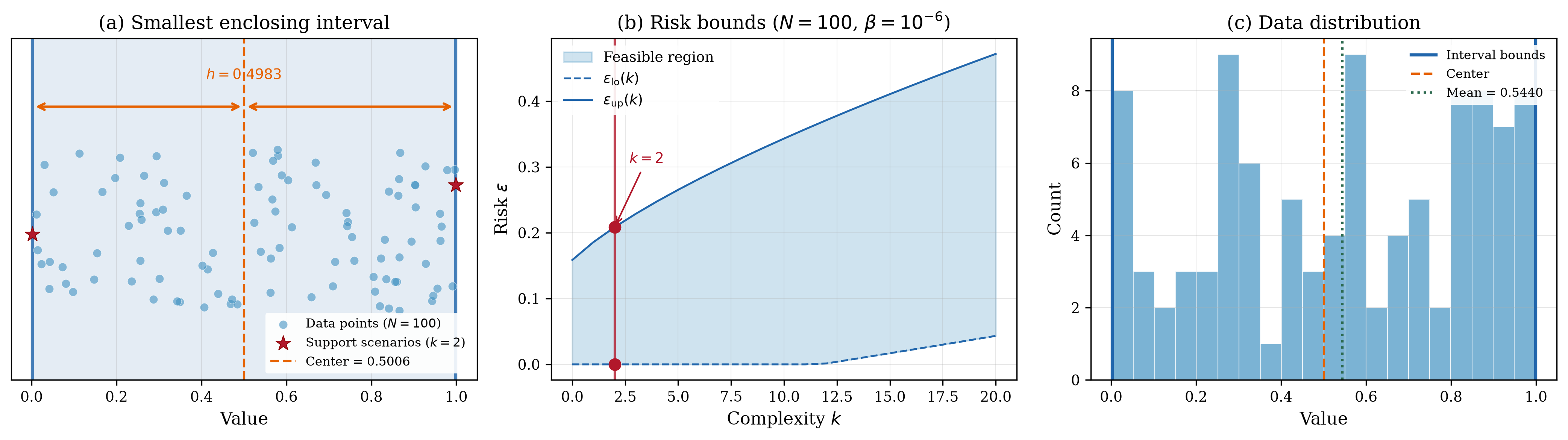
Output of benchmarks/LP_half_width_2d/plot.py:
- (a) The 100 data points, the optimal interval and its two support scenarios (
$k = 2$ ). - (b)
$\underline{\varepsilon}(k)$ and$\overline{\varepsilon}(k)$ for$N = 100$ and$\beta = 10^{-6}$ , with the benchmark's$k$ marked. - (c) A histogram of the data with the interval bounds.