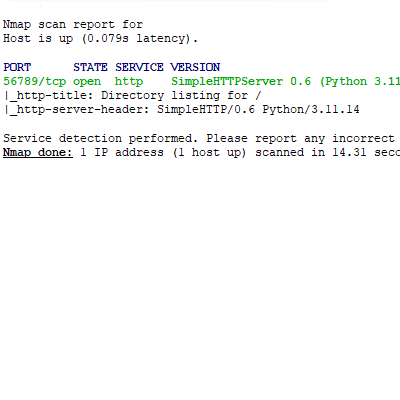
- To anyone, the server looks like a forgotten open port of python http.server module (shown below).
- Easy to setup with docker.
- DDoS solution provided + You can edit how many packets unauthorized IP can send (default 15 packets = 5 password attempts) before being banned (Only with fail2ban usage).
- Looks harmless
- Doesn't store any logs. You can also use /quit to delete all logs from RAM on the server.
- Only the server is needed to be publicly available (clients never talk to each other).
- Great tool for 2-10chatters at one time.
- Replay attacks wont work.
- Server is only for UNIX, client is for all platforms.
- Security is priority #1 of this project.
- Code is separated into multiple files for better modularity.
- After 100 packets. The server clears all logs. When server is shutting down, all logs are deleted.
- BUT, works only on WAN. Avoid using LAN. 2 clients using the same public IP at the same time is going to crash both clients. If you want to chat across LAN, use different tool.
Be careful about who you give your server access code to!
 |
 |
ℹ️ Info: Please ignore the IP addresses in the GIF below. It shows the program in a lab testing environment.

- If client leaves using ^C after joining a room and waiting there, the client can't enter the same room (The client MUST enter a new one to become legitimate client once again)
- Try to AVOID ^C AT ANY COSTS
- If some IP addr. exceeds the ddos_protection var limit, than the program stores the IP addr. into
report.txtpermanently to your dir. Should be used with fail2ban. - Change port var to any port you'd like to avoid bots.
- You can also change after how many packets the logs will be erased and
report.txtsaved. (Not for docker) - READ THE FOLLOWING WARNINGS!
⚠️ Warning: Do not share your server-side code with everyone. The server usesast.literal_eval()so APT could abuse this function for DoS purposes when server-side code is publicly known. The exploit is hard to replicate, but not impossible. The exploit could only shut down your server-side system so no RCE etc.
⚠️ Warning: After using/quityour terminal might stop working as intended. If you encounter this type of error, useresetcommand (for Unix)
report.txt will be now saved to your current dir as report_from_docker.txt. The file WILL be overwritten after restarting the docker.
cd /tmp
curl -L "https://raw.githubusercontent.com/jak0ub/CLI_Chatter/main/Dockerfile" -o Dockerfile
curl -L "https://raw.githubusercontent.com/jak0ub/CLI_Chatter/main/docker-compose.yml" -o docker-compose.yml
touch report_from_docker.txt
chmod 777 report_from_docker.txt
sudo docker compose up -d
- Do not share server password with everyone. Once someone has your password, they can send as many packets as they'd like.
- Server stores potential threats inside
report.txtorreport_from_docker.txt(docker version) to your current dir. - If you want to ban any IP inside this report, use fail2ban
Fail2ban setup for docker (Ban any IP after specified amount of packets until the server is rebooted)
Switch to super user
sudo su
Install fail2ban(Use your own package manager)
apt install fail2ban
Edit conf file
vi /etc/fail2ban/filter.d/cli_chatter.conf
Paste this inside vi session and use ESC + :wq + Enter
[Definition]
datepattern = ^
failregex = ^<HOST>\s+->\s+\d+x packets$
ignoreregex = ^Logged IP addresses|^If needed|^$
Now edit another config file
vi /etc/fail2ban/jail.d/cli_chatter.local
Paste this inside vi session and use ESC + :wq + Enter
[cli_chatter]
enabled = true
filter  = cli_chatter
logpath = /tmp/report_from_docker.txt
backend = polling
maxretry= 1
findtime= 1
bantime = 86400
action = iptables-multiport[name=CliChatter, chain=DOCKER-USER, port="1:65535", protocol=tcp]
Start the program
systemctl start fail2ban
systemctl enable fail2ban