Table of Contents
npm install json-asAdd the --transform to your asc command (e.g. in package.json)
--transform json-as/transformOptionally, for additional performance, also add:
--enable simdAlternatively, add it to your asconfig.json
{
  "options": {
    "transform": ["json-as/transform"]
  }
}
If you'd like to see the code that the transform generates, run the build step with DEBUG=true
import { JSON } from "json-as";

@json
class Vec3 {
  x: f32 = 0.0;
  y: f32 = 0.0;
  z: f32 = 0.0;
}

@json
class Player {
  @alias("first name")
  firstName!: string;
  lastName!: string;
  lastActive!: i32[];
  // Drop in a code block, function, or expression that evaluates to a boolean
  @omitif((self: Player) => self.age < 18)
  age!: i32;
  @omitnull()
  pos!: Vec3 | null;
  isVerified!: boolean;
}

const player: Player = {
  firstName: "Jairus",
  lastName: "Tanaka",
  lastActive: [3, 9, 2025],
  age: 18,
  pos: {
    x: 3.4,
    y: 1.2,
    z: 8.3,
  },
  isVerified: true,
};

const serialized = JSON.stringify<Player>(player);
const deserialized = JSON.parse<Player>(serialized);

console.log("Serialized    " + serialized);
console.log("Deserialized " + JSON.stringify(deserialized));This library allows selective omission of fields during serialization using the following decorators:
@omit
This decorator excludes a field from serialization entirely.
@json
class Example {
  name!: string;
  @omit
  SSN!: string;
}

const obj = new Example();
obj.name = "Jairus";
obj.SSN = "123-45-6789";

console.log(JSON.stringify(obj)); // { "name": "Jairus" }
@omitnull
This decorator omits a field only if its value is null.
@json
class Example {
  name!: string;
  @omitnull()
  optionalField!: string | null;
}

const obj = new Example();
obj.name = "Jairus";
obj.optionalField = null;

console.log(JSON.stringify(obj)); // { "name": "Jairus" }
@omitif((self: this) => condition)
This decorator omits a field based on a custom predicate function.
@json
class Example {
  name!: string;
  @omitif((self: Example) => self.age <= 18)
  age!: number;
}

const obj = new Example();
obj.name = "Jairus";
obj.age = 18;

console.log(JSON.stringify(obj)); // { "name": "Jairus" }

obj.age = 99;

console.log(JSON.stringify(obj)); // { "name": "Jairus", "age": 99 }
If age were higher than 18, it would be included in the serialization.
AssemblyScript doesn't support using nullable primitive types, so instead, json-as offers the JSON.Box class to remedy it.
For example, this schema won't compile in AssemblyScript:
@json
class Person {
  name!: string;
  age: i32 | null = null;
}
Instead, use JSON.Box to allow nullable primitives:
@json
class Person {
  name: string;
  age: JSON.Box<i32> | null = null;
  constructor(name: string) {
    this.name = name;
  }
}

const person = new Person("Jairus");
console.log(JSON.stringify(person)); // {"name":"Jairus","age":null}

person.age = new JSON.Box<i32>(18); // Set age to 18
console.log(JSON.stringify(person)); // {"name":"Jairus","age":18}Sometimes it's necessary to work with unknown data or data with dynamic types.
Because AssemblyScript is a statically-typed language, that typically isn't allowed, so json-as provides the JSON.Value and JSON.Obj types.
Here's a few examples:
Working with multi-type arrays
When dealing with arrays that have multiple types within them, eg. ["string",true,["array"]], use JSON.Value[]
const a = JSON.parse<JSON.Value[]>('["string",true,["array"]]');
console.log(JSON.stringify(a[0])); // "string"
console.log(JSON.stringify(a[1])); // true
console.log(JSON.stringify(a[2])); // ["array"]
Working with unknown objects
When dealing with an object with an unknown structure, use the JSON.Obj type
const obj = JSON.parse<JSON.Obj>('{"a":3.14,"b":true,"c":[1,2,3],"d":{"x":1,"y":2,"z":3}}');

console.log("Keys: " + obj.keys().join(" ")); // a b c d
console.log(
  "Values: " +
    obj
      .values()
      .map<string>((v) => JSON.stringify(v))
      .join(" "),
); // 3.14 true [1,2,3] {"x":1,"y":2,"z":3}

const y = obj.get("d")!.get<JSON.Obj>().get("y")!;
console.log('o1["d"]["y"] = ' + y.toString()); // o1["d"]["y"] = 2
Working with dynamic types within a schema
More often, objects will be completely statically typed except for one or two values.
In such cases, JSON.Value can be used to handle fields that may hold different types at runtime.
@json
class DynamicObj {
  id: i32 = 0;
  name: string = "";
  data!: JSON.Value; // Can hold any type of value
}

const obj = new DynamicObj();
obj.id = 1;
obj.name = "Example";
obj.data = JSON.parse<JSON.Value>('{"key":"value"}'); // Assigning an object

console.log(JSON.stringify(obj)); // {"id":1,"name":"Example","data":{"key":"value"}}

obj.data = JSON.Value.from<i32>(42); // Changing to an integer
console.log(JSON.stringify(obj)); // {"id":1,"name":"Example","data":42}

obj.data = JSON.Value.from("a string"); // Changing to a string
console.log(JSON.stringify(obj)); // {"id":1,"name":"Example","data":"a string"}Sometimes its necessary to simply copy a string instead of serializing it.
For example, the following data would typically be serialized as:
const map = new Map<string, string>();
map.set("pos", '{"x":1.0,"y":2.0,"z":3.0}');

console.log(JSON.stringify(map));
// {"pos":"{\"x\":1.0,\"y\":2.0,\"z\":3.0}"}
// pos's value (Vec3) is contained within a string... ideally, it should be left alone
If, instead, one wanted to insert Raw JSON into an existing schema/data structure, they could make use of the JSON.Raw type to do so:
const map = new Map<string, JSON.Raw>();
map.set("pos", new JSON.Raw('{"x":1.0,"y":2.0,"z":3.0}'));

console.log(JSON.stringify(map));
// {"pos":{"x":1.0,"y":2.0,"z":3.0}}
// Now its properly formatted JSON where pos's value is of type Vec3 not string!By default, enums with values other than i32 arn't supported by AssemblyScript. However, you can use a workaround:
namespace Foo {
  export const bar = "a";
  export const baz = "b";
  export const gob = "c";
}

type Foo = string;

const serialized = JSON.stringify<Foo>(Foo.bar);
// "a"This library supports custom serialization and deserialization methods, which can be defined using the @serializer and @deserializer decorators.
Here's an example of creating a custom data type called Point which serializes to (x,y)
import { bytes } from "json-as/assembly/util";

@json
class Point {
  x: f64 = 0.0;
  y: f64 = 0.0;
  constructor(x: f64, y: f64) {
    this.x = x;
    this.y = y;
  }

  @serializer
  serializer(self: Point): string {
    return `(${self.x},${self.y})`;
  }

  @deserializer
  deserializer(data: string): Point {
    const dataSize = bytes(data);
    if (dataSize <= 2) throw new Error("Could not deserialize provided data as type Point");

    const c = data.indexOf(",");
    const x = data.slice(1, c);
    const y = data.slice(c + 1, data.length - 1);

    return new Point(f64.parse(x), f64.parse(y));
  }
}

const obj = new Point(3.5, -9.2);

const serialized = JSON.stringify<Point>(obj);
const deserialized = JSON.parse<Point>(serialized);

console.log("Serialized    " + serialized);
console.log("Deserialized  " + JSON.stringify(deserialized));
The serializer function converts a Point instance into a string format (x,y).
The deserializer function parses the string (x,y) back into a Point instance.
These functions are then wrapped before being consumed by the json-as library:
@inline __SERIALIZE_CUSTOM(): void {
  const data = this.serializer(this);
  const dataSize = data.length << 1;
  memory.copy(bs.offset, changetype<usize>(data), dataSize);
  bs.offset += dataSize;
}

@inline __DESERIALIZE_CUSTOM(data: string): Point {
  return this.deserializer(data);
}
This allows custom serialization while maintaining a generic interface for the library to access.
The json-as library is engineered for multi-GB/s processing speeds, leveraging SIMD and SWAR optimizations along with highly efficient transformations. The charts below highlight key performance metrics such as build time, operations-per-second, and throughput.
You can re-run the benchmarks at any time by clicking the button below. After the workflow completes, refresh this page to view updated results.

The following charts compare JSON-AS (both SWAR and SIMD variants) against JavaScript's native JSON implementation. Benchmarks were conducted in a GitHub Actions environment. On modern hardware, you may see even higher throughput.
Note: Benchmarks reflect the latest version. Older versions may show different performance.
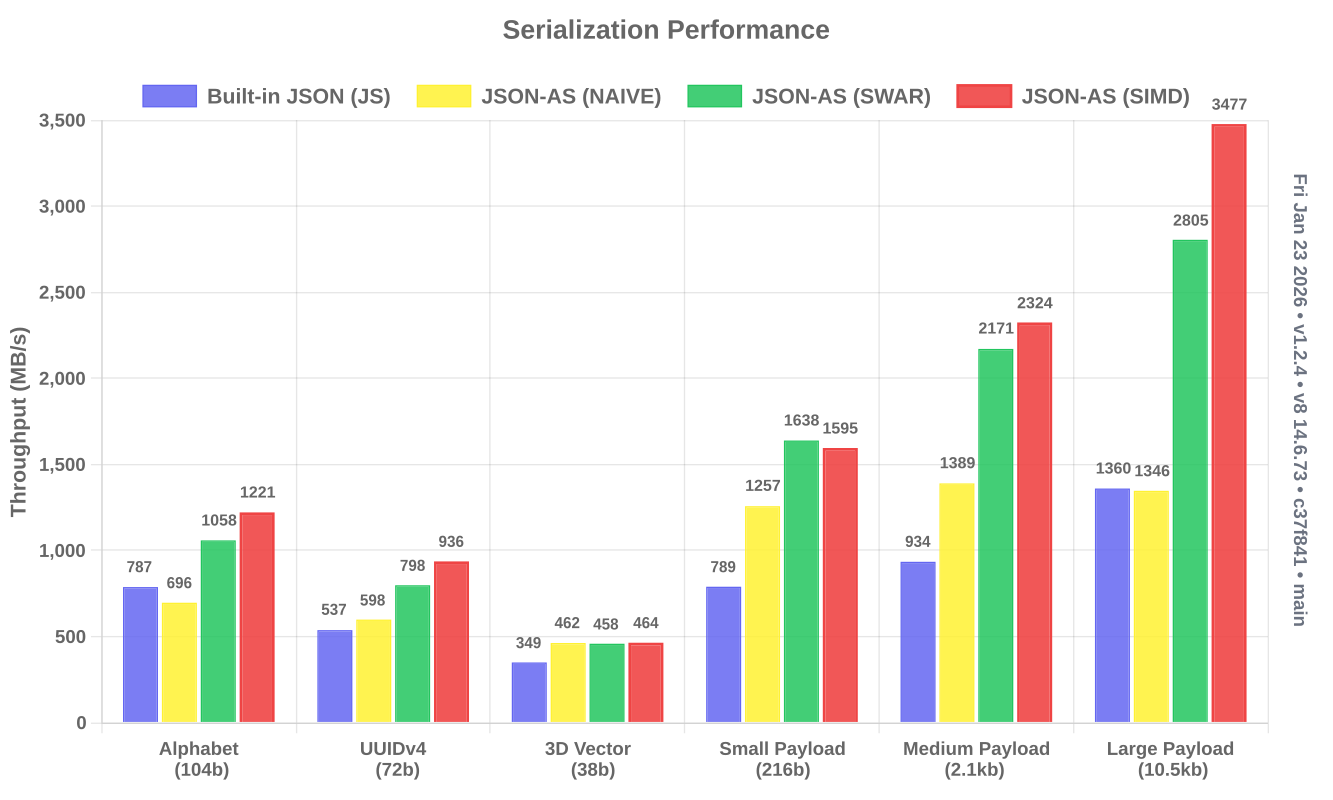
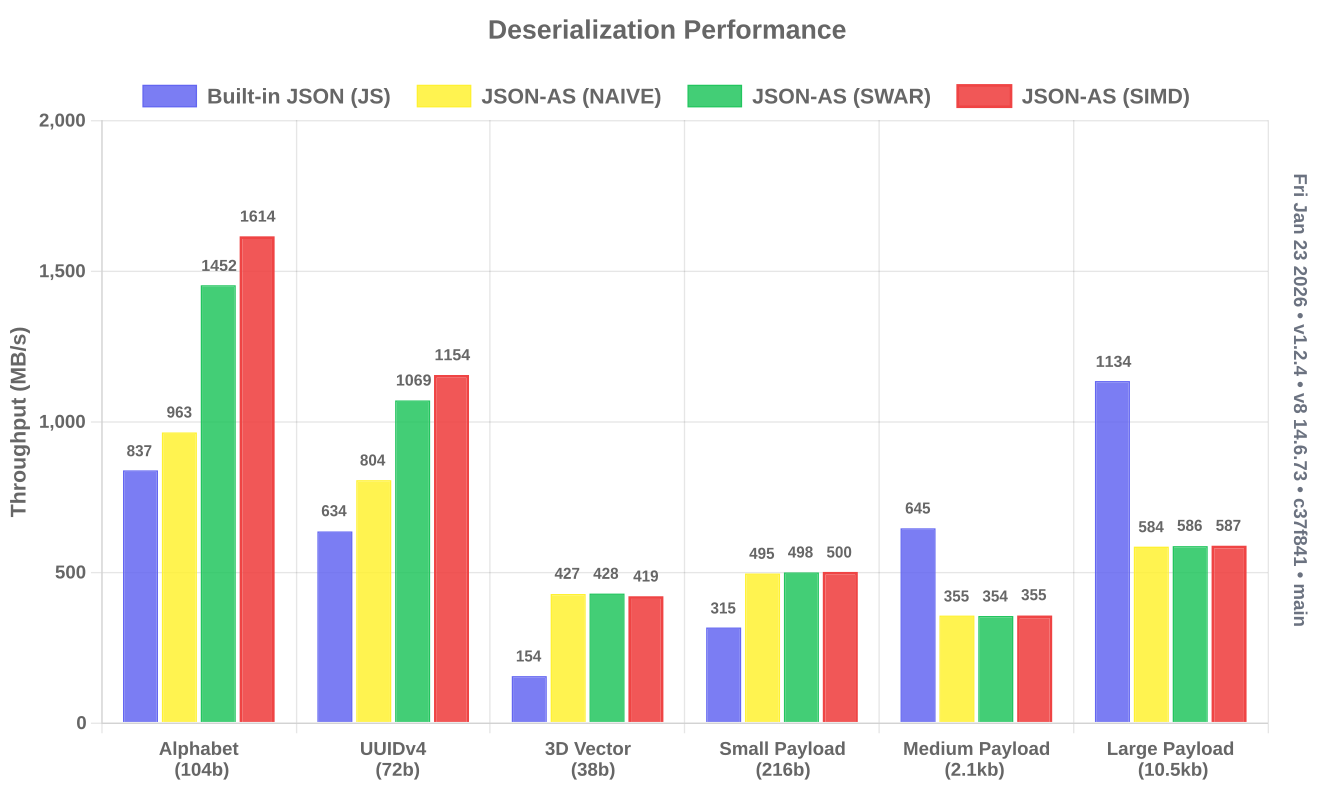
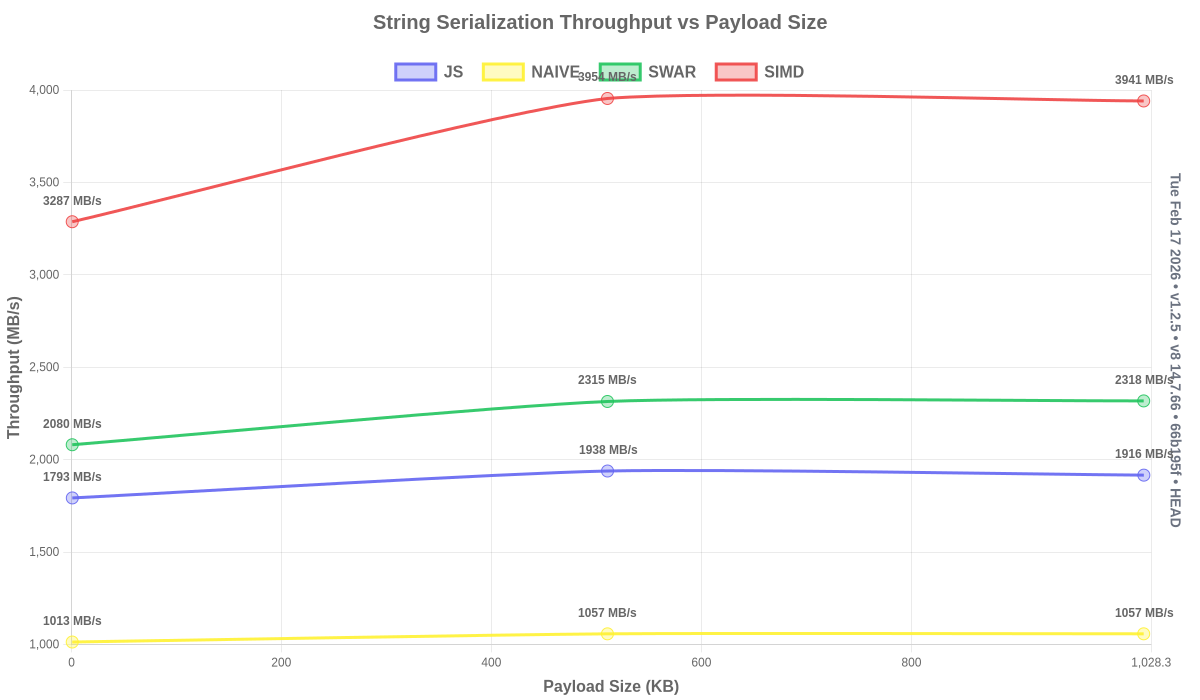
Note: I have focused on extensively optimizing serialization. I used to have deserialization be highly unsafe and extremely fast, but I've since doubled down on safety for deserialization which has negatively affected performance. I will be optimizing soon.
Benchmarks are run directly on top of v8 for more tailored control
- Download JSVU off of npm
npm install jsvu -g- Modify your dotfiles to add
~/.jsvu/bintoPATH
export PATH="${HOME}/.jsvu/bin:${PATH}"- Clone the repository
git clone https://github.com/JairusSW/json-as- Install dependencies
npm i- Run benchmarks for either AssemblyScript or JavaScript
./run-bench.as.shor
./run-bench.js.shJSON_DEBUG=1 - Prints out generated code at compile-time
JSON_DEBUG=2 - The above and prints keys/values as they are deserialized
JSON_WRITE=path-to-file.ts - Writes out generated code to path-to-file.json.ts for easy inspection
This project is distributed under an open source license. You can view the full license using the following link: License
Please send all issues to GitHub Issues and to converse, please send me an email at me@jairus.dev
- Email: Send me inquiries, questions, or requests at me@jairus.dev
- GitHub: Visit the official GitHub repository Here
- Website: Visit my official website at jairus.dev
- Discord: Contact me at My Discord or on the AssemblyScript Discord Server


