

🧠 A fully local, privacy-preserving AI research assistant built with Ollama, LangChain, and Streamlit no cloud APIs, no cost, no rate limits.
AutoResearcher is a local Retrieval-Augmented Generation (RAG) system that can read, understand, and summarize multiple PDFs using a locally running LLM from Ollama (such as Llama 3, Mistral, or Qwen).
It builds a local Chroma vector database using SentenceTransformer embeddings, retrieves relevant document chunks for a given question, and synthesizes a concise, cited answer via Ollama’s LLMs.
- 📄 PDF Upload: Upload one or multiple research papers or reports
- 🧩 Offline Vector Index: Uses Chroma + SentenceTransformers for local embeddings
- 💬 Local LLM (Ollama): Runs Llama 3 or any supported model via
/api/chat - 🔍 RAG Pipeline: Retrieves top-k context chunks for precise, cited synthesis
- 🧠 Diverse Retrieval (MMR): Ensures variety across documents
- 📊 Index Stats View: Inspect all indexed sources and chunk counts
- 🧾 Clean UI: Streamlit interface for research-style question answering
| Component | Description |
|---|---|
| Ollama | Local LLM engine (Llama 3 / Mistral / Qwen etc.) |
| Streamlit | Interactive web UI |
| LangChain + Chroma | Retrieval-augmented memory backend |
| SentenceTransformers | Local text embeddings |
| PyMuPDF / PyPDF | Robust PDF parsing |
git clone https://github.com/Iyanuoluwa007/AutoResearcher.git
cd AutoResearcherpython -m venv .venv
.\.venv\Scripts\activate # (Windows)
# or: source .venv/bin/activate (Linux/macOS)pip install -r requirements.txtDownload Ollama from https://ollama.ai Then pull and serve your preferred model (e.g. Llama 3.2):
ollama pull llama3.2
ollama serveCreate a .env file (or copy .env.example):
OLLAMA_HOST=http://127.0.0.1:11434
OLLAMA_MODEL=llama3.2
EMBED_MODEL_NAME=all-MiniLM-L6-v2streamlit run app.pyThen open http://localhost:8501
- Start Ollama in a terminal:
ollama serve- Launch Streamlit in another terminal.
- Upload one or more PDFs (research papers, docs, manuals).
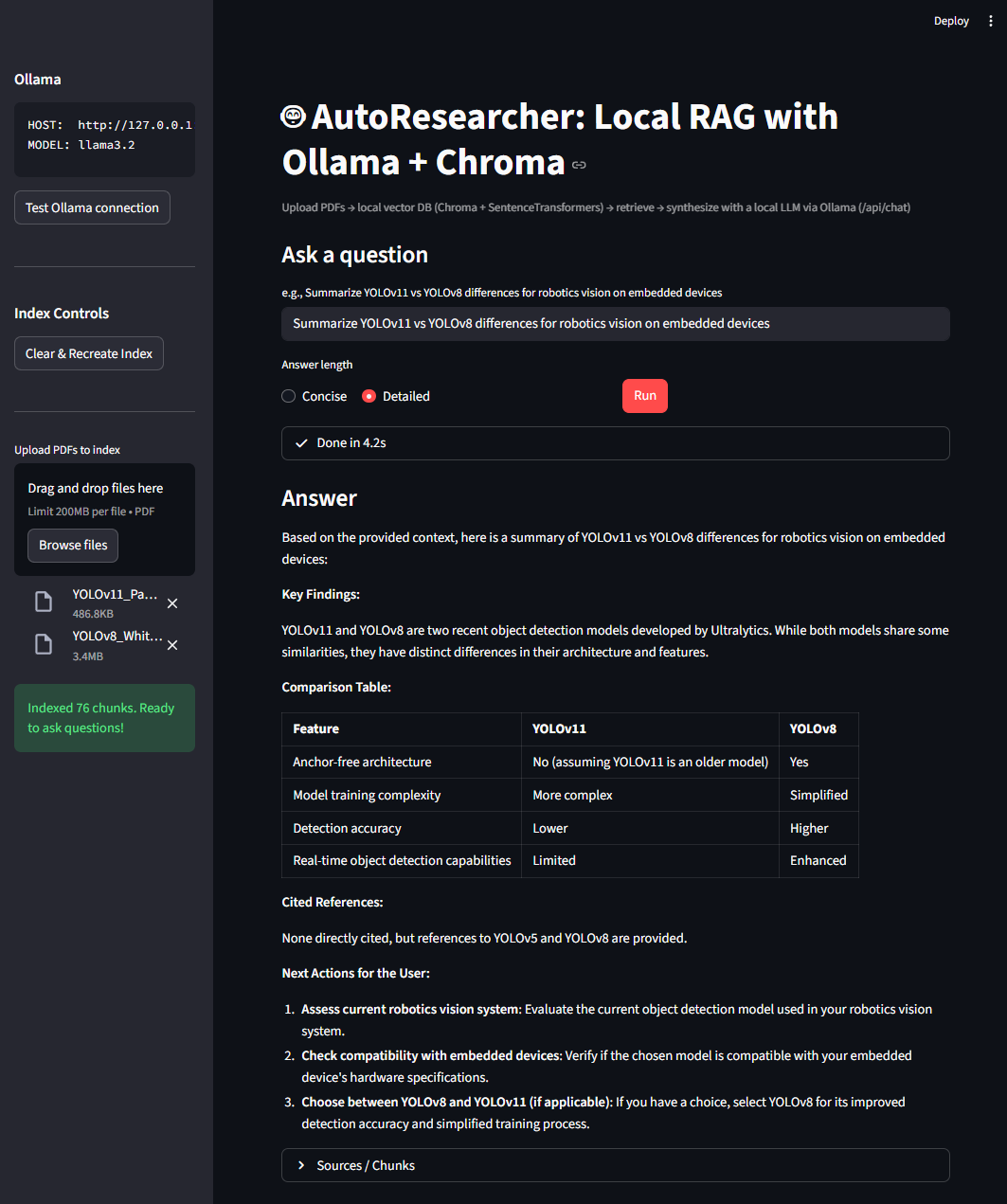
- Ask a question (e.g. “Compare YOLOv11 vs YOLOv8 for robotics vision on embedded devices”).
- View a structured, cited summary, fully local!
AutoResearcher/
│
├── app.py               # Streamlit application
├── requirements.txt     # Dependencies
├── .env.example         # Example environment config
├── data/                # Auto-created (PDFs + Chroma DB)
└── README.md- 🔄 Multi-Agent version using LangGraph (plan → gather → synthesize)
- 🌐 Web Search integration (Tavily API)
- 🗣️ Text-to-Speech / voice query input
- 📊 Export to Markdown / PDF summaries
Released under the MIT Licence. See LICENSE.
Copyright (c) 2026 Oke Iyanuoluwa Enoch.
You are free to use, modify and build on this work. The licence asks one thing in return, and it is not optional: keep the copyright notice and the licence text with any copy or substantial portion of the software. That notice is how the work stays credited to its author.
If you fork this, publish something derived from it, or use it in a product, paper or demo, please credit it visibly and link back:
Built on AutoResearcher by Oke Iyanuoluwa Enoch.
The MIT Licence covers this repository own code only. Any third-party data, pretrained weights, papers or assets that may be present remain the property of their owners and are subject to their own terms.