A free library for python on ti83 premium CE python to create simple menu, you can all personalize (the options, the title, the start cursor position) and that return the place that the user has choose as a int.
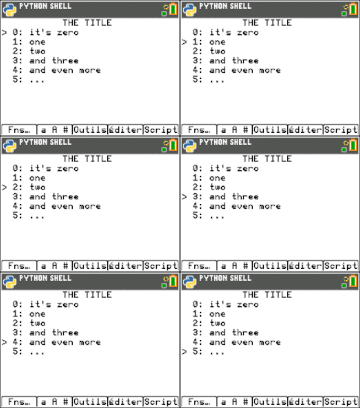
(sorry if my calculator is in french)
You can control it with the buttons up, down, numbers, enter, (annul, suppr, trace, graphe return 0 because it's the best place for a quit button), negative numbers by pressing 2nd and the number.
First of all you need the python app on ti83 version 3.4.0 with the ti_system in it.
After you can download the precompiled .8xv file and put it on your TI83 with TI Connect or TILP.
Also you can get the source code from the source branch here to get a look into the code.
You just have to import the MENU script like that :
from MENU import menuand you can call like this :
menu( [list], <curs>, <title> )Were :
listis the list of all options can be displayedcursthe place where the cursor is displayed at start (is 0 at default)titleis a text thatwill be displayed on the top if the menu if you want to disable it put it onFalse(is False at default)
If you want to replace the cursor where he was previously you can but you have to manage minus numbers. Like said at the top of the page you can make minus number by pressing 2nd and a number.
- do not limit user at 10 options with scroll.
- let the options take more then one line.