


Note
What's new in 0.1.0: SureChEMBL relaunched its website in 2024, which broke the patent retrieval of earlier versions. PEMT 0.1.0 retrieves patents from the SureChEMBL bulk data instead (no Selenium or chromedriver needed), maps genes with the current HGNC and ChEMBL data, and fixes a bug that queried many proteins as complex or fusion targets. The --os and --chromedriver-path options were removed. See the release notes for details.
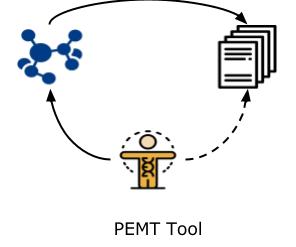
PEMT is a patent extractor tool that enables users to retrieve patents relevant to drug discovery. The overall workflow of the tool can be seen in the figure below:

The code can be installed from PyPI with:
$ pip install pemtor run without installing, using uv: uvx pemt --help.
PEMT writes its results and caches to a pemt_data folder in the directory you run it from (or to the repository's data folder when run from a source checkout). Set the PEMT_DATA_DIR environment variable to use another folder.
The most recent code can be installed from the source on GitHub with:
$ pip install git+https://github.com/Fraunhofer-ITMP/PEMT.gitFor developers, the project uses uv to manage the environment. Clone the repository and create the environment (Python version from .python-version, dependencies from uv.lock) with:
$ git clone https://github.com/Fraunhofer-ITMP/PEMT.git
$ cd PEMT
$ uv sync
Run the command line tool and the tests inside that environment with:
$ uv run pemt --help
$ uv run pytestRead the official docs for more information.
For running PEMT from the gene level, you need a file with either a symbol column (HGNC gene symbols, use --no-uniprot) or a uniprot column (UniProt accessions, use --uniprot):
| symbol |
|---|
| ABL1 |
| KIT |
| FLT3 |
| uniprot |
|---|
| P00519 |
| P10721 |
| P36888 |
For running PEMT from the chemical level, you need a tab-separated file with ChEMBL compound identifiers:
| chembl |
|---|
| ChEMBL_ID_1 |
| ChEMBL_ID_2 |
| ChEMBL_ID_3 |
Note: Gene files can be comma, tab or semicolon separated (--input-type comma|tab|semicolon, default comma). Other columns in the file are ignored.
How genes are mapped to ChEMBL:
- Gene symbols (
--no-uniprot) are resolved with the HGNC complete set, which PEMT downloads and refreshes every 30 days (mapper/hgnc_complete_set.txtin the data folder). A symbol is matched as an approved symbol first, then as a previous symbol (e.g.MLL→KMT2A), then as an alias; ambiguous aliases are skipped. Genes with several protein products use all of their UniProt accessions. - UniProt accessions are used as given.
- Each accession is looked up in the current ChEMBL release and only its single protein target is used, not complexes, fusion proteins or degrader targets that contain the protein.
- A chemical counts as active on a target if it has a pChEMBL value of at least 6 in a binding or functional assay.
- ChEMBL compounds are matched to SureChEMBL by their standard InChIKey.
The ChEMBL release, the HGNC file date and the symbol → UniProt mapping of each run are saved in mapper/<ANALYSIS NAME>_run_info.json.
Patents are retrieved from the SureChEMBL bulk data, which is queried with DuckDB. By default PEMT reads the latest release directly from the EBI server, so no download is needed; the SureChEMBL part of a run typically takes 15–20 minutes, largely independent of how many chemicals it has. Use --surechembl-source to pick a dated release (e.g. 2026-09-22, for reproducible results) or a local folder with the downloaded Parquet files.
As mentioned above, the tool has a two-step approach. Each of these steps can be run individually as well as together as shown below:
- Chemical enrichment
The following command finds the chemicals that are active on the genes of interest in ChEMBL bioassays. Indicate whether the file contains UniProt accessions (
--uniprot, the default) or gene symbols (--no-uniprot).
$ pemt run-chemical-extractor --name=<ANALYSIS NAME> --data=<DATA FILE PATH> --input-type=<DATA FILE SEPARATOR> --uniprot
- Patent enrichment The following command interlinks chemicals to patent literature publicly available.
$ pemt run-patent-extractor --name=<ANALYSIS NAME> --no-chemicalBy default a chemical counts for a patent wherever it is mentioned. To only count patents that name the chemical in specific sections, add --sections (repeatable), e.g. --sections claims.
Tip: most mentions of a chemical are in a patent's description only (about 88% in a test run on ABL1, KIT and FLT3). For well-known drugs and common compounds (e.g. imatinib, or oleic acid, which is active on FLT3 in ChEMBL and appears in over 400,000 patents) this is dominated by passing mentions such as combination therapies or formulations. Use
--sections claimsfor a patent landscape of chemicals that are actually claimed.
We also allow the flexibility to start the pipeline from this step, if the user has a list of chemicals in the format indicated above. The user then has to use the tag --chemical and provide a respective --chemical-data path.
Other options: --year (earliest publication year, default 2000) and --surechembl-source (see above). Patents are kept if at least one of their IPC codes belongs to a drug discovery relevant class (see VALID_CODES in pemt/constants.py).
- PEMT workflow
The following command runs both steps on a gene file. It accepts the options of both steps (
--uniprot/--no-uniprot,--input-type,--year,--sections,--surechembl-source).
$ pemt run-pemt --name=<ANALYSIS NAME> --data=<DATA FILE PATH> --input-type=<DATA FILE SEPARATOR>For example, for three kinases given as gene symbols, counting only patents that claim the chemicals:
$ pemt run-pemt --name=kinases --data=genes.csv --no-uniprot --sections claimsAll files are written to the data folder (see Installation), named after --name:
| File | Content |
|---|---|
mapper/<name>_gene_to_chemicals.json |
Active ChEMBL chemicals per gene |
mapper/<name>_run_info.json |
ChEMBL release, HGNC file date, symbol → UniProt mapping |
patent_dumps/<name>_chemicals.tsv |
ChEMBL id, SureChEMBL id, name and InChIKey of each chemical |
patent_dumps/<name>_patent_data.tsv |
One row per chemical and patent (columns below) |
patent_dumps/<name>_gene_patent_data.tsv |
The same with an additional genes column (gene based runs) |
Columns of the patent tables: chembl, surechembl, patent_id (e.g. WO-2011041462-A2), date (publication date), ipc (the matching IPC codes), assignee, family_id (EPO patent family, useful to count inventions rather than publications) and sections (where the chemical appears: description, claims, abstract, title, image, mol_attachment).
Re-running with the same --name reuses earlier results; the patent step is only repeated for new chemicals or when the patent options change.
If you have difficulties using PEMT, please open an issue at our GitHub repository.
If you have found PEMT useful in your work, please consider citing: PEMT: A patent enrichment tool for drug discovery.
Yojana Gadiya, Andrea Zaliani, Philip Gribbon, Martin Hofmann-Apitius, PEMT: a patent enrichment tool for drug discovery, Bioinformatics, 2022;, btac716, https://doi.org/10.1093/bioinformatics/btac716
PEMT is a scientific tool that has been developed in an academic capacity, and thus comes with no warranty or guarantee of maintenance, support, or back-up of data.
This project has been funded (until 2022) by EOSC-Life which has received funding from the European Union's Horizon 2020 programme under grant agreement number 824087.