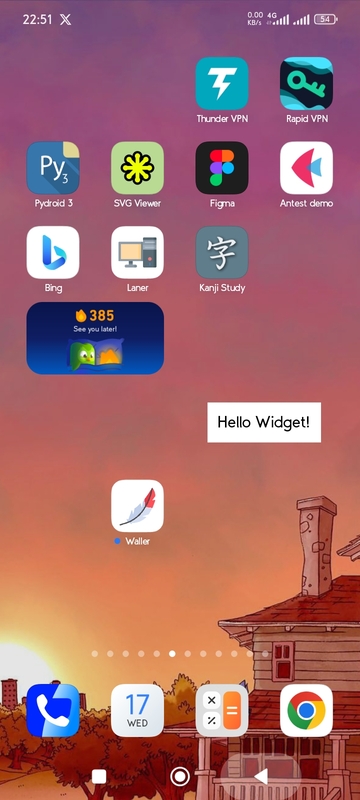
This repo contains how to create An Android Widget.
Complete Sample: working app
Store it in: res/layout/simple_widget.xml
This a simple widget with a text
<?xml version="1.0" encoding="utf-8"?>
<LinearLayout xmlns:android="http://schemas.android.com/apk/res/android"
    android:orientation="vertical"
    android:padding="10dp"
    android:background="#FFFFFF"
    android:gravity="center"
    android:layout_width="wrap_content"
    android:layout_height="wrap_content">

    <TextView
        android:id="@+id/widget_text"
        android:text="Loading..."
        android:textSize="18sp"
        android:textColor="#000"
        android:layout_width="wrap_content"
        android:layout_height="wrap_content"/>

</LinearLayout>Like: size, preview icon and others
path: res/xml/widgetproviderinfo.xml
<appwidget-provider xmlns:android="http://schemas.android.com/apk/res/android"
    android:minWidth="120dp"
    android:minHeight="60dp"
    android:updatePeriodMillis="1800000"
    android:initialLayout="@layout/simple_widget"
    android:previewImage="@drawable/ic_launcher_foreground"
    android:resizeMode="horizontal|vertical"
    android:widgetCategory="home_screen">
</appwidget-provider>
Create preview image png in right pathres/drawable/ic_launcher_foreground.png
path: src/SimpleWidget.java.
- This will receive an event when widget is add to change it's text
- You Can use python to make changes, but i don't to make it recive events like swipes and taps to widget
package org.wally.waller; // Change here from buildozer.spec package.domain+package.name

import android.appwidget.AppWidgetManager;
import android.appwidget.AppWidgetProvider;
import android.content.Context;
import android.widget.RemoteViews;

import org.wally.waller.R; // Change here from buildozer.spec package.domain+package.name
import android.app.PendingIntent;
import android.content.Intent;

public class SimpleWidget extends AppWidgetProvider {

    @Override
    public void onUpdate(Context context, AppWidgetManager appWidgetManager, int[] appWidgetIds) {
        for (int appWidgetId : appWidgetIds) {

            RemoteViews views = new RemoteViews(context.getPackageName(), R.layout.simple_widget);

            // Example: Set text
            views.setTextViewText(R.id.widget_text, "Hello Widget!");

            // Update widget
            appWidgetManager.updateAppWidget(appWidgetId, views);
        }
    }
}path:p4a/hook.py
from pathlib import Path
from pythonforandroid.toolchain import ToolchainCL


def after_apk_build(toolchain: ToolchainCL):
    manifest_file = Path(toolchain._dist.dist_dir) / "src" / "main" / "AndroidManifest.xml"
    text = manifest_file.read_text(encoding="utf-8")

    package = "org.wally.waller"
    receiver_xml = f'''
    <receiver android:name="{package}.SimpleWidget"
              android:enabled="true"
              android:exported="false">
        <intent-filter>
            <action android:name="android.appwidget.action.APPWIDGET_UPDATE" />
        </intent-filter>
        <meta-data android:name="android.appwidget.provider"
               android:resource="@xml/widgetproviderinfo" />
    </receiver>
    '''

    if receiver_xml.strip() not in text:
        if "</application>" in text:
            text = text.replace("</application>", f"{receiver_xml}\n</application>")
            print("Receiver added")
        else:
            print("Could not find </application> to insert receiver")
    else:
        print("Receiver already exists in manifest")

    manifest_file.write_text(text, encoding="utf-8")
print("Successfully_101: Manifest update completed successfully!")android.add_resources = res
android.add_src = src
p4a.hook = p4a/hook.pySample Image: