Fast, accessible interfaces. Written in Rust.
Native on Linux, macOS and Windows. At home on the web.
Website · Live components · Documentation · Changelog · Get started · Discord


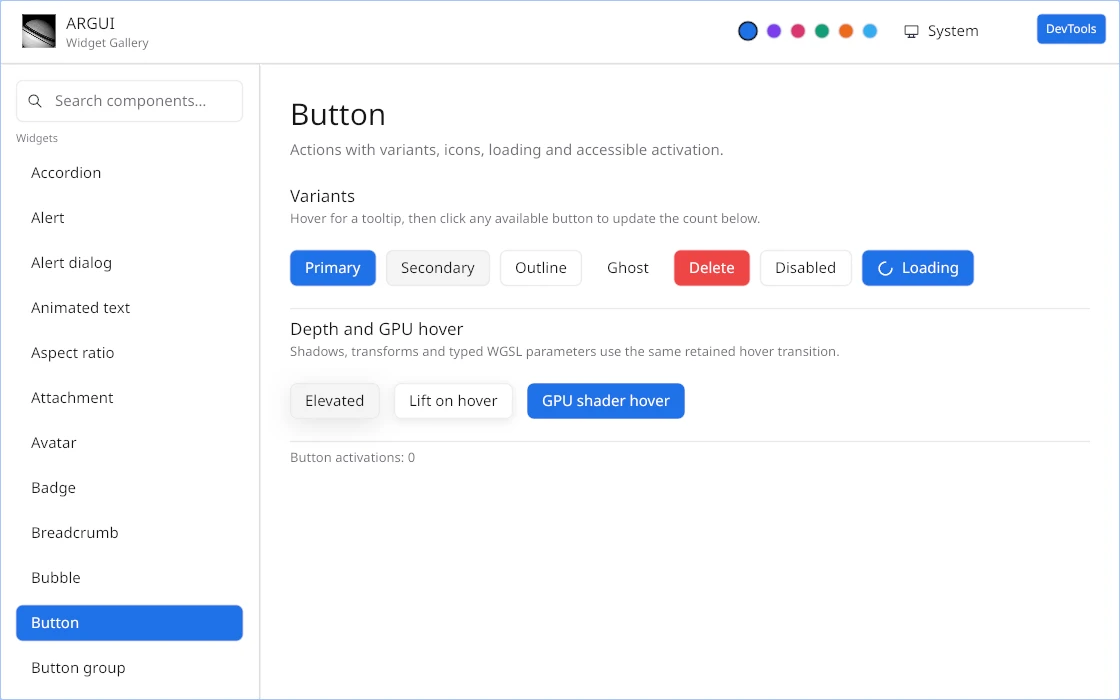
Explore the live gallery, or run it locally:
git clone https://github.com/ExtraBinoss/argui.git
cd argui
cargo run -p argui-widget-gallery --release
The base gallery already includes every widget, Fluent localization, tasks,
effects and DevTools. Enable optional platform integrations individually;
--all-features additionally compiles WebView, updater, native popups, desktop
backdrop, hardware sensors and the debug hot-reload bridge.
For state-preserving Rust patches, install Dioxus CLI and run the gallery with
dx serve --package argui-widget-gallery --features hot-reload --hot-patch.
The hot-reload guide explains the executable layout and
the changes that still require a restart.
The minimum Rust version is declared in the workspace Cargo manifest. Linux builds with all features also need the native dependencies.
Argui brings a retained UI tree, GPU rendering and a growing widget collection to one Rust API. Compose your interface, keep state in models and let the runtime update what changed. The same rendering stack runs on desktop, WebAssembly and the opt-in Android/iOS shells.
- Responsive by design. Flex and grid layout, light and dark themes, animation and virtualized lists.
- Accessible controls. Keyboard navigation, focus, text editing, native AccessKit integration, browser semantics and mobile Web virtual keyboards.
- GPU effects. Custom WGSL shaders, gradients, shadows, blur and liquid glass.
- Retained GPU canvases. Embed bounded application WGPU compute/render viewports while Argui preserves layout, clipping, effects, input and presentation.
- Adaptive damage rendering. Small visual changes repaint only merged GPU regions, while large changes stay on the direct full-surface path.
- Native integrations. Multiple windows, file pickers, trays, WebViews and popovers that can extend beyond the window on supported backends.
- Optional updates. A signed update engine with a separate, reusable progress dialog.
- Inspect as you build. Element inspection, live styles, theme editing and profiling through optional DevTools.
- Keep state while editing. Optional Subsecond hot patching refreshes Rust views and handlers in native debug builds.
- Fluent i18n is here. Optional locale negotiation, fallback chains, variables, plurals and
live locale switching are provided by
argui-i18nand demonstrated in the Widget Gallery.
Widgets and platform integrations are enabled individually. Idle interfaces do not request animation frames. Read the performance measurements for workloads, memory figures and reproduction commands.
- Retained application models, scoped state, tasks and multi-window commands
- Flexbox, grid, scrolling, virtualization and responsive layout
- WGPU rendering on desktop, Android, iOS and WebAssembly
- Text shaping, editing, selection, bidirectional text and IME input
- Mouse, touch, keyboard, focus and accessible semantics
- Light/dark themes, animation, images, SVG and custom WGSL effects
- Retained custom WGPU canvases with native and WebAssembly/WebGPU support
- Fluent localization through the optional
i18nfeature - State-preserving Subsecond patches through the optional
hot-reloadfeature - Optional DevTools, file picker, updater, WebView, tray, global shortcuts, native popovers and desktop backdrop
- Android/iOS bootstrap crates, safe areas and packaged Widget Gallery CI artifacts
- Local typed widget callbacks and renderer-independent application tests
The public integration flags are i18n, hot-reload, tasks, devtools,
devtools-all-smi, file-picker, updater, widget-updater,
webview, tray, global-shortcuts, native-popups, desktop-backdrop and widgets-all.
argui-effects additionally exposes artistic, blur, color, liquid-glass,
refraction, scroll and shadow. Every flag is opt-in; argui has no default
feature bundle.
| Need | Feature(s) | Targets |
|---|---|---|
| Core runtime, WGPU renderer, layout and text | none | All supported targets |
| Android native entry point | add argui-android |
Android only; fully opt-in |
| iOS native entry point | add argui-ios |
iOS only; fully opt-in |
| Fluent locale negotiation, messages and plurals | i18n |
All targets |
| Async model tasks | tasks |
All targets |
| Every widget | widgets-all |
All targets |
| A small widget set | the matching widget-* flags |
All targets |
| Common forms and overlays | basic |
All targets |
| Common UI plus native integrations | desktop |
Desktop |
| Common UI plus browser/WebView support | web |
Desktop and browser |
| Inspector and profiler | devtools |
Desktop and WebAssembly |
| NVIDIA/AMD/Intel sensor collection | devtools-all-smi |
Supported desktop hosts |
| State-preserving Rust patches | hot-reload |
Native desktop debug builds |
| System file dialogs | file-picker; add widget-file-picker for its UI |
Desktop and browser |
| Signed native update engine and dialog | updater, widget-updater |
Desktop |
| Retained WebViews | webview |
Desktop and browser frame support |
| System tray | tray |
Linux, Windows, macOS |
| Global keyboard shortcuts | global-shortcuts |
Windows, macOS, Linux X11/Wayland |
| Windows outside the main surface | native-popups |
Linux, Windows, macOS |
| Acrylic, Mica and native blur materials | desktop-backdrop |
Linux, Windows, macOS |
Linux, Windows, macOS and WebAssembly are selected by the Cargo target and do not need an OS feature. A focused application can enable capabilities directly:
[dependencies]
argui = { version = "0.3.2", default-features = false, features = [
  "i18n", "tasks", "widget-button", "widget-input",
] }
For mobile, add the platform entry crate as a separate dependency:
# Android
argui = { version = "0.3.2", features = ["i18n", "widgets-all"] }
argui-android = "0.3.2"

# iOS
argui = { version = "0.3.2", features = ["i18n", "widgets-all"] }
argui-ios = "0.3.2"
Available widget flags are widget-accordion, widget-alert,
widget-alert-dialog, widget-animated-text, widget-aspect-ratio,
widget-attachment, widget-avatar, widget-badge, widget-breadcrumb,
widget-bubble, widget-button, widget-button-group, widget-calendar,
widget-card, widget-carousel, widget-chart, widget-checkbox,
widget-collapsible, widget-color-picker, widget-combobox,
widget-command-palette, widget-context-menu, widget-data-table,
widget-date-picker, widget-dialog, widget-direction, widget-drawer,
widget-empty, widget-field, widget-file-picker, widget-hover-card,
widget-icons, widget-implicit-animation, widget-input, widget-input-group,
widget-input-otp,
widget-item, widget-kbd, widget-label, widget-list, widget-marker,
widget-menu, widget-menubar, widget-message, widget-message-scroller,
widget-native-select, widget-navigation-menu, widget-pagination,
widget-popover, widget-progress, widget-questionnaire,
widget-radio-group, widget-range, widget-scroll-area, widget-select,
widget-separator, widget-sheet, widget-sidebar, widget-skeleton,
widget-slider, widget-spinner, widget-split-pane, widget-switch,
widget-table, widget-tabs, widget-text-selection, widget-textarea,
widget-toast, widget-toggle, widget-toggle-group, widget-tooltip,
widget-tree-view, widget-typography and widget-vlist.
- Linux native application and CI coverage
- Windows native implementation and complete-workspace CI compile
- macOS native implementation and complete-workspace CI compile
- WebAssembly application and browser gallery
- Android debug APK and unsigned release AAB built by CI
- iOS XCFramework and unsigned Simulator app built by CI
- Shared logical-pixel safe-area API with Android and iOS detection
- Android production release support — physical-device validation, mobile services and owner-managed Play signing remain
- iOS production release support — simulator/device validation, mobile services, archive signing and TestFlight remain
Follow the native mobile integration guide for the current Android/iOS architecture, build commands and completion checklist. The repository structure lists every crate, direct dependency and crates.io publication position.
Argui integrations are opt-in, so an application only includes what it enables. In the current Linux measurement, the stripped Widget Gallery release is 26.8 MiB with its base configuration and 29.2 MiB with every desktop integration enabled. Hot reload is removed from release builds.
See the performance guide for the measured configurations and reproduction command.
The optimized browser applications also reach their first usable frame in less than one second on the measured machine:
| Application | Release .wasm |
Median to ready | Five-run range |
|---|---|---|---|
| AI streaming harness | 6.15 MiB | 0.30 s | 0.26–0.46 s |
| Widget Gallery | 9.84 MiB | 0.79 s | 0.59–0.99 s |
These are five cache-disabled loads from a local static server in Chrome 153.0.8010.36 on Linux, measured from navigation start until the release renderer announced readiness and its target semantic node existed. The machine uses an Intel Core Ultra 5 125H. Remote startup also depends on transfer speed, HTTP compression and browser caching. The raw measurements record every sample and the exact environment.
Add only the widgets your application uses:
[dependencies]
argui = { version = "0.3.2", features = ["widget-button"] }
use argui::{runtime::{Context, Render}, ui::Element, widgets::{Button, WidgetTheme}};
struct Editor {
saved: bool,
}
impl Editor {
fn view(&mut self, theme: &WidgetTheme, cx: &mut Context<Self>) -> Element {
Button::new("save", "Save changes", theme.button())
.on_click(cx.callback(|editor| editor.saved = true))
.build()
}
}Continue with the product-shaped example applications,
simplified 0.3 API,
models and state,
localization, hot reload, the
widget catalogue or the complete examples.
The protected CI publishes [PUBLISH] commits in dependency order and creates
the matching GitHub release. See the
release workflow.
Contributions go through pull requests. Start with the repository documentation, then follow the development guide and quality gate. Every crate must meet the 85% floor for lines, functions, regions and branches. Join the Argui Discord to discuss the project.
Dual-licensed under MIT or Apache-2.0, at your option.