Applications window: natural-size row buttons, menu button toggles in place - #234
Open
kacperpaczos wants to merge 2 commits into
Open
Applications window: natural-size row buttons, menu button toggles in place#234kacperpaczos wants to merge 2 commits into
kacperpaczos wants to merge 2 commits into
Conversation



… place

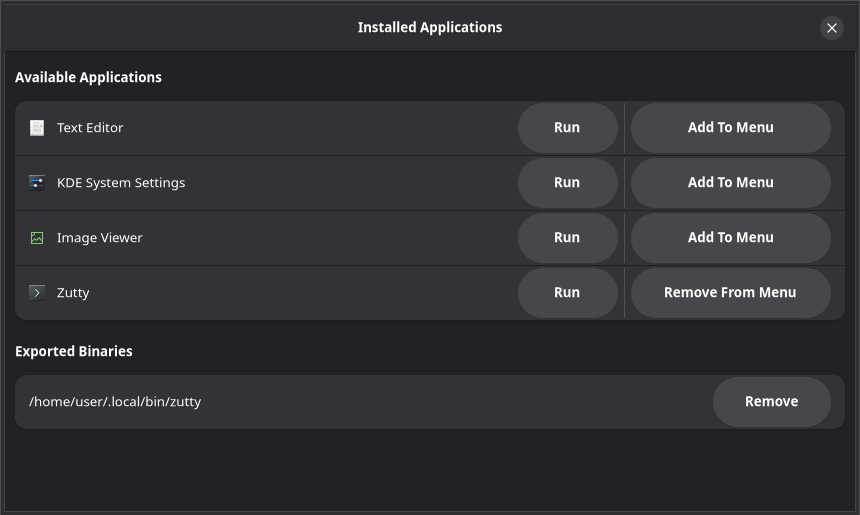
The Run / Add To Menu / Remove buttons in the applications window carried
the pill style plus fixed width requests and a separator, so they were
stretched to the row's height and to column widths - the list read as a
table of oversized buttons, and the app name was squeezed into the space
left over. They now keep their natural size, centred in the row, like any
other suffix button in a boxed list.

Add To Menu and Remove From Menu were two separate buttons chosen once,
from whether the exported desktop file existed when the window opened, so
after a click the heading said "App Exported!" while the row still offered
Add To Menu until the window was reopened. One button now does both: after
each click it re-reads the host's applications directory and is relabelled
from what the menu actually holds, and the confirmation is only written
when that changed.

The host file name (<box>-<desktop file>.desktop, what distrobox-export
writes) is factored into one helper shared by the list and the toggle, with
a unit test pinning it.

Natural-size buttons in the row still came out ragged: Remove From Menu
is wider than Add To Menu, so neighbouring rows' Run buttons stopped
lining up and the suffix read as a jagged table. Instead of trying to
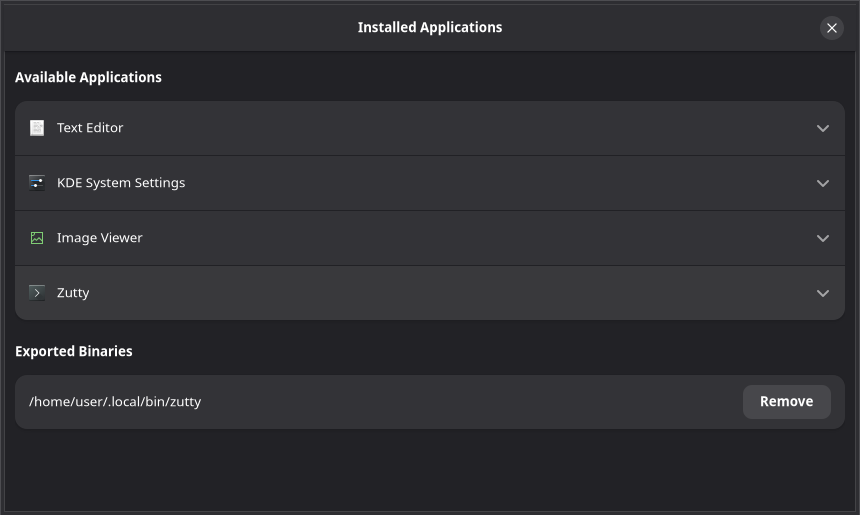
align buttons, the row stops holding them: each application is an
AdwExpanderRow that collapsed shows only the icon, the name and the
arrow - every row identical, the name gets the full width - and its
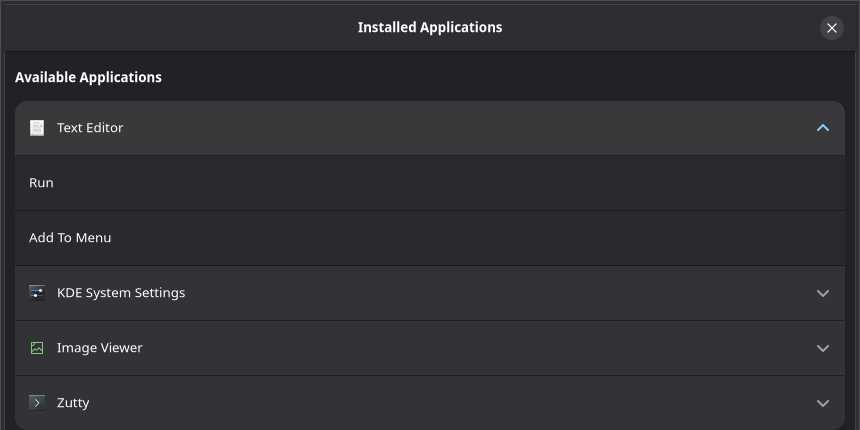
actions are activatable rows inside: Run, and the Add To Menu / Remove
From Menu row, which keeps being retitled from what the host menu
actually holds after each activation.

The binaries' Remove stays a suffix button: it is the row's only action
and is the same width in every row.
This file contains hidden or bidirectional Unicode text that may be interpreted or compiled differently than what appears below. To review, open the file in an editor that reveals hidden Unicode characters.
Learn more about bidirectional Unicode characters
Sign up for free
to join this conversation on GitHub.
Already have an account?
Sign in to comment
1 participant

Add this suggestion to a batch that can be applied as a single commit.This suggestion is invalid because no changes were made to the code.Suggestions cannot be applied while the pull request is closed.Suggestions cannot be applied while viewing a subset of changes.Only one suggestion per line can be applied in a batch.Add this suggestion to a batch that can be applied as a single commit.Applying suggestions on deleted lines is not supported.You must change the existing code in this line in order to create a valid suggestion.Outdated suggestions cannot be applied.This suggestion has been applied or marked resolved.Suggestions cannot be applied from pending reviews.Suggestions cannot be applied on multi-line comments.Suggestions cannot be applied while the pull request is queued to merge.Suggestion cannot be applied right now. Please check back later.
Fixes #232, fixes #233
Two things about the rows in the applications window, in the same block of
on_show_applications_clicked.Each application is an expander row
The rows held Run, Add To Menu / Remove From Menu (and the binaries' Remove) as
pillbuttons with fixedwidth_requests and agtk::Separatorbetween them - stretched to the row's full height and lined up in columns, the list read as a table of oversized buttons, and the app name was squeezed into what was left (#232). Dropping the pills for natural-size buttons (first commit) turned out not to be enough: Remove From Menu is wider than Add To Menu, so neighbouring rows' buttons stopped lining up and the suffix came out ragged.So the row stops holding buttons altogether (second commit): each application is an
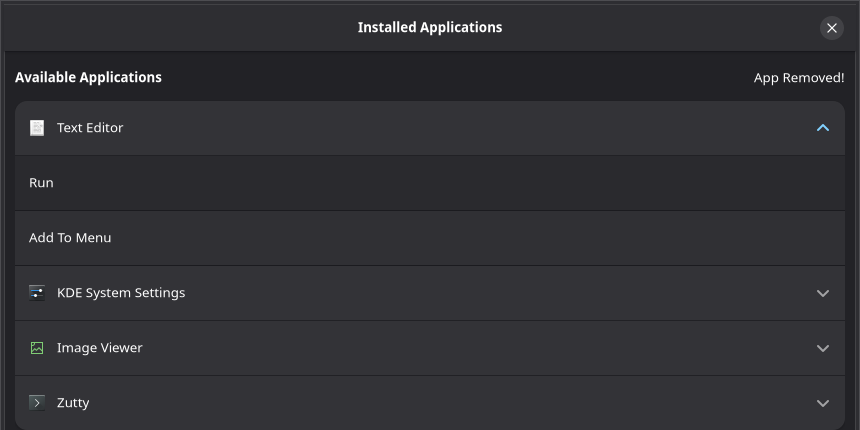
AdwExpanderRowthat collapsed shows only the icon, the name and the arrow - every row identical, the name gets the full width, nothing to align - and what can be done with the app lives in activatable rows inside it: Run, and the menu row below. The one trade-off: running an app is now two clicks (expand, then Run) instead of one. The binaries' Remove stays a suffix button (valign: center, no pill) - it is the row's only action and is the same width in every row.One menu row that follows the menu
Which of Add To Menu / Remove From Menu an app got was decided once, when the list was built, from whether
<box>-<desktop file>.desktopexisted on the host at that moment; after a click the heading said "App Exported!" but the row still offered Add To Menu until the window was reopened (#233). The action is now one row: on activation it exports or removes depending on the current state, then re-reads the host's applications directory and retitles itself from what the menu actually holds. The confirmation text is only written when that changed, so it can't say "App Exported!" when nothing was. The two old handlers collapse intotoggle_app_in_menu+set_menu_row_title.The host file name (
<box>-<desktop file>.desktop, whatdistrobox-exportwrites -desktop_home_file="${container_name}-$(basename "${desktop_file}")"in distrobox-export) was assembled inline inget_apps_in_box; it is nowexported_desktop_file_name, shared with the newis_app_exported, with a unit test pinning the format. All four labels are the same literalgettextstrings as before, so existing translations carry over.Before / after
Same stub data on a virtual display: four desktop files in the box, one of them (Zutty) already exported.
Before - pills stretched to the row height, separator between them, fixed widths:
After - a uniform list, one row per app:
Expanded - the app's actions as rows inside:
Activating Add To Menu on Text Editor - the host now has
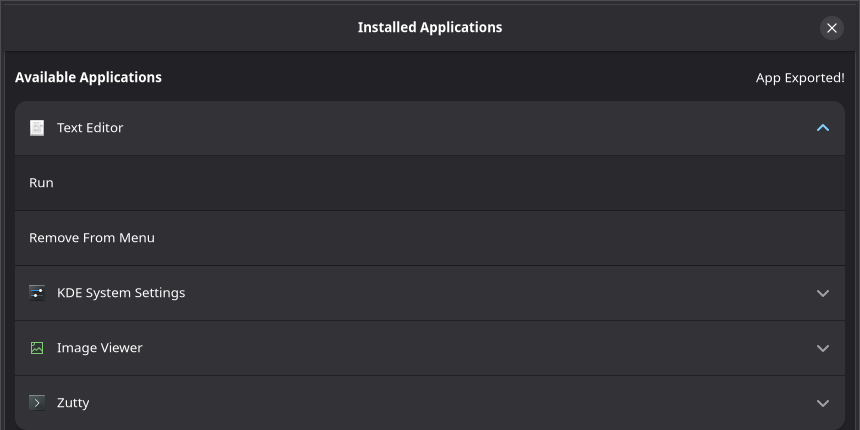
second-org.gnome.TextEditor.desktopand the same row now reads Remove From Menu:…and activating it again - the file is gone and the row is back to Add To Menu:
(The faint dashes above "Exported Binaries" in the expanded shots are an artifact of the cairo software renderer the virtual display uses, not part of the change.)
Testing
cargo test: 6 passed (the new one pinsexported_desktop_file_nameto distrobox-export's naming).distroboxwhosedistrobox-export --appcreates/deletes the host desktop file: the file list on disk and the row title agree after each activation, as in the captures above.lsviaflatpak-spawn) is the existingget_host_desktop_files, unchanged; I only tested the native path.One thing I did not add: if the export command fails (the file never appears), the row stays on Add To Menu and no confirmation is written - which is at least truthful, but there is no error message either. Happy to add one if you'd like it in this PR.