









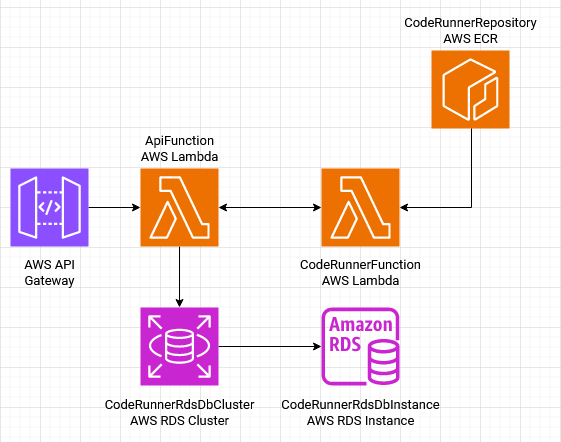
How would you run user's code in a safe way? This application is my answer, Code Runner runs user's code in a containerized Lambda, preventing access to credentials or any other type of sensitive information. It simulates a challenge platform (HackerRank, Codewars, etc) where users write their solutions and have a service running, comparing the output and validating the results.
- Node.js ^20.9.0
- Serveless Framework
- AWS Account
npm install
Or simply:
yarn
The application uses just one database: Postgres.
In this file you may configure the database URL, app's port, code-runner container URL and code-runner function name. Rename the .env.example in the root directory to .env and update your settings as needed.
| key | description | default |
|---|---|---|
| DATABASE_URL | Database connection Url. | postgresql://postgres:docker@localhost:5432/code-runner?schema=public |
| PORT | Port number where the app will run. | 5000 |
| CODERUNNER_CONTAINER_URL | code-runner container URL. All you'll need to update if you change docker-compose.yml is the URL's port. |
http://localhost:9000/2015-03-31/functions/function/invocations |
| CODERUNNER_FUNCTION | code-runner function name, it needs to match with the name on template.yml |
CodeRunnerFunction |
For the fastest setup it is recommended to use docker-compose, you just need to run:
docker-compose up -d pgOr if you prefer to create the container manually:
docker run --name pg -e POSTGRES_PASSWORD=docker -p 5432:5432 -d postgresRemember to run the database migrations:
npx prisma migrate devSee more information on Prisma Migrate.
Also, it is necessary to run the code-runner container, this is the one that will execute users' code:
docker-compose up -d code-runnerDon't forget to update you
.envfile you changed the container settings.
First of all start up the server:
npm run dev:server
Or:
yarn dev:server
Make sure to have the
Code Runner Containerand Postgres running, otherwise you will not be able to execute users' code
| route | HTTP Method | params | description |
|---|---|---|---|
/challenges |
GET | - | Return challenges paginated. |
/challenges/:id |
GET | id of a challenge. |
Return challenge's details. |
/challenges |
POST | Body with challenge title, description, instructions and inputs. |
Create a new challenge. |
/challenges/:id/solution |
POST | id of a challenge. Body with users' code and language used to solve the problem. |
Execute users' code, it uses the results to compare with the expected values provided for the challenge. |
POST /challenges
Request body:
{
  "title": "Square It Up!",
  "description": "Create a function that takes a single integer and returns its square. This challenge will test your ability to perform basic math operations and return statements.",
  "instructions": "1. Input: You'll receive a single integer as input.\n2. Output: Return the square of the input integer (the integer multiplied by itself).\n 3. Example: If the input is 5, the output should be 25.\n\nGive it a try and square it up!",
  "languages": [
    "js",
    "ts",
    "python",
    "go"
  ],
  "inputs": [
    {
      "id": "clwm7ealm000008ky9raxasvv",
      "value": {
          "input": 5
      },
      "expected": 25
    },
    {
      "id": "clwm7eoyf000108ky2gmpa65o",
      "value": {
          "input": 12
      },
      "expected": 144
     },
    {
      "id": "clwm7f482000308kyg437fhmq",
      "value": {
          "input": 25
      },
      "expected": 625
    }
  ]
}
POST /challenges/:id/solution
Request body:
{
  "code": "function run(value){\n  return value * value;\n}",
  "language": "js",
}
Deploy the application in the following order:
Only deployable manually, this is responsible for create permissions needed by github actions, that is, you don't need to deploy this stack if you are not using the pipeline.
sam deploy --stack-name coderunner-ops \
  --template ops.yml \
--no-fail-on-empty-changeset(Required) - Responsible for create an ECR Repository and RDS Database Instance and its credentials.
sam deploy --stack-name coderunner-infrastructure \
  --template infrastructure.yml \
  --no-fail-on-empty-changeset
Push container image to ECR Repository created in the previous step:
- Log in into ECR:
aws ecr get-login-password --region <AWS_REGION> | docker login --username AWS --password-stdin <AWS_ACCOUNT_ID>.dkr.ecr.<AWS_REGION>.amazonaws.com- Build the image:
cd container
docker build --platform linux/amd64 -t coderunner:1.0.0 .- Tag
docker tag coderunner:1.0.0 <AWS_ACCOUNT_ID>.dkr.ecr.<AWS_REGION>.amazonaws.com/coderunner:1.0.0- And push to ECR Repository
docker push <AWS_ACCOUNT_ID>.dkr.ecr.<AWS_REGION>.amazonaws.com/coderunner:1.0.0Deploy application:
sam deploy --stack-name coderunner-dev \
  --no-fail-on-empty-changeset \
  --image-repositories CodeRunnerFunction=<AWS_ACCOUNT_ID>.dkr.ecr.us-east-1.amazonaws.com/coderunner \
  --capabilities CAPABILITY_IAM \
  --role-arn <CLOUDFORMATION_ROLE_ARN> \
  --parameter-overrides \
  ImageUri=<AWS_ACCOUNT_ID>.dkr.ecr.us-east-1.amazonaws.com/coderunner:1.0.0
You can get
CLOUDFORMATION_ROLE_ARNfromops.ymlif you deployed it, otherwise you will need to create it manually.
Jest was the choice to test the app, to run:
$ yarn test
Or:
$ npm run test
You can see the coverage report inside tests/coverage. They are automatically created after the tests run.