
A Windhawk mod for Windows that dims the screen past the bottom of the brightness slider, and adds a warm tint for the evening.
Open it with Ctrl+Alt+Shift+D, or click the tray icon. Everything in the panel is also in that icon's right-click menu.
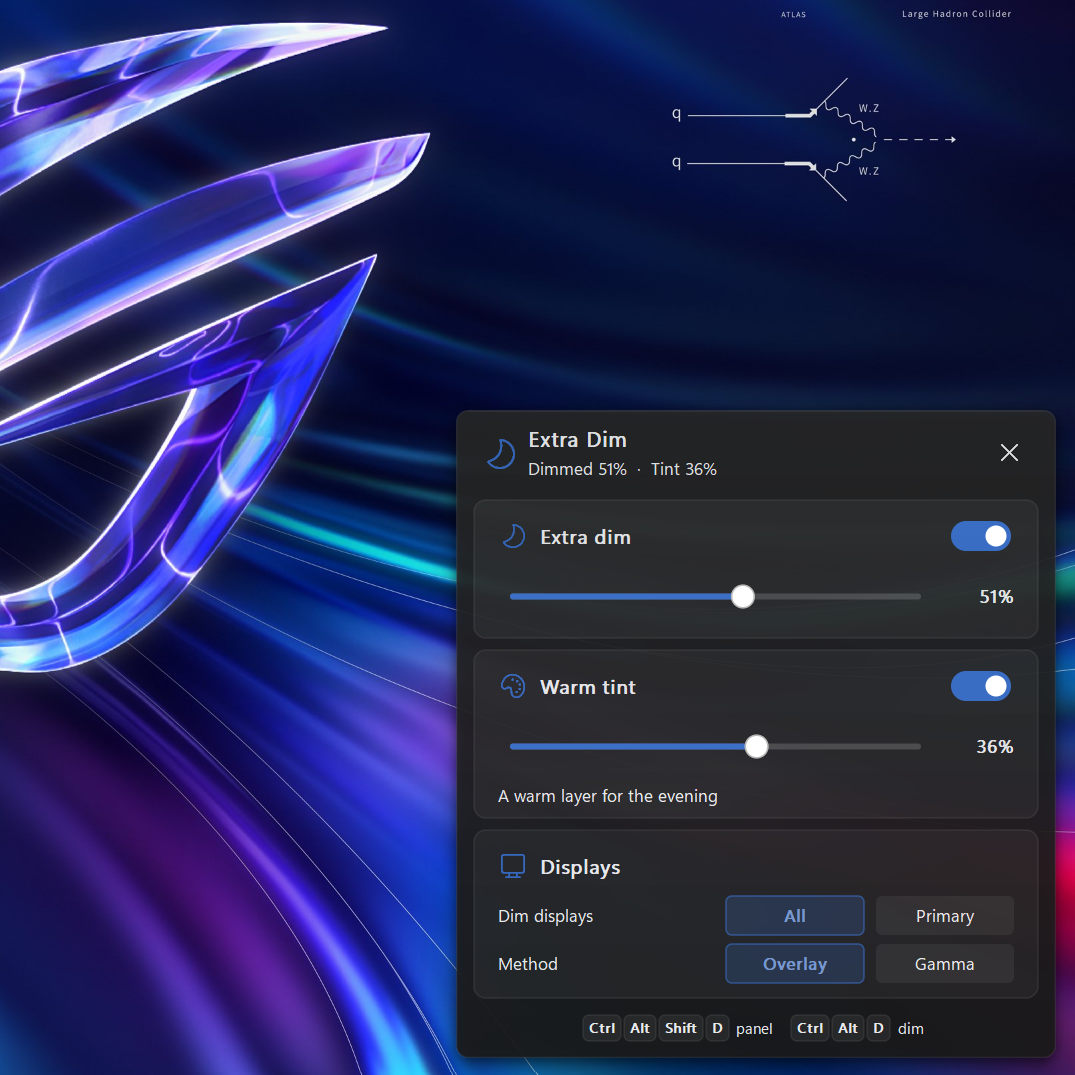
| Feature | What it does |
|---|---|
| Extra dim | Dims below the 0% brightness Windows stops at. The slider tops out at the ceiling you set, so the screen can't go fully black by accident. Switching it off keeps the level. |
| Overlay method | A click-through black layer over each display. Works with any GPU and driver, doesn't touch HDR, and costs nothing while it's off. No effect in exclusive-fullscreen games. |
| Gamma method | Lowers the display's own gamma ramp instead, which does reach exclusive fullscreen. Depends on the driver. |
| Automatic fallback | If the driver refuses the gamma ramp, the mod notices and goes back to the overlay, and the Displays card says so instead of claiming gamma. |
| Warm tint | A separate warm layer with its own color and strength. Stacks with dimming or runs alone. Its strength stays visible in the panel while the tint is off. |
| All displays or one | Dim every monitor or only the primary. Each monitor gets its own layer, so adding or removing one doesn't break it. |
| Out of captures | Screenshots, recordings and screen sharing stay at normal brightness. Overlay method only. |
| Dimmed pointer | Off by default. Windows draws the pointer above every window, so under the overlay it is swapped for a darkened copy while dimming is on, and the user's own scheme is reloaded when it stops - or at the next start, if the process never got that far. |
| Fluent panel | Per-pixel surface, Segoe UI Variable and Segoe Fluent Icons, Windows' theme and accent or ones you pin yourself. |
| Tray icon | Click to open or close the panel, right-click for the controls. The tooltip shows the levels. Redrawn in your accent, and put back if Explorer restarts. |
| Hotkeys | Open the panel, toggle the dim and toggle the tint out of the box; optional chords for dim more and dim less. Every chord can be changed or cleared. |
| Remembers | Levels, toggles, method and display choice survive a restart. The method and display picked in the panel are kept beside the setting they replaced, so changing that setting in Windhawk wins them back. |
| Setting | Default | Notes |
|---|---|---|
| Start with extra dim on | Off | Applies the start level as soon as the mod loads. |
| Extra dim level on start | 40% | Applied when the mod loads. Also the level the slider starts from. |
| Remember changes | On | When off, the startup values win every time. |
| Theme | Follow Windows | Or force Light or Dark. |
| Accent color | Windows accent | Nine presets, or a color of your own. |
| Panel opacity | 96% | The plate only; text and controls stay opaque. |
| Panel scale | 100% | On top of the monitor's own DPI scaling. |
| Screen position | Right | Nine anchors, kept inside the work area. |
| Target monitor | Pointer | Or always the primary display. |
| Horizontal / vertical offset | 0 px | Fine placement. |
| Close when the panel loses focus | On | Behaves like a shell flyout. |
| Show a tray icon | On | Keeps the notification-area icon while the mod is loaded. |
| Step | 10% | One wheel notch, arrow key or hotkey press. |
| Maximum dim level | 90% | Ceiling for the slider. At 100% the screen is nearly black. |
| Dimming method | Overlay | Overlay or Gamma; the Displays card can change it too. |
| Dim every display | On | All monitors, or only the primary. |
| Leave the layer out of screen captures | On | Overlay method only. |
| Keep the panel above the dim layer | Off | Off dims the panel along with the rest of the screen. |
| Smooth level changes | On | Glides between levels instead of jumping. |
| Dim the mouse pointer too | Off | Overlay method only; Gamma dims the pointer already. The system cursors are swapped while dimming is on. |
| Warm tint color | #FFB56B |
Color of the warm layer. |
| Starting tint strength | 0% | What the Warm tint toggle restores. |
| Shortcuts | ctrl+alt+shift+d, ctrl+alt+d, ctrl+alt+t; dim more / dim less empty |
Written the way they're pressed. Empty disables one. Dim more and dim less start unbound so no chord is taken from another program; the panel, the tray menu and the wheel change the level. A chord needs Ctrl, Alt, Shift or Win; a lone key is ignored unless it's an F-key. |
- Windows 10 or Windows 11.
- Windhawk installed and running.
- In Windhawk, open Mods and click Create new mod.
- Set the id to
extra-dim, replace the template with all ofextra-dim.wh.cpp, and click Compile mod. - Switch the mod on. The tray icon appears, and Ctrl+Alt+Shift+D opens the panel.
It's a tool mod, so it runs in its own windhawk.exe process rather than inside
Explorer. Nothing here can take the shell down.
- Overlay doesn't reach exclusive fullscreen. Those games bypass the desktop, so there's nothing to draw over. Use Gamma there.
- Gamma is the driver's call. If
SetDeviceGammaRampis refused, the mod returns to the overlay instead of leaving the screen untouched. Choosing Gamma in the panel asks the driver again. - The secure desktop stays bright. Windows doesn't run third-party windows on the UAC prompt or the sign-in screen.
- Some shell UI stays bright. The layer sits with ordinary topmost windows, so anything Windows raises above them - the Alt+Tab switcher, flyouts that go topmost - is not covered. Gamma reaches those, because it dims the scanout rather than the desktop.
- Gamma looks lighter. Drivers limit how far the ramp may go, so at the same percentage gamma is brighter than the overlay. The two look most alike at low levels and drift apart as the level rises.
- Pointer dimming swaps the system cursors. That is a session-wide change, so the option is off by default. A run that ends without its shutdown leaves the swap behind, and the next start puts the user's own scheme back before anything else.
- Panel - a per-pixel-alpha layered window painted in software: 32-bit premultiplied DIB, signed-distance rounded rectangles, ClearType blended per channel. Every measurement is a logical unit times the monitor's DPI and the panel scale.
- Dim layer - one
WS_EX_LAYERED | WS_EX_TRANSPARENT | WS_EX_TOPMOSTwindow per display, filled with a single color and given a single alpha, re-raised by a slow watchdog. - Gamma - a DC per display, the current ramp saved, and exactly that ramp put back on the way out, so a calibrated display returns as it was. The saved copy also goes to storage: a run that dies with a ramp applied is undone by the next one before it takes its own copy, so ramps can't stack.
- Tint - its own layered window with its own color and strength.
- Pointer - each system cursor is rebuilt by hand from its own color and mask bitmaps, darkened by the same amount as the layer, then swapped in; gamma needs none of it, because the pointer rides on the scanout. Undoing a swap reloads the user's cursor scheme, which brings back animated and multi-size cursors too.
- Tray icon - drawn with GDI at four times the size and averaged down, which antialiases it and gives the shell the coverage a 32-bit icon expects.
- Shutdown - the screen and the pointer are handed back first, then the tray
icon is removed, because the tray call is cross-process and can stall against a
busy Explorer. Sign-out is handled the same way, through
WM_ENDSESSION.
The mod's own Windhawk storage, one set per user account: the levels and toggles, and - only while they are in use - the panel's method and display choice, a copy of each display's original gamma ramp, and a flag saying the pointer is swapped. Nothing else. The mod doesn't read or write Windows' Night light setting, and sends nothing anywhere.
MIT.