Mac driver for Wacom drawing tablets that no longer have official support.
One self-contained app bundle. Pen input runs on a real-time thread at audio-grade scheduling priority.


MockTab is a community-built project. It is not affiliated with Wacom Co., Ltd. or Xencelabs. Product names describe hardware compatibility only.
MockTab supports Wacom models across multiple families:
- Intuos 1–5 / Intuos Pro Gen 1 (PTH-x50/x51, PTZ, PTK series), USB.
- Intuos Pro Gen 2 (PTH-460, PTH-660, PTH-860), USB and Bluetooth Classic.
- Intuos Pro Gen 3 (PTK-470, PTK-670, PTK-870), USB, experimental.
- Cintiq pen displays, including CintiqV1 and IntuosV2-format models.
- DTU / DTUS small pen displays, USB, experimental.
- Bamboo and consumer CTL/CTH tablets.
- Xencelabs Pen Display and Quick Keys remote, wired and wireless.
Full list: mocktab.org/hardware
Other devices may not work yet. Filing an issue with diagnostic details can help improve support.
- macOS 13 Ventura or later.
macOS 27 Golden Gate beta: Activating a background window by clicking its visible content is not currently reliable. Instead, first click the window's titlebar to bring it forward, then use the pen normally.
- Download the latest
.dmgfrom Releases. - Drag
MockTab.appto Applications and launch it. - Grant Accessibility when prompted, which MockTab needs for proper operation. Open System Settings, turn MockTab on, then relaunch.
- Grant Input Monitoring if prompted.
- Plug in or pair your tablet.
If permissions do not take effect, remove MockTab from the pane and add it again. Moving or reinstalling the app may invalidate previous approvals.
git clone --recurse-submodules https://github.com/Cyzor/tablet-driver.git
cd tablet-driver
open MockTab.xcodeproj
You need Xcode 15 or later. Select the MockTab scheme and build. If you build a fork, change code signing to your own team in the project’s Signing & Capabilities tab.
If you already cloned the repo without --recurse-submodules, run git submodule update --init.
To run the decoder test suite:
cd TabletKit
swift test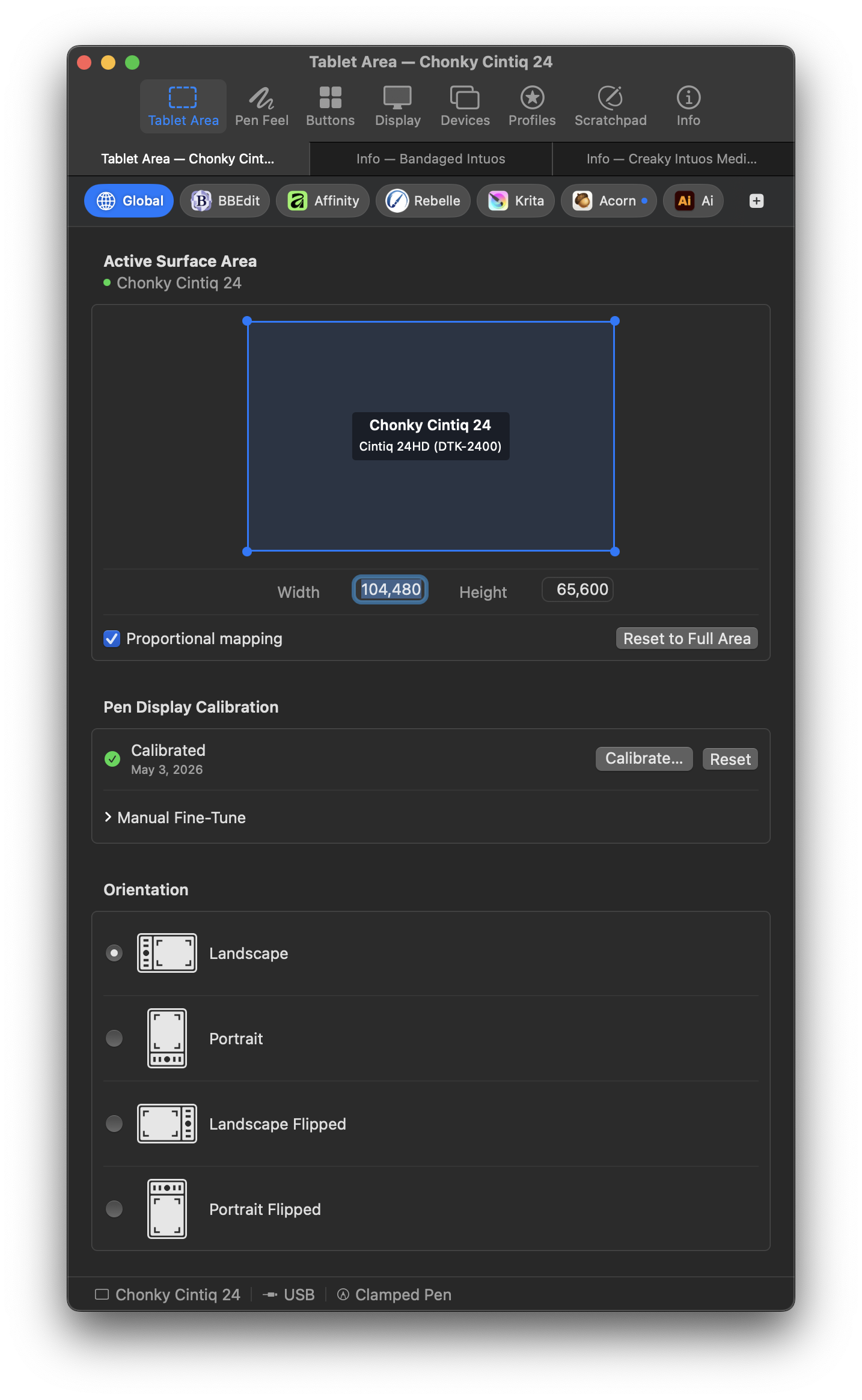
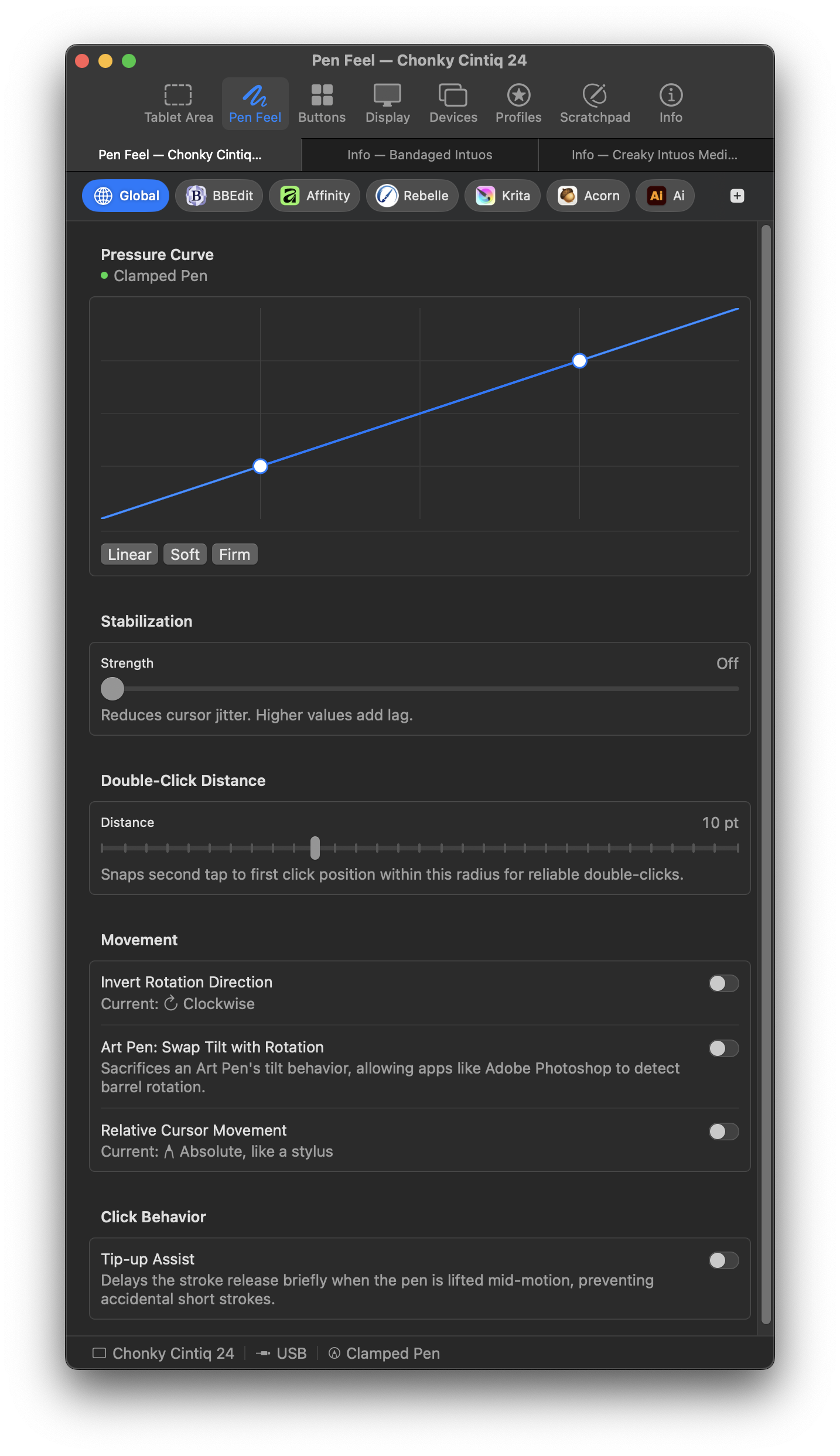
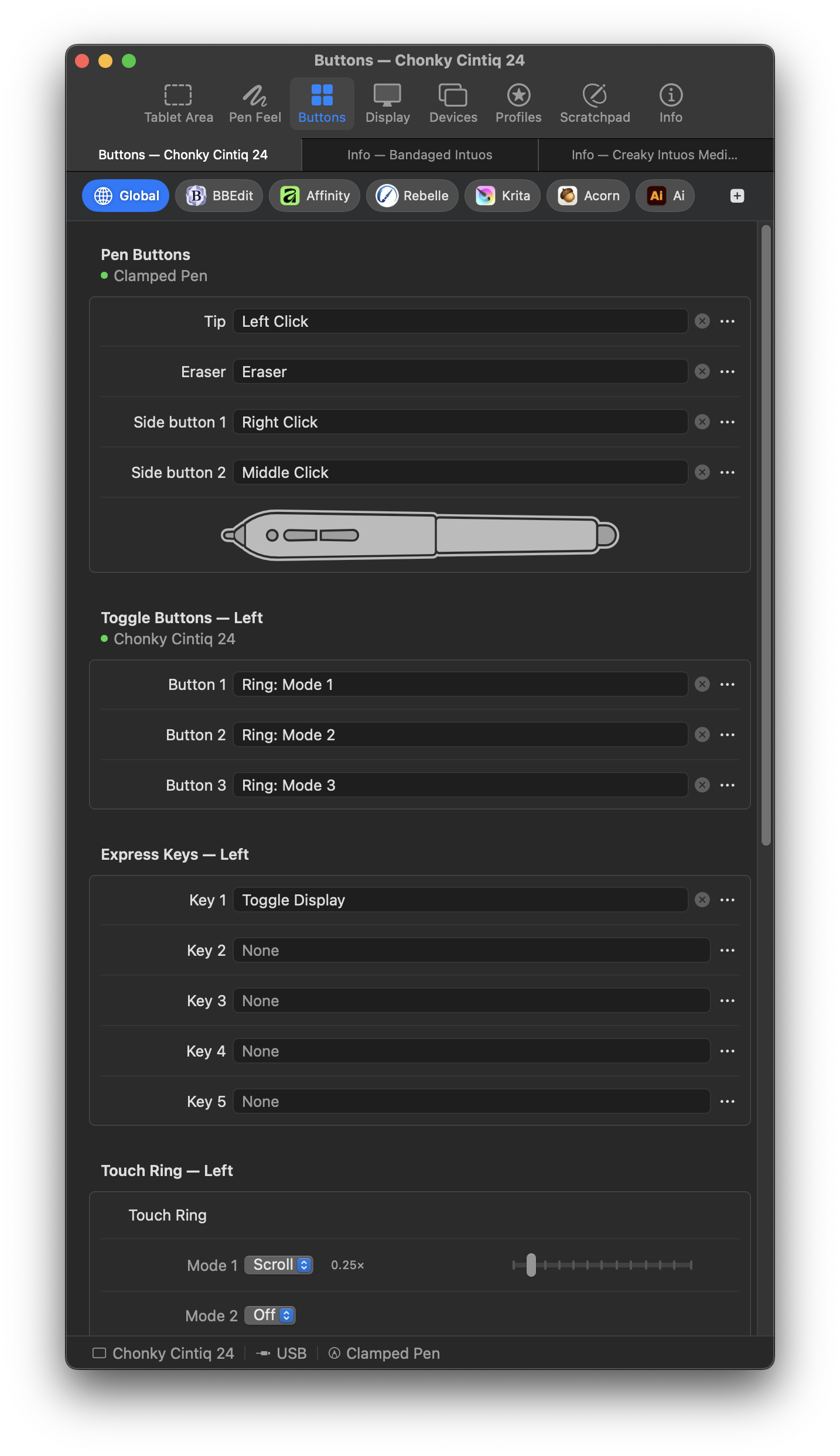
- Tablet area mapping.
- Pressure and pen behavior controls.
- Button mapping for barrel buttons, express keys, and touch rings.
- Per-app overrides that activate automatically.
- Display mapping to any connected display.
- Wireless support through Bluetooth and USB dongle protocols.
- Capacitive touch with two-finger scroll, tap-to-click, and adjustable touch area on supported models.
- Live scratchpad for input testing.
- Profile import and export.
- Menu bar mode with no Dock icon.
- Multiple tablet generations at once.
- Pen input on a real-time thread at audio-grade scheduling priority.
- One self-contained app bundle, signed and notarized, with no system agents or login items.
- Huion, XP-Pen, and other non-Wacom hardware except Xencelabs.
- Recent Wacom product cycles not listed above, including the Cintiq Pro 2023 refresh.
- Windows, Linux, and iPad.
MockTab relies on TabletKit, a Swift package that decodes raw HID reports into pen coordinates, pressure, tilt, rotation, and touch events. MockTab/Driver/ contains the app-specific glue, including IOKit transport, event injection, and device routing.
// Package.swift of a consumer project
dependencies: [
    .package(url: "https://github.com/Cyzor/TabletKit", from: "0.1.0"),
],
targets: [
    .target(name: "MyApp", dependencies: [
        .product(name: "TabletKit", package: "TabletKit"),
    ]),
]
import TabletKit
var state = DecoderState()
var decoder: any TabletReportDecoder = IntuosV2Decoder()
let results = decoder.decode(report: ptr, length: len, spec: spec, state: &state, deviceFamily: "intuosProGen2")TabletKit has no AppKit or system-event dependencies of its own. It uses a registry of known devices, so it can run in any Swift context.
TabletKit lives in this repository as a git submodule at TabletKit/, pinned to the commit MockTab builds against.
If you cloned without --recurse-submodules, run:
git submodule update --initDecoder work happens in the submodule and belongs in the TabletKit repo, not here. Run its tests with:
cd TabletKit
swift testThe app is GPL-3.0-or-later. See LICENSE. You can run, study, modify, and share it. Modified versions must stay under the same license.
The TabletKit Swift package lives in the TabletKit repo and is MPL-2.0. See LICENSES/MPL-2.0.txt. Changes to TabletKit’s own files must stay open, but consumers can link it from projects under any license.
Per-file licenses use SPDX headers (SPDX-License-Identifier:).
MockTab’s protocol knowledge and device data draw from several open-source projects. OpenTabletDriver provides per-vendor JSON configurations and supplies all of TabletKit’s non-Wacom registry entries and some Wacom ones. wacom-hid-descriptors shaped decoder development across multiple tablet families, and libwacom provides the reference for Wacom physical dimensions. Report formats and protocol constants trace back to input-wacom and the Linux kernel HID subsystem.
Bug reports, device-support requests, translation corrections, and decoder work are all in scope. See Contributing.md for details. Decoder PRs belong on TabletKit. Forking is another option for consideration.
For decoder analysis, tools/wacom_capture.d records raw USB traffic before any decoder interprets it. It provides higher fidelity than the in-app capture flow, but it requires disabling System Integrity Protection. See TabletKit’s CONTRIBUTING for the data-source hierarchy.
Note that it still might be possible to coax Wacom's native driver to cooperate again without turning to an alternative driver.
If the tablet light is on but Wacom Center shows “No device connected,” or Wacom’s installer says “Supported tablet not found,” the driver may consider your model to be discontinued. See mocktab.org/troubleshooting.html for symptoms, affected hardware, and steps to try.
For post-install issues such as pressure not working, conflict warnings, or tablet recognition failures, the same page covers each case.
Pen taps not activating background windows (macOS 27 Golden Gate beta only): see the note under Requirements.
Pen clicks ignored in Little Snitch: enable Little Snitch's own Preferences → Security → Other → "Allow GUI Scripting access to Little Snitch." It rejects simulated input by default as an anti-spoofing measure.
- CHANGELOG.md — release history.
- mocktab.org — website and FAQ.
- Hardware compatibility — full device list.
- Troubleshooting — common problems and fixes.
- Issues — bug reports and feature requests.