

Warning
Corvus Arcade is early alpha. So far it has only been built and tested with Battle.net and Overwatch on Apple Silicon. Other games and launchers are not supported yet and may not run at all. Expect rough edges, breakage between updates, and features that change or disappear. Use it for fun and experimentation, not as a dependable way to play.
A game launcher that runs Windows games on Apple Silicon Macs, with no CrossOver subscription and no manual Wine setup. Corvus Arcade bundles its own redistributable engine, Wine 11 with DXMT and Apple's D3DMetal (Game Porting Toolkit), and drives it from a native SwiftUI launcher. Pick a game, press Play. It is free, and it runs entirely on your Mac.
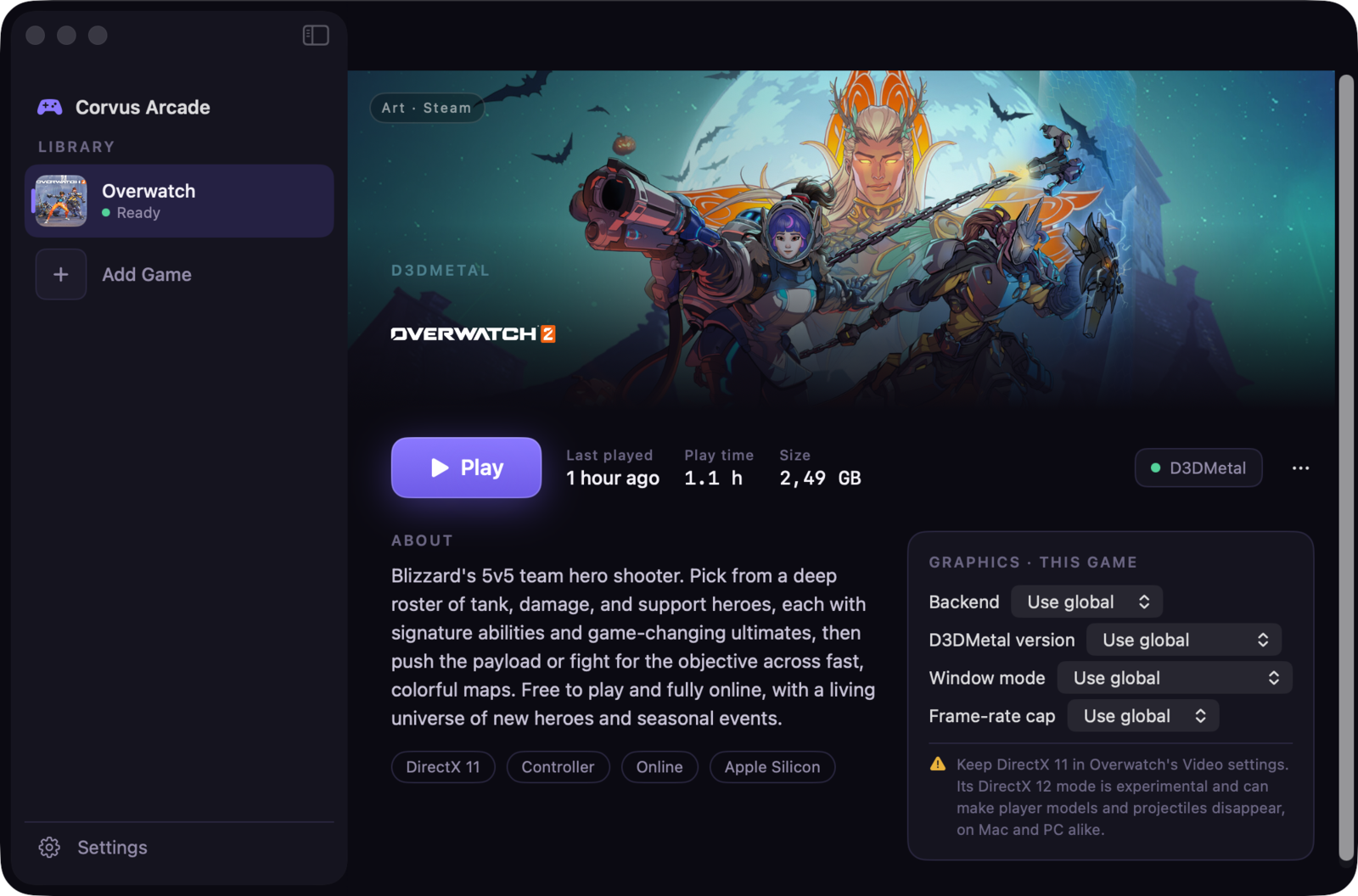
The launcher, with per-game backend, GPTK version, window mode, and frame cap.
- Alpha status
- Features
- What makes Corvus Arcade different
- Requirements
- Built with
- Privacy
- More from CorvusDevs
Corvus Arcade is a work in progress and is shared in the open so people can follow along and try it.
- Tested target: Battle.net + Overwatch on Apple Silicon. That is the only combination that has been run end to end.
- Everything else is unproven. The "Add Game" flow is experimental. Anti-cheat, DirectX 12-only titles, and many launchers may not work at all.
- No guarantees. Things will break between builds. There is no support commitment yet.
- One-click Overwatch. A curated setup creates a clean bottle, installs Battle.net, and launches straight toward a match.
- Your own engine, bundled. Wine 11 with DXMT and Apple's D3DMetal ship inside the app. No CrossOver, no Homebrew, no terminal.
- Backend picker. Choose DXMT (open-source Metal D3D11) or D3DMetal (Apple's toolkit, D3D11 and D3D12), globally or per game.
- GPTK 3 or GPTK 4. Switch between the stable D3DMetal 3 and the newer D3DMetal 4 beta per game, with the framework swapped in at launch.
- Alt-tab friendly. A windowed mode runs the game inside a Mac window so you can Cmd-Tab to other apps mid-game.
- Frame-rate cap, MetalFX, and an FPS overlay. Tune performance and heat, with a live frames-per-second readout when you want it.
- Per-game overrides. Backend, GPTK version, window mode, and frame cap can all be set for a single game.
- First-run system check. Confirms Rosetta 2, the bundled engine, and free disk space before you start, and installs Rosetta for you if needed.
- Real setup progress. The Battle.net download shows a live progress bar with a forward-only time estimate.
- Bottle management. Reset, delete, clear temporary files, see disk usage, and open the bottle folder from the game's page.
- Stays out of the way. Keeps the display awake while you play, hides on launch if you like, and tells you if a game crashed with one click to the log.
- Add your own games (experimental). Point it at a Windows installer or
.exe, and it builds a fresh bottle. - Native and private. SwiftUI throughout, no account, no telemetry.
🎮 A launcher, not a toolkit. No CrossOver license, no Whisky bottles to hand-configure, no Terminal. The engine is bundled and the setup is one button.
🧩 Real per-game control. DXMT vs D3DMetal, GPTK 3 vs GPTK 4, fullscreen vs alt-tab-able window, and a frame cap, all switchable per game.
🐦 Built for Apple Silicon. No Intel baggage. The engine and the launcher are tuned for M-series Macs and Apple's Metal-based Game Porting Toolkit.
🛡️ Private and free. No account, no analytics, no phone-home. GPTK ships under Apple's non-commercial terms, so Corvus Arcade is free.
- Apple Silicon Mac (M1 or newer)
- macOS 15 or later
- Rosetta 2 (the app installs it for you if it is missing)
- Around 60 GB free for a Battle.net + Overwatch install
SwiftUI · Wine 11 · DXMT · Apple D3DMetal / Game Porting Toolkit · Rosetta 2 · Sparkle
No accounts, no analytics, no telemetry, no tracking. Corvus Arcade runs entirely on your Mac. It downloads the Battle.net installer directly from Blizzard and, optionally, cover art from public sources; nothing else leaves your machine.
| App | Description | |
|---|---|---|
 |
Corvus Display | Brightness, color, and resolution for any Mac display |
 |
Corvus Player | The most powerful media player for macOS |
 |
Ekual | Automatic loudness equalization for macOS |
 |
Corvus RSS Reader | Privacy-first RSS reader for Safari |
 |
Purple Crow for Safari | BTTV, FFZ & 7TV emotes plus 50+ Twitch features |
Made with care by CorvusDevs · Not affiliated with Blizzard, Apple, or CrossOver