Developed by Special Research Group 268, Confoederatio Research Division (SRG268-CRD). Functions as a performant alternative to Segment-Anything, especially for symbolic maps. Additionally applicable to real-world photos, graphics, and other use-cases.
Originally developed to aid in auto-vectorisation for Naissance HGIS.
Requirements:
- Ensure Anaconda is installed such that you have access to Anaconda Prompt:
- Run Anaconda As Administrator >
conda init cmd.exeto tie it to your Command Prompt system. - Restart Command Prompt (Administrator)
conda env create -f environment.yml(Installs all Python dependencies)conda activate sam_env(Ensures accurate dependencies once installed)
The root app bundle is located in ./main/app.py. For developers, Spyder configuration files are already specified.
Harbinger.Segmentation is designed for use with CLI workflows. By default, all that is required is requisite input pathing, i.e. python app.py -i input.png. It is also possible to specify a custom output folder: python app.py -i input.png -o ../custom_output/. See the below table for a full list of options and flags:
Available CLI Arguments:
| Flag | Type | Default | Description |
|---|---|---|---|
| -i, --input | string | None | Path to input map image file. |
| -o, --output-dir | string | output | Directory where output files will be written. |
| --gui | flag | False | Explicitly launch Streamlit GUI in browser. |
| --mask-legends / --no-mask-legends | bool | True | Automatically detect and mask legend infoboxes. |
| --save-semantic-features / --no-save-semantic-features | bool | True | Export JSON labels file. |
| --save-output-images / --no-save-output-images | bool | True | Save all intermediate stage PNG images. |
| --colour-thresh | int | 15 | Colour similarity quantisation threshold (1-50). |
| --edge-thresh | int | 20 | Edge gradient threshold (1-50). |
| --density-seeding-thresh | int | 25 | Density seeding threshold (0-100). |
| --border-buffer | int | 1 | Border buffer padding size (1-8). |
| --text-buffer | int | 8 | OCR text mask padding size (1-50). |
| --locales | list | en ru | Language code list for EasyOCR. |
Output Files.
Note
Unlike in the Streamlit GUI, these files do not undergo JPEG compression, and are presented iN the image's original resolution.
As the pipeline gradually completes, images in the chosen output folder are overriden one-by-one. These images correspond as follows:
output/:
1.png: Original Map2.png: UI Masking3.png: Denoised Image4.png: Sharpness Layer5.png: Semantic Features6.png: Denoised Edges7.png: 1st-pass Segmentation8.png: 1st-pass Filtering9.png: Edge Restoration10.png: 2nd-pass Segmentation11.png: 1st-pass kNN Repair12.png: 2nd-pass kNN Repair
Semantic features are available as output/labels.json. They have a JSON contract as follows:
Object[], where each [n] is:
.name: string.centre: [int, int] - The X, Y coordinates of the centre of the bounding box..extent: [[int, int], [int, int], [int, int], [int, int]] - Representing the NW, NE, SW, and SE corners of the OCR bbox respectively..probability: float - The certainty estimate with which this OCR label was read.
Non-Latin characters use Unicode display characters (i.e. \u0417).
All available locales:
available_locales = [
  "abq", "ady", "af", "sq", "ang", "ar", "as", "ava", "az", "be",
  "bn", "bho", "bh", "bs", "bg", "che", "ch_sim", "ch_tra", "hr", "cs",
  "da", "dar", "nl", "en", "et", "fr", "de", "gom", "hi", "hu",
  "is", "id", "inh", "ga", "it", "ja", "kbd", "kn", "ko", "ku",
  "lbe", "la", "lv", "lez", "lt", "mah", "mai", "ms", "mt", "mi",
  "mr", "mn", "sck", "ne", "new", "no", "oc", "pi", "fa", "pl",
  "pt", "ro", "ru", "rs_cyrillic", "rs_latin", "sk", "sl", "es", "sw",
  "sv", "tab", "tl", "tjk", "ta", "te", "th", "tr", "uk", "ur",
  "ug", "uz", "vi", "cy"
]
Multiple locales can be selected at a time, but some combinations may be incompatible. You will be warned of these combinations where they appear, and it will fallback to English.
The GUI for Harbinger.Segmentation relies on Streamlit, and can be served either over Spyder by running app.py, or through your terminal of choice: python app.py --gui. Options can be configured from the left sidebar, and execution will only take place when pressing 'Run'.
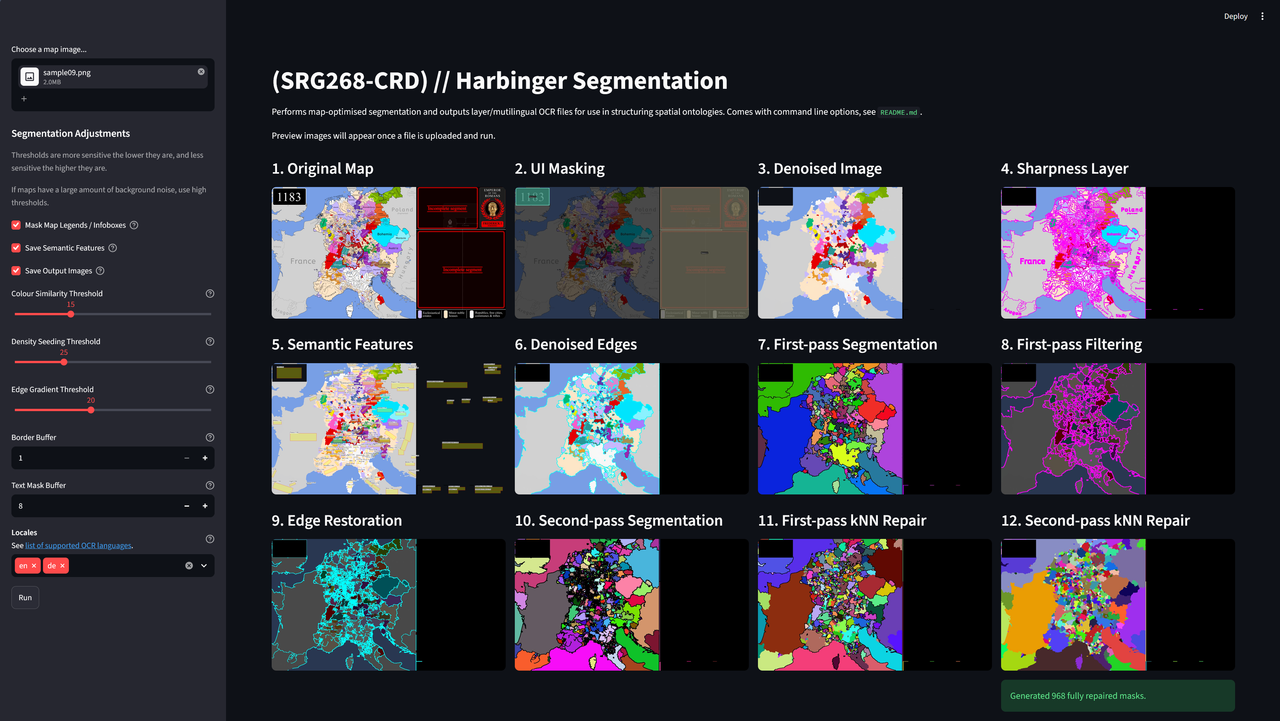

The GUI is beneficial for first-time users. Note that if your image is highly noisy in the background, we recommend high Edge Gradient Thresholds - the maximum value is often recommended. Real-world photos should also use medium-high Colour Similarity Thresholds (~30-45). Additionally, if you still see OCR text in your image, consider increasing the Text Mask Buffer.
Technical Notes for Developers.
Default imports:
import argparse
import json
import math
import os
import random
import sys
import cv2
import easyocr
import numpy as np
from PIL import Image, ImageDraw, ImageFont
from scipy.ndimage import distance_transform_edt
from scipy.spatial import cKDTree
from scipy.stats import mode
import streamlit as st
from streamlit.web import cli as stcli
Imports are not fully minimised from sam_env, so sam_env may be bigger than needed. This should be checked by Confoederatio developers in the future.